


In-depth understanding of Python closure mechanism

This article uses Python as an example to explain closures in a simple and easy-to-understand way; according to Baidu Encyclopedia, a closure is a function that can read the internal variables of other functions. For example, in JavaScript, only sub-functions inside the function can read local variables. Therefore, closure can be understood as "a function defined inside a function"; in essence, closure is the bridge that connects the inside of the function and the outside of the function
Understand the definition of closure
Definition: A closure is a function that can read the internal variables of other functions
Understanding: According to the split statement analysis, the closure is...a function. It turns out that the closure is a function. Let’s look at the details to see what kind of function the closure is. The closure can also be read. Get the internal variables of other functions. In other words, the closure function can get the information of the internal variables of other functions - in this way, the information is encapsulated, like a package, which is more vivid
Example:
def make_averager():
    series = []    def averager(new_value):
        series.append(new_value)
total = sum(series) return total/len(series) return averager>>> avg = make_averager()>>> avg(10)10.0>>> avg(11)10.5>>> avg(12)11.0
Remarks: Closure is the abbreviation of lexical closure, which is functional programming. Important grammatical structures
Python’s namespace and scope rules
In C, there is a special keyword namespace (namespace in English)
Without mentioning C, in Python, There are four namespaces:
1) local namespace: local variable
2) nonlocal namespace: Variables of outer functions in nested functions (Python3.x)
##3)global namespace: Global variables
4) build-in namespace: Built-in variables
namespace is a mapping from variable names to actual objects. Most namespaces are implemented as dictionaries in Python
The nonlocal keyword was introduced in Python 3.0. You can use this keyword to easily access and modify the outer variables of nested functions (if you only access without modifying, you don’t need the nonlocal keyword. Words)
If you modify the outer variable without using the nonlocal keyword, an error will be reported:
def make_averager():
    count = 0
    total = 0

    def averager(new_value):
        count += 1    # Same as: count = count + 1
total += new_value return total/count return average>>> avg = make_averager() >>> avg(10) Traceback (most recent call last):...UnboundLocalError: Local variable 'count' referened before assignment >>>
To modify outer variables, you must use nonlocalKeywords:
def make_averager():
    count = 0
    total = 0

    def averager(new_value):
        nonlocal count, total    # Declaration of namespace.
        count += 1
total += new_value return total/count return average>>> avg = make_averager()>>> avg(10)10.0>>> avg(11)10.5>>> avg(12)12
Explanation: In averager In the function, count and total are free variables (Free variables refer to variables that are not bound locally). Free variables are often declared in one scope and used in another scope (such as The above series, count, total)
#Then why in the example of "Understanding the Definition of Closure", the series variable is also a free variable for the inner function But can it be modified directly? Here we need to distinguish the meaning of "modification" of mutable types and immutable types. The series list is a mutable sequence. The append() method is used to modify the value of the list in place. Here we only use the "list variable" feature , but for immutable digital objects count and total, count = 1, this operation actually generates New object
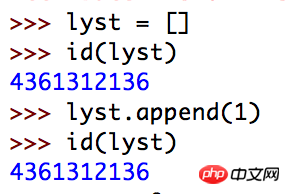
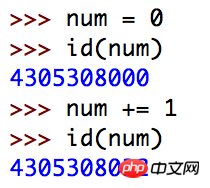
##Always remember that free variables can only be referenced and not modified (Unless the mutable object can be modified in place, in fact, this is how closures are implemented in Python 2.x). To modify, you must use the nonlocal keyword
Closures and lambda expressions
Lambda expressions in Python It is an anonymous function, and the two can be equal
For demonstration purposes, using a for loop or Pythonic list derivation is a good choice:




To implement yourself in Python Decorator (decorator), must master the knowledge: 1) closure nested function, 2) nonlocal keyword (introduced in Python3.x)
本文以Python为例,深入浅出讲解闭包;根据百度百科的解释,闭包就是能够读取其他函数内部变量的函数,例如在JavaScript中,只有函数内部的子函数才能读取局部变量,所以闭包可以理解成『定义在一个函数内部的函数』;在本质上,闭包是将函数内部和函数外部连接起来的桥梁 定义:闭包(closure)是能够读取其它函数内部变量的函数 理解:根据拆分语句分析,闭包是……函数,原来闭包是函数,再看细节部分,闭包是怎样的函数,闭包还能够读取其它函数内部变量,换句话说,闭包函数可以获取其它函数内部变量的信息——这样信息就被封装起来了,像一个包一样,比较形象 实例: 备注:闭包(closure)是词法闭包(lexical closure)的简称,是函数式编程的重要的语法结构 在C++中,有个专门的关键字 不扯C++,在Python中,存在四种命名空间: 1) 2) 3) 4) namespace是变量名到实际对象的一个映射,大部分namespace都是按Python中的字典来实现的 如果修改外层变量却不使用 要修改外层变量就必须使用 解释:在averager函数中,count、total是自由变量(自由变量是指未在本地绑定的变量),自由变量往往是在一个作用域中声明,并在另一个作用域中使用(比如上面的series、count、total) 那为什么在『理解闭包的定义』的实例中,series变量虽然对于内层函数也是自由变量但是却可以直接修改?这里要区分开可变类型和不可变类型的『修改』的含义,series列表是可变序列, 始终记住,自由变量只能引用不能修改(除非可变对象可以原地修改,事实上Python2.x中就是这样实现闭包的),要修改就必须使用nonlocal关键字 Python的lambda表达式就是匿名函数,二者可以划等号 出于演示考虑,用for循环或者Pythonic的列表推导是个不错的选择: 要在Python中实现自己的装饰器(decorator),必须掌握的知识:1)闭包+嵌套函数,2)nonlocal关键字(Python3.x引入) The above is the detailed content of In-depth understanding of Python closure mechanism. For more information, please follow other related articles on the PHP Chinese website!""" Implement a decorator, which return the runtime of the program. """import timedef clock(func):
def clocked(*args):
t0 = time.pref_counter()
result = func(*args)
elapsed = time.pref_counter() - t0
name = func.__name__
arg_str = ', '.join(repr(arg) for arg in args)
print('[%0.8fs] %s(%s) -> %r' %(elpased, name, arg_str, result)) return result return clocked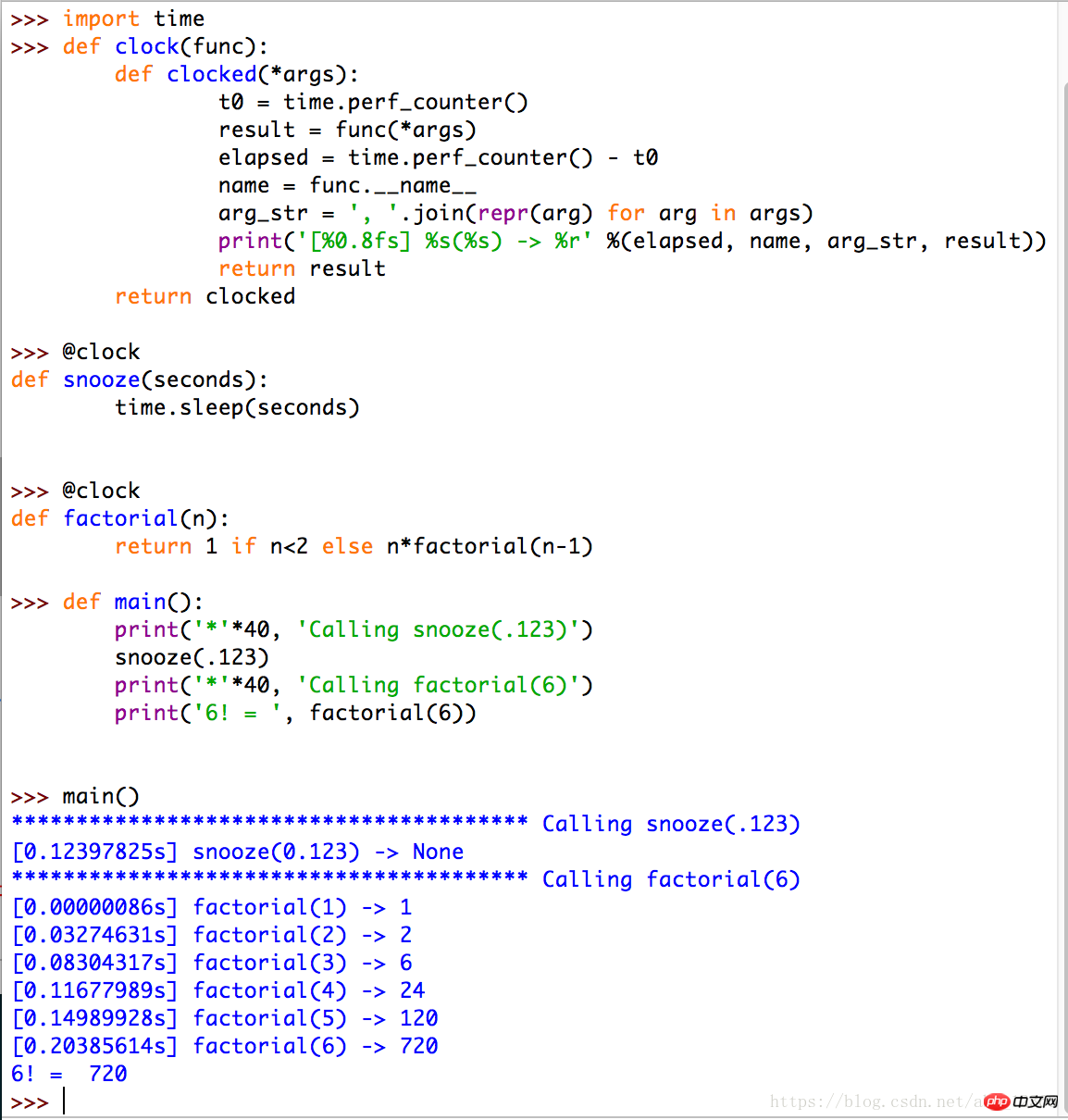
理解闭包的定义
def make_averager():
series = [] def averager(new_value):
series.append(new_value)
total = sum(series) return total/len(series) return averager>>> avg = make_averager()>>> avg(10)10.0>>> avg(11)10.5>>> avg(12)11.0
Python的命名空间、作用域规则
namespace(命名空间的英文)local namespace:本地变量nonlocal namespace:嵌套函数中外层函数的变量(Python3.x)global namespace:全局变量build-in namespace:内置变量nonlocal关键字在Python3.0中被引入,使用这个关键字可以轻松的访问并修改嵌套函数的较外层变量(如果仅仅是访问而不修改可以不用nonlocal关键字)nonlocal关键字会报错:def make_averager():
count = 0
total = 0
def averager(new_value):
count += 1 # Same as: count = count + 1
total += new_value return total/count return average>>> avg = make_averager()
>>> avg(10)
Traceback (most recent call last):...UnboundLocalError: Local variable 'count' referened before assignment
>>>
nonlocal关键字:def make_averager():
count = 0
total = 0
def averager(new_value):
nonlocal count, total # Declaration of namespace.
count += 1
total += new_value return total/count return average>>> avg = make_averager()>>> avg(10)10.0>>> avg(11)10.5>>> avg(12)12
append()方法于在原地修改列表的值,这里我们只用到了『列表可变』这一列表的特性,但是对于不可变的数字对象count、total,count += 1,这样的操作实际上生成了新的对象闭包和lambda表达式
闭包和装饰器
""" Implement a decorator, which return the runtime of the program. """import timedef clock(func):
    def clocked(*args):
        t0 = time.pref_counter()
        result = func(*args)
        elapsed = time.pref_counter() - t0
        name = func.__name__
        arg_str = ', '.join(repr(arg) for arg in args)
        print('[%0.8fs] %s(%s) -> %r' %(elpased, name, arg_str, result))        return result    return clocked

Hot AI Tools

Undresser.AI Undress
AI-powered app for creating realistic nude photos

AI Clothes Remover
Online AI tool for removing clothes from photos.

Undress AI Tool
Undress images for free

Clothoff.io
AI clothes remover

AI Hentai Generator
Generate AI Hentai for free.

Hot Article
Hot Tools

Notepad++7.3.1
Easy-to-use and free code editor

SublimeText3 Chinese version
Chinese version, very easy to use

Zend Studio 13.0.1
Powerful PHP integrated development environment

Dreamweaver CS6
Visual web development tools

SublimeText3 Mac version
God-level code editing software (SublimeText3)
Hot Topics
 1384
1384
 52
52

 PHP and Python: Code Examples and Comparison
Apr 15, 2025 am 12:07 AM
PHP and Python: Code Examples and Comparison
Apr 15, 2025 am 12:07 AM
PHP and Python have their own advantages and disadvantages, and the choice depends on project needs and personal preferences. 1.PHP is suitable for rapid development and maintenance of large-scale web applications. 2. Python dominates the field of data science and machine learning.
 Python vs. JavaScript: Community, Libraries, and Resources
Apr 15, 2025 am 12:16 AM
Python vs. JavaScript: Community, Libraries, and Resources
Apr 15, 2025 am 12:16 AM
Python and JavaScript have their own advantages and disadvantages in terms of community, libraries and resources. 1) The Python community is friendly and suitable for beginners, but the front-end development resources are not as rich as JavaScript. 2) Python is powerful in data science and machine learning libraries, while JavaScript is better in front-end development libraries and frameworks. 3) Both have rich learning resources, but Python is suitable for starting with official documents, while JavaScript is better with MDNWebDocs. The choice should be based on project needs and personal interests.
 How is the GPU support for PyTorch on CentOS
Apr 14, 2025 pm 06:48 PM
How is the GPU support for PyTorch on CentOS
Apr 14, 2025 pm 06:48 PM
Enable PyTorch GPU acceleration on CentOS system requires the installation of CUDA, cuDNN and GPU versions of PyTorch. The following steps will guide you through the process: CUDA and cuDNN installation determine CUDA version compatibility: Use the nvidia-smi command to view the CUDA version supported by your NVIDIA graphics card. For example, your MX450 graphics card may support CUDA11.1 or higher. Download and install CUDAToolkit: Visit the official website of NVIDIACUDAToolkit and download and install the corresponding version according to the highest CUDA version supported by your graphics card. Install cuDNN library:
 Detailed explanation of docker principle
Apr 14, 2025 pm 11:57 PM
Detailed explanation of docker principle
Apr 14, 2025 pm 11:57 PM
Docker uses Linux kernel features to provide an efficient and isolated application running environment. Its working principle is as follows: 1. The mirror is used as a read-only template, which contains everything you need to run the application; 2. The Union File System (UnionFS) stacks multiple file systems, only storing the differences, saving space and speeding up; 3. The daemon manages the mirrors and containers, and the client uses them for interaction; 4. Namespaces and cgroups implement container isolation and resource limitations; 5. Multiple network modes support container interconnection. Only by understanding these core concepts can you better utilize Docker.
 MiniOpen Centos compatibility
Apr 14, 2025 pm 05:45 PM
MiniOpen Centos compatibility
Apr 14, 2025 pm 05:45 PM
MinIO Object Storage: High-performance deployment under CentOS system MinIO is a high-performance, distributed object storage system developed based on the Go language, compatible with AmazonS3. It supports a variety of client languages, including Java, Python, JavaScript, and Go. This article will briefly introduce the installation and compatibility of MinIO on CentOS systems. CentOS version compatibility MinIO has been verified on multiple CentOS versions, including but not limited to: CentOS7.9: Provides a complete installation guide covering cluster configuration, environment preparation, configuration file settings, disk partitioning, and MinI
 How to operate distributed training of PyTorch on CentOS
Apr 14, 2025 pm 06:36 PM
How to operate distributed training of PyTorch on CentOS
Apr 14, 2025 pm 06:36 PM
PyTorch distributed training on CentOS system requires the following steps: PyTorch installation: The premise is that Python and pip are installed in CentOS system. Depending on your CUDA version, get the appropriate installation command from the PyTorch official website. For CPU-only training, you can use the following command: pipinstalltorchtorchvisiontorchaudio If you need GPU support, make sure that the corresponding version of CUDA and cuDNN are installed and use the corresponding PyTorch version for installation. Distributed environment configuration: Distributed training usually requires multiple machines or single-machine multiple GPUs. Place
 How to choose the PyTorch version on CentOS
Apr 14, 2025 pm 06:51 PM
How to choose the PyTorch version on CentOS
Apr 14, 2025 pm 06:51 PM
When installing PyTorch on CentOS system, you need to carefully select the appropriate version and consider the following key factors: 1. System environment compatibility: Operating system: It is recommended to use CentOS7 or higher. CUDA and cuDNN:PyTorch version and CUDA version are closely related. For example, PyTorch1.9.0 requires CUDA11.1, while PyTorch2.0.1 requires CUDA11.3. The cuDNN version must also match the CUDA version. Before selecting the PyTorch version, be sure to confirm that compatible CUDA and cuDNN versions have been installed. Python version: PyTorch official branch
 How to update PyTorch to the latest version on CentOS
Apr 14, 2025 pm 06:15 PM
How to update PyTorch to the latest version on CentOS
Apr 14, 2025 pm 06:15 PM
Updating PyTorch to the latest version on CentOS can follow the following steps: Method 1: Updating pip with pip: First make sure your pip is the latest version, because older versions of pip may not be able to properly install the latest version of PyTorch. pipinstall--upgradepip uninstalls old version of PyTorch (if installed): pipuninstalltorchtorchvisiontorchaudio installation latest
