


 Backend Development
PHP Tutorial
Laravel Redis multiple processes fetch queue problem at the same time
Backend Development
PHP Tutorial
Laravel Redis multiple processes fetch queue problem at the same time
Laravel Redis multiple processes fetch queue problem at the same time

最近在工作中遇到了一个问题,开启多个进程处理队列会重复读取 Redis 中队列吗?是否因此导致重复执行任务?本文主要给大家介绍了关于 Laravel Redis 多个进程同时取队列问题的相关资料,文中通过示例代码介绍的非常详细,对大家的学习或工作具有一定的参考学习价值,需要的朋友下面来一起学习学习吧。希望能帮助到大家。

使用 Supervisor 监听 Laravel 队列任务,其中 Supervisor 的配置如下:
[program:laravel-worker]
process_name=%(program_name)s_%(process_num)02d
command=php /var/www/xxx.cn/artisan queue:work --queue=sendfile --tries=3 --daemon
autostart=true
autorestart=true
numprocs=8
redirect_stderr=true
stdout_logfile=/var/www/xxx.cn/worker.log
注意: numprocs = 8,代表开启 8 个进程来执行 command 中的命令。
如下:
PS C:\Users\tanteng\website\laradock> docker-compose exec php-worker sh
/etc/supervisor/conf.d # ps -ef | grep php
 7 root  0:00 php /var/www/xxx.cn/artisan queue:work --queue=sendfile --tries=3 --daemon
 8 root  0:00 php /var/www/xxx.cn/artisan queue:work --queue=sendfile --tries=3 --daemon
 9 root  0:00 php /var/www/xxx.cn/artisan queue:work --queue=sendfile --tries=3 --daemon
 10 root  0:00 php /var/www/xxx.cn/artisan queue:work --queue=sendfile --tries=3 --daemon
 11 root  0:00 php /var/www/xxx.cn/artisan queue:work --queue=sendfile --tries=3 --daemon
 12 root  0:00 php /var/www/xxx.cn/artisan queue:work --queue=sendfile --tries=3 --daemon
 13 root  0:00 php /var/www/xxx.cn/artisan queue:work --queue=sendfile --tries=3 --daemon
 14 root  0:00 php /var/www/xxx.cn/artisan queue:work --queue=sendfile --tries=3 --daemon
 44 root  0:00 grep php
Laravel 多进程读取队列内容是否会重复
在 Laravel 的某个控制器方法,一次放入多个任务队列:
public function index(Request $request)
{
 $this->dispatch((new SendFile3())->onQueue('sendfile'));
 $this->dispatch((new SendFile3())->onQueue('sendfile'));
 $this->dispatch((new SendFile3())->onQueue('sendfile'));
 $this->dispatch((new SendFile3())->onQueue('sendfile'));
 $this->dispatch((new SendFile3())->onQueue('sendfile'));
 $this->dispatch((new SendFile3())->onQueue('sendfile'));
 $this->dispatch((new SendFile3())->onQueue('sendfile'));
 $this->dispatch((new SendFile3())->onQueue('sendfile'));
 $this->dispatch((new SendFile3())->onQueue('sendfile'));
 $this->dispatch((new SendFile3())->onQueue('sendfile'));
 $this->dispatch((new SendFile3())->onQueue('sendfile'));
 $this->dispatch((new SendFile3())->onQueue('sendfile'));
 $this->dispatch((new SendFile3())->onQueue('sendfile'));
 $this->dispatch((new SendFile3())->onQueue('sendfile'));
 $this->dispatch((new SendFile3())->onQueue('sendfile'));
 $this->dispatch((new SendFile3())->onQueue('sendfile'));
 $this->dispatch((new SendFile3())->onQueue('sendfile'));
 $this->dispatch((new SendFile3())->onQueue('sendfile'));
}在队列处理的方法打印日志,打印处理的队列的 ID:
app/Jobs/SendFile3.php
public function handle()
{
 info('invoke SendFile3');
 dump('invoke handle');
 $rawbody = $this->job->getRawBody();
 $info = json_decode($rawbody, true);
 info('queue id:' . $info['id']);
}Laravel 使用 Redis 的 list 作为队列的数据结构,并会为每个队列分配一个 ID,数据结构如下:
{
 "job": "Illuminate\\Queue\\CallQueuedHandler@call",
 "data": {
 "commandName": "App\\Jobs\\SendFile3",
 "command": "O:18:\"App\\Jobs\\SendFile3\":4:{s:6:\"\u0000*\u0000job\";N;s:10:\"connection\";N;s:5:\"queue\";s:8:\"sendfile\";s:5:\"delay\";N;}"
 },
 "id": "hadBcy3IpNsnOofQQdHohsa451OkQs88",
 "attempts": 1
}请求这个控制器路由(或者命令行方式),就可以看到 Redis 中多了很多队列任务了,如图:
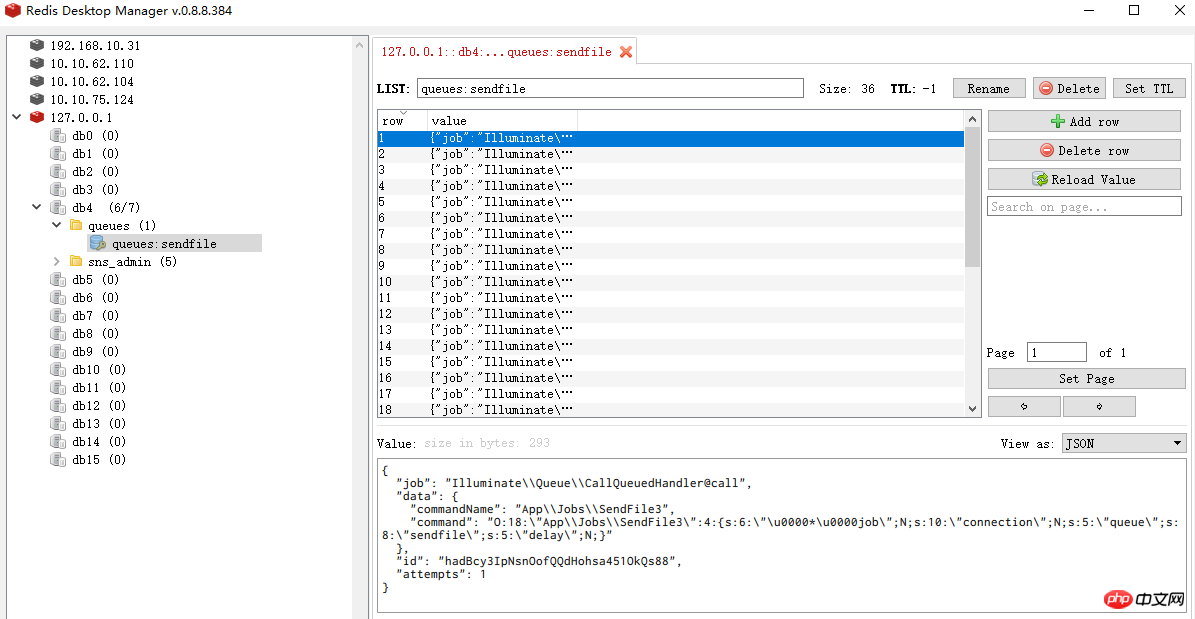
这个时候开启 Supervisor 处理队列任务,并查看日志:
[2017-12-23 19:01:01] local.INFO: invoke SendFile3
[2017-12-23 19:01:01] local.INFO: invoke SendFile3
[2017-12-23 19:01:01] local.INFO: invoke SendFile3
[2017-12-23 19:01:01] local.INFO: invoke SendFile3
[2017-12-23 19:01:01] local.INFO: invoke SendFile3
[2017-12-23 19:01:01] local.INFO: invoke SendFile3
[2017-12-23 19:01:01] local.INFO: invoke SendFile3
[2017-12-23 19:01:01] local.INFO: invoke SendFile3
[2017-12-23 19:01:01] local.INFO: queue id:JaClJzhDEvntzLCRIz6uRQkCVLbE8Y9C
[2017-12-23 19:01:01] local.INFO: queue id:ukHv0Li4P2VgPa55qU6yEOJM27Mo5YwJ
[2017-12-23 19:01:01] local.INFO: queue id:ObMpwDTmnaveBUkU7aan5abt3Agyt90l
[2017-12-23 19:01:01] local.INFO: queue id:fo2qZn2ftSdQtdnKOciMK7iJb4qlhRGE
[2017-12-23 19:01:01] local.INFO: queue id:uLjFMoOU7Wk7bOAd4zpHb3ccRMJHBtR6
[2017-12-23 19:01:01] local.INFO: queue id:87ULqPBObFmGr16nl5wxFVOi71zGCeRM
[2017-12-23 19:01:01] local.INFO: queue id:9UVl0muQLzBqlRI99rChGW2ElXwVEMIE
[2017-12-23 19:01:01] local.INFO: queue id:a0vgyZuz9HtmH7DGHEpXqesFTcQU3QAF
[2017-12-23 19:01:01] local.INFO: invoke SendFile3
[2017-12-23 19:01:01] local.INFO: invoke SendFile3
[2017-12-23 19:01:01] local.INFO: queue id:2cXuXxopPkgYiV4WO8gv9CJ6CwXeKtYL
[2017-12-23 19:01:01] local.INFO: invoke SendFile3
[2017-12-23 19:01:01] local.INFO: queue id:9acTAYa8cxpJX6Q3Gb1sULokotP8reqZ
[2017-12-23 19:01:01] local.INFO: invoke SendFile3
[2017-12-23 19:01:01] local.INFO: invoke SendFile3
[2017-12-23 19:01:01] local.INFO: queue id:BPHQvBboChlv4gr2I0vyLVyw9bijtTYJ
[2017-12-23 19:01:01] local.INFO: invoke SendFile3
[2017-12-23 19:01:01] local.INFO: queue id:Fm6tNajdxYKtdQbDMYDmwWJFLnNikRyg
[2017-12-23 19:01:01] local.INFO: invoke SendFile3
[2017-12-23 19:01:01] local.INFO: queue id:nyAbcvSkBVPbaH3e2ItQkoLJlP1ficib
[2017-12-23 19:01:01] local.INFO: queue id:WBHsSVZtP43569UoPXxfLLJcvYmPW7cP
[2017-12-23 19:01:01] local.INFO: invoke SendFile3
[2017-12-23 19:01:01] local.INFO: queue id:bliPnKcRSDApwVmKLNxEhaKelhm0RDEY
[2017-12-23 19:01:01] local.INFO: invoke SendFile3
[2017-12-23 19:01:01] local.INFO: invoke SendFile3
[2017-12-23 19:01:01] local.INFO: queue id:eOAoQucEIwRz9uZ64xm6IDKgiqj9Xc3W
[2017-12-23 19:01:01] local.INFO: invoke SendFile3
[2017-12-23 19:01:01] local.INFO: queue id:lzise9EiqQqINrhALbmAI4qNg7qylpb2
[2017-12-23 19:01:01] local.INFO: invoke SendFile3
[2017-12-23 19:01:01] local.INFO: queue id:WXYKvcfOhS1pPnwOwUTsenoMv5l5EUXe
[2017-12-23 19:01:01] local.INFO: invoke SendFile3
[2017-12-23 19:01:01] local.INFO: queue id:XtH5JiwLgnrwWzI02Oyi70pihAOkuJUD
[2017-12-23 19:01:01] local.INFO: invoke SendFile3
[2017-12-23 19:01:01] local.INFO: invoke SendFile3
[2017-12-23 19:01:01] local.INFO: queue id:9ehmE5HImlpNubpY0xWN8UVrOzxeMqws
[2017-12-23 19:01:01] local.INFO: queue id:C1sK87cpZl47edLA0zhfo7PJ9MIEcoyx
[2017-12-23 19:01:01] local.INFO: invoke SendFile3
[2017-12-23 19:01:01] local.INFO: invoke SendFile3
[2017-12-23 19:01:01] local.INFO: invoke SendFile3
[2017-12-23 19:01:01] local.INFO: queue id:2kwl51oH4lyyRrljCReGUCkNiJRDl7oe
[2017-12-23 19:01:01] local.INFO: queue id:ObRpoqrYTPYiyv2delMlOXu3sAPpWJlN
[2017-12-23 19:01:01] local.INFO: invoke SendFile3
[2017-12-23 19:01:01] local.INFO: queue id:6qgu6W3TapLjSrt688yv9HRXvDDLxntz
[2017-12-23 19:01:01] local.INFO: queue id:wiTlERhwn7s9cQkfUF9lLlNADpXjKncI
[2017-12-23 19:01:01] local.INFO: invoke SendFile3
[2017-12-23 19:01:01] local.INFO: queue id:ZSLW0VLFBDpL4wjTJzu3Yb3V45pNe807
[2017-12-23 19:01:01] local.INFO: invoke SendFile3
[2017-12-23 19:01:01] local.INFO: queue id:qhZlXLGfGWRluIeNm7VbllmTJZYb2h5n
[2017-12-23 19:01:01] local.INFO: invoke SendFile3
[2017-12-23 19:01:01] local.INFO: queue id:LUx1IByD3L2psNl9BZwHhk2knXyRPzW6
[2017-12-23 19:01:01] local.INFO: invoke SendFile3
[2017-12-23 19:01:01] local.INFO: queue id:M2RESPjyo5hpAFxxL0EQbWwsUq4jpmWn
[2017-12-23 19:01:01] local.INFO: invoke SendFile3
[2017-12-23 19:01:01] local.INFO: invoke SendFile3
[2017-12-23 19:01:01] local.INFO: queue id:hUsGaiIAOO6ZfGQc5kGHGpsv5RpoRPYO
[2017-12-23 19:01:01] local.INFO: queue id:cEHJsOy6bLeZ4NbncPziaHqlarMeyyEF
[2017-12-23 19:01:01] local.INFO: invoke SendFile3
[2017-12-23 19:01:01] local.INFO: queue id:w4bkFiJKMU5saqG2xKN3ZRL5BYXGATMk
[2017-12-23 19:01:01] local.INFO: invoke SendFile3
[2017-12-23 19:01:01] local.INFO: queue id:0zBuwbxlrEhhxKfYBkVyTY4z35f154sI
[2017-12-23 19:01:01] local.INFO: queue id:mvoZvyDPvq4tcPjEy9G7PMtH3MwPkPik
[2017-12-23 19:01:01] local.INFO: invoke SendFile3
[2017-12-23 19:01:01] local.INFO: queue id:TLvF74eeidECWKtjZqWvW03UJTRPTL9r
[2017-12-23 19:01:01] local.INFO: queue id:me8wyPfgcz0nf9xvcXz0hf2xVxqa1FFS
这 8 个进程并发处理队列,但从打印的日志看,没有出现同样的 ID. 我们再看一下 Laravel 如何使用 Redis 处理队列的。
分析一下 Laravel 队列的处理
Laravel 中入队列方法
public function pushRaw($payload, $queue = null, array $options = [])
{
 $this->getConnection()->rpush($this->getQueue($queue), $payload);

 return Arr::get(json_decode($payload, true), 'id');
}用的是 Redis 的 rpush 命令。
Laravel 中取队列方法
public function pop($queue = null)
{
 $original = $queue ?: $this->default;
 $queue = $this->getQueue($queue);
 $this->migrateExpiredJobs($queue.':delayed', $queue);
 if (! is_null($this->expire)) {
  $this->migrateExpiredJobs($queue.':reserved', $queue);
 }
 list($job, $reserved) = $this->getConnection()->eval(
  LuaScripts::pop(), 2, $queue, $queue.':reserved', $this->getTime() + $this->expire
 );
 if ($reserved) {
  return new RedisJob($this->container, $this, $job, $reserved, $original);
 }
}这里用的是 lua 脚本取队列,如下:
public static function pop()
{
 return <<<'LUA'
local job = redis.call('lpop', KEYS[1])
local reserved = false
if(job ~= false) then
reserved = cjson.decode(job)
reserved['attempts'] = reserved['attempts'] + 1
reserved = cjson.encode(reserved)
redis.call('zadd', KEYS[2], ARGV[1], reserved)
end
return {job, reserved}
LUA;
}那么结论是:从 Laravel 的处理方式和打印的日志结果看,即使多个进程读取同一个队列,也不会读取到一样的数据。
相关推荐:
The above is the detailed content of Laravel Redis multiple processes fetch queue problem at the same time. For more information, please follow other related articles on the PHP Chinese website!

Hot AI Tools

Undresser.AI Undress
AI-powered app for creating realistic nude photos

AI Clothes Remover
Online AI tool for removing clothes from photos.

Undress AI Tool
Undress images for free

Clothoff.io
AI clothes remover

AI Hentai Generator
Generate AI Hentai for free.

Hot Article
Hot Tools

Notepad++7.3.1
Easy-to-use and free code editor

SublimeText3 Chinese version
Chinese version, very easy to use

Zend Studio 13.0.1
Powerful PHP integrated development environment

Dreamweaver CS6
Visual web development tools

SublimeText3 Mac version
God-level code editing software (SublimeText3)
Hot Topics
 1378
1378
 52
52

 How to build the redis cluster mode
Apr 10, 2025 pm 10:15 PM
How to build the redis cluster mode
Apr 10, 2025 pm 10:15 PM
Redis cluster mode deploys Redis instances to multiple servers through sharding, improving scalability and availability. The construction steps are as follows: Create odd Redis instances with different ports; Create 3 sentinel instances, monitor Redis instances and failover; configure sentinel configuration files, add monitoring Redis instance information and failover settings; configure Redis instance configuration files, enable cluster mode and specify the cluster information file path; create nodes.conf file, containing information of each Redis instance; start the cluster, execute the create command to create a cluster and specify the number of replicas; log in to the cluster to execute the CLUSTER INFO command to verify the cluster status; make
 How to use the redis command
Apr 10, 2025 pm 08:45 PM
How to use the redis command
Apr 10, 2025 pm 08:45 PM
Using the Redis directive requires the following steps: Open the Redis client. Enter the command (verb key value). Provides the required parameters (varies from instruction to instruction). Press Enter to execute the command. Redis returns a response indicating the result of the operation (usually OK or -ERR).
 How to clear redis data
Apr 10, 2025 pm 10:06 PM
How to clear redis data
Apr 10, 2025 pm 10:06 PM
How to clear Redis data: Use the FLUSHALL command to clear all key values. Use the FLUSHDB command to clear the key value of the currently selected database. Use SELECT to switch databases, and then use FLUSHDB to clear multiple databases. Use the DEL command to delete a specific key. Use the redis-cli tool to clear the data.
 How to read the source code of redis
Apr 10, 2025 pm 08:27 PM
How to read the source code of redis
Apr 10, 2025 pm 08:27 PM
The best way to understand Redis source code is to go step by step: get familiar with the basics of Redis. Select a specific module or function as the starting point. Start with the entry point of the module or function and view the code line by line. View the code through the function call chain. Be familiar with the underlying data structures used by Redis. Identify the algorithm used by Redis.
 How to use single threaded redis
Apr 10, 2025 pm 07:12 PM
How to use single threaded redis
Apr 10, 2025 pm 07:12 PM
Redis uses a single threaded architecture to provide high performance, simplicity, and consistency. It utilizes I/O multiplexing, event loops, non-blocking I/O, and shared memory to improve concurrency, but with limitations of concurrency limitations, single point of failure, and unsuitable for write-intensive workloads.
 How to view all keys in redis
Apr 10, 2025 pm 07:15 PM
How to view all keys in redis
Apr 10, 2025 pm 07:15 PM
To view all keys in Redis, there are three ways: use the KEYS command to return all keys that match the specified pattern; use the SCAN command to iterate over the keys and return a set of keys; use the INFO command to get the total number of keys.
 How to start the server with redis
Apr 10, 2025 pm 08:12 PM
How to start the server with redis
Apr 10, 2025 pm 08:12 PM
The steps to start a Redis server include: Install Redis according to the operating system. Start the Redis service via redis-server (Linux/macOS) or redis-server.exe (Windows). Use the redis-cli ping (Linux/macOS) or redis-cli.exe ping (Windows) command to check the service status. Use a Redis client, such as redis-cli, Python, or Node.js, to access the server.
 How to read redis queue
Apr 10, 2025 pm 10:12 PM
How to read redis queue
Apr 10, 2025 pm 10:12 PM
To read a queue from Redis, you need to get the queue name, read the elements using the LPOP command, and process the empty queue. The specific steps are as follows: Get the queue name: name it with the prefix of "queue:" such as "queue:my-queue". Use the LPOP command: Eject the element from the head of the queue and return its value, such as LPOP queue:my-queue. Processing empty queues: If the queue is empty, LPOP returns nil, and you can check whether the queue exists before reading the element.
