



artTemplate是騰訊開源的前端模板框架,和mustache,handlerbars類似,在web專案中可以很方便的使用,上手快,如果用過mustache,那麼幾乎可以快速切換到template框架上來。
學習過程:
1、語法介紹:
資料綁定:與angularjs類似,只不過視圖與模型是單向的綁定,模型改變,視圖改變,反過來則不行。
<script id="tpl1" type="text/template">
	<h1 id="data-nbsp-mapping-nbsp-example">1、data mapping example</h1>
	<h2 id="message">{{message}}</h2>
</script>
//js中使用模板渲染
var data1 = {message:"hello,artTemplate is a javasript framework."};
$("node1").innerHTML = template("tpl1",data1);
條件判斷:這裡支援單一的if,也可以加入else分支,沒有else if分支。
{{if isShow}}
	<h3 id="满足条件展示消息-message">(2、满足条件展示消息:{{message}}</h3>
{{else}}
	<h3 id="x-条件不满足-展示默认消息">(2x、条件不满足,展示默认消息</h3>
{{/if}}
遍歷集合:
{{each list as item index}}
	<h3 id="the-nbsp-index-nbsp-of-nbsp-message-nbsp-is-nbsp-nbsp-index-nbsp-nbsp-item">the index of message is : {{index+1}} -> {{item}}</h3>
{{/each}}
輔助函數:可以用來將後端請求的資料進行映射,例如1->正常,0->錯誤。使用的時候只需要在表達式後面通過"|func"的方式就可以,例如{{message | filterhandler}},其中filterhandler為自訂的輔助函數。
先定義一個輔助函數,這裡定義的是一個簡單的轉換日期格式函數。
template.helper("date2str",function(date){
var today = new Date(date);
var year = today.getFullYear();
var month = today.getMonth()+1;
if(month<10)month = "0"+month;
var day = today.getDate();
if(day<10)day = "0"+day;
return year+"-"+month+"-"+day;
 });
使用輔助函數
<p id="node4"></p>
<script id="tpl4" type="text/template">
	<h1 id="template-helper-nbsp-func-nbsp-example">4、template.helper func example</h1>
	<h3 id="today-nbsp-is-nbsp-datenow-nbsp-nbsp-date-str">today is {{datenow | date2str}}</h3>
 </script>

//js代码中调用
 var data4 = {datenow:new Date()};
 $("node4").innerHTML = template("tpl4",data4);
預先編譯:與使用模板不同的是,預先編譯需要的是一個string類型的文檔片段,然後將資料交給預編譯後的模板進行渲染。
var tpl5 = "<h1 id="compile-nbsp-example">5、compile example</h1><h3 id="this-nbsp-is-nbsp-a-nbsp-string-nbsp-the-nbsp-type-nbsp-is-nbsp-not-nbsp-type">this is a string the type is not {{type}}</h3>";
$("node5").innerHTML = template.compile(tpl5)({type:"text/template"});
引用子範本:
<p id="node6"></p>
<script id="tpl6" type="text/template">
<h1 id="include-nbsp-child-nbsp-template-nbsp-example">6、include child template example</h1>
<p class="parenttemplate">
<h3 id="parent-nbsp-template">parent template</h3>
{{include 'tpl6-child'}}
</p>
</script>
<script id="tpl6-child" type="text/template">
<p class="childtemplate">
<h3 id="child-nbsp-template">child template</h3>
</p>
</script>2、下載template.js庫,並引入到html檔案中。
3、這裡給一個綜合的例子,將前面介紹的一些文法練習一下:
<!doctype html>
<html>
<head>
<meta charset="UTF-8"/>
<title>artTemplate example</title>
<style type="text/css">
*{margin:0;}
h1,h2,h3{margin:3px;}
h2,h3{text-indent:20px;}
.parenttemplate{background:#ccc;width:600px;height:60px;}
.childtemplate{background:lightblue;}
</style>
<script type="text/javascript" src="template.js"></script>
<script>
function $(id){return document.getElementById(id);}
window.onload = function(){
//data mapping
var data1 = {message:"hello,artTemplate is a javasript framework."};
$("node1").innerHTML = template("tpl1",data1);
//if condition
var data2 = {isShow:true,message:"hello,template"};
$("node2").innerHTML = template("tpl2",data2);
data2.isShow = false;
$("node2x").innerHTML = template("tpl2",data2);
//list foreach
var data3 = {list:["Javascript","JQuery","artTemplate"]};
$("node3").innerHTML = template("tpl3",data3);
//helper function
template.helper("date2str",function(date){
var today = new Date(date);
var year = today.getFullYear();
var month = today.getMonth()+1;
if(month<10)month = "0"+month;
var day = today.getDate();
if(day<10)day = "0"+day;
return year+"-"+month+"-"+day;
});
var data4 = {datenow:new Date()};
$("node4").innerHTML = template("tpl4",data4);
//compile example
var tpl5 = "<h1 id="compile-nbsp-example">5、compile example</h1><h3>this is a string the type is not {{type}}
</h3>";
$("node5").innerHTML = template.compile(tpl5)({type:"text/template"});
$("node6").innerHTML = template("tpl6",{});
//escape html
$("node7").innerHTML = template("tpl7",{message:"<span>escape html tag</span>"});
}
</script>
</head>
<body>
<p id="node1"></p>
<script id="tpl1" type="text/template">
<h1 id="data-nbsp-mapping-nbsp-example">1、data mapping example</h1>
<h2 id="message">{{message}}</h2>
</script>
<p id="node2"></p>
<p id="node2x"></p>
<script id="tpl2" type="text/template">
<h1 id="if-nbsp-condition-nbsp-example">2、if condition example</h1>
{{if isShow}}
<h3 id="满足条件展示消息-message">(2、满足条件展示消息:{{message}}</h3>
{{else}}
<h3 id="x-条件不满足-展示默认消息">(2x、条件不满足,展示默认消息</h3>
{{/if}}
</script>
<p id="node3"></p>
<script id="tpl3" type="text/template">
<h1 id="list-nbsp-example">3、list example</h1>
{{each list as item index}}
<h3 id="the-nbsp-index-nbsp-of-nbsp-message-nbsp-is-nbsp-nbsp-index-nbsp-nbsp-item">the index of message is : {{index+1}} -> {{item}}</h3>
{{/each}}
</script>
<p id="node4"></p>
<script id="tpl4" type="text/template">
<h1 id="template-helper-nbsp-func-nbsp-example">4、template.helper func example</h1>
<h3 id="today-nbsp-is-nbsp-datenow-nbsp-nbsp-date-str">today is {{datenow | date2str}}</h3>
</script>
<p id="node5"></p>
<p id="node6"></p>
<script id="tpl6" type="text/template">
<h1 id="include-nbsp-child-nbsp-template-nbsp-example">6、include child template example</h1>
<p class="parenttemplate">
<h3 id="parent-nbsp-template">parent template</h3>
{{include 'tpl6-child'}}
</p>
</script>
<script id="tpl6-child" type="text/template">
<p class="childtemplate">
<h3 id="child-nbsp-template">child template</h3>
</p>
</script>
<p id="node7"></p>
<script id="tpl7" type="text/template">
<h1 id="escape-nbsp-html-nbsp-tag-nbsp-example">7、escape html tag example</h1>
<h3 id="origin-nbsp-expression-nbsp-nbsp-message">origin expression : {{#message}}</h3>
<h3 id="after-nbsp-escape-nbsp-nbsp-nbsp-message">after escape ==> : {{message}}</h3>
</script>
</body>
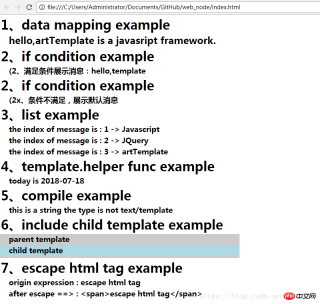
</html>執行這個範例,可以得到如下的效果:

以上是javascript前端模板引擎框架artTemplate使用總結 - CSDN博客的詳細內容。更多資訊請關注PHP中文網其他相關文章!

 掌握JavaScript開發人員的命令行Jul 24, 2025 am 03:59 AM
掌握基礎但深入的命令行技能:熟練使用Tab補全、history、Ctrl R搜索、pwd定位及ls-la查看隱藏文件;2.高效運用Node.js與包管理器:善用npminit-y、--save-dev、npx免安裝運行、npmrun腳本及outdated檢查,優選pnpm提速;3.精準搜索代碼與日誌:結合grep-r/-i、find找文件、jq格式化JSON及xargs組合查找含特定內容的JS文件;4.編寫簡單腳本自動化任務:如deploy.sh一鍵部署,chmod x賦予執行權;5.自定義Sh
 如何檢查變量是否是JS中的數組?Jul 24, 2025 am 03:58 AM
判斷變量是否為數組類型,首選Array.isArray()方法,其次可使用Object.prototype.toString.call()。 1.Array.isArray(variable)返回true或false,適用於現代瀏覽器和Node.js;2.Object.prototype.toString.call(variable)==='[objectArray]',兼容老舊環境。避免使用typeof和instanceof,因它們在判斷數組時存在缺陷。根據需求選擇合適方法:無需兼容舊版本時優先
 JavaScript依賴管理策略Jul 24, 2025 am 03:58 AM
保持依賴版本一致、定期更新依賴、分清依賴類型、使用Monorepo管理多項目依賴。 1.使用package-lock.json或yarn.lock提交至Git以確保環境一致性;2.定期檢查依賴樹,避免重複安裝和衝突;3.使用npmoutdated或yarnoutdated檢查更新,優先處理安全問題並評估主版本升級影響;4.明確區分dependencies和devDependencies,避免生產環境誤裝開發工具;5.使用Lerna或Nx等工具統一管理多個項目的共享依賴與代碼,提升協作效率。
 帶Jest和劇作家的高級JavaScript測試策略Jul 24, 2025 am 03:56 AM
使用Jest的MockFunctions和Timers可控制異步行為,通過jest.fn()和jest.useFakeTimers()提升測試效率;2.Playwright中使用Fixtures和PageObjectModel(POM)可提高可維護性,封裝常用操作和頁面邏輯;3.Jest與Playwright可協同實現單元測試與端到端測試的全面覆蓋;4.Playwright的TraceViewer可用於直觀調試失敗測試。這些策略分別優化測試效率、代碼結構、測試層級覆蓋與調試能力,適用於復雜項目提
 如何使用bun:多合一的JavaScript工具包Jul 24, 2025 am 03:54 AM
Bun是一個現代JavaScript運行時,可替代Node.js、npm和Webpack等工具,其核心優勢在於速度。 1.Bun基於Zig構建,使用JavaScriptCore引擎,能直接運行JavaScript和TypeScript文件,無需額外配置;2.它內置包管理器,支持從npm安裝依賴,速度比npm快10–100倍,並生成bun.lockb鎖文件;3.內置原生打包器,支持最小化、環境變量、代碼分割等功能,可替代Webpack或esbuild;4.提供類Jest語法的快速測試運行器,自動查找
 使用JavaScript Websockets實時通信Jul 24, 2025 am 03:50 AM
要實現實時通信,使用JavaScript的WebSocket關鍵在於理解其基本用法和常見場景。 1.建立連接只需一行代碼:constsocket=newWebSocket('ws://example.com/socket');,使用open、message、error、close事件處理連接狀態;2.發送和接收數據常用JSON格式,通過socket.send()發送,監聽message事件接收並解析數據;3.處理斷開和重連可通過監聽close和error事件,結合setTimeout實現自動重連,
 ES模塊與commonjs:詳細的比較Jul 24, 2025 am 03:50 AM
ESModules(ESM)和CommonJS是JavaScript的兩種模塊系統,主要區別在於語法、加載機制、執行時機、環境支持和互操作性。 1.語法上,ESM使用import/export靜態聲明,CommonJS使用require()/module.exports動態賦值。 2.加載機制上,ESM支持靜態分析和tree-shaking,CommonJS為運行時動態加載,靈活性高但不利於優化。 3.執行時機上,ESM通過實時綁定處理循環依賴,能獲取最新值;CommonJS緩存模塊輸出,可能返回部分
 JavaScript和Node.js中的高級錯誤處理策略Jul 24, 2025 am 03:47 AM
centecustomerrorclasseslikevalidationErrandDataBaseErrortoEnablePreciseErnableSerrorhandusingInstanceOfandImproveloggingConsistency.2.usecentralizedErrizedErrizedErrizedErnizedErnizedMiddlemiddlewareinexpress.jsbypassingerrorrornothtempress()


熱AI工具

Undress AI Tool
免費脫衣圖片

Undresser.AI Undress
人工智慧驅動的應用程序,用於創建逼真的裸體照片

AI Clothes Remover
用於從照片中去除衣服的線上人工智慧工具。

Clothoff.io
AI脫衣器

Video Face Swap
使用我們完全免費的人工智慧換臉工具,輕鬆在任何影片中換臉!

熱門文章
熱工具

ZendStudio 13.5.1 Mac
強大的PHP整合開發環境

記事本++7.3.1
好用且免費的程式碼編輯器

SublimeText3漢化版
中文版,非常好用

mPDF
mPDF是一個PHP庫,可以從UTF-8編碼的HTML產生PDF檔案。原作者Ian Back編寫mPDF以從他的網站上「即時」輸出PDF文件,並處理不同的語言。與原始腳本如HTML2FPDF相比,它的速度較慢,並且在使用Unicode字體時產生的檔案較大,但支援CSS樣式等,並進行了大量增強。支援幾乎所有語言,包括RTL(阿拉伯語和希伯來語)和CJK(中日韓)。支援嵌套的區塊級元素(如P、DIV),

MantisBT
Mantis是一個易於部署的基於Web的缺陷追蹤工具,用於幫助產品缺陷追蹤。它需要PHP、MySQL和一個Web伺服器。請查看我們的演示和託管服務。

