


 Backend DevelopmentPython TutorialHow to use Beanstalkd in Python for asynchronous task processing
This article mainly introduces the method of using Beanstalkd for asynchronous task processing in Python. Now I share it with you and give it as a reference. Let’s take a look together
Use Beanstalkd as the message queue service, and then combine it with Python’s decorator syntax to implement a simple asynchronous task processing tool.
Final effect
Define task:
from xxxxx.job_queue import JobQueue

queue = JobQueue()

@queue.task('task_tube_one')
def task_one(arg1, arg2, arg3):
 # do task
Submit task:
task_one.put(arg1="a", arg2="b", arg3="c")
Then These tasks can be performed by the background work thread.
Implementation process
1. Understand Beanstalk Server
Beanstalk is a simple, fast work queue. https://github.com /kr/beanstalkd
Beanstalk is a message queue service implemented in C language. It provides a common interface and was originally designed to reduce page latency in large-scale web applications by running time-consuming tasks asynchronously. There are different Beanstalkd Client implementations for different languages. There are beanstalkc and so on in Python. I use beanstalkc as a tool to communicate with beanstalkd server.
2. Implementation principle of asynchronous task execution
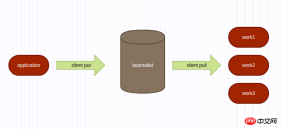
beanstalkd can only schedule task strings. In order for the program to support submitting functions and parameters, the function is then executed by the woker and the parameters are carried. A middle layer is needed to register functions with passed parameters.
The implementation mainly includes 3 parts:
Subscriber: Responsible for registering the function on a tube of beanstalk. The implementation is very simple, registering the corresponding relationship between the function name and the function itself. (This means that the same function name cannot exist in the same group (tube)). Data is stored in class variables.
class Subscriber(object):
 FUN_MAP = defaultdict(dict)

 def __init__(self, func, tube):
  logger.info('register func:{} to tube:{}.'.format(func.__name__, tube))
  Subscriber.FUN_MAP[tube][func.__name__] = func
JobQueue: Conveniently converts an ordinary function into a decorator with Putter capability
class JobQueue(object):
 @classmethod
 def task(cls, tube):
  def wrapper(func):
   Subscriber(func, tube)
   return Putter(func, tube)

  return wrapper
Putter: Combine the function name, function parameters, and specified grouping into an object, then serialize json into a string, and finally push it to the beanstalkd queue through beanstalkc.
class Putter(object):
 def __init__(self, func, tube):
  self.func = func
  self.tube = tube

 # 直接调用返回
 def __call__(self, *args, **kwargs):
  return self.func(*args, **kwargs)

 # 推给离线队列
 def put(self, **kwargs):
  args = {
   'func_name': self.func.__name__,
   'tube': self.tube,
   'kwargs': kwargs
  }
  logger.info('put job:{} to queue'.format(args))
  beanstalk = beanstalkc.Connection(host=BEANSTALK_CONFIG['host'], port=BEANSTALK_CONFIG['port'])
  try:
   beanstalk.use(self.tube)
   job_id = beanstalk.put(json.dumps(args))
   return job_id
  finally:
   beanstalk.close()
Worker: Take the string from the beanstalkd queue, and then deserialize it into an object through json.loads to obtain the function name, parameters and tube . Finally, the function code corresponding to the function name is obtained from the Subscriber, and then the parameters are passed to execute the function.
class Worker(object):
worker_id = 0
def __init__(self, tubes):
self.beanstalk = beanstalkc.Connection(host=BEANSTALK_CONFIG['host'], port=BEANSTALK_CONFIG['port'])
self.tubes = tubes
self.reserve_timeout = 20
self.timeout_limit = 1000
self.kick_period = 600
self.signal_shutdown = False
self.release_delay = 0
self.age = 0
self.signal_shutdown = False
signal.signal(signal.SIGTERM, lambda signum, frame: self.graceful_shutdown())
Worker.worker_id += 1
import_module_by_str('pear.web.controllers.controller_crawler')
def subscribe(self):
if isinstance(self.tubes, list):
for tube in self.tubes:
if tube not in Subscriber.FUN_MAP.keys():
logger.error('tube:{} not register!'.format(tube))
continue
self.beanstalk.watch(tube)
else:
if self.tubes not in Subscriber.FUN_MAP.keys():
logger.error('tube:{} not register!'.format(self.tubes))
return
self.beanstalk.watch(self.tubes)
def run(self):
self.subscribe()
while True:
if self.signal_shutdown:
break
if self.signal_shutdown:
logger.info("graceful shutdown")
break
job = self.beanstalk.reserve(timeout=self.reserve_timeout) # 阻塞获取任务,最长等待 timeout
if not job:
continue
try:
self.on_job(job)
self.delete_job(job)
except beanstalkc.CommandFailed as e:
logger.warning(e, exc_info=1)
except Exception as e:
logger.error(e)
kicks = job.stats()['kicks']
if kicks < 3:
self.bury_job(job)
else:
message = json.loads(job.body)
logger.error("Kicks reach max. Delete the job", extra={'body': message})
self.delete_job(job)
@classmethod
def on_job(cls, job):
start = time.time()
msg = json.loads(job.body)
logger.info(msg)
tube = msg.get('tube')
func_name = msg.get('func_name')
try:
func = Subscriber.FUN_MAP[tube][func_name]
kwargs = msg.get('kwargs')
func(**kwargs)
logger.info(u'{}-{}'.format(func, kwargs))
except Exception as e:
logger.error(e.message, exc_info=True)
cost = time.time() - start
logger.info('{} cost {}s'.format(func_name, cost))
@classmethod
def delete_job(cls, job):
try:
job.delete()
except beanstalkc.CommandFailed as e:
logger.warning(e, exc_info=1)
@classmethod
def bury_job(cls, job):
try:
job.bury()
except beanstalkc.CommandFailed as e:
logger.warning(e, exc_info=1)
def graceful_shutdown(self):
self.signal_shutdown = True
When writing the above code, I found a problem:
Register the function name and function through Subscriber The corresponding relationship is that it runs in a Python interpreter, that is, in one process, and the Worker runs asynchronously in another process. How can the Worker get the same Subscriber as Putter? Finally, I found that this problem can be solved through Python's decorator mechanism.
This sentence solves the Subscriber problem
import_module_by_str('pear.web.controllers.controller_crawler')
# import_module_by_str 的实现
def import_module_by_str(module_name):
 if isinstance(module_name, unicode):
  module_name = str(module_name)
 __import__(module_name)
When executing import_module_by_str, __import__ will be called to dynamically load classes and functions. After loading the module containing the function using JobQueue into memory. When running Woker, the Python interpreter will first execute the @-decorated decorator code and load the corresponding relationship in Subscriber into memory.
For actual use, please see https://github.com/jiyangg/Pear/blob/master/pear/jobs/job_queue.py
Related recommendations:
php-beanstalkd message queue class instance detailed explanation
The above is the detailed content of How to use Beanstalkd in Python for asynchronous task processing. For more information, please follow other related articles on the PHP Chinese website!

 Python: Automation, Scripting, and Task ManagementApr 16, 2025 am 12:14 AM
Python excels in automation, scripting, and task management. 1) Automation: File backup is realized through standard libraries such as os and shutil. 2) Script writing: Use the psutil library to monitor system resources. 3) Task management: Use the schedule library to schedule tasks. Python's ease of use and rich library support makes it the preferred tool in these areas.
 Python and Time: Making the Most of Your Study TimeApr 14, 2025 am 12:02 AM
To maximize the efficiency of learning Python in a limited time, you can use Python's datetime, time, and schedule modules. 1. The datetime module is used to record and plan learning time. 2. The time module helps to set study and rest time. 3. The schedule module automatically arranges weekly learning tasks.
 Python: Games, GUIs, and MoreApr 13, 2025 am 12:14 AM
Python excels in gaming and GUI development. 1) Game development uses Pygame, providing drawing, audio and other functions, which are suitable for creating 2D games. 2) GUI development can choose Tkinter or PyQt. Tkinter is simple and easy to use, PyQt has rich functions and is suitable for professional development.
 Python vs. C : Applications and Use Cases ComparedApr 12, 2025 am 12:01 AM
Python is suitable for data science, web development and automation tasks, while C is suitable for system programming, game development and embedded systems. Python is known for its simplicity and powerful ecosystem, while C is known for its high performance and underlying control capabilities.
 The 2-Hour Python Plan: A Realistic ApproachApr 11, 2025 am 12:04 AM
You can learn basic programming concepts and skills of Python within 2 hours. 1. Learn variables and data types, 2. Master control flow (conditional statements and loops), 3. Understand the definition and use of functions, 4. Quickly get started with Python programming through simple examples and code snippets.
 Python: Exploring Its Primary ApplicationsApr 10, 2025 am 09:41 AM
Python is widely used in the fields of web development, data science, machine learning, automation and scripting. 1) In web development, Django and Flask frameworks simplify the development process. 2) In the fields of data science and machine learning, NumPy, Pandas, Scikit-learn and TensorFlow libraries provide strong support. 3) In terms of automation and scripting, Python is suitable for tasks such as automated testing and system management.
 How Much Python Can You Learn in 2 Hours?Apr 09, 2025 pm 04:33 PM
You can learn the basics of Python within two hours. 1. Learn variables and data types, 2. Master control structures such as if statements and loops, 3. Understand the definition and use of functions. These will help you start writing simple Python programs.
 How to teach computer novice programming basics in project and problem-driven methods within 10 hours?Apr 02, 2025 am 07:18 AM
How to teach computer novice programming basics within 10 hours? If you only have 10 hours to teach computer novice some programming knowledge, what would you choose to teach...


Hot AI Tools

Undresser.AI Undress
AI-powered app for creating realistic nude photos

AI Clothes Remover
Online AI tool for removing clothes from photos.

Undress AI Tool
Undress images for free

Clothoff.io
AI clothes remover

AI Hentai Generator
Generate AI Hentai for free.

Hot Article
Hot Tools

DVWA
Damn Vulnerable Web App (DVWA) is a PHP/MySQL web application that is very vulnerable. Its main goals are to be an aid for security professionals to test their skills and tools in a legal environment, to help web developers better understand the process of securing web applications, and to help teachers/students teach/learn in a classroom environment Web application security. The goal of DVWA is to practice some of the most common web vulnerabilities through a simple and straightforward interface, with varying degrees of difficulty. Please note that this software

VSCode Windows 64-bit Download
A free and powerful IDE editor launched by Microsoft

SublimeText3 Linux new version
SublimeText3 Linux latest version

Atom editor mac version download
The most popular open source editor

SublimeText3 Chinese version
Chinese version, very easy to use

