



This article introduces you to the relevant knowledge points about implementing the todolist function through native JavaScript. Friends in need can learn about it.
This project can mainly practice the logical relationship between js manipulation of DOM, events, and event triggers, as well as how to write to the cache and obtain the cache.
Main functions:
Add user input to to-do items
Todolist can be classified and the user can check it Group the to-do items into the completed group
Each item in the todolist can be deleted and edited
Write user input data to localStorage locally Cache, to save the input data
Can clear the local cache under the domain name and clear all todolist items
Specific functions Implementation
HTML code
<!DOCTYPE html>
<html lang="en">
<head>
 <meta charset="UTF-8">
 <title>todolist-prime</title>
 <link rel="stylesheet" href="yuansheng.css" rel="external nofollow" >
</head>
<body>

 <header>
  <section>
   <label for="add_list">My todolist</label>
   <input type="text" id="add_list" name="add_list" placeholder="type here" required>
  </section>
 </header>

 <p class="content">
  <h1 id="未完成-span-nbsp-id-todocount-span">未完成<span id="todocount"></span></h1>
  <ol id="todolist">
  </ol>

  <h1 id="已完成-span-nbsp-id-donecount-span">已完成<span id="donecount"></span></h1>
  <ol id="donelist">
  </ol>
 </p>

 <p id="clear">
 <span style="white-space:pre;">	</span><button id="clearbutton"><h3 id="全部清除">全部清除</h3></button>
 </p>
 <script src="todolist-prime.js"></script>
</body>
</html>
JS code and analysis
Create an array object to save the data entered by the user. Each element of the array Each item is an object. The "todo" attribute of the object stores the data entered by the user. The "done" attribute can be understood as the label of the user-entered data and is mainly used to classify "todo" values.
Every time the user completes inputting data, the cache must be updated and the input box initialized.
function addTodolist(e) {
 var obj_list = {
  todo: "", //用于存储用户输入的数据
  done: false  //初始化用户输入的数据属性,以便对用户待办事项进行分类
 };
 document.getElementById("add_list").value = document.getElementById("add_list").value.trim();
 if (document.getElementById("add_list").value.length === 0){
  alert("不能为空");
  return;
 }

 obj_list.todo = document.getElementById("add_list").value;
 todolist.push(obj_list);

 saveData(todolist);

 document.getElementById("add_list").value = "";  //初始化输入框
 load();  //将用户输入的数据添加至dom节点
 document.getElementById("add_list").focus();
}
Add the input data to the dom node and classify it according to the value of the input data attribute ("done").
<span style="font-size:14px;">function load(){
var todo = document.getElementById("todolist"),
done = document.getElementById("donelist"),
todocount = document.getElementById("todocount"),
donecount = document.getElementById("donecount"),
todoString = "",
doneString = "",
todoCount = 0,
doneCount = 0;
document.getElementById("add_list").focus();
todolist = loadData();
//todolist数组对象里若包含用户输入数据,则将其添加至dom节点;若为空对象,则初始化页面。
if (todolist != null){
for (var i=0; i<todolist.length; i ++){
if(!todolist[i].done){
todoString += "<li>"
//通过onchange事件,复选框值有改变则调用update函数,并改变输入数据“done”属性的布尔值,这样
//下次load()后,这段数据会进入不同的分组,未完成的事项分入已完成事项组,已完成事项分入未完成事项组
//点击事项调用edit函数
//点击“-”,调用remove函数
+ "<input type='checkbox' onchange='update("+i+", \"done\", true)'>"
+ "<p id='p-"+i+"' onclick='edit("+i+")'>" + todolist[i].todo + "</p>" +
"<a onclick='remove("+i+")'>-</a>" +
"</li>"; //将每次用户输入的数据,通过节点<p>利用id标记,以便后续编辑功能定位
todoCount ++;
}
else{
doneString += "<li>"
+ "<input type='checkbox' "
+ "onchange='update("+i+", \"done\", false)' checked>"
+ "<p id='p-"+i+"' onclick='edit("+i+")'>" + todolist[i].todo + "</p>"
+ "<a onclick='remove("+i+")'>-</a>"
+ "</li>";
doneCount ++;
}
}
todo.innerHTML = todoString;
done.innerHTML = doneString;
todocount.innerHTML = todoCount;
donecount.innerHTML = doneCount;
}
else {
todo.innerHTML = "";
done.innerHTML = "";
todocount.innerHTML = 0;
donecount.innerHTML = 0;
}
}</span>Click the item to trigger the edit event, insert the editable form control into the paragraph, and update the data stored in the todolist array with the value entered by the user through the update function
function edit(i) {
var p = document.getElementById('p-' + i),
pContent = p.innerHTML,
inputId;
//通过upadate函数对todolist数组相应项进行更新,将用户输入的内容写入到todolist数组相应项的todo属性中
function confirm() {
if (inputId.value.length === 0) {
p.innerHTML = pContent;
alert("内容不能为空");
}
else {
update(i, "todo", inputId.value); //修改事项内容后,更新数组里对应项"todo"属性的值,以便更新dom节点
}
}
//结合keypress事件,按下enter键,调用confirm函数
function enter(e) {
if (e.keyCode == 13){
confirm();
}
}
p.innerHTML = "<input type='text' id='input-"+i+"' value='"+pContent+"'>";
inputId = document.getElementById('input-'+i);
inputId.focus();
inputId.setSelectionRange(0, inputId.value.length);
inputId.onblur = confirm; //表单控件失去焦点,调用confirm函数,即对页面内容进行更新
inputId.onkeypress = enter; //对按键事件进行监控
}Invert the array todolist The attributes ("todo" or "done") of the corresponding item are updated and loaded
function update(i, field, value) {
 todolist[i][field] = value;
 saveData(todolist);
 load();
}
Delete the corresponding item and load
function remove(i) {
 todolist.splice(i, 1);

 saveData(todolist); //相同名称的缓存会覆盖,更新缓存

 load();
}
Save user data to the local cache
function saveData(data) {
 localStorage.setItem("mytodolist", JSON.stringify(data)); //JS对象转换成JSON对象存进本地缓存
}
Get data from the local cache, if there is data, assign it to todolist, so that the user data will still exist after refreshing the page
function loadData() {
 var hisTory = localStorage.getItem("mytodolist");
 if(hisTory !=null){
  return JSON.parse(hisTory);  //JSON对象转换为JS对象
 }
 else { return []; }
}
Clear the local cache
function clear() {
 localStorage.clear();
 load();
}
Monitoring of a series of events
window.addEventListener("load", load); //页面加载完毕调用load函数
document.getElementById("clearbutton").onclick = clear;
document.getElementById("add_list").onkeypress = function (event) {
 if(event.keyCode === 13){
  addTodolist();
 }
};
CSS
body {
  margin: 0px;
  padding: 0px;
  font-size: 16px;
  background-color: gainsboro;
}
header {
  height: 50px;
  background-color: cornflowerblue;
}
header section {
  margin: 0 auto;
  width: 40%;
}

header section label {
  float: left;
  line-height: 50px; /*设置line-height和包含块高度一致,以实现行内元素垂直居中*/
  font-size: 20px;
}

#add_list {
  float: right;
  margin-top: 11px;
  width: 60%;
  height: 24px;
  border-radius: 5px;
  box-shadow: 0 1px 0 black;
  font-size: 18px;
  text-indent: 10px;
}

h1 {
  position: relative;
}

h1 span {
  position: absolute;
  top: 1px;
  right: 5px;
  display: inline-block;
  width: 23px;
  height: 23px;
  border-radius: 23px;  /*创建圆形标记*/
  line-height: 23px;
  font-size: 18px;
  text-align: center;
  background: #E6E6FA;
}

.content {
  width: 40%;
  margin: 0 auto;
}

li {
  position: relative;
  margin-bottom: 10px;
  border-radius: 5px;
  padding: 0 10px;
  height: 32px;
  box-shadow: 0 1px 0 black;
  line-height: 32px;
  background-color: burlywood;
  list-style: none;
}

ol li input {
  position: absolute;
  top: 4px;
  left: 10px;
  width: 20px;
  height: 20px;
  cursor: pointer;
}
p{
  margin: 0;
}
ol li p {
  display: inline;
  margin-left: 35px;
}

ol li p input{
  top: 5px;
  margin-left: 35px;
  width: 70%;
  height: 14px;
  font-size: 14px;
  line-height: 14px;
}

ol li a {
  position: absolute;
  top: 8px;
  right: 10px;
  display: inline-block;
  border: 1px;
  border-radius: 50%;
  width: 16px;
  height: 16px;
  font-size: 32px;
  line-height: 10px;
  color: red;
  font-weight: bolder;
  cursor: pointer;
  background-color: gray;
}

#clear {
  width: 100px;
  margin: 0 auto;
}

#clearbutton {
  border-color: red;
  border-radius: 5px;
  box-shadow: 0 1px 0 yellow;
  cursor: pointer;
}

button h3{
  font-size: 13px;
  line-height: 13px;
}
The final implementation effect
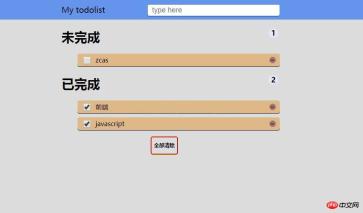
The above is what I compiled for everyone. I hope it will be helpful to everyone in the future.
Related articles:
How to deal with axios interception settings and error handling?
The above is the detailed content of How to implement todolist function in native JavaScript. For more information, please follow other related articles on the PHP Chinese website!

 JavaScript in Action: Real-World Examples and ProjectsApr 19, 2025 am 12:13 AM
JavaScript's application in the real world includes front-end and back-end development. 1) Display front-end applications by building a TODO list application, involving DOM operations and event processing. 2) Build RESTfulAPI through Node.js and Express to demonstrate back-end applications.
 JavaScript and the Web: Core Functionality and Use CasesApr 18, 2025 am 12:19 AM
The main uses of JavaScript in web development include client interaction, form verification and asynchronous communication. 1) Dynamic content update and user interaction through DOM operations; 2) Client verification is carried out before the user submits data to improve the user experience; 3) Refreshless communication with the server is achieved through AJAX technology.
 Understanding the JavaScript Engine: Implementation DetailsApr 17, 2025 am 12:05 AM
Understanding how JavaScript engine works internally is important to developers because it helps write more efficient code and understand performance bottlenecks and optimization strategies. 1) The engine's workflow includes three stages: parsing, compiling and execution; 2) During the execution process, the engine will perform dynamic optimization, such as inline cache and hidden classes; 3) Best practices include avoiding global variables, optimizing loops, using const and lets, and avoiding excessive use of closures.
 Python vs. JavaScript: The Learning Curve and Ease of UseApr 16, 2025 am 12:12 AM
Python is more suitable for beginners, with a smooth learning curve and concise syntax; JavaScript is suitable for front-end development, with a steep learning curve and flexible syntax. 1. Python syntax is intuitive and suitable for data science and back-end development. 2. JavaScript is flexible and widely used in front-end and server-side programming.
 Python vs. JavaScript: Community, Libraries, and ResourcesApr 15, 2025 am 12:16 AM
Python and JavaScript have their own advantages and disadvantages in terms of community, libraries and resources. 1) The Python community is friendly and suitable for beginners, but the front-end development resources are not as rich as JavaScript. 2) Python is powerful in data science and machine learning libraries, while JavaScript is better in front-end development libraries and frameworks. 3) Both have rich learning resources, but Python is suitable for starting with official documents, while JavaScript is better with MDNWebDocs. The choice should be based on project needs and personal interests.
 From C/C to JavaScript: How It All WorksApr 14, 2025 am 12:05 AM
The shift from C/C to JavaScript requires adapting to dynamic typing, garbage collection and asynchronous programming. 1) C/C is a statically typed language that requires manual memory management, while JavaScript is dynamically typed and garbage collection is automatically processed. 2) C/C needs to be compiled into machine code, while JavaScript is an interpreted language. 3) JavaScript introduces concepts such as closures, prototype chains and Promise, which enhances flexibility and asynchronous programming capabilities.
 JavaScript Engines: Comparing ImplementationsApr 13, 2025 am 12:05 AM
Different JavaScript engines have different effects when parsing and executing JavaScript code, because the implementation principles and optimization strategies of each engine differ. 1. Lexical analysis: convert source code into lexical unit. 2. Grammar analysis: Generate an abstract syntax tree. 3. Optimization and compilation: Generate machine code through the JIT compiler. 4. Execute: Run the machine code. V8 engine optimizes through instant compilation and hidden class, SpiderMonkey uses a type inference system, resulting in different performance performance on the same code.
 Beyond the Browser: JavaScript in the Real WorldApr 12, 2025 am 12:06 AM
JavaScript's applications in the real world include server-side programming, mobile application development and Internet of Things control: 1. Server-side programming is realized through Node.js, suitable for high concurrent request processing. 2. Mobile application development is carried out through ReactNative and supports cross-platform deployment. 3. Used for IoT device control through Johnny-Five library, suitable for hardware interaction.


Hot AI Tools

Undresser.AI Undress
AI-powered app for creating realistic nude photos

AI Clothes Remover
Online AI tool for removing clothes from photos.

Undress AI Tool
Undress images for free

Clothoff.io
AI clothes remover

Video Face Swap
Swap faces in any video effortlessly with our completely free AI face swap tool!

Hot Article
Hot Tools

Notepad++7.3.1
Easy-to-use and free code editor

SublimeText3 Chinese version
Chinese version, very easy to use

DVWA
Damn Vulnerable Web App (DVWA) is a PHP/MySQL web application that is very vulnerable. Its main goals are to be an aid for security professionals to test their skills and tools in a legal environment, to help web developers better understand the process of securing web applications, and to help teachers/students teach/learn in a classroom environment Web application security. The goal of DVWA is to practice some of the most common web vulnerabilities through a simple and straightforward interface, with varying degrees of difficulty. Please note that this software

Zend Studio 13.0.1
Powerful PHP integrated development environment

PhpStorm Mac version
The latest (2018.2.1) professional PHP integrated development tool

