



This article mainly introduces the method of packaging js with webpack. Now I will share it with you and give you a reference.
Webpack is a front-end resource loading/packaging tool. It will perform static analysis based on module dependencies, and then generate corresponding static resources for these modules according to specified rules.
Before practicing the code, let’s talk about the basic knowledge of webpack.
1. Why use WebPack
Many web pages today can actually be regarded as feature-rich applications. They have complex JavaScript codes and a lot of Dependency package. In order to simplify the complexity of development, many good practices have emerged in the front-end community
Modularization allows us to refine complex programs into small files;
Similar to TypeScript, a development language based on JavaScript: it allows us to implement features that cannot be used directly in the current version of JavaScript, and can later be installed into JavaScript files so that the browser can Recognition;
Scss, less and other CSS preprocessors
…
2. What is Webpack
WebPack can be regarded as a module packager: what it does is to analyze your project structure and find JavaScript modules and other extension languages that cannot be run directly by browsers. (Scss, TypeScript, etc.) and package it into a suitable format for browser consumption.
3. What are the characteristics of WebPack compared to Grunt and Gulp?
In fact, Webpack is not much comparable to the other two. Gulp/Grunt is a A tool that can optimize the front-end development process, and WebPack is a modular solution, but the advantages of Webpack allow Webpack to replace Gulp/Grunt tools.
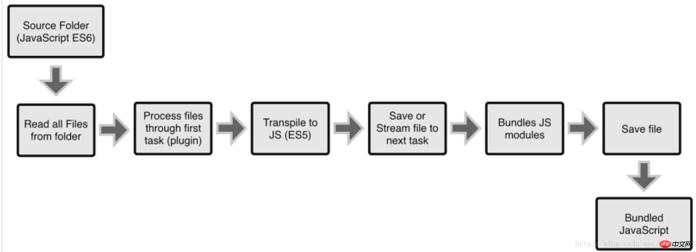
The way Grunt and Gulp work is: in a configuration file, specify the specific steps to perform tasks such as compilation, combination, compression, etc. on certain files. This tool can then automatically complete these tasks for you.
These improvements have indeed greatly improved our development efficiency, but the files developed using them often require additional processing to be recognized by the browser, and manual processing is very anti-locking. This is Provides requirements for the emergence of tools like WebPack.
The way Webpack works is: treat your project as a whole, through a given main file (such as: index.js), Webpack will start from this file Find all the dependency files of your project, use loaders to process them, and finally package them into a JavaScript file that can be recognized by the browser.
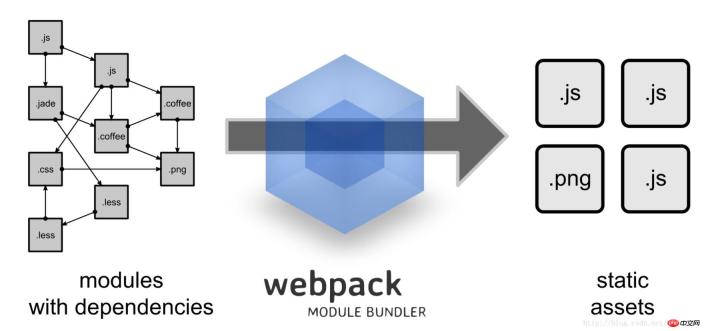
We can see from the picture that Webpack can convert a variety of static resources js, css, and less into a static file, reducing page requests.
If you really want to compare the two, Webpack's processing speed is faster and more direct, and it can package more different types of files.
Next, we will briefly introduce
How Webpack merges multiple js files (note that this is just the merging of files, that is, merging multiple written js into one js file to reduce http requests).
Install webpack
Before installing Webpack, your local environment needs to support node.js. To install node.js, please refer to the official node documentation.
Use the following command to install webpack globally.
$ npm install webpack -g
webpack has been installed on your computer and you can now use the webpack command.
Use webpack in the project
Use the following command to generate the package.json file in the project root directory.
$ npm init
Install webpack into the project
Add webpack to the pageage.json configuration file, use the following command :
$ npm install --save-dev webpack
Look at the package.json file again at this time. Compared with when package.json was just created, a new piece of code has been added.

Two ways of webpack packaging
webpack entry
output (command line) webpack -config webpack.conf.js (specify webpack configuration file)
Use command line Packaging js
1: Create two js files
Create app.js, sum.js, export one sum.js Addition function, app.js uses this function.
// app.js

import {sum} from './sum';
console.log('sum(21, 22)', sum(21, 22));

// sum.js
export function sum(a, b) {
  return a + b;
}
Two: Use the webpack command to package
Use in the current directory: webpack app.js bundle.js ; The entry here is app.js, and the output file is bundle.js, so you will see an extra bundle.js file in the file.
Create an html file to run, introduce bundle.js to run, the console will print: sum(21, 22) 43.
使用webapck的配置文件打包(还是上面的两个js文件)
创建一个webpack.conf.js,编写wepack的配置文件
// 配置文件使用commonjs规范

module.exports = {

  // 入口,是一个对象
  entry: {
    app: './app.js'
  },

  // 输出
  output: {
    // 带五位hash值的js
    filename: '[name].[hash:5].js'
  }
}
在命令行输入:webpack --config webpack.conf.js,发现生成了一个app.dd1c6.js带hash的js文件。将这个js文件引入HTML里面发正常输出:sum(21, 22) 43
配置文件的命名为webpack.config.js,则直接在命令行输入webpack就可以。
webapck配合babel打包ES6、7
在项目根目录安装bable-loader和babel-core,babel-preset
使用npm init生成一个配置文件
npm install babel-loader babel-core --save-dev
新建app.js,index.html,webpack.config.js等文件
编写webpack.config.js
安装babel-preset来指定编译的版本:npm install babel-preset-env --save-dev
在app.js里面随便写一些ES6的语法
使用命令行输入webpack进行编译
webpack配置文件
// 配置文件使用commonjs规范
module.exports = {

  // 入口,是一个对象
  entry: {
    app: './app.js' // 相对路径
  },

  // 输出
  output: {
    // 带五位hash值的js
    filename: '[name].[hash:8].js'
  },

  // 指定loader
  module: {

    // rules中的每一项是一个规则
    rules:[
      {
        test: /\.js$/, // 值一个正则,符合这些正则的资源会用一个loade来处理
        use: {
          loader: 'babel-loader', // 使用bable-loader来处理
          options: { // 指定参数
            presets: [
              ['babel-preset-env', {
                targets: {
                  browsers: ['> 1%', 'last 2 version'] //具体可以去babel-preset里面查看
                }
              }]

            ] // 指定哪些语法编译
          }
        },
        exclude: '/node_module/' // 排除在外
      }
    ]
  }
}
app.js和编译之后带hash的js
// app.js
let func = () => {};
const num = 30;
let arr = [3, 4, 5, 6];

let newArr = arr.map(item => item * 2); // 将以前数组每一项*2

console.log(newArr);

// ==================//
// 编译之后(直接截取了编译的代码)
"use strict";


var func = function func() {};
var num = 30;
var arr = [3, 4, 5, 6];

var newArr = arr.map(function (item) {
 return item * 2;
}); // 将以前数组每一项*2

console.log(newArr);
babel的两个插件:Babel Polyfill 和 Babel Runtime Transform
用来处理一些函数和方法(Genertor,Set,Map,Array.from等未被babel处理,需要上面的两个插件)
Babel Polyfill(全局垫片),npm install babel-polyfill --save, 使用:import "babel-polyfill";
Babel Runtime Transform(为开发框架准备),npm install babel-plugin-transform-runtime --save, npm install babel-runtime --save
新建一个.babelrc来进行配置
app.js里面新增代码
import "babel-polyfill";
let func = () => {};
const num = 30;
let arr = [3, 4, 5, 6];
let newArr = arr.map(item => item * 2); // 将以前数组每一项*2

console.log(newArr);
// 需要babel-polyfill
arr.includes(8);

// Genertor 函数
function* func2() {
}
webpack配置
// 配置文件使用commonjs规范
module.exports = {
  // 入口,是一个对象
  entry: {
    app: './app.js' // 相对路径
  },

  // 输出
  output: {
    // 带五位hash值的js
    filename: '[name].[hash:8].js'
  },

  // 指定loader
  module: {

    // rules中的每一项是一个规则
    rules:[
      {
        test: /\.js$/, // 值一个正则,符合这些正则的资源会用一个loade来处理
        use: {
          loader: 'babel-loader', // 使用bable-loader来处理
          options: { // 指定参数

          }
        },
        exclude: '/node_module/' // 排除在外
      }
    ]
  }
}
.babelrc文件配置
{
  "presets": [
    ["babel-preset-env", {
      "targets": {
        "browsers": ["> 1%", "last 2 version"]
      }
    }]
  ],
  "plugins": ["transform-runtime"]
}
上面是我整理给大家的,希望今后会对大家有帮助。
相关文章:
The above is the detailed content of How to package js with webpack. For more information, please follow other related articles on the PHP Chinese website!

 Python vs. JavaScript: The Learning Curve and Ease of UseApr 16, 2025 am 12:12 AM
Python is more suitable for beginners, with a smooth learning curve and concise syntax; JavaScript is suitable for front-end development, with a steep learning curve and flexible syntax. 1. Python syntax is intuitive and suitable for data science and back-end development. 2. JavaScript is flexible and widely used in front-end and server-side programming.
 Python vs. JavaScript: Community, Libraries, and ResourcesApr 15, 2025 am 12:16 AM
Python and JavaScript have their own advantages and disadvantages in terms of community, libraries and resources. 1) The Python community is friendly and suitable for beginners, but the front-end development resources are not as rich as JavaScript. 2) Python is powerful in data science and machine learning libraries, while JavaScript is better in front-end development libraries and frameworks. 3) Both have rich learning resources, but Python is suitable for starting with official documents, while JavaScript is better with MDNWebDocs. The choice should be based on project needs and personal interests.
 From C/C to JavaScript: How It All WorksApr 14, 2025 am 12:05 AM
The shift from C/C to JavaScript requires adapting to dynamic typing, garbage collection and asynchronous programming. 1) C/C is a statically typed language that requires manual memory management, while JavaScript is dynamically typed and garbage collection is automatically processed. 2) C/C needs to be compiled into machine code, while JavaScript is an interpreted language. 3) JavaScript introduces concepts such as closures, prototype chains and Promise, which enhances flexibility and asynchronous programming capabilities.
 JavaScript Engines: Comparing ImplementationsApr 13, 2025 am 12:05 AM
Different JavaScript engines have different effects when parsing and executing JavaScript code, because the implementation principles and optimization strategies of each engine differ. 1. Lexical analysis: convert source code into lexical unit. 2. Grammar analysis: Generate an abstract syntax tree. 3. Optimization and compilation: Generate machine code through the JIT compiler. 4. Execute: Run the machine code. V8 engine optimizes through instant compilation and hidden class, SpiderMonkey uses a type inference system, resulting in different performance performance on the same code.
 Beyond the Browser: JavaScript in the Real WorldApr 12, 2025 am 12:06 AM
JavaScript's applications in the real world include server-side programming, mobile application development and Internet of Things control: 1. Server-side programming is realized through Node.js, suitable for high concurrent request processing. 2. Mobile application development is carried out through ReactNative and supports cross-platform deployment. 3. Used for IoT device control through Johnny-Five library, suitable for hardware interaction.
 Building a Multi-Tenant SaaS Application with Next.js (Backend Integration)Apr 11, 2025 am 08:23 AM
I built a functional multi-tenant SaaS application (an EdTech app) with your everyday tech tool and you can do the same. First, what’s a multi-tenant SaaS application? Multi-tenant SaaS applications let you serve multiple customers from a sing
 How to Build a Multi-Tenant SaaS Application with Next.js (Frontend Integration)Apr 11, 2025 am 08:22 AM
This article demonstrates frontend integration with a backend secured by Permit, building a functional EdTech SaaS application using Next.js. The frontend fetches user permissions to control UI visibility and ensures API requests adhere to role-base
 JavaScript: Exploring the Versatility of a Web LanguageApr 11, 2025 am 12:01 AM
JavaScript is the core language of modern web development and is widely used for its diversity and flexibility. 1) Front-end development: build dynamic web pages and single-page applications through DOM operations and modern frameworks (such as React, Vue.js, Angular). 2) Server-side development: Node.js uses a non-blocking I/O model to handle high concurrency and real-time applications. 3) Mobile and desktop application development: cross-platform development is realized through ReactNative and Electron to improve development efficiency.


Hot AI Tools

Undresser.AI Undress
AI-powered app for creating realistic nude photos

AI Clothes Remover
Online AI tool for removing clothes from photos.

Undress AI Tool
Undress images for free

Clothoff.io
AI clothes remover

AI Hentai Generator
Generate AI Hentai for free.

Hot Article
Hot Tools

MantisBT
Mantis is an easy-to-deploy web-based defect tracking tool designed to aid in product defect tracking. It requires PHP, MySQL and a web server. Check out our demo and hosting services.

SAP NetWeaver Server Adapter for Eclipse
Integrate Eclipse with SAP NetWeaver application server.

VSCode Windows 64-bit Download
A free and powerful IDE editor launched by Microsoft

SublimeText3 English version
Recommended: Win version, supports code prompts!

ZendStudio 13.5.1 Mac
Powerful PHP integrated development environment

