



This article introduces you to the relevant knowledge of Vue.js form control operation. This article demonstrates the method of using v-model in input and textarea elements through examples. This article introduces you very well and has reference value. Friends who need it can refer to it
Concept Description
v-model command: Create two-way data binding on the form control element. v-model will automatically choose the correct method to update the element based on the control type.
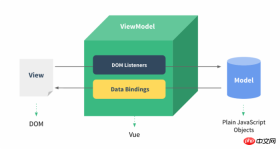
Input box
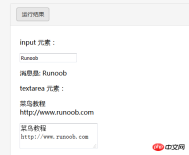
The example demonstrates the use of v-model in the input and textarea elements to achieve bidirectionality Data binding:
HTML
<!DOCTYPE html>
<html>
<head>
<meta charset="utf-8">
<title>Vue 测试实例 - 菜鸟教程(runoob.com)</title>
<script src="https://cdn.bootcss.com/vue/2.2.2/vue.min.js"></script>
</head>
<body>
<p id="app">
<p>input 元素:</p>
<input v-model="message" placeholder="编辑我……">
<p>消息是: {{ message }}</p>
<p>textarea 元素:</p>
<p style="white-space: pre">{{ message2 }}</p>
<textarea v-model="message2" placeholder="多行文本输入……"></textarea>
</p>
<script>
new Vue({
el: '#app',
data: {
message: 'Runoob',
message2: '菜鸟教程\r\nhttp://www.runoob.com'
}
})
</script>
</body>
</html>The effect is as shown in the figure:
Complex Check box
If the check box is a single one, it is a logical value. If there are multiple check boxes, it is bound to the same array:
HTML
<!DOCTYPE html>
<html>
<head>
<meta charset="utf-8">
<title>Vue 测试实例 - 菜鸟教程(runoob.com)</title>
<script src="https://cdn.bootcss.com/vue/2.2.2/vue.min.js"></script>
</head>
<body>
<p id="app">
<p>单个复选框:</p>
<input type="checkbox" id="checkbox" v-model="checked">
<label for="checkbox">{{ checked }}</label>
<p>多个复选框:</p>
<input type="checkbox" id="runoob" value="Runoob" v-model="checkedNames">
<label for="runoob">Runoob</label>
<input type="checkbox" id="google" value="Google" v-model="checkedNames">
<label for="google">Google</label>
<input type="checkbox" id="taobao" value="Taobao" v-model="checkedNames">
<label for="taobao">taobao</label>
<br>
<span>选择的值为: {{ checkedNames }}</span>
</p>
<script>
new Vue({
el: '#app',
data: {
checked : false,
checkedNames: []
}
})
</script>
</body>
</html>The effect is as shown:

Radio button
##HTML
<!DOCTYPE html>
<html>
<head>
<meta charset="utf-8">
<title>Vue 测试实例 - 菜鸟教程(runoob.com)</title>
<script src="https://cdn.bootcss.com/vue/2.2.2/vue.min.js"></script>
</head>
<body>
<p id="app">
<input type="radio" id="runoob" value="Runoob" v-model="picked">
<label for="runoob">Runoob</label>
<br>
<input type="radio" id="google" value="Google" v-model="picked">
<label for="google">Google</label>
<br>
<span>选中值为: {{ picked }}</span>
</p>
<script>
new Vue({
el: '#app',
data: {
picked : 'Runoob'
}
})
</script>
</body>
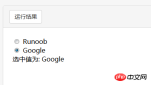
</html>The effect is as shown:
drop-down list
HTML
<!DOCTYPE html>
<html>
<head>
<meta charset="utf-8">
<title>Vue 测试实例 - 菜鸟教程(runoob.com)</title>
<script src="https://cdn.bootcss.com/vue/2.2.2/vue.min.js"></script>
</head>
<body>
<p id="app">
<select v-model="selected" name="fruit">
<option value="">选择一个网站</option>
<option value="www.runoob.com">Runoob</option>
<option value="www.google.com">Google</option>
</select>
<p id="output">
选择的网站是: {{selected}}
</p>
</p>
<script>
new Vue({
el: '#app',
data: {
selected: ''
}
})
</script>
</body>
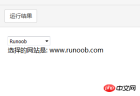
</html>The effect is as shown:
##Modifier.lazy
By default, v-model synchronizes the value and data of the input box in the input event, but you can add a modifier lazy to switch to synchronization in the change event:
<!-- 在 "change" 而不是 "input" 事件中更新 -->
<input v-model.lazy="msg" >
.number
If you want to automatically convert the user's input value to the Number type (if the conversion result of the original value is NaN, the original value will be returned), you can add a modifier number to v-model To handle input values:
<input v-model.number="age" type="number">
This is often useful because input values in HTML will always be returned as string types when type="number".
.trim
If you want to automatically filter the first and last spaces input by the user, you can add the trim modifier to v-model to filter the input:
<input v-model.trim="msg">
The above is what I compiled for everyone. I hope It will be helpful to everyone in the future.
Related articles:
Collection of methods to disable ajax caching in (ASP/PHP/JSP/html/js)ajax Methods of using actions with different namespacesUse ajax to preview the link and you can see the content of the linkThe above is the detailed content of Summary of Vue.js form control operations. For more information, please follow other related articles on the PHP Chinese website!

 Understanding the JavaScript Engine: Implementation DetailsApr 17, 2025 am 12:05 AM
Understanding how JavaScript engine works internally is important to developers because it helps write more efficient code and understand performance bottlenecks and optimization strategies. 1) The engine's workflow includes three stages: parsing, compiling and execution; 2) During the execution process, the engine will perform dynamic optimization, such as inline cache and hidden classes; 3) Best practices include avoiding global variables, optimizing loops, using const and lets, and avoiding excessive use of closures.
 Python vs. JavaScript: The Learning Curve and Ease of UseApr 16, 2025 am 12:12 AM
Python is more suitable for beginners, with a smooth learning curve and concise syntax; JavaScript is suitable for front-end development, with a steep learning curve and flexible syntax. 1. Python syntax is intuitive and suitable for data science and back-end development. 2. JavaScript is flexible and widely used in front-end and server-side programming.
 Python vs. JavaScript: Community, Libraries, and ResourcesApr 15, 2025 am 12:16 AM
Python and JavaScript have their own advantages and disadvantages in terms of community, libraries and resources. 1) The Python community is friendly and suitable for beginners, but the front-end development resources are not as rich as JavaScript. 2) Python is powerful in data science and machine learning libraries, while JavaScript is better in front-end development libraries and frameworks. 3) Both have rich learning resources, but Python is suitable for starting with official documents, while JavaScript is better with MDNWebDocs. The choice should be based on project needs and personal interests.
 From C/C to JavaScript: How It All WorksApr 14, 2025 am 12:05 AM
The shift from C/C to JavaScript requires adapting to dynamic typing, garbage collection and asynchronous programming. 1) C/C is a statically typed language that requires manual memory management, while JavaScript is dynamically typed and garbage collection is automatically processed. 2) C/C needs to be compiled into machine code, while JavaScript is an interpreted language. 3) JavaScript introduces concepts such as closures, prototype chains and Promise, which enhances flexibility and asynchronous programming capabilities.
 JavaScript Engines: Comparing ImplementationsApr 13, 2025 am 12:05 AM
Different JavaScript engines have different effects when parsing and executing JavaScript code, because the implementation principles and optimization strategies of each engine differ. 1. Lexical analysis: convert source code into lexical unit. 2. Grammar analysis: Generate an abstract syntax tree. 3. Optimization and compilation: Generate machine code through the JIT compiler. 4. Execute: Run the machine code. V8 engine optimizes through instant compilation and hidden class, SpiderMonkey uses a type inference system, resulting in different performance performance on the same code.
 Beyond the Browser: JavaScript in the Real WorldApr 12, 2025 am 12:06 AM
JavaScript's applications in the real world include server-side programming, mobile application development and Internet of Things control: 1. Server-side programming is realized through Node.js, suitable for high concurrent request processing. 2. Mobile application development is carried out through ReactNative and supports cross-platform deployment. 3. Used for IoT device control through Johnny-Five library, suitable for hardware interaction.
 Building a Multi-Tenant SaaS Application with Next.js (Backend Integration)Apr 11, 2025 am 08:23 AM
I built a functional multi-tenant SaaS application (an EdTech app) with your everyday tech tool and you can do the same. First, what’s a multi-tenant SaaS application? Multi-tenant SaaS applications let you serve multiple customers from a sing
 How to Build a Multi-Tenant SaaS Application with Next.js (Frontend Integration)Apr 11, 2025 am 08:22 AM
This article demonstrates frontend integration with a backend secured by Permit, building a functional EdTech SaaS application using Next.js. The frontend fetches user permissions to control UI visibility and ensures API requests adhere to role-base


Hot AI Tools

Undresser.AI Undress
AI-powered app for creating realistic nude photos

AI Clothes Remover
Online AI tool for removing clothes from photos.

Undress AI Tool
Undress images for free

Clothoff.io
AI clothes remover

AI Hentai Generator
Generate AI Hentai for free.

Hot Article
Hot Tools

EditPlus Chinese cracked version
Small size, syntax highlighting, does not support code prompt function

WebStorm Mac version
Useful JavaScript development tools

Safe Exam Browser
Safe Exam Browser is a secure browser environment for taking online exams securely. This software turns any computer into a secure workstation. It controls access to any utility and prevents students from using unauthorized resources.

SublimeText3 English version
Recommended: Win version, supports code prompts!

Zend Studio 13.0.1
Powerful PHP integrated development environment

