



This article mainly introduces to you the relevant information about using native js to implement the HTML5 mini game of Arkanoid. This is a small requirement encountered in recent work. The article introduces it in detail through sample code and shares the complete The source code is for everyone's reference and study. Friends who need it can follow the editor to learn together. I hope it can help everyone.
Preface
PS: A large amount of es6 syntax is used in this project, so friends who are not familiar with es6 syntax are best to understand some basic principles before continuing reading.
First of all, let me explain the purpose of this series: In fact, it is mainly because the blogger hopes to be proficient in using canvas-related APIs, and at the same time is more interested in the implementation logic of small games, so I hope to use this series of small games to Play games to improve your programming skills; regarding es6 syntax, I personally think that es6 syntax will become more and more popular in the future, so I am familiar with the grammar usage skills in advance. The implementation logic of the mini-game may not be perfect, and there may be some bugs, but after all, it is just to improve programming abilities and skills. I hope you don’t take it too seriously.
As the first time to share, I choose to break bricks. A little game with not too complicated logic. At the same time, in order to get closer to the real game effect, levels, brick health, and a simplified implementation of the physical collision model have also been added to the game. In fact, just focus on the game implementation logic
First take a screenshot after the previous game is completed
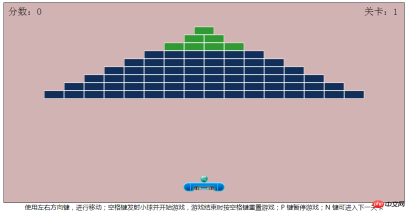
The game project directory is as follows
.
├─ index.html // 首页html
│
├─ css // css样式资源文件
├─ images // 图片资源文件
└─ js
 ├─ common.js // 公共js方法
 ├─ game.js // 游戏主要运行逻辑
 └─ scene.js // 游戏场景相关类
Game implementation Logic
Here we instantiate the baffles, balls, bricks, and scoreboards that need to be drawn in the game, and the main running logic of the game is instantiated separately
Baffles Paddle
class Paddle {
 constructor (_main) {
 let p = {
 x: _main.paddle_x,  // x 轴坐标
 y: _main.paddle_y,  // y 轴坐标
 w: 102,  // 图片宽度
 h: 22,  // 图片高度
 speed: 10,  // x轴移动速度
 ballSpeedMax: 8,  // 小球反弹速度最大值
 image: imageFromPath(allImg.paddle), // 引入图片对象
 isLeftMove: true,  // 能否左移
 isRightMove: true,  // 能否右移
 }
 Object.assign(this, p)
 }
 // 向左移动
 moveLeft () {
 ...
 }
 // 向右移动
 moveRight () {
 ...
 }
 // 小球、挡板碰撞检测
 collide (ball) {
 ...
 }
 // 计算小球、挡板碰撞后x轴速度值
 collideRange (ball) {
 ...
 }
}
Baffle class: It mainly defines its coordinate position, picture size, x-axis displacement speed, control of the ball's rebound speed, etc., and then responds to moveLeft and moveRight movement events according to different keys, and is detected by the collide method. Whether the ball collides with the baffle, and returns a Boolean value
小球Ball
class Ball {
 constructor (_main) {
 let b = {
 x: _main.ball_x, // x 轴坐标
 y: _main.ball_y, // y 轴坐标
 w: 18, // 图片宽度
 h: 18, // 图片高度
 speedX: 1, // x 轴速度
 speedY: 5, // y 轴速度
 image: imageFromPath(allImg.ball), // 图片对象
 fired: false, // 是否运动,默认静止不动
 }
 Object.assign(this, b)
 }
 move (game) {
 ...
 }
}
Small ball: Most of its attributes are similar to the baffle, and the movement trajectory of the ball is mainly controlled through the move method
BrickBlock
class Block {
 constructor (x, y, life = 1) {
 let bk = {
 x: x,     // x 轴坐标
 y: y,     // y 轴坐标
 w: 50,     // 图片宽度
 h: 20,     // 图片高度
 image: life == 1 ? imageFromPath(allImg.block1) : imageFromPath(allImg.block2), // 图片对象
 life: life,     // 生命值
 alive: true,     // 是否存活
 }
 Object.assign(this, bk)
 }
 // 消除砖块
 kill () {
 ...
 }
 // 小球、砖块碰撞检测
 collide (ball) {
 ...
 }
 // 计算小球、砖块碰撞后x轴速度方向
 collideBlockHorn (ball) {
 ...
 }
}
Brick class: There will be two different attributes, namely life and whether it is alive. Then, when the ball collides with the brick, the kill method is called to deduct the current brick's blood volume. When the blood volume is 0, the brick is cleared. The collide method detects whether the ball collides with the bricks, and returns a Boolean value
ScoreboardScore
class Score {
 constructor (_main) {
 let s = {
 x: _main.score_x,  // x 轴坐标
 y: _main.score_y,  // y 轴坐标
 text: '分数:',   // 文本分数
 textLv: '关卡:',  // 关卡文本
 score: 200,   // 每个砖块对应分数
 allScore: 0,   // 总分
 blockList: _main.blockList,  // 砖块对象集合
 blockListLen: _main.blockList.length, // 砖块总数量
 lv: _main.LV,   // 当前关卡
 }
 Object.assign(this, s)
 }
 // 计算总分
 computeScore () {
 ...
 }
}
Score category: The current score and number of levels will be recorded, and the computeScore method will record the ball Called when a brick is collided and the blood volume of the brick is 0, and the total score is accumulated
Scene Scene
class Scene {
 constructor (lv) {
 let s = {
 lv: lv,   // 游戏难度级别
 canvas: document.getElementById("canvas"), // canvas 对象
 blockList: [],   // 砖块坐标集合
 }
 Object.assign(this, s)
 }
 // 实例化所有砖块对象
 initBlockList () {
 ...
 }
 // 创建砖块坐标二维数组,并生成不同关卡
 creatBlockList () {
 ...
 }
}
Scene class: Mainly based on the difficulty level of the game, different levels and brick collections are drawn ( Only three levels have been generated so far). The creatBlockList method first generates the two-dimensional coordinate array of all bricks, and then calls the initBlockList method to instantiate all bricks
Game main logic Game
class Game {
 constructor (fps = 60) {
 let g = {
 actions: {},    // 记录按键动作
 keydowns: {},    // 记录按键 keycode
 state: 1,    // 游戏状态值,初始默认为1
 state_START: 1,   // 开始游戏
 state_RUNNING: 2,   // 游戏开始运行
 state_STOP: 3,   // 暂停游戏
 state_GAMEOVER: 4,   // 游戏结束
 state_UPDATE: 5,   // 游戏通关
 canvas: document.getElementById("canvas"),  // canvas 元素
 context: document.getElementById("canvas").getContext("2d"), // canvas 画布
 timer: null,    // 轮询定时器
 fps: fps,    // 动画帧数,默认60
 }
 Object.assign(this, g)
 }
 ...
}
Game core class: This includes the main game Run logic, including but not limited to the following points
Draw the entire scene of the game
- ##Call the timer to draw the animation frame by frame
- Game clearance and game end determination
- Bind button event
- Boundary detection processing function
- Collision detection processing function
let _main = {
 LV: 1,  // 初始关卡
 MAXLV: 3,  // 最终关卡
 scene: null,  // 场景对象
 blockList: null,  // 所有砖块对象集合
 ball: null,  // 小球对象
 paddle: null,  // 挡板对象
 score: null,  // 计分板对象
 ball_x: 491,  // 小球默认 x 轴坐标
 ball_y: 432,  // 小球默认 y 轴坐标
 paddle_x: 449,  // 挡板默认 x 轴坐标
 paddle_y: 450,  // 挡板默认 y 轴坐标
 score_x: 10,  // 计分板默认 x 轴坐标
 score_y: 30,  // 计分板默认 y 轴坐标
 fps: 60,  // 游戏运行帧数
 game: null,  // 游戏主要逻辑对象
 start: function () {
 let self = this
 /**
 * 生成场景(根据游戏难度级别不同,生成不同关卡)
 */
 self.scene = new Scene(self.LV)
 // 实例化所有砖块对象集合
 self.blockList = self.scene.initBlockList()
 /**
 * 小球
 */
 self.ball = new Ball(self)
 /**
 * 挡板
 */
 self.paddle = new Paddle(self)
 /**
 * 计分板
 */
 self.score = new Score(self)
 /**
 * 游戏主要逻辑
 */
 self.game = new Game(self.fps)
 /**
 * 游戏初始化
 */
 self.game.init(self)
 }
}
Entry function: implements the instantiation of all classes needed in the game, and Initialize the gameRelated recommendations:Example sharing jQuery to implement the puzzle game
html5 Make a mooncake eating game Tutorial
Object-oriented implementation of a simple version of Super Mario mini-game
The above is the detailed content of How to implement HTML5 brick-breaking game using native js. For more information, please follow other related articles on the PHP Chinese website!

 Python vs. JavaScript: The Learning Curve and Ease of UseApr 16, 2025 am 12:12 AM
Python is more suitable for beginners, with a smooth learning curve and concise syntax; JavaScript is suitable for front-end development, with a steep learning curve and flexible syntax. 1. Python syntax is intuitive and suitable for data science and back-end development. 2. JavaScript is flexible and widely used in front-end and server-side programming.
 Python vs. JavaScript: Community, Libraries, and ResourcesApr 15, 2025 am 12:16 AM
Python and JavaScript have their own advantages and disadvantages in terms of community, libraries and resources. 1) The Python community is friendly and suitable for beginners, but the front-end development resources are not as rich as JavaScript. 2) Python is powerful in data science and machine learning libraries, while JavaScript is better in front-end development libraries and frameworks. 3) Both have rich learning resources, but Python is suitable for starting with official documents, while JavaScript is better with MDNWebDocs. The choice should be based on project needs and personal interests.
 From C/C to JavaScript: How It All WorksApr 14, 2025 am 12:05 AM
The shift from C/C to JavaScript requires adapting to dynamic typing, garbage collection and asynchronous programming. 1) C/C is a statically typed language that requires manual memory management, while JavaScript is dynamically typed and garbage collection is automatically processed. 2) C/C needs to be compiled into machine code, while JavaScript is an interpreted language. 3) JavaScript introduces concepts such as closures, prototype chains and Promise, which enhances flexibility and asynchronous programming capabilities.
 JavaScript Engines: Comparing ImplementationsApr 13, 2025 am 12:05 AM
Different JavaScript engines have different effects when parsing and executing JavaScript code, because the implementation principles and optimization strategies of each engine differ. 1. Lexical analysis: convert source code into lexical unit. 2. Grammar analysis: Generate an abstract syntax tree. 3. Optimization and compilation: Generate machine code through the JIT compiler. 4. Execute: Run the machine code. V8 engine optimizes through instant compilation and hidden class, SpiderMonkey uses a type inference system, resulting in different performance performance on the same code.
 Beyond the Browser: JavaScript in the Real WorldApr 12, 2025 am 12:06 AM
JavaScript's applications in the real world include server-side programming, mobile application development and Internet of Things control: 1. Server-side programming is realized through Node.js, suitable for high concurrent request processing. 2. Mobile application development is carried out through ReactNative and supports cross-platform deployment. 3. Used for IoT device control through Johnny-Five library, suitable for hardware interaction.
 Building a Multi-Tenant SaaS Application with Next.js (Backend Integration)Apr 11, 2025 am 08:23 AM
I built a functional multi-tenant SaaS application (an EdTech app) with your everyday tech tool and you can do the same. First, what’s a multi-tenant SaaS application? Multi-tenant SaaS applications let you serve multiple customers from a sing
 How to Build a Multi-Tenant SaaS Application with Next.js (Frontend Integration)Apr 11, 2025 am 08:22 AM
This article demonstrates frontend integration with a backend secured by Permit, building a functional EdTech SaaS application using Next.js. The frontend fetches user permissions to control UI visibility and ensures API requests adhere to role-base
 JavaScript: Exploring the Versatility of a Web LanguageApr 11, 2025 am 12:01 AM
JavaScript is the core language of modern web development and is widely used for its diversity and flexibility. 1) Front-end development: build dynamic web pages and single-page applications through DOM operations and modern frameworks (such as React, Vue.js, Angular). 2) Server-side development: Node.js uses a non-blocking I/O model to handle high concurrency and real-time applications. 3) Mobile and desktop application development: cross-platform development is realized through ReactNative and Electron to improve development efficiency.


Hot AI Tools

Undresser.AI Undress
AI-powered app for creating realistic nude photos

AI Clothes Remover
Online AI tool for removing clothes from photos.

Undress AI Tool
Undress images for free

Clothoff.io
AI clothes remover

AI Hentai Generator
Generate AI Hentai for free.

Hot Article
Hot Tools

Atom editor mac version download
The most popular open source editor

Safe Exam Browser
Safe Exam Browser is a secure browser environment for taking online exams securely. This software turns any computer into a secure workstation. It controls access to any utility and prevents students from using unauthorized resources.

Zend Studio 13.0.1
Powerful PHP integrated development environment

SublimeText3 English version
Recommended: Win version, supports code prompts!

Notepad++7.3.1
Easy-to-use and free code editor

