



Principle of implementation
First of all, let’s explain how to achieve the magnifying glass effect:
Method 1: Prepare a high-pixel large Picture, when the mouse is placed on the original picture, the corresponding position of the large picture is loaded and displayed.
Method 2: Enlarge the original image, that is, adjust the length and width of the original image.
Above we introduced two ways to achieve the magnifying glass effect. Next, we apply the above two ways to our jQuery plug-in.
First of all, we need an img element to display the original image object, and a container as a display box; the large image object is stored in the display box. When the mouse moves over the original image, the corresponding part is displayed by absolute positioning of the large image, achieving a magnifying glass-like effect.
Next, let us define the Index.html page, the specific implementation is as follows:
<!doctype html>
<html lang="en-US">
<head>
  <meta http-equiv="Content-Type" content="text/html;charset=utf-8">
  <title>jQuery Image Zoom Demo</title>
  <meta name="author" content="Jackson Huang">
</head>
<body>
<p class="magnify">
<p class="large"></p>
<img  class="small lazy"  src="/static/imghwm/default1.png"  data-src="./img/1.jpg"       style="max-width:90%" / alt="How to use jQuery to achieve a magnifying glass effect" >
</p>
</body>
</html>
Above, we defined the small object to display the original image, and the large object as a display The frame is used to display the corresponding position of the large image.
mousemove event
Next, we use the jQuery plug-in to achieve the magnifying glass effect when the mouse moves over the small object , the corresponding position of the large image will be displayed in the large object, which involves the mousemove event, so we need to implement the listening method of the mousemove event (how to define the jQuery plug-in, please refer to "Customize jQuery plug-in Step by Step》).
Now, let’s implement the jquery.imagezoom.js plug-in!
(function ($) {

    $.fn.imageZoom = function (options) {

    // The native width and height of the image.
    var native_width = 0,
        native_height = 0,
        current_width = 0,
        current_height = 0,
        $small = $(".small"),
        $large = $(".large");

    $(".magnify").mousemove(function (e) {
        /* Act on the event */
        if (!native_width && !native_height) {
            var image_object = new Image();
            image_object.src = $small.attr('src');

            // Gets the image native height and width.
            native_height = image_object.height;
            native_width = image_object.width;

            // Gets the image current height and width.
            current_height = $small.height();
            current_width = $small.width();

        } else {

            // Gets .maginfy offset coordinates.
            var magnify_offset = $(this).offset(),

                // Gets coordinates within .maginfy.
                mx = e.pageX - magnify_offset.left,
                my = e.pageY - magnify_offset.top;

            // Checks the mouse within .maginfy or not.
            if (mx < $(this).width() && my < $(this).height() && mx > 0 && my > 0) {
                $large.fadeIn(100);
            } else {
                $large.fadeOut(100);
            } if ($large.is(":visible")) {
                /* Gets the large image coordinate by ratio
                   small.x / small.width = large.x / large.width
                   small.y / small.height = large.y / large.height
                   then we need to keep pointer in the centre,
                   so deduct the half of .large width and height.
                */
                var rx = Math.round(mx / $small.width() * native_width - $large.width() / 2) * -1,
                    ry = Math.round(my / $small.height() * native_height - $large.height() / 2) * -1,
                    bgp = rx + "px " + ry + "px",
                    px = mx - $large.width() / 2,
                    py = my - $large.height() / 2;
                $large.css({
                    left: px,
                    top: py,
                    backgroundPosition: bgp
                });
            }

        }
    });
});
Above, I implemented the listening method of the mousemove event. When the mouse moves to the magnify object, we need to get the relative coordinate position of the current mouse. Let’s explain how to get the mouse through pictures. relative coordinate position.
#Relative coordinates
Figure 1 Mouse relative coordinates 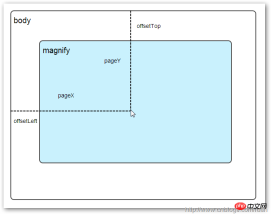
## When the mouse moves to the Magnify object, we need to get the mouse in Magnify The relative coordinate position in , here we define the relative coordinate as (mx,my). From the above figure, we know that the relative coordinate is equal to (pageX - offsetLeft, pageY - offsetTop).
mx / small.width (width of the original image) = rx / native_width (width of the large image)
my / small.height (length of the original image) = ry / native_height (large The length of the picture) Through the above proportional relationship, we know that the coordinates (rx, ry) of the large picture are equal to (mx/small.width*native_width, my/small.height*native_height). Through the above formula, we can obtain the corresponding coordinate position of the large image. When the mouse moves to the magnify object, the corresponding part of the large image will be displayed. Next, we need to implement the loading of the large image. background-position attributeBefore implementing the loading and display of large images, first introduce the knowledge of background positioning background-position in CSS. Figure 2 CSS background-position
Above, there is a 100x100 pixel image which is composed of four colors, and each color occupies 50x50 pixels. Next, we will display the image by modifying the background-position attribute value of the CSS of the image. Different positions of the picture.
We see that there are two rows of small squares under the big square. They display different colors and positions. Here we achieve this by modifying the background-position attribute value of each p element CSS. 例如:第一行的蓝色方形,我们设置CSS的background-position属性为:0px -50px;这相当于原图往上移动50px,第一行的其他方形也通过左右和上下移动实现的。 但第二行的方形就显得更加奇怪了,因为它们都由四种颜色组成,而且颜色的位置都不一样,这究竟是怎样实现的呢? 例如:第二行的第一个方形,我们设置CSS的background-position属性为:25px 25px;这相当于原图向下和向右移动了25px,由于image wrap的作用它会填充剩余位置的颜色。 现在,我们已经了解到了CSS的background-position属性的作用,所以我们通过修改large对象的background-position属性来显示对应的图像部分,具体实现如下: 上面,我们通过加载大图的方式来实现放大镜效果,接下来,我们将介绍通过调整原图的长和宽来实现放大镜效果。 前面,我们通过mousemove事件来放大图片,这里我们将通过鼠标的滚轮事件实现图片放大效果。 由于,不同的浏览器有不同的滚轮事件。主要是有三种:onmousewheel(IE 6/7/8)、mousewheel(IE9,Chrome,Safari和Opera)和DOMMouseScroll(只有Firefox支持),关于这三个事件这里不做详细的介绍了。 由于不同浏览器之间存在着差异,为了实现浏览器之间的兼容,所以,我们需要监听以上三种滚轮事件(onmousewheel,mousewheel和DOMMouseScroll),具体实现如下: 上面,我们实现了兼容不同浏览器的滚轮事件监听方法,接下来,判断滚轮向上或向下也要考虑不同浏览器的兼容性,主流的览器(IE、Opera、Safari、Firefox、Chrome)中Firefox 使用detail,其余四类使用wheelDelta;两者只在取值上不一致,代表含义一致,detail与wheelDelta只各取两个值,detail只取±3,wheelDelta只取±120,其中正数表示为向上,负数表示向下。 由于detail和wheelDelta都有两个值表示向上或向下滚动,所以不同浏览器间可以通过以下方式实现兼容,具体实现如下: 上面,我们已经处理了不同浏览器滚轮监听方法,当用户滚动滚轮时需要动态地修改原图的尺寸,这里我们定义缩放比scaling为0.3,也就是说每当用户滚动一下滚轮原图就按0.3的比例进行缩放,具体实现如下: 现在,我们已经实现了通过滚轮对图片进行缩放查看的效果,完整的实现如下: 上面,我们实现了放大镜效果,当我们鼠标停留在图片上方会自动放大图片的相应部位,当然我们可以通过滚轮调整放大的比例。$large.css({
left: px,
top: py,
backgroundPosition: bgp
});mousewheel事件
$(".magnify").bind('DOMMouseScroll mousewheel onmousewheel', function(e) {
});$(".magnify").bind('DOMMouseScroll mousewheel onmousewheel', function(e) {
// cross-browser wheel delta
var e = window.event || e; // old IE support.
var delta = Math.max(-1, Math.min(1, (e.wheelDelta || -e.detail)));
});// Gets the image scaling height and width.
native_height += (native_height * scaling * delta);
native_width += (native_width * scaling * delta);
// Update backgroud image size.
$large.css('background-size', native_width + "px " + native_height + "px");
(function($) {
$.fn.imageZoom = function(options) {
// The native width and height of the image.
var defaults = {
scaling: 0.3
};
// Combines object defaults and options.
options = $.extend(defaults, options),
native_width = 0,
native_height = 0,
current_width = 0,
current_height = 0,
$small = $(".small"),
$large = $(".large");
$(".magnify").mousemove(function(e) {
/* Act on the event */
if (!native_width && !native_height) {
var image_object = new Image();
image_object.src = $small.attr('src');
// Gets the image native height and width.
native_height = image_object.height;
native_width = image_object.width;
// Gets the image current height and width.
current_height = $small.height();
current_width = $small.width();
} else {
// Gets .maginfy offset coordinates.
var magnify_offset = $(this).offset(),
// Gets coordinates within .maginfy.
mx = e.pageX - magnify_offset.left,
my = e.pageY - magnify_offset.top;
// Checks the mouse within .maginfy or not.
if (mx < $(this).width() && my < $(this).height() && mx > 0 && my > 0) {
$large.fadeIn(100);
} else {
$large.fadeOut(100);
}
if ($large.is(":visible")) {
/* Gets the large image coordinate by ratio
small.x / small.width = large.x / large.width
small.y / small.height = large.y / large.height
then we need to keep pointer in the centre,
so deduct the half of .large width and height.
*/
var rx = Math.round(mx / $small.width() * native_width - $large.width() / 2) * -1,
ry = Math.round(my / $small.height() * native_height - $large.height() / 2) * -1,
bgp = rx + "px " + ry + "px",
px = mx - $large.width() / 2,
py = my - $large.height() / 2;
$large.css({
    left: px,
    top: py,
    backgroundPosition: bgp
});
}
}
});
$(".magnify").bind('DOMMouseScroll mousewheel onmousewheel', function(e) {
var image_object = new Image();
image_object.src = $large.attr('src');
// cross-browser wheel delta
e = window.event || e; // old IE support.
var delta = Math.max(-1, Math.min(1, (e.wheelDelta || -e.detail)));
// Gets the image scaling height and width.
native_height += (native_height * defaults.scaling * delta);
native_width += (native_width * defaults.scaling * delta);
// The image can't smaller than the original.
if (native_height < current_height) {
native_height = current_height;
}
if (native_width < current_width) {
native_width = current_width;
}
// console.log("native_height: " + native_height + " native_width: " + native_width);
// Gets .maginfy offset coordinates.
var magnify_offset = $(this).offset(),
mx = e.pageX - magnify_offset.left,
my = e.pageY - magnify_offset.top;
// Update backgroud image size.
$large.css('background-size', native_width + "px " + native_height + "px");
/* Gets the large image coordinate by ratio
small.x / small.width = large.x / large.width
small.y / small.height = large.y / large.height
then we need to keep pointer in the centre,
so deduct the half of .large width and height.
*/
var rx = Math.round(mx / $small.width() * native_width - $large.width() / 2) * -1,
ry = Math.round(my / $small.height() * native_height - $large.height() / 2) * -1,
bgp = rx + "px " + ry + "px",
px = mx - $large.width() / 2,
py = my - $large.height() / 2;
$large.css({
left: px,
top: py,
backgroundPosition: bgp
});
});
};
})(jQuery);
The above is the detailed content of How to use jQuery to achieve a magnifying glass effect. For more information, please follow other related articles on the PHP Chinese website!

 JavaScript and the Web: Core Functionality and Use CasesApr 18, 2025 am 12:19 AM
The main uses of JavaScript in web development include client interaction, form verification and asynchronous communication. 1) Dynamic content update and user interaction through DOM operations; 2) Client verification is carried out before the user submits data to improve the user experience; 3) Refreshless communication with the server is achieved through AJAX technology.
 Understanding the JavaScript Engine: Implementation DetailsApr 17, 2025 am 12:05 AM
Understanding how JavaScript engine works internally is important to developers because it helps write more efficient code and understand performance bottlenecks and optimization strategies. 1) The engine's workflow includes three stages: parsing, compiling and execution; 2) During the execution process, the engine will perform dynamic optimization, such as inline cache and hidden classes; 3) Best practices include avoiding global variables, optimizing loops, using const and lets, and avoiding excessive use of closures.
 Python vs. JavaScript: The Learning Curve and Ease of UseApr 16, 2025 am 12:12 AM
Python is more suitable for beginners, with a smooth learning curve and concise syntax; JavaScript is suitable for front-end development, with a steep learning curve and flexible syntax. 1. Python syntax is intuitive and suitable for data science and back-end development. 2. JavaScript is flexible and widely used in front-end and server-side programming.
 Python vs. JavaScript: Community, Libraries, and ResourcesApr 15, 2025 am 12:16 AM
Python and JavaScript have their own advantages and disadvantages in terms of community, libraries and resources. 1) The Python community is friendly and suitable for beginners, but the front-end development resources are not as rich as JavaScript. 2) Python is powerful in data science and machine learning libraries, while JavaScript is better in front-end development libraries and frameworks. 3) Both have rich learning resources, but Python is suitable for starting with official documents, while JavaScript is better with MDNWebDocs. The choice should be based on project needs and personal interests.
 From C/C to JavaScript: How It All WorksApr 14, 2025 am 12:05 AM
The shift from C/C to JavaScript requires adapting to dynamic typing, garbage collection and asynchronous programming. 1) C/C is a statically typed language that requires manual memory management, while JavaScript is dynamically typed and garbage collection is automatically processed. 2) C/C needs to be compiled into machine code, while JavaScript is an interpreted language. 3) JavaScript introduces concepts such as closures, prototype chains and Promise, which enhances flexibility and asynchronous programming capabilities.
 JavaScript Engines: Comparing ImplementationsApr 13, 2025 am 12:05 AM
Different JavaScript engines have different effects when parsing and executing JavaScript code, because the implementation principles and optimization strategies of each engine differ. 1. Lexical analysis: convert source code into lexical unit. 2. Grammar analysis: Generate an abstract syntax tree. 3. Optimization and compilation: Generate machine code through the JIT compiler. 4. Execute: Run the machine code. V8 engine optimizes through instant compilation and hidden class, SpiderMonkey uses a type inference system, resulting in different performance performance on the same code.
 Beyond the Browser: JavaScript in the Real WorldApr 12, 2025 am 12:06 AM
JavaScript's applications in the real world include server-side programming, mobile application development and Internet of Things control: 1. Server-side programming is realized through Node.js, suitable for high concurrent request processing. 2. Mobile application development is carried out through ReactNative and supports cross-platform deployment. 3. Used for IoT device control through Johnny-Five library, suitable for hardware interaction.
 Building a Multi-Tenant SaaS Application with Next.js (Backend Integration)Apr 11, 2025 am 08:23 AM
I built a functional multi-tenant SaaS application (an EdTech app) with your everyday tech tool and you can do the same. First, what’s a multi-tenant SaaS application? Multi-tenant SaaS applications let you serve multiple customers from a sing


Hot AI Tools

Undresser.AI Undress
AI-powered app for creating realistic nude photos

AI Clothes Remover
Online AI tool for removing clothes from photos.

Undress AI Tool
Undress images for free

Clothoff.io
AI clothes remover

AI Hentai Generator
Generate AI Hentai for free.

Hot Article
Hot Tools

Atom editor mac version download
The most popular open source editor

SecLists
SecLists is the ultimate security tester's companion. It is a collection of various types of lists that are frequently used during security assessments, all in one place. SecLists helps make security testing more efficient and productive by conveniently providing all the lists a security tester might need. List types include usernames, passwords, URLs, fuzzing payloads, sensitive data patterns, web shells, and more. The tester can simply pull this repository onto a new test machine and he will have access to every type of list he needs.

PhpStorm Mac version
The latest (2018.2.1) professional PHP integrated development tool

SAP NetWeaver Server Adapter for Eclipse
Integrate Eclipse with SAP NetWeaver application server.

Dreamweaver CS6
Visual web development tools

