


ホームページ >ウェブフロントエンド >Vue.js >Vue コンポーネント間で通信するにはどうすればよいですか?手法の紹介


コンポーネント通信
子コンポーネントは this.$parent を使用して親コンポーネントとその親チェーン上の任意のインスタンスにアクセスできますが、子コンポーネントは親コンポーネントのデータに直接依存することを避け、明示的に props を使用してデータを渡すようにする必要があります。
さらに、子コンポーネント内で親コンポーネントの状態を変更することは非常に悪い習慣です。
これにより、親コンポーネントと子コンポーネントが作成されてしまいます。密結合;
親コンポーネントを見ただけでは状態を理解するのは困難です。サブコンポーネントによって変更される可能性があるためです。理想的には、コンポーネント自体のみがその状態を変更できます。
各 Vue インスタンスはイベント トリガーです:
$on() - イベントをリッスンします。
$emit() - イベントをスコープ チェーンの上にディスパッチします。 (トリガーイベント)
$dispatch() - 親チェーンに沿ってバブルアップするイベントをディスパッチします。
$broadcast()—イベントをブロードキャストし、そのイベントをすべての子孫に下方に伝播します。
監視とトリガー
v-on はカスタム イベントをリッスンします:
<!DOCTYPE html>
<html>
<head>
<meta charset="UTF-8">
<title></title>
</head>
<body>
<!--子组件模板-->
<template id="child-template">
<input v-model="msg" />
<button v-on:click="notify">Dispatch Event</button>
</template>
<!--父组件模板-->
<div id="events-example">
<p>Messages: {{ messages | json }}</p>
<child v-on:child-msg="handleIt"></child>
</div>
</body>
<script src="js/vue.js"></script>
<script>
// 注册子组件
// 将当前消息派发出去
Vue.component('child', {
template: '#child-template',
data: function (){
return { msg: 'hello' }
},
methods: {
notify: function() {
if(this.msg.trim()){
this.$dispatch('child-msg',this.msg);
this.msg = '';
}
}
}
})
// 初始化父组件
// 在收到消息时将事件推入一个数组中
var parent = new Vue({
el: '#events-example',
data: {
messages: []
},
methods:{
'handleIt': function(){
alert("a");
}
}
})
</script>
</html>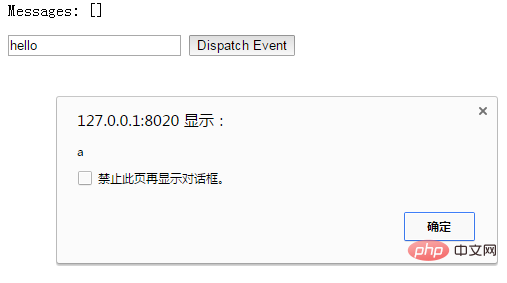
#親コンポーネントは、子コンポーネントによってトリガーされたイベントをリッスンするために子コンポーネントが使用される v-on を直接使用できます。コンポーネントイベントのルート要素。 .native を使用して v-on を変更できます。例:
<!DOCTYPE html>
<html>
<head>
<meta charset="UTF-8">
<title></title>
</head>
<body>
<div id="counter-event-example">
<p>{{ total }}</p>
<button-counter v-on:increment="incrementTotal"></button-counter>
<button-counter v-on:increment="incrementTotal"></button-counter>
</div>
</body>
<script src="js/vue.js" type="text/javascript" charset="utf-8"></script>
<script type="text/javascript">
Vue.component('button-counter', {
template: '<button v-on:click="increment">{{ counter }}</button>',
data: function () {
return {
counter: 0
}
},
methods: {
increment: function () {
this.counter += 1
this.$emit('increment')
}
},
})
new Vue({
el: '#counter-event-example',
data: {
total: 0
},
methods: {
incrementTotal: function () {
this.total += 1
}
}
})
</script>
</html> ディスパッチ イベント - $dispatch()
<my-component v-on:click.native="doTheThing"></my-component>
サブコンポーネントのボタン要素は、次のようにバインドされます。このイベントは、通知メソッドを指します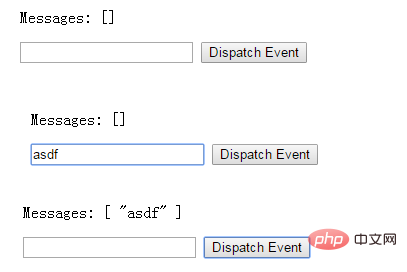
イベントのブロードキャスト - $broadcast()
<!DOCTYPE html>
<html>
<head>
<meta charset="UTF-8">
<title></title>
</head>
<body>
<div id="app">
<p>Messages: {{ messages | json }}</p>
<child-component></child-component>
</div>
<template id="child-component">
<input v-model="msg" />
<button v-on:click="notify">Dispatch Event</button>
</template>
<script src="js/vue.js"></script>
<script>
// 注册子组件
Vue.component('child-component', {
template: '#child-component',
data: function() {
return {
msg: ''
}
},
methods: {
notify: function() {
if (this.msg.trim()) {
this.$dispatch('child-msg', this.msg)
this.msg = ''
}
}
}
})
// 初始化父组件
new Vue({
el: '#app',
data: {
messages: []
},
events: {
'child-msg': function(msg) {
this.messages.push(msg)
}
}
})
</script>
</body>
</html>#親コンポーネントと子コンポーネント間のアクセス
親コンポーネントが子コンポーネントにアクセスする: $children または $refs を使用します
<!DOCTYPE html>
<html>
<head>
<meta charset="UTF-8">
<title></title>
</head>
<body>
<div id="app">
<input v-model="msg" />
<button v-on:click="notify">Broadcast Event</button>
<child-component></child-component>
</div>
<template id="child-component">
<ul>
<li v-for="item in messages">
父组件录入了信息:{{ item }}
</li>
</ul>
</template>
<script src="js/vue.js"></script>
<script>
// 注册子组件
Vue.component('child-component', {
template: '#child-component',
data: function() {
return {
messages: []
}
},
events: {
'parent-msg': function(msg) {
this.messages.push(msg)
}
}
})
// 初始化父组件
new Vue({
el: '#app',
data: {
msg: ''
},
methods: {
notify: function() {
if (this.msg.trim()) {
this.$broadcast('parent-msg', this.msg)
}
}
}
})
</script>
</body>
</html>
<!DOCTYPE html>
<html>
<head>
<meta charset="UTF-8">
<title></title>
</head>
<body>
<div id="app">
<parent-component></parent-component>
</div>
<template id="parent-component">
<child-component1></child-component1>
<child-component2></child-component2>
<button v-on:click="showChildComponentData">显示子组件的数据</button>
</template>
<template id="child-component1">
<h2>This is child component 1</h2>
</template>
<template id="child-component2">
<h2>This is child component 2</h2>
</template>
<script src="js/vue.js"></script>
<script>
Vue.component('parent-component', {
template: '#parent-component',
components: {
'child-component1': {
template: '#child-component1',
data: function() {
return {
msg: 'child component 111111'
}
}
},
'child-component2': {
template: '#child-component2',
data: function() {
return {
msg: 'child component 222222'
}
}
}
},
methods: {
showChildComponentData: function() {
for (var i = 0; i < this.$children.length; i++) {
alert(this.$children[i].msg)
}
}
}
})
new Vue({
el: '#app'
})
</script>
</body>
</html>効果は $children と同じです。 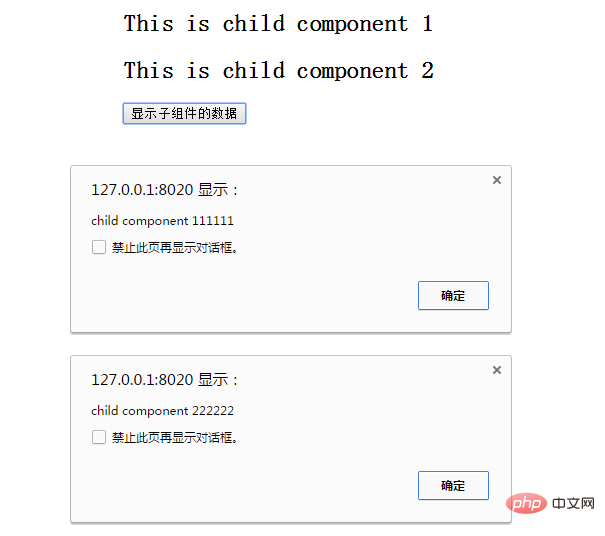 $parent:
<!DOCTYPE html>
<html>
<head>
<meta charset="UTF-8">
<title></title>
</head>
<body>
<div id="app">
<parent-component></parent-component>
</div>
<template id="parent-component">
<!--<child-component1></child-component1>
<child-component2></child-component2>-->
<child-component1 v-ref:cc1></child-component1>
<child-component2 v-ref:cc2></child-component2>
<button v-on:click="showChildComponentData">显示子组件的数据</button>
</template>
<template id="child-component1">
<h2>This is child component 1</h2>
</template>
<template id="child-component2">
<h2>This is child component 2</h2>
</template>
<script src="js/vue.js"></script>
<script>
Vue.component('parent-component', {
template: '#parent-component',
components: {
'child-component1': {
template: '#child-component1',
data: function() {
return {
msg: 'child component 111111'
}
}
},
'child-component2': {
template: '#child-component2',
data: function() {
return {
msg: 'child component 222222'
}
}
}
},
methods: {
showChildComponentData: function() {
// for (var i = 0; i < this.$children.length; i++) {
// alert(this.$children[i].msg)
// }
alert(this.$refs.cc1.msg);
alert(this.$refs.cc2.msg);
}
}
})
new Vue({
el: '#app'
})
</script>
</body>
</html>
冒頭で述べたように、子コンポーネントで親コンポーネントの状態を変更することはお勧めできません。
非親子コンポーネント通信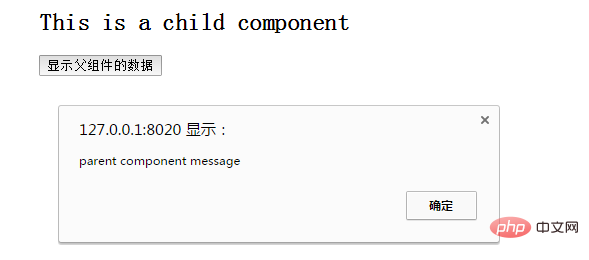
非親子関係を持つコンポーネントも通信する必要がある場合があります。単純なシナリオでは、空の Vue インスタンスを中央イベント バスとして使用します:
<!DOCTYPE html>
<html>
<head>
<meta charset="UTF-8">
<title></title>
</head>
<body>
<div id="app">
<parent-component></parent-component>
</div>
<template id="parent-component">
<child-component></child-component>
</template>
<template id="child-component">
<h2>This is a child component</h2>
<button v-on:click="showParentComponentData">显示父组件的数据</button>
</template>
<script src="js/vue.js"></script>
<script>
Vue.component('parent-component', {
template: '#parent-component',
components: {
'child-component': {
template: '#child-component',
methods: {
showParentComponentData: function() {
alert(this.$parent.msg)
}
}
}
},
data: function() {
return {
msg: 'parent component message'
}
}
})
new Vue({
el: '#app'
})
</script>
</body>
</html>関連する推奨事項:
2020 フロントエンド Vue インタビューの質問の概要(回答付き)vue チュートリアルの推奨事項: 2020 年の最新の vue.js ビデオ チュートリアル 5 選プログラミング関連の知識をさらに深めてください。訪問:
プログラミング入門! !
以上がVue コンポーネント間で通信するにはどうすればよいですか?手法の紹介の詳細内容です。詳細については、PHP 中国語 Web サイトの他の関連記事を参照してください。
