



本教程制作效果比较简洁,用到的元素不多就云彩,月亮及一些小元素。主体部分为云彩的制作,作者直接用画笔涂出来,方法非常不错。
最终效果 
1、新建一个文档。预设设置为国际标准纸张,大小设置为A4。.然后在背景图层上运用图案叠加的图层样式。图案选择亚麻织物,它是photoshop中默认的模式。 
#p# 2、增加一个新的图层,并用矩形工具(U)创建一个比背景稍微小点的矩形,因为图像需要一些边缘。接着在图层样式中应用一个渐变叠加。设置样式为线性,角度设置为90度,颜色设置为#12141c, #3e221a, #341f1b。 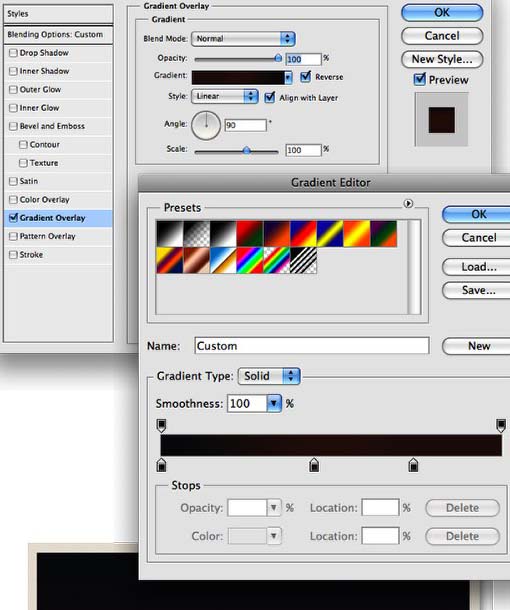
3、我创建了一个笔刷来创建云彩。因为这样相对简单一些。一下是创建笔刷的设置:
a、画笔笔尖形状:圆形,直径为500像素,硬度为0%,间距为25%。
b、形状动态:大小抖动设置为100%,最小直径为20%,角度抖动为20%,圆度抖动为0%。
c、散布:散步两轴,并设置为120%,数量为5,数量抖动为100%。
d、纹理:图案设置为云彩,缩放为400%(但是你想云彩更加蓬松一些你可以设置一个更大的值,或者如果你想要一个较小的笔刷,你可以减少它的大小),模式设置为颜色加深。 


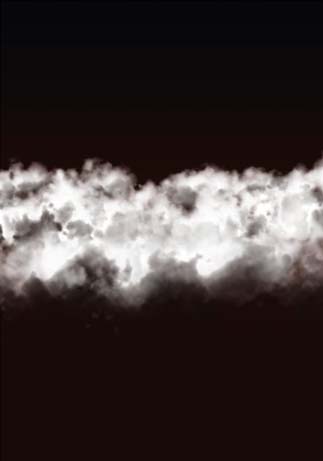
#p# 4、现在增加一个新的图层,颜色设置为白色。选择云的笔刷绘制云彩。在这里有个秘诀就是慢点绘制。一次一次的绘制直到得到你想要的形状。 
5、先前的步骤我们创建了云彩的第一部分,但是为了使云彩更加的有体积感和真实感,你需要创建一些暗的地方。新建一个图层,运行 图层>创建剪贴蒙版.现在设置颜色为黑色,改变笔刷的不透明度为50%。然后绘制暗的地方。如果你看过真正的云彩,你将注意暗的地方总是在云彩的底部,所以同样也要绘制成那样。 
6、绘制一个云彩,将它移动到图像的右边,如下图所示。 
#p# 7、绘制另一个云彩把它放在另一边。 
8、现在创建一个大的云彩,记住如果你增加了笔刷的大小,你必须增加笔刷预设中图案的大小。创建更小的也是如此,因此你可以根据这样的方法来创建不同的云彩。大的云彩应该放在文件的前面,小的云彩应该放在后面。 

#p# 9、新建一个图层,用渐变进行覆盖,设置云彩的颜色为#291907 ,#dad6d2。改变混合模式为叠加。 
10、这里我决定选择一张月亮的图片来代替绘制的,这样可以更简单的完成。 

#p# 11、改变月亮的混合模式为颜色减淡,并复制这个图层将会使月亮显的更加亮。 
12、在图层调板中新建一个文件夹,并设置混合模式为图层减淡。这个文件夹放置在月亮图层的底部。在这个文件夹的内部,新建一个图层,并设置颜色为白色。运用笔刷工具(B),选择一个圆形软的笔刷,硬度为0%,透明度为20%。使它稍微比月亮要大些,因而增大或减小笔刷的大小。然后绘制一个光线,如下图所示。 
13、选择橡皮擦工具(E),删除一页不应该发亮的地方。 
14、现在让我们增加圣诞老人的驯鹿,你可以在网上寻找这样的照片。 
#p# 15、这一步我将增加一些星星,在所有图层的底部新建一个图层,删除月亮底部的一些一方,甚至很暗的地方。 
16、来创建一个北极光的效果,在图层调板中增加一个新的文件夹,重命名为”aurora”并且改变混合模式为颜色减淡。在文件夹中新建一个图层,并选择笔刷工具。用你创建的云彩笔刷绘制一些云彩,如下图所示。 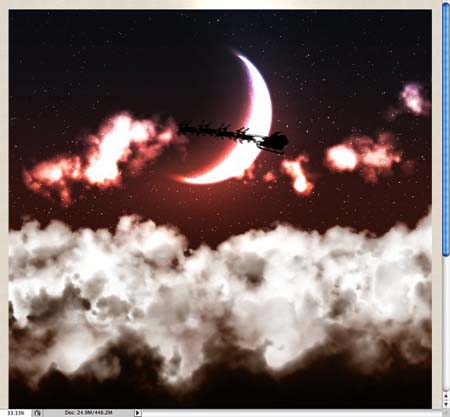
17、运行滤镜>模糊>动感模糊。设置角度为90度,距离为450像素。 
18、运行滤镜>扭曲>球面化。设置数量为53%,模式为正常。 
#p# 19、给北极光效果制作最后一个滤镜,制作一点波浪的扭曲。运行滤镜>扭曲>波浪。设置如下图所示。 
20、我的第一个设计的想法就是给它一个经典年份的风格。为了做到那样的效果我运用了一些纹理,只需要在所有图层的顶部增加一些纹理,改变混合模式和透明度,在这个例子中我运用了一个旧的纸图像,混合模式为叠加。 

#p# 21、给整个图层增加一些文字和标志,给这个组重命名为”card”,并复制这个组。随着复制这个组并选择 图层 > 合并组。 
22、运行滤镜>模糊>高斯模糊。设置半径为20像素,并改变混合模式为滤色。然后使用橡皮擦(E)删除某些太亮不需要的地方。基本上除了云和月亮外,删除图像所有其余的部分。完成最终效果。 

 Photoshop and Digital Art: Painting, Illustration, and CompositingApr 18, 2025 am 12:01 AM
Photoshop's applications in digital art include painting, illustration and image synthesis. 1) Painting: Using brushes, pencils and mixing tools, the artist can create realistic effects. 2) Illustration: With vector and shape tools, artists can accurately draw complex graphics and add effects. 3) Synthesis: Using mask and layer blending mode, artists can seamlessly blend different image elements.
 Advanced Photoshop Tutorial: Master Retouching & CompositingApr 17, 2025 am 12:10 AM
Photoshop's advanced photo editing and synthesis technologies include: 1. Use layers, masks and adjustment layers for basic operations; 2. Use image pixel values to achieve photo editing effects; 3. Use multiple layers and masks for complex synthesis; 4. Use "liquefaction" tools to adjust facial features; 5. Use "frequency separation" technology to perform delicate photo editing, these technologies can improve image processing level and achieve professional-level effects.
 Using Photoshop for Graphic Design: Branding and MoreApr 16, 2025 am 12:02 AM
The steps to using Photoshop for brand design include: 1. Use the Pen tool to draw basic shapes, 2. Add shadows and highlights through layer styles, 3. Adjust colors and details, 4. Use smart objects and actions to automatically generate different versions of the design. Photoshop helps designers create and optimize brand elements with the flexibility of layers and masks, ensuring consistency and professionalism of designs, from simple logos to complex branding guides.
 Photoshop's Subscription Model: What You Get for Your MoneyApr 15, 2025 am 12:17 AM
Photoshop's subscription model is worth buying. 1) Users can access the latest version and use across devices at any time. 2) The subscription fee is low, and continuous updates and technical support are provided. 3) Advanced functions such as neural filters can be used for complex image processing. Despite the high long-term costs, its convenience and feature updates are valuable to professional users.
 Photoshop: Investigating Free Trials and Discount OptionsApr 14, 2025 am 12:06 AM
You can get the access to Photoshop in the most economical way: 1. Experience the software features with a 7-day free trial; 2. Find student or teacher discounts, as well as seasonal promotions; 3. Use coupons on third-party websites; 4. Subscribe to Adobe CreativeCloud's monthly or annual plan.
 Photoshop for Designers: Creating Visual ConceptsApr 13, 2025 am 12:09 AM
Creating visual concepts in Photoshop can be achieved through the following steps: 1. Create a new document, 2. Add a background layer, 3. Use the brush tool to draw basic shapes, 4. Adjust colors and brightness, 5. Add text and graphics, 6. Use masks for local editing, 7. Apply filter effects, these steps help designers build a complete visual work from scratch.
 Is Photoshop Free? Understanding Subscription PlansApr 12, 2025 am 12:11 AM
Photoshop is not free, but there are several ways to use it at low cost or free: 1. The free trial period is 7 days, and you can experience all functions during this period; 2. Student and teacher discounts can cut costs by half, and school proof is required; 3. The CreativeCloud package is suitable for professional users and includes a variety of Adobe tools; 4. PhotoshopElements and Lightroom are low-cost alternatives, with fewer functions but lower prices.
 Photoshop's Value: Weighing the Cost Against Its FeaturesApr 11, 2025 am 12:02 AM
Photoshop is worth the investment because it provides powerful features and a wide range of application scenarios. 1) Core functions include image editing, layer management, special effects production and color adjustment. 2) Suitable for professional designers and photographers, but amateurs may consider alternatives such as GIMP. 3) Subscribe to AdobeCreativeCloud can be used as needed to avoid high one-time spending.


Hot AI Tools

Undresser.AI Undress
AI-powered app for creating realistic nude photos

AI Clothes Remover
Online AI tool for removing clothes from photos.

Undress AI Tool
Undress images for free

Clothoff.io
AI clothes remover

AI Hentai Generator
Generate AI Hentai for free.

Hot Article
Hot Tools

Atom editor mac version download
The most popular open source editor

SecLists
SecLists is the ultimate security tester's companion. It is a collection of various types of lists that are frequently used during security assessments, all in one place. SecLists helps make security testing more efficient and productive by conveniently providing all the lists a security tester might need. List types include usernames, passwords, URLs, fuzzing payloads, sensitive data patterns, web shells, and more. The tester can simply pull this repository onto a new test machine and he will have access to every type of list he needs.

PhpStorm Mac version
The latest (2018.2.1) professional PHP integrated development tool

SAP NetWeaver Server Adapter for Eclipse
Integrate Eclipse with SAP NetWeaver application server.

Dreamweaver CS6
Visual web development tools

