



pycharm Steps to create a new project: 1. Open PyCharm and select "New Project"; 2. Click the first option on the left, and then click the folder icon in the upper right corner; 3. According to Choose the storage location of a file according to your own requirements; 4. Click the "create" button to enter the editing page for creating a project; 5. Edit your own project code, click the name of the new project on the left, and then select "Refactor" , "Move Directory"; 6. Click "..." and click "Reconstruct" to save.

The operating system of this tutorial: Windows 10 system, PyCharm 2020.2.1 version, Dell G3 computer.
The steps to create a new project in PyCharm are as follows:
1. When we click to open PyCharm, there are three options on the main page. Here, select [New Project].
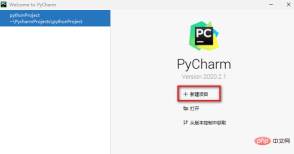
2. Then we will enter the window to select a new project. Here, click the first option on the left, and then click the file in the upper right corner. Click the clip icon.
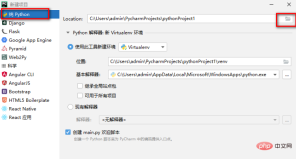
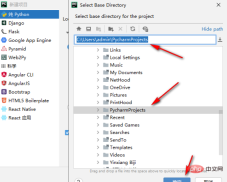
#3. Then in the window that opens, select a file storage location according to your own requirements. After selecting, click the OK button.
#4. At this time, you will return to the window of creating a project. Click the [create] button under the window to enter the editing page of creating a project.
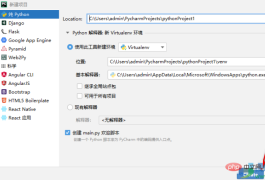
5. Then you can edit your own code directly on this page. After you edit, if you want to change the storage location of the file, , then right-click the name of the new project on the left, and then select [Refactor]-[Move Directory].
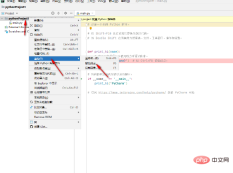
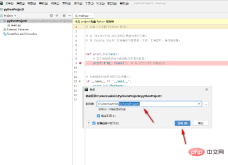
#6. Click the […] icon in the opened window to modify the file storage location. After the modification is completed, click the [Reconstruct] button to save.
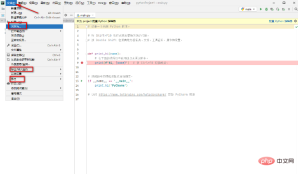
After the settings are completed, you can click the [File] option button to save the file as or export it. In addition, you can also directly edit the code. On the page, you can also create a new project by selecting [New Project] under the [File] option. If you are using the English version of PyCharm software, then you can just follow the editor’s options, they are all the same.
It should be noted that when creating a new project, you can choose to use an existing Python interpreter or create a new interpreter. If you already have a Python environment and want to use it in PyCharm, you can choose an existing interpreter; if you don't have a Python environment yet, or want to create a new environment, you can choose to create a new interpreter.
When creating a new project, you can also choose to use a virtual environment. A virtual environment can help you isolate the dependencies of different projects and avoid interference between different projects. If you are not sure whether you need to use a virtual environment, you can choose according to your needs.
The above is the detailed content of How to create a new project in pycharm. For more information, please follow other related articles on the PHP Chinese website!

 Building High-Performance Computing Solutions with PythonJul 21, 2025 am 03:17 AM
Pythoncanbeusedeffectivelyforhigh-performancecomputing(HPC)byleveragingspecifictoolsandtechniques.1)UsecompiledextensionslikeNumPy,SciPy,Cython,andNumbaforfasternumericalcomputations.2)TakeadvantageofparallelismwithmultiprocessingforCPU-boundtasksand
 Factory Method Pattern in PythonJul 21, 2025 am 03:15 AM
The factory method pattern is a design pattern that instantiates specific classes through subclass decisions. It defines an interface to create objects, delaying the creation of objects to subclass processing, thereby achieving decoupling. This mode is suitable for scenarios such as hidden object creation details, uncertain future subclass types, and the need to call different objects in a unified interface. The implementation steps include: defining the base class or interface; creating multiple subclasses; writing factory functions or methods that return different instances according to parameters. Factory methods can be further encapsulated into classes to facilitate management of complex logic. When using it, you should pay attention to avoiding too many conditional judgments, preventing business logic from being mixed into the factory, avoiding over-design. It is also recommended to deal with abnormal inputs, keep the logic simple, and use it only when scalability is required.
 Building a Chatbot with Python NLTKJul 21, 2025 am 03:12 AM
It is feasible to use Python and NLTK as chatbots, but the goals and methods need to be clarified. 1. Install Python and NLTK and download the necessary corpus such as punkt, stopwords and wordnet. 2. The implementation process includes text preprocessing (word segmentation, stop word deactivation, word shape restoration), intent recognition or keyword matching, and response generation. 3. Simple response can be achieved through keyword matching, or classification models can be trained to improve the effect. 4. Extension directions include introducing more powerful NLP tools such as spaCy or Transformers, maintaining Q&A databases, and avoiding too much hardcoded logic. In short, it is suitable for introductory and small projects, with low deployment costs but strong controllability.
 Image Processing with Python PillowJul 21, 2025 am 03:11 AM
Pillow library image processing is very simple and suitable for daily operations. 1. Install pipinstallpillow and import the Image module to start; 2. You can open the picture and view width, height, format and other information; 3. Use crop to extract specific areas; 4. Use resize to zoom, pay attention to maintaining the proportion and avoiding deformation; 5. Use the draw.text method to add text watermarks, and specify the font path, position and color; 6. Use the paste method to overlay transparent layers in the image watermark; 7. Filter processing supports turning grayscale images, adjusting brightness contrast, etc.; 8. Although the Pillow function is basic, it is practical, and mastering common methods and document query can quickly complete the requirements.
 Python for Distributed ComputingJul 21, 2025 am 03:03 AM
Python is widely used in distributed computing because of its rich ecosystem and efficient development. 1. Distributed computing is to split tasks into multiple machines to perform to improve efficiency. Python is chosen because it has many libraries, easy to debug, and strong compatibility. 2. Common frameworks include Celery (asynchronous tasks), Dask (data science), PySpark (big data processing), and Ray (high-performance scheduling). 3. Celery can be used to build a simple system: install dependencies, write tasks, start worker, and trigger tasks. 4. Note points include task granularity, data lightweighting, failure retry, monitoring logs and task dependency management.
 Python Regular Expressions TutorialJul 21, 2025 am 03:02 AM
Regular expressions are used in Python to find, match, and replace text patterns. 1. Use re.search and re.match to determine whether the text contains a specific pattern. The former searches for the entire string, while the latter only starts from the beginning. 2. Extract content through brackets, such as using match.group(1) to obtain the required part when extracting the email address; 3. Use re.sub to replace sensitive words or format text, such as replacing the email with [EMAIL]; 4. Notes include escaping special characters, controlling greedy matching, ignoring uppercase and uppercase case and multi-line matching. Mastering these can quickly process text on mobile phones.
 Building Cross-Platform Mobile Apps with Python BeeWareJul 21, 2025 am 03:01 AM
BeeWare is a tool for developing cross-platform mobile applications using Python, which enables a truly native experience through native controls. 1. It is based on the TogaUI toolkit and Briefcase packaging tool, and supports macOS, Windows, Linux, iOS and Android platforms; 2. Unlike Kivy, Flutter or ReactNative, it directly calls the platform API without bridging; 3. It is suitable for developers familiar with Python to carry out rapid prototype development and data-driven gadget-based app development; 4. The current version is more suitable for small and medium-sized or experimental projects, and there are still restrictions on scenarios with high requirements for complex UI and performance; 5. The steps to get started include installing Be
 Implementing Edge Computing Solutions with PythonJul 21, 2025 am 02:56 AM
The core of Python's implementation of edge computing is to bring data processing and decision-making close to data sources, and improve efficiency by deploying lightweight services, executing local inference and establishing a cache upload mechanism. 1. Use Flask or FastAPI to deploy local API services on edge nodes to achieve fast response; 2. Use Python to perform data preprocessing and lightweight AI inference to reduce the amount of uploaded data; 3. Use SQLite to implement local cache and combine asynchronous upload to cope with network instability. At the same time, you need to pay attention to details such as dependency control, model size, retry strategy and resource occupation.


Hot AI Tools

Undress AI Tool
Undress images for free

Undresser.AI Undress
AI-powered app for creating realistic nude photos

AI Clothes Remover
Online AI tool for removing clothes from photos.

Clothoff.io
AI clothes remover

Video Face Swap
Swap faces in any video effortlessly with our completely free AI face swap tool!

Hot Article
Hot Tools

ZendStudio 13.5.1 Mac
Powerful PHP integrated development environment

Atom editor mac version download
The most popular open source editor

VSCode Windows 64-bit Download
A free and powerful IDE editor launched by Microsoft

WebStorm Mac version
Useful JavaScript development tools

Safe Exam Browser
Safe Exam Browser is a secure browser environment for taking online exams securely. This software turns any computer into a secure workstation. It controls access to any utility and prevents students from using unauthorized resources.

