



Perhaps the most anticipated feature of iOS 17 is the "Standby Mode" function. Users can enter a new "Standby Mode" by simply turning their iPhone sideways while charging. This article introduces how to use iOS 17 standby mode.

Standby Mode Application Scenario
The "Standby Mode" function is best used on a bedside table, kitchen workbench or office desk when charging with MagSafe , the "standby mode" function can remember the user's preferred display mode. The "standby mode" function can be easily turned on with just a tap on the screen, and the iPhone 14 Pro with always-on display can display this function at any time.
Standby mode usage tutorial
First move the iPhone to the stand or charging stand, and then charge it through the charging cable or wirelessly. When charging, if the phone is placed horizontally, it will automatically enter standby mode.
When the standby mode is enabled for the first time, the user will see some instructions, telling the user that they can change the widget by swiping right, left, up and down.
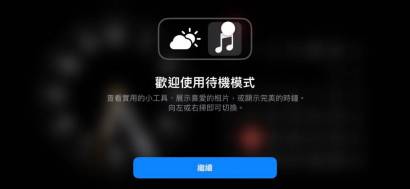
You can also change widgets manually, or there is a smart rotation option, similar to the home screen’s smart stacking of widgets, that will change them for you. In addition to this two-column view, you can also swipe left and right to go to different layouts. There is one for the monthly calendar and one for the small clock.

Photos can be pulled from your collection of featured photos, or you can manually select photos to create a new slideshow. Photos will automatically switch, or you can tap the screen to advance.

It has multiple full-screen clocks to choose from, some with different fonts, some showing a world map, and another with an elegant mechanical face.
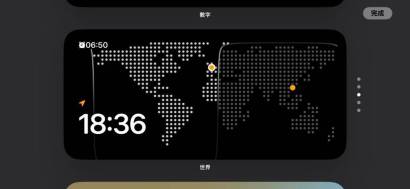
One of the best features is that when the room lights are turned off, standby mode intelligently dims the screen and switches to an all-red look. This helps reduce the blue light from your screen, aiding in better sleep.
Of course, if you use iPhone 14 Pro or iPhone 15 Pro, you can see the always-on screen, making the standby mode more like a clock and information display tool.
The above is the detailed content of iOS 17 Standby Mode Tutorial: Maximizing Battery Life. For more information, please follow other related articles on the PHP Chinese website!

Hot AI Tools

Undresser.AI Undress
AI-powered app for creating realistic nude photos

AI Clothes Remover
Online AI tool for removing clothes from photos.

Undress AI Tool
Undress images for free

Clothoff.io
AI clothes remover

AI Hentai Generator
Generate AI Hentai for free.

Hot Article
Hot Tools

ZendStudio 13.5.1 Mac
Powerful PHP integrated development environment

SublimeText3 Mac version
God-level code editing software (SublimeText3)

Notepad++7.3.1
Easy-to-use and free code editor

SublimeText3 Linux new version
SublimeText3 Linux latest version

MantisBT
Mantis is an easy-to-deploy web-based defect tracking tool designed to aid in product defect tracking. It requires PHP, MySQL and a web server. Check out our demo and hosting services.

