


How to solve the problem of sending error report in win10

How to solve win10 sending error report? When we use the computer, sometimes after an application error occurs, a window will pop up to send an error report, but in fact, even if it is sent, it will have no effect. Some users who use the official version of Win10 want to turn it off, but don’t know how to turn off the error report sent by Win10. First, let’s take a look at how to turn off the error report sent by Win10.
How to solve win10 sending error report? The specific method is as follows:
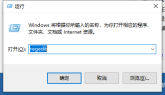
1. On the Windows 10 desktop, we right-click the Start button in the lower left corner and select the "Run" menu item in the pop-up menu.

#2. Enter the command regedit in the opened Windows 10 run window, and then click the OK button.
3. In the opened registry editor window, locate HKEY_CURRENT_USER\Software\Microsoft\Windows\Windows Error Reporting registry key.
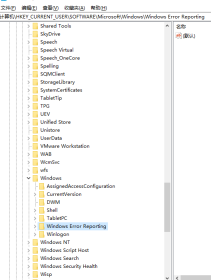
#4. Next, right-click the blank position of the window on the right, and click the "New/Dword (32-bit) Value" menu item in the pop-up menu.

5. Rename the registry key just generated to DontShowUI
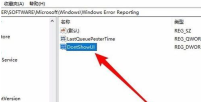
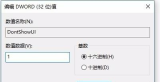
6. Double-click the key to open it In the value editing window, modify the numerical data by 1 in the window, and finally click the OK button.
7. Next, we enter services.msc in the run window and click the OK button.
8. Next, in the service window that opens, locate the Windows Error Reporting Service service item.

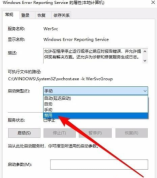
9. Double-click the service item. If the service status is running, stop it first, and then change the startup type to "disabled". After restarting the computer, the error report window will no longer pop up.
The above is all the content brought by the editor on how to solve the problem of sending error reports in win10. I hope it can help.
The above is the detailed content of How to solve the problem of sending error report in win10. For more information, please follow other related articles on the PHP Chinese website!

Hot AI Tools

Undresser.AI Undress
AI-powered app for creating realistic nude photos

AI Clothes Remover
Online AI tool for removing clothes from photos.

Undress AI Tool
Undress images for free

Clothoff.io
AI clothes remover

AI Hentai Generator
Generate AI Hentai for free.

Hot Article
Hot Tools

SublimeText3 Linux new version
SublimeText3 Linux latest version

EditPlus Chinese cracked version
Small size, syntax highlighting, does not support code prompt function

PhpStorm Mac version
The latest (2018.2.1) professional PHP integrated development tool

MinGW - Minimalist GNU for Windows
This project is in the process of being migrated to osdn.net/projects/mingw, you can continue to follow us there. MinGW: A native Windows port of the GNU Compiler Collection (GCC), freely distributable import libraries and header files for building native Windows applications; includes extensions to the MSVC runtime to support C99 functionality. All MinGW software can run on 64-bit Windows platforms.

ZendStudio 13.5.1 Mac
Powerful PHP integrated development environment

