



Windows 11 has been officially released, and the operating system brings a series of new features. The biggest change is the visual interface, making it look more streamlined.
In addition to the UI, it also features improved security features, support for multiple monitors, countless multitasking options, and more.
You can use the operating system in the form of system updates, but what if you want to create a bootable drive and install Windows 11 on another PC?
It’s possible too, and in today’s tutorial we’ll show you how to make a Windows 11 bootable USB drive properly.
Can I download Windows 11 for free?
Yes, just like previous operating systems, Windows 11 is free to download. You can enjoy it as a free system update and install it.
If you prefer a clean installation, we are happy to inform you that you can also download the ISO file completely free of charge and use it to install Windows 11 on your PC.
How to upgrade to Windows 11?
- Press the Windows I key to open the Settings application.
- Now go to the Update and Security section.

- Click the Download and Install button.
- Follow the on-screen instructions.


How to make a Windows 11 bootable drive?
In order to make a USB flash drive that can boot Windows 11, you will need a flash drive that is at least 8GB in size. However, if any issues arise, a larger flash may be a better choice.
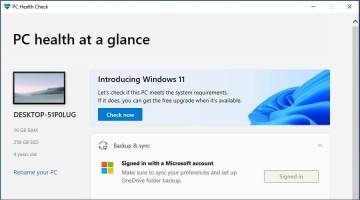
Finally, you need to check the official Windows 11 requirements and make sure your PC can handle this operating system. Now everything is ready, you just need the appropriate software to create a bootable drive.
2. Use the Media Creation Tool
If you want to create a Windows 11 bootable USB, you can easily do this using the Media Creation Tool. This is a Microsoft tool that allows users to download and store the installation files for Windows 11 so that they can use it to reinstall the operating system later.
1. Connect the USB flash drive to the PC.
2. Enter the Windows 11 download page.
3. You will see multiple options. Navigate to the Create Windows 11 Installation Media section and click the Download Now button.


Next to continue.

Next .

Next .

3. Download Windows ISO
- Visit the Windows 11 download page.
- Click the Download button in the Download Windows 11 Disk Image section.
- Select the desired language and click Confirm.
- Click the 64-bit Download button.
- Waiting for the ISO file to download.


4. Use special software
- to download Rufus.
- Make sure the correct device is selected. This is especially important if you have multiple USB storage devices connected to your PC.
- Make sure the boot selection is set to Disk or ISO Image. Now click on the Select button.
- Select the Windows 11 bootable ISO file.
- Set the Image option to Standard Windows installation. Now set your partition scheme to GPT.
- When finished, click Start.
- A warning window will appear asking you to confirm whether you want to format the flash drive. Select to confirm.
- Wait for the process to complete.


What are the requirements for Windows 11?
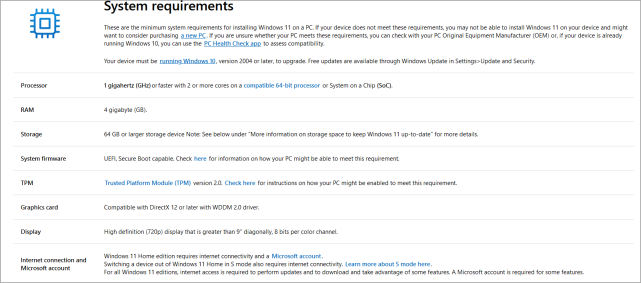
- CPU: Compatible with 64-bit processors
- Memory: 4GB
- Storage: 64GB
- TPM : TPM 2.0
The requirements are slightly higher compared to previous versions, but if you If your CPU is in the list of supported devices, there will be no problems installing the update.
A big issue for some users is the TPM, to learn more about it, visit our Windows 11 and TPM tutorial for more information.
Is it better to upgrade or clean install Windows 11?
Generally, it is better to upgrade to Windows 11 as this is the best way if you want to keep all your files and applications.
However, if any issues arise after upgrading, you may want to try performing a clean installation. By doing this, you will delete all files from your system drive and start over.
Before this, we strongly recommend you to back up all important files to prevent data loss.
You can easily make a bootable Windows 11 drive by following the instructions in this tutorial. If you're not sure whether you should switch, visit our Windows 11 vs. Windows 10 tutorial for more information.
For most people, using a media creation tool is the easiest way, but you can use whatever method you prefer. Advanced users can manually download the ISO file and create a bootable drive.
The above is the detailed content of How to create a bootable USB drive for Windows 11. For more information, please follow other related articles on the PHP Chinese website!

 What is an OTG U disk?Sep 04, 2025 am 12:05 AM
AnOTGUdiskisaportablestoragedevicewithdualconnectors(USB-Aandmicro-USBorUSB-C)thatenablesdirectfiletransferbetweensmartphones,tablets,andcomputerswithoutneedingahostcomputer;1)itworksbyallowingmobiledevicestoactasUSBhostsviaOTGtechnology;2)itsupports
 What does a solid red light on my wifi router mean?Sep 03, 2025 am 07:15 AM
AsolidredlightonyourWi-Firouterindicatesaconnectivityorhardwareissue.CheckISPoutages,ensurepropercableconnections,rebootmodemandrouter,verifyWANsettings,updatefirmware,orperformafactoryreset.Ifproblemspersist,considerhardwarefailureandcontactmanufact
 How to enable bridge mode on my 192.168.0.1 router?Sep 03, 2025 am 06:59 AM
Accessyourrouter’sadminpanelbyentering192.168.0.1inawebbrowserandlogginginwiththecorrectcredentials.2.Locatethebridgemodeoption,whichmaybelabeledasbridge,AP,ormodemmode,dependingonthebrand—TP-Link:Advanced>OperationMode;Netgear:Advanced>Router/
 Can a U disk wear out?Sep 03, 2025 am 06:52 AM
Yes,aUdiskcanwearoutovertimedespitehavingnomovingparts,primarilydueto1.limitedwrite/erasecycles(10,000–100,000percelldependingonSLC,MLC,orTLCNANDflash),wherefrequentdatachangesdegradememorycells;2.controllerandfirmwarefailuresfrompowersurges,overheat
 How to create a bookmark index in a large PDF?Sep 03, 2025 am 06:28 AM
UseAdobeAcrobatProtomanuallycreateandorganizebookmarkswithfullcontrolovernaming,hierarchy,andzoomlevels.2.Auto-generatebookmarksfromsearchabletextusingAcrobat’sActionWizardorPDF-XChangeEditorbydetectingheadingstylesorfontrules.3.UtilizefreetoolslikeP
 How to Make a PDF Read-Only? The Best MethodsSep 03, 2025 am 05:51 AM
UseAdobeAcrobatProtosetapasswordandrestricteditingbyselecting"EncryptwithPassword"andchoosing"Nochangesallowed".2.UtilizefreeonlinetoolslikeSmallpdforiLovePDFtoaddapermissionspasswordthatpreventsediting,copying,orprinting.3.Sharet
 How to fix 'An error occurred while creating the user account'Sep 03, 2025 am 05:40 AM
When encountering the "Anerroroccurredwhilecreating theuseraccount" error, first check whether the administrator permission is enabled to ensure that the current account is an administrator account or switch to a permissioned account; secondly, confirm whether the system disk space is sufficient, it is recommended to retain at least 1GB of free space; then try to create a user through the command line, Windows uses "netuser new username, new password/add", Linux/macOS uses "sudoadduser new username"; finally check the system log to get detailed error information, Windows is in the event viewer, Linux is in /var/log/auth.l
 How to fix VIDEO_DXGKRNL_FATAL_ERRORSep 03, 2025 am 05:36 AM
When encountering the VIDEO_DXGKRNL_FATAL_ERROR blue screen error, the main reasons are graphics card driver problems, system files are damaged or graphics card overheating. The solutions are as follows: 1. Update or roll back the graphics card driver. It is recommended to go to NVIDIA, AMD or Intel official website to download the latest version; 2. Check the graphics card temperature, use MSIAfterburner, HWMonitor or GPU-Z monitoring, if the temperature is too high, clean up dust, improve the air duct or reduce the image quality; 3. Disable the overclocking settings, restore the default or uninstall the overclocking software; 4. Run sfc/scannow and DISM/Online/Cleanup-Image/RestoreHealth to check and repair

Hot AI Tools

Undress AI Tool
Undress images for free

Undresser.AI Undress
AI-powered app for creating realistic nude photos

AI Clothes Remover
Online AI tool for removing clothes from photos.

Clothoff.io
AI clothes remover

Video Face Swap
Swap faces in any video effortlessly with our completely free AI face swap tool!

Hot Article
Hot Tools

MinGW - Minimalist GNU for Windows
This project is in the process of being migrated to osdn.net/projects/mingw, you can continue to follow us there. MinGW: A native Windows port of the GNU Compiler Collection (GCC), freely distributable import libraries and header files for building native Windows applications; includes extensions to the MSVC runtime to support C99 functionality. All MinGW software can run on 64-bit Windows platforms.

SublimeText3 English version
Recommended: Win version, supports code prompts!

SublimeText3 Chinese version
Chinese version, very easy to use

mPDF
mPDF is a PHP library that can generate PDF files from UTF-8 encoded HTML. The original author, Ian Back, wrote mPDF to output PDF files "on the fly" from his website and handle different languages. It is slower than original scripts like HTML2FPDF and produces larger files when using Unicode fonts, but supports CSS styles etc. and has a lot of enhancements. Supports almost all languages, including RTL (Arabic and Hebrew) and CJK (Chinese, Japanese and Korean). Supports nested block-level elements (such as P, DIV),

ZendStudio 13.5.1 Mac
Powerful PHP integrated development environment

