


How to fix 'We couldn't load this extension error” in Edge browser

Extensions are tools that are built and programmed to provide consumers with a great surfing experience through additional functionality on Windows systems.
However, recently many Windows users have complained that after installing an extension in the Edge browser, an error message "We cannot load this extension" is issued after restarting the Edge browser.
Some people just continue to use the browser without loading the extension because they are not sure what to do next. This issue could also be caused by a wrong extension file or a flaw in the MS Edge browser itself.
After further investigation into the issue causing difficulty loading the extension, we discovered some solutions that may greatly help resolve the issue. If you encounter similar issues, please see this page for more information.
Workaround -
Manually downloading and installing extensions from the internet may be compromised due to reasons from some third parties. Therefore, we recommend users to uninstall the extension from the Edge browser and carefully download the new extension file from the Internet before reinstalling it. If it still doesn't work, try the other solutions given below in this article.
Fix 1 – Fix Microsoft Edge Browser
Sometimes, the main cause of this issue can be an issue related to the Edge browser application itself. So, we explain how to fix Edge Browser in a few simple steps below.
Step 1: To launch the Run Command box, press the windows and R keys simultaneously on your keyboard.
Step 2: Enter appwiz.cpl in the Run Command box, and then press the Enter key to launch Control Panel applications and features.
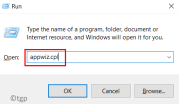
Step 3: Find Microsoft Edge browser and right-click on it.
Step 4: Select Change from the context menu, which will open the repair window.

Step 5: Click Repair on the window to start fixing it by downloading and installing Edge Browser.
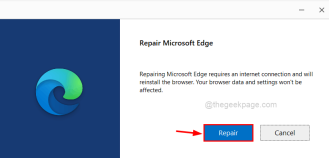
Step 6: Wait until it completes the process.
Step 7: Now restart the Edge browser and check if the extension is loading correctly.
Fix 2 – Reinstall the extension in the Edge browser
Step 1: First, open the Microsoft Edge browser on your system.
Step 2: Open a new tab and enter edge://extensions/ in the address bar, then press Enter key.
Step 3: This will open the extension page.
Step 4: Click Remove on the extension you want to uninstall from the Edge browser.

Step 5: To go to the Edge add-ons page, click on Get Microsoft Edge Extensions on the left panel as shown below .

Step 6: On the left side of the Edge Add-ons page, type the extension in the search bar as shown below.
Step 7: From the search results, find the extension you want to install on the Edge browser and click Get to start the download and installation.

Step 8: Once completed, close the Edge Add-ons tab and restart the Edge browser.
Now check if the issue is resolved.
The above is the detailed content of How to fix 'We couldn't load this extension error” in Edge browser. For more information, please follow other related articles on the PHP Chinese website!

Hot AI Tools

Undresser.AI Undress
AI-powered app for creating realistic nude photos

AI Clothes Remover
Online AI tool for removing clothes from photos.

Undress AI Tool
Undress images for free

Clothoff.io
AI clothes remover

AI Hentai Generator
Generate AI Hentai for free.

Hot Article
Hot Tools

SublimeText3 Chinese version
Chinese version, very easy to use

MantisBT
Mantis is an easy-to-deploy web-based defect tracking tool designed to aid in product defect tracking. It requires PHP, MySQL and a web server. Check out our demo and hosting services.

PhpStorm Mac version
The latest (2018.2.1) professional PHP integrated development tool

WebStorm Mac version
Useful JavaScript development tools

ZendStudio 13.5.1 Mac
Powerful PHP integrated development environment

