



How to Enable Archive Apps on Windows 11
This feature should be enabled by default, but it's worth double-checking in case it's turned off.
You can enable or disable the Archive Apps feature on Windows 11 using the following steps:
- Click the Start button and select# from the Start menu ##set up.
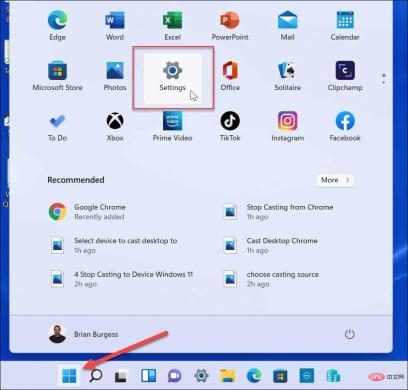
- When settings open, click
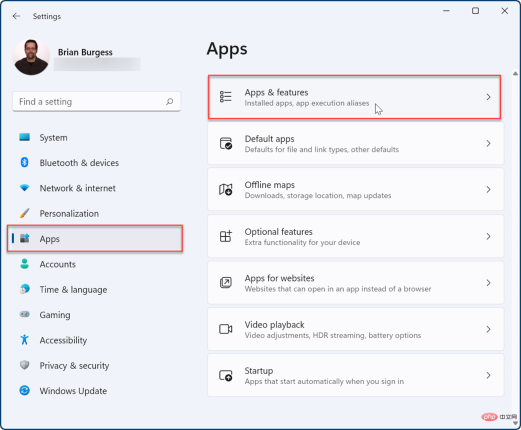
- Apps in the left column. Click
- Apps and Features on the right.
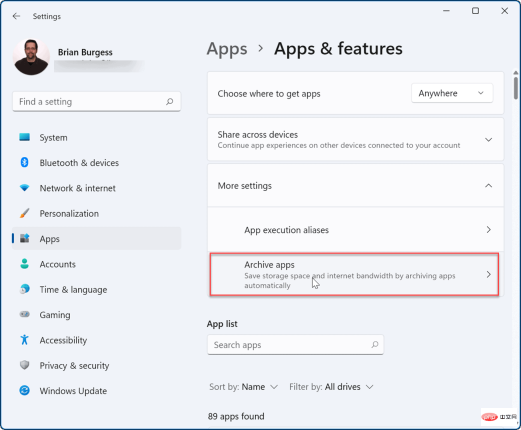
- Expand the
- More Settings section on the menu below and select Archive Applications options.
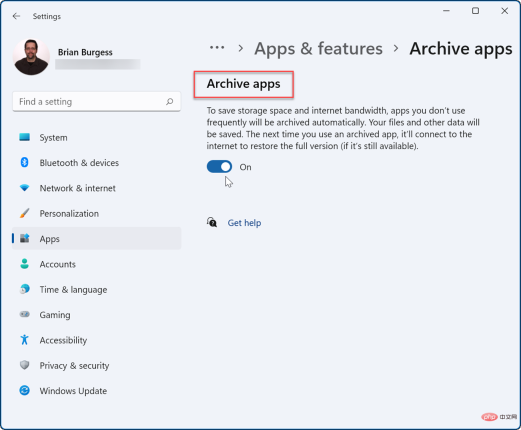
- You can turn the
- Archive app feature on or off using its toggle switch.
this feature only works with Microsoft Store apps. When restoring an app from its archived state, the app still needs to be in the store, and you'll also need an internet connection to restore it.
If you have apps you don’t want to risk, it’s best to disable the Archive Apps feature to protect them. Get the most out of Windows 11When it comes to apps, Windows 11 includes some useful features, such as blocking Internet access to apps. No longer need a software program on your PC? Find out how to uninstall apps on Windows 11. If your computer doesn't start up as quickly as you'd like, disable startup apps on Windows 11 to improve performance. If you have a newbie who's just starting to use Windows 11, you might want to do this so they can't install any apps they find online. Instead, you can ask them to install only Microsoft Store apps. Your Windows PC isn’t just for Microsoft Store apps, either. Instead, you can install Android apps on Windows 11, or install WSL on Windows 11 and run Linux apps.The above is the detailed content of How to enable archive apps on Windows 11. For more information, please follow other related articles on the PHP Chinese website!

Hot AI Tools

Undresser.AI Undress
AI-powered app for creating realistic nude photos

AI Clothes Remover
Online AI tool for removing clothes from photos.

Undress AI Tool
Undress images for free

Clothoff.io
AI clothes remover

AI Hentai Generator
Generate AI Hentai for free.

Hot Article
Hot Tools

VSCode Windows 64-bit Download
A free and powerful IDE editor launched by Microsoft

DVWA
Damn Vulnerable Web App (DVWA) is a PHP/MySQL web application that is very vulnerable. Its main goals are to be an aid for security professionals to test their skills and tools in a legal environment, to help web developers better understand the process of securing web applications, and to help teachers/students teach/learn in a classroom environment Web application security. The goal of DVWA is to practice some of the most common web vulnerabilities through a simple and straightforward interface, with varying degrees of difficulty. Please note that this software

SublimeText3 Linux new version
SublimeText3 Linux latest version

Dreamweaver CS6
Visual web development tools

MantisBT
Mantis is an easy-to-deploy web-based defect tracking tool designed to aid in product defect tracking. It requires PHP, MySQL and a web server. Check out our demo and hosting services.

