



Test environment: MySQL8.0.19
Preparation
CREATE TABLE json_demo (
	`id` INT ( 11 ) NOT NULL PRIMARY KEY,
	`content` json NOT NULL
);
INSERT INTO json_demo ( id, content )
VALUES
	/*这条是数组*/
	( 1, '[{"key": 1, "order": 1, "value": "34252"},{"key": 2, "order": 2, "value": "23423"}]' ),
	/*这条是数组*/
	( 2, '[{"key": 4, "order": 4, "value": "234"},{"key": 5, "order": 5, "value": "234324523"}]' ),
	/*这条是对象*/
	( 3, '{"key": 3, "order": 3, "value": "43242"}' ),
	/*这条是对象*/
	( 4, '{"key": 6, "order": 6, "value": "5423"}' );
JSON object basic operation
Query the specified field value
/* 基础查询 */
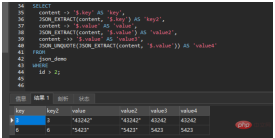
SELECT
	content -> '$.key' AS 'key',
	JSON_EXTRACT(content, '$.key') AS 'key2',
	content -> '$.value' AS 'value',
	JSON_EXTRACT(content, '$.value') AS 'value2',
	content ->> '$.value' AS 'value3',
	JSON_UNQUOTE(JSON_EXTRACT(content, '$.value')) AS 'value4'
FROM
	json_demo
WHERE
	id > 2;
TIPS:
- ##-> and ->> are the syntax designed by MySQL , among which -> is supported in MySQL5.7, and ->> is supported in MySQL8.0.
- -> Equivalent to JSON_EXTRACT(), when the query field is a string, the return value will also have "".
- ->> Equivalent to JSON_UNQUOTE(JSON_EXTRACT()), when the query field is a string, the return value will not have "".
Used for conditional query
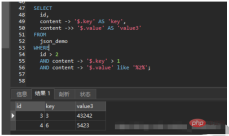
content -> '$.key' can be regarded as a field, and the operations that can be performed on a field are basically He can do it.SELECT id, content -> '$.key' AS 'key', content ->> '$.value' AS 'value3' FROM json_demo WHERE id > 2 AND content -> '$.key' > 1 AND content -> '$.value' like '%2%';
/* 修改 */
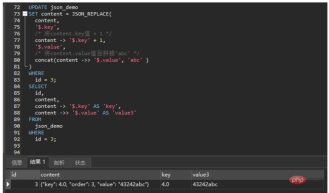
UPDATE json_demo
SET content = JSON_REPLACE(
	content,
	/* 将content.key值 + 1 */
	'$.key', content -> '$.key' + 1,
	/* 将content.value值后拼接'abc' */
	'$.value', concat(content ->> '$.value', 'abc')
) WHERE id = 3;
/* JSON_SET也可以 */
UPDATE json_demo
SET content = JSON_SET(
	content,
	/* 将content.key值 + 1 */
	'$.key', content -> '$.key' + 1,
	/* 将content.value值后拼接'abc' */
	'$.value', concat(content ->> '$.value', 'abc')
) WHERE id = 3;
/* 查询修改结果 */
SELECT id,content,content -> '$.key' AS 'key',content ->> '$.value' AS 'value3'
FROM json_demo WHERE id = 3;
/* 重新赋值 */
UPDATE json_demo SET
content = JSON_REPLACE(content,'$.key',3,'$.value','43242') WHERE id = 3;
TIPS:
- Both JSON_REPLACE and JSON_SET can be used to modify the value of a certain field. The difference is that when JSON_REPLACE replaces a non-existent attribute, the operation is invalid; while JSON_SET will insert the non-existent attribute.
- So JSON_SET can also be used to append attributes, similar to JSON_INSERT. The difference is that JSON_INSERT operation will fail if an existing attribute is inserted, while JSON_SET will replace it.
Append elements
UPDATE json_demo
SET content = JSON_INSERT(content, '$.key', 234)
WHERE id = 3;

SELECT id,content,content -> '$.key' AS 'key' FROM json_demo WHERE id = 3;

UPDATE json_demo
SET content = JSON_INSERT(content, '$.temp', 234)
WHERE id = 3;

SELECT id,content,content -> '$.key' AS 'key' FROM json_demo WHERE id = 3;

UPDATE json_demo
SET content = JSON_SET(content, '$.temp2', 432)
WHERE id = 3;

SELECT id,content,content -> '$.key' AS 'key' FROM json_demo WHERE id = 3;
 ##JSON array operation
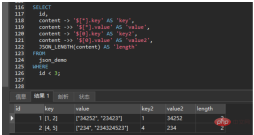
SELECT
	id,
	content -> '$[*].key' AS 'key',
	content ->> '$[*].value' AS 'value',
	content -> '$[0].key' AS 'key2',
	content ->> '$[0].value' AS 'value2',
	/* 查询数组长度 */
	JSON_LENGTH(content) AS 'length'
FROM
	json_demo
WHERE
	id < 3;
SELECT
id,
content -> '$[*].key' AS 'key',
content ->> '$[*].value' AS 'value'
FROM
json_demo
WHERE
id < 3
/* content.value的值中存在like'%34%'的值 */
AND content ->> '$[*].value' like '%34%'
/* content.key的值中有4 */
AND JSON_OVERLAPS(content ->> '$[*].key', '4' );
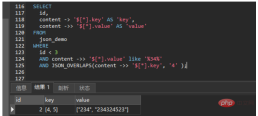
The basic operations are not much different from the JSON object, that is, add the corresponding index bit '$[0]' after '$', and specify all '$[*] '. If the array contains an array, you can specify the deep array elements through '$[1][2][3]'.
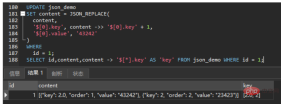
Both JSON_ARRAY_APPEND and JSON_ARRAY_INSERT can append array elements. The difference is that JSON_ARRAY_APPEND does not need to specify the index bit, in which case it will be appended to the last position; JSON_ARRAY_INSERT must specify the index bit, and an error will be reported if not specified.
JSON_ARRAY_APPEND is appended after the specified index bit, while JSON_ARRAY_INSERT is inserted in front of the specified index bit.
More operations
| Name | Description |
|---|---|
| JSON_ARRAY() | Create a JSON array |
| JSON_ARRAY_APPEND() | Append data to a JSON document |
| Insert into JSON array | |
| Whether the JSON document contains a specific object in the path | |
| Whether the JSON document contains any data in the path | |
| The maximum depth of the JSON document | |
| Return data from JSON document | |
| Insert data into JSON document | |
| Key array in JSON document | |
| In JSON document Number of elements | |
| Merge JSON documents, retaining duplicate keys. Deprecated synonyms for JSON_MERGE_PRESERVE() | |
| Merge JSON documents, replacing values for duplicate keys | |
| Merge JSON documents, retaining duplicate keys | |
| Create JSON object | |
| Compares two JSON documents and returns TRUE (1) if they have any key-value pairs or array elements in common, otherwise returns FALSE (0) | |
| Print JSON document in an easy-to-read format | |
| Reference JSON document | |
| Remove data from JSON document | |
| Replace values in JSON documents | |
| Validate JSON documents against the JSON schema; if the document is validated against the schema, then Returns TRUE/1; otherwise, returns FALSE/0. | |
| Validates a JSON document against a JSON schema; returns a report on the validation results in JSON format, including success or failure and failure Reason | |
| The path of the value in the JSON document | ##JSON_SET() |
| JSON_STORAGE_FREE() | |
| JSON_STORAGE_SIZE() | |
| JSON_TABLE() | |
| JSON_TYPE() | |
| JSON_UNQUOTE() | |
| JSON_VALID() | |
| ##JSON_VALUE() (introduced in 8.0.21) | |
| MEMBER OF() (8.0.17 Introduced) | |
The above is the detailed content of How to use JSON type fields in MySQL. For more information, please follow other related articles on the PHP Chinese website!

 MySQL's Role: Databases in Web ApplicationsApr 17, 2025 am 12:23 AM
The main role of MySQL in web applications is to store and manage data. 1.MySQL efficiently processes user information, product catalogs, transaction records and other data. 2. Through SQL query, developers can extract information from the database to generate dynamic content. 3.MySQL works based on the client-server model to ensure acceptable query speed.
 MySQL: Building Your First DatabaseApr 17, 2025 am 12:22 AM
The steps to build a MySQL database include: 1. Create a database and table, 2. Insert data, and 3. Conduct queries. First, use the CREATEDATABASE and CREATETABLE statements to create the database and table, then use the INSERTINTO statement to insert the data, and finally use the SELECT statement to query the data.
 MySQL: A Beginner-Friendly Approach to Data StorageApr 17, 2025 am 12:21 AM
MySQL is suitable for beginners because it is easy to use and powerful. 1.MySQL is a relational database, and uses SQL for CRUD operations. 2. It is simple to install and requires the root user password to be configured. 3. Use INSERT, UPDATE, DELETE, and SELECT to perform data operations. 4. ORDERBY, WHERE and JOIN can be used for complex queries. 5. Debugging requires checking the syntax and use EXPLAIN to analyze the query. 6. Optimization suggestions include using indexes, choosing the right data type and good programming habits.
 Is MySQL Beginner-Friendly? Assessing the Learning CurveApr 17, 2025 am 12:19 AM
MySQL is suitable for beginners because: 1) easy to install and configure, 2) rich learning resources, 3) intuitive SQL syntax, 4) powerful tool support. Nevertheless, beginners need to overcome challenges such as database design, query optimization, security management, and data backup.
 Is SQL a Programming Language? Clarifying the TerminologyApr 17, 2025 am 12:17 AM
Yes,SQLisaprogramminglanguagespecializedfordatamanagement.1)It'sdeclarative,focusingonwhattoachieveratherthanhow.2)SQLisessentialforquerying,inserting,updating,anddeletingdatainrelationaldatabases.3)Whileuser-friendly,itrequiresoptimizationtoavoidper
 Explain the ACID properties (Atomicity, Consistency, Isolation, Durability).Apr 16, 2025 am 12:20 AM
ACID attributes include atomicity, consistency, isolation and durability, and are the cornerstone of database design. 1. Atomicity ensures that the transaction is either completely successful or completely failed. 2. Consistency ensures that the database remains consistent before and after a transaction. 3. Isolation ensures that transactions do not interfere with each other. 4. Persistence ensures that data is permanently saved after transaction submission.
 MySQL: Database Management System vs. Programming LanguageApr 16, 2025 am 12:19 AM
MySQL is not only a database management system (DBMS) but also closely related to programming languages. 1) As a DBMS, MySQL is used to store, organize and retrieve data, and optimizing indexes can improve query performance. 2) Combining SQL with programming languages, embedded in Python, using ORM tools such as SQLAlchemy can simplify operations. 3) Performance optimization includes indexing, querying, caching, library and table division and transaction management.
 MySQL: Managing Data with SQL CommandsApr 16, 2025 am 12:19 AM
MySQL uses SQL commands to manage data. 1. Basic commands include SELECT, INSERT, UPDATE and DELETE. 2. Advanced usage involves JOIN, subquery and aggregate functions. 3. Common errors include syntax, logic and performance issues. 4. Optimization tips include using indexes, avoiding SELECT* and using LIMIT.


Hot AI Tools

Undresser.AI Undress
AI-powered app for creating realistic nude photos

AI Clothes Remover
Online AI tool for removing clothes from photos.

Undress AI Tool
Undress images for free

Clothoff.io
AI clothes remover

AI Hentai Generator
Generate AI Hentai for free.

Hot Article
Hot Tools

EditPlus Chinese cracked version
Small size, syntax highlighting, does not support code prompt function

WebStorm Mac version
Useful JavaScript development tools

Safe Exam Browser
Safe Exam Browser is a secure browser environment for taking online exams securely. This software turns any computer into a secure workstation. It controls access to any utility and prevents students from using unauthorized resources.

SublimeText3 English version
Recommended: Win version, supports code prompts!

Zend Studio 13.0.1
Powerful PHP integrated development environment

