


How to turn off wallpapers and notifications on Always-on Display on iPhone

iOS 16 is a major update for Apple’s mobile devices as it not only introduces new features but also brings exclusive features to iPhone 14 Pro and Pro Max. These new iPhones are Apple's first with always-on displays. Apple sees AOD slightly differently, instead of the entire screen going black, the display dims and the refresh rate is dynamically reduced to 1Hz.
Needless to say, this didn’t sit well with many users and reviewers around the world, as most would have casually checked their phones and assumed it was a notification and not an AOD. Apple appears to have recognized and corrected this issue in the latest version of iOS 16, adding the ability to disable wallpapers and notifications when using AOD.
So, if you find AOD too distracting on your iPhone 14 Pro or Pro Max, here’s how you can turn off wallpapers and notifications.
How to turn off wallpapers and notifications on AOD on iPhone
First use the first section below to familiarize yourself with the requirements for using these new features on iPhone. You can then use the subsequent tutorials to enable or disable wallpapers and notifications to your liking.
Requires
- iOS 16.2 or later
- iPhone 14 Pro or iPhone 14 Pro Max
iOS 16.2 currently in beta stage, this feature is available with the release of iOS 16.3 dev beta 3 and later. If you want to take advantage of these features immediately, we recommend installing the beta version. However, if you want to avoid using beta versions of iOS due to battery and bug issues, we recommend waiting until the public release, which should happen next month.
Step-by-Step Tutorial
After updating your iPhone, you can follow the methods below to switch on and off AOD’s wallpaper and notifications on your iPhone.
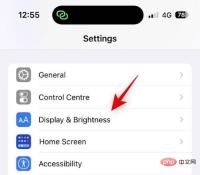
Open the Settings app and tap Display & Brightness.
Now click the Always on display at the bottom.
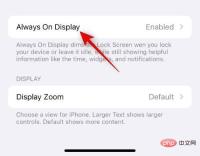
Make sure the always-on display switch is turned on at the top.

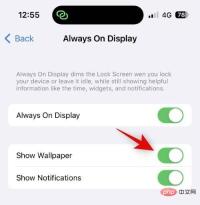
If you wish to hide the wallpaper when using AOD, click and turn off the Show wallpaper switch.
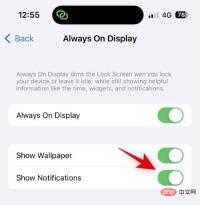
Similarly, if you wish to disable notifications when using AOD, tap and turn off the Notifications switch.
#You can now lock your device and try out AOD’s new look.
That's it! When using AOD on iPhone 14 Pro and Pro Max, you will now turn off wallpapers and notifications.
Other Ways to Minimize the Appearance of AOD
There are several other ways you can minimize the appearance of AOD on your iPhone. You can choose to dim AOD, customize your lock screen for a minimal look, and add your favorite widgets to suit your aesthetic.
Custom widgets have come a long way and they can help add minimal widgets to your iOS 16 lock screen that was not possible before. Keep your AOD screens looking clean with this comprehensive article from us.
The above is the detailed content of How to turn off wallpapers and notifications on Always-on Display on iPhone. For more information, please follow other related articles on the PHP Chinese website!

Hot AI Tools

Undresser.AI Undress
AI-powered app for creating realistic nude photos

AI Clothes Remover
Online AI tool for removing clothes from photos.

Undress AI Tool
Undress images for free

Clothoff.io
AI clothes remover

AI Hentai Generator
Generate AI Hentai for free.

Hot Article
Hot Tools

mPDF
mPDF is a PHP library that can generate PDF files from UTF-8 encoded HTML. The original author, Ian Back, wrote mPDF to output PDF files "on the fly" from his website and handle different languages. It is slower than original scripts like HTML2FPDF and produces larger files when using Unicode fonts, but supports CSS styles etc. and has a lot of enhancements. Supports almost all languages, including RTL (Arabic and Hebrew) and CJK (Chinese, Japanese and Korean). Supports nested block-level elements (such as P, DIV),

Safe Exam Browser
Safe Exam Browser is a secure browser environment for taking online exams securely. This software turns any computer into a secure workstation. It controls access to any utility and prevents students from using unauthorized resources.

ZendStudio 13.5.1 Mac
Powerful PHP integrated development environment

SublimeText3 Mac version
God-level code editing software (SublimeText3)

Dreamweaver Mac version
Visual web development tools

