


PyTorch parallel training DistributedDataParallel complete code example

The problem of training large deep neural networks (DNN) using large datasets is a major challenge in the field of deep learning. As DNN and dataset sizes increase, so do the computational and memory requirements for training these models. This makes it difficult or even impossible to train these models on a single machine with limited computing resources. Some of the major challenges of training large DNNs using large datasets include:
- Long training time: The training process can take weeks or even months to complete, depending on the complexity of the model and the size of the dataset .
- Memory limitations: Large DNNs may require large amounts of memory to store all model parameters, gradients, and intermediate activations during training. This can cause out-of-memory errors and limit the size of the model that can be trained on a single machine.
To address these challenges, various techniques have been developed to scale up the training of large DNNs with large datasets, including model parallelism, data parallelism, and hybrid parallelism, as well as hardware, software, and Algorithm optimization.
In this article we will demonstrate data parallelism and model parallelism using PyTorch.
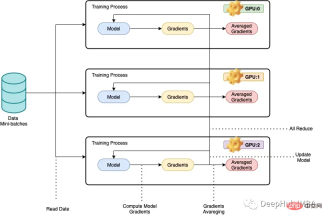
What we call parallelism generally refers to training deep neural networks (dnn) on multiple GPUs or multiple machines to achieve Less training time. The basic idea behind data parallelism is to split the training data into smaller chunks and let each GPU or machine process a separate chunk of data. The results for each node are then combined and used to update model parameters. In data parallelism, the model architecture is the same on each node, but the model parameters are partitioned between nodes. Each node trains its own local model using allocated chunks of data, and at the end of each training iteration, the model parameters are synchronized across all nodes. This process is repeated until the model converges to a satisfactory result.
Below we use the ResNet50 and CIFAR10 data sets for a complete code example:
In data parallelism, the model architecture remains the same on each node, but the model parameters are between nodes. Partitioning is done, and each node trains its own local model using the allocated data chunks.
PyTorch's DistributedDataParallel library can efficiently communicate and synchronize gradients and model parameters across nodes to achieve distributed training. This article provides an example of how to implement data parallelism with PyTorch using the ResNet50 and CIFAR10 datasets, where the code is run on multiple GPUs or machines, with each machine processing a subset of the training data. The training process is parallelized using PyTorch's DistributedDataParallel library.
Import the necessary libraries
import os
 from datetime import datetime
 from time import time
 import argparse
 import torchvision
 import torchvision.transforms as transforms
 import torch
 import torch.nn as nn
 import torch.distributed as dist
 from torch.nn.parallel import DistributedDataParallel
Next, we will check the GPU.
import subprocess
 result = subprocess.run(['nvidia-smi'], stdout=subprocess.PIPE)
 print(result.stdout.decode())
Because we need to run on multiple servers, it is not practical to execute them one by one manually, so a scheduler is needed. Here we use a SLURM file to run the code (slurmFree and open source job scheduler for Linux and Unix-like kernels),
def main():

 # get distributed configuration from Slurm environment

 parser = argparse.ArgumentParser()
 parser.add_argument('-b', '--batch-size', default=128, type =int,
 help='batch size. it will be divided in mini-batch for each worker')
 parser.add_argument('-e','--epochs', default=2, type=int, metavar='N',
 help='number of total epochs to run')
 parser.add_argument('-c','--checkpoint', default=None, type=str,
 help='path to checkpoint to load')
 args = parser.parse_args()

 rank = int(os.environ['SLURM_PROCID'])
 local_rank = int(os.environ['SLURM_LOCALID'])
 size = int(os.environ['SLURM_NTASKS'])
 master_addr = os.environ["SLURM_SRUN_COMM_HOST"]
 port = "29500"
 node_id = os.environ['SLURM_NODEID']
 ddp_arg = [rank, local_rank, size, master_addr, port, node_id]
 train(args, ddp_arg)
Then, we use the DistributedDataParallel library to perform distributed training.
def train(args, ddp_arg):

 rank, local_rank, size, MASTER_ADDR, port, NODE_ID = ddp_arg

 # display info
 if rank == 0:
 #print(">>> Training on ", len(hostnames), " nodes and ", size, " processes, master node is ", MASTER_ADDR)
 print(">>> Training on ", size, " GPUs, master node is ", MASTER_ADDR)
 #print("- Process {} corresponds to GPU {} of node {}".format(rank, local_rank, NODE_ID))

 print("- Process {} corresponds to GPU {} of node {}".format(rank, local_rank, NODE_ID))


 # configure distribution method: define address and port of the master node and initialise communication backend (NCCL)
 #dist.init_process_group(backend='nccl', init_method='env://', world_size=size, rank=rank)
 dist.init_process_group(
 backend='nccl',
 init_method='tcp://{}:{}'.format(MASTER_ADDR, port),
 world_size=size,
 rank=rank
)

 # distribute model
 torch.cuda.set_device(local_rank)
 gpu = torch.device("cuda")
 #model = ResNet18(classes=10).to(gpu)
 model = torchvision.models.resnet50(pretrained=False).to(gpu)
 ddp_model = DistributedDataParallel(model, device_ids=[local_rank])
 if args.checkpoint is not None:
 map_location = {'cuda:%d' % 0: 'cuda:%d' % local_rank}
 ddp_model.load_state_dict(torch.load(args.checkpoint, map_location=map_location))

 # distribute batch size (mini-batch)
 batch_size = args.batch_size
 batch_size_per_gpu = batch_size // size

 # define loss function (criterion) and optimizer
 criterion = nn.CrossEntropyLoss()
 optimizer = torch.optim.SGD(ddp_model.parameters(), 1e-4)


 transform_train = transforms.Compose([
 transforms.RandomCrop(32, padding=4),
 transforms.RandomHorizontalFlip(),
 transforms.ToTensor(),
 transforms.Normalize((0.4914, 0.4822, 0.4465), (0.2023, 0.1994, 0.2010)),
])

 # load data with distributed sampler
 #train_dataset = torchvision.datasets.CIFAR10(root='./data',
 # train=True,
 # transform=transform_train,
 # download=False)

 # load data with distributed sampler
 train_dataset = torchvision.datasets.CIFAR10(root='./data',
train=True,
transform=transform_train,
download=False)

 train_sampler = torch.utils.data.distributed.DistributedSampler(train_dataset,
 num_replicas=size,
 rank=rank)

 train_loader = torch.utils.data.DataLoader(dataset=train_dataset,
batch_size=batch_size_per_gpu,
shuffle=False,
num_workers=0,
pin_memory=True,
sampler=train_sampler)

 # training (timers and display handled by process 0)
 if rank == 0: start = datetime.now()
 total_step = len(train_loader)

 for epoch in range(args.epochs):
 if rank == 0: start_dataload = time()

 for i, (images, labels) in enumerate(train_loader):

 # distribution of images and labels to all GPUs
 images = images.to(gpu, non_blocking=True)
 labels = labels.to(gpu, non_blocking=True)

 if rank == 0: stop_dataload = time()

 if rank == 0: start_training = time()

 # forward pass
 outputs = ddp_model(images)
 loss = criterion(outputs, labels)

 # backward and optimize
 optimizer.zero_grad()
 loss.backward()
 optimizer.step()

 if rank == 0: stop_training = time()
 if (i + 1) % 10 == 0 and rank == 0:
 print('Epoch [{}/{}], Step [{}/{}], Loss: {:.4f}, Time data load: {:.3f}ms, Time training: {:.3f}ms'.format(epoch + 1, args.epochs,
 i + 1, total_step, loss.item(), (stop_dataload - start_dataload)*1000,
(stop_training - start_training)*1000))
 if rank == 0: start_dataload = time()

 #Save checkpoint at every end of epoch
 if rank == 0:
 torch.save(ddp_model.state_dict(), './checkpoint/{}GPU_{}epoch.checkpoint'.format(size, epoch+1))

 if rank == 0:
 print(">>> Training complete in: " + str(datetime.now() - start))


 if __name__ == '__main__':

 main()
The code splits the data and model across multiple GPUs and updates the model in a distributed manner. Here are some explanations of the code:
train(args, ddp_arg) has two parameters, args and ddp_arg, where args is the command line parameter passed to the script, and ddp_arg contains distributed training related parameters.
rank, local_rank, size, MASTER_ADDR, port, NODE_ID = ddp_arg: Unpack the distributed training related parameters in ddp_arg.
If rank is 0, print the number of GPUs currently used and the master node IP address information.
dist.init_process_group(backend='nccl', init_method='tcp://{}:{}'.format(MASTER_ADDR, port), world_size=size, rank=rank): Use NCCL backend Initialize the distributed process group.
torch.cuda.set_device(local_rank): Select the specified GPU for this process.
model = torchvision.models. ResNet50 (pretrained=False).to(gpu): Load the ResNet50 model from the torchvision model and move it to the specified gpu.
ddp_model = DistributedDataParallel(model, device_ids=[local_rank]): Wrap the model in the DistributedDataParallel module, which means that we can perform distributed training
Load CIFAR-10 data Collect and apply data augmentation transformations.
train_sampler=torch.utils.data.distributed.DistributedSampler(train_dataset,num_replicas=size,rank=rank): Create a DistributedSampler object to split the data set onto multiple GPUs.
train_loader =torch.utils.data.DataLoader(dataset=train_dataset,batch_size=batch_size_per_gpu,shuffle=False,num_workers=0,pin_memory=True,sampler=train_sampler): Create a DataLoader object and the data will be loaded in batches In the model, this is consistent with our usual training steps, except that a distributed data sampling DistributedSampler is added.
Train the model for the specified number of epochs, and use optimizer.step() to update the weights in a distributed manner.
rank0 saves a checkpoint at the end of each round.
rank0 shows loss and training time every 10 batches.
At the end of training, the total time spent on printing the training model is also in rank0.
Code test
Training was conducted using 1 node with 1/2/3/4 GPUs, 2 nodes with 6/8 GPUs, and each node with 3/4 GPUs The test of Resnet50 on Cifar10 is shown in the figure below. The batch size of each test remains the same. The time taken to complete each test was recorded in seconds. As the number of GPUs used increases, the time required to complete the test decreases. When using 8 GPUs, it took 320 seconds to complete, which is the fastest time recorded. This is for sure, but we can see that the training speed does not increase linearly with the increase in the number of GPUs. This may be because Resnet50 is a relatively small model and does not require parallel training.

Using data parallelism on multiple GPUs can significantly reduce the time required to train a deep neural network (DNN) on a given dataset . As the number of GPUs increases, the time required to complete the training process decreases, indicating that DNNs can be trained more efficiently in parallel.
This approach is particularly useful when dealing with large data sets or complex DNN architectures. By leveraging multiple GPUs, the training process can be accelerated, allowing for faster model iteration and experimentation. However, it should be noted that the performance improvements achieved through Data Parallelism may be limited by factors such as communication overhead and GPU memory limitations, and require careful tuning to obtain the best results.
The above is the detailed content of PyTorch parallel training DistributedDataParallel complete code example. For more information, please follow other related articles on the PHP Chinese website!

 Gemma Scope: Google's Microscope for Peering into AI's Thought ProcessApr 17, 2025 am 11:55 AM
Exploring the Inner Workings of Language Models with Gemma Scope Understanding the complexities of AI language models is a significant challenge. Google's release of Gemma Scope, a comprehensive toolkit, offers researchers a powerful way to delve in
 Who Is a Business Intelligence Analyst and How To Become One?Apr 17, 2025 am 11:44 AM
Unlocking Business Success: A Guide to Becoming a Business Intelligence Analyst Imagine transforming raw data into actionable insights that drive organizational growth. This is the power of a Business Intelligence (BI) Analyst – a crucial role in gu
 How to Add a Column in SQL? - Analytics VidhyaApr 17, 2025 am 11:43 AM
SQL's ALTER TABLE Statement: Dynamically Adding Columns to Your Database In data management, SQL's adaptability is crucial. Need to adjust your database structure on the fly? The ALTER TABLE statement is your solution. This guide details adding colu
 Business Analyst vs. Data AnalystApr 17, 2025 am 11:38 AM
Introduction Imagine a bustling office where two professionals collaborate on a critical project. The business analyst focuses on the company's objectives, identifying areas for improvement, and ensuring strategic alignment with market trends. Simu
 What are COUNT and COUNTA in Excel? - Analytics VidhyaApr 17, 2025 am 11:34 AM
Excel data counting and analysis: detailed explanation of COUNT and COUNTA functions Accurate data counting and analysis are critical in Excel, especially when working with large data sets. Excel provides a variety of functions to achieve this, with the COUNT and COUNTA functions being key tools for counting the number of cells under different conditions. Although both functions are used to count cells, their design targets are targeted at different data types. Let's dig into the specific details of COUNT and COUNTA functions, highlight their unique features and differences, and learn how to apply them in data analysis. Overview of key points Understand COUNT and COU
 Chrome is Here With AI: Experiencing Something New Everyday!!Apr 17, 2025 am 11:29 AM
Google Chrome's AI Revolution: A Personalized and Efficient Browsing Experience Artificial Intelligence (AI) is rapidly transforming our daily lives, and Google Chrome is leading the charge in the web browsing arena. This article explores the exciti
 AI's Human Side: Wellbeing And The Quadruple Bottom LineApr 17, 2025 am 11:28 AM
Reimagining Impact: The Quadruple Bottom Line For too long, the conversation has been dominated by a narrow view of AI’s impact, primarily focused on the bottom line of profit. However, a more holistic approach recognizes the interconnectedness of bu
 5 Game-Changing Quantum Computing Use Cases You Should Know AboutApr 17, 2025 am 11:24 AM
Things are moving steadily towards that point. The investment pouring into quantum service providers and startups shows that industry understands its significance. And a growing number of real-world use cases are emerging to demonstrate its value out


Hot AI Tools

Undresser.AI Undress
AI-powered app for creating realistic nude photos

AI Clothes Remover
Online AI tool for removing clothes from photos.

Undress AI Tool
Undress images for free

Clothoff.io
AI clothes remover

AI Hentai Generator
Generate AI Hentai for free.

Hot Article
Hot Tools

Atom editor mac version download
The most popular open source editor

SecLists
SecLists is the ultimate security tester's companion. It is a collection of various types of lists that are frequently used during security assessments, all in one place. SecLists helps make security testing more efficient and productive by conveniently providing all the lists a security tester might need. List types include usernames, passwords, URLs, fuzzing payloads, sensitive data patterns, web shells, and more. The tester can simply pull this repository onto a new test machine and he will have access to every type of list he needs.

PhpStorm Mac version
The latest (2018.2.1) professional PHP integrated development tool

SAP NetWeaver Server Adapter for Eclipse
Integrate Eclipse with SAP NetWeaver application server.

Dreamweaver CS6
Visual web development tools

