



no. pycharm is a cross-platform Python IDE that can be used on windows, linux, macOS and other platforms. PyCharm is an excellent editor for developing Python code. It comes with a set of tools that can help users improve their efficiency when developing in the Python language, such as debugging, syntax highlighting, project management, code jumps, smart tips, auto-completion, and units. Testing, version control.
The operating environment of this tutorial: linux7.3 system, pycharm2022, Dell G3 computer.
pycharm is not under linux. pycharm is a cross-platform Python IDE that can be used on windows, linux, macOS and other platforms.
PyCharm is a Python integrated development environment (IDE). It is an excellent editor for developing Python code. It comes with a set of tools that can help users improve their efficiency when developing in the Python language. Such as debugging, syntax highlighting, project management, code jumping, smart prompts, auto-completion, unit testing, and version control.
PyCharm has the functions that general IDEs have, such as debugging, syntax highlighting, project management, code jumps, smart prompts, auto-completion, unit testing, and version control
PyCharm also provides some great features for Django development and supports Google App Engine. What’s even cooler is that PyCharm supports IronPython.
Installing Pycharm in Linux environment
Operating environment: Linux 7 (with desktop service)
Pycharm version: pycharm-community-2022.1.2
Specific ideas: Download the Pycharm Linux release version - put it into the Linux virtual machine ——Unpackage——Run the pycharm.sh script to install——Create a desktop icon——Manually select the Python interpreter——Complete the installation
Specific operations:
1. Go to the Pycharm official website to download the corresponding Linux release version of Pycharm
(If you have mines at home, download and purchase the Professional version, if you don’t have mines, download the Community free version) (Note: The two versions are different. Difference: Professional The version has more functions and is aimed at advanced developers and enterprises. But beginners can also learn python community version)
Download link:
https://www.jetbrains.com/pycharm/download/#section=linux
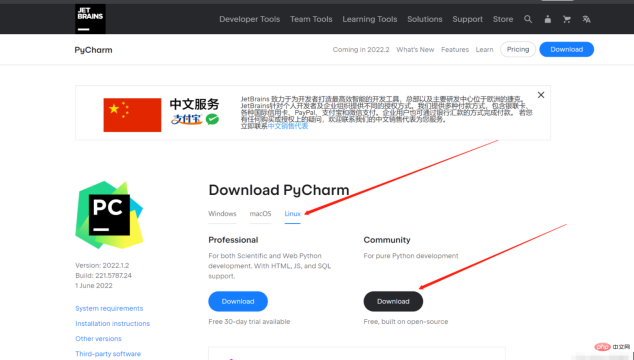
Download After that, you will get a compressed package with the suffix tar.gz (such as: pycharm-community-2022.1.2.tar.gz)
2. Drag the compressed package into the VM virtual machine.
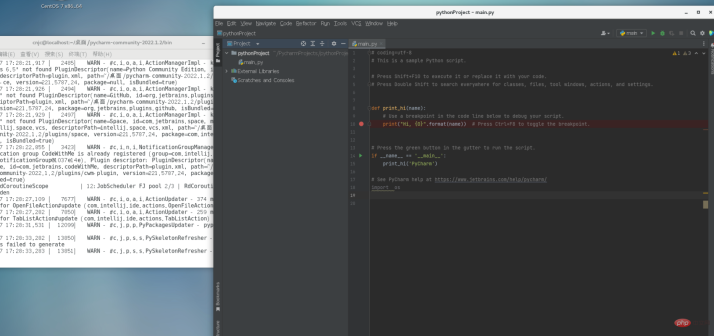
Execute decompression command:
tar -zxvf pycharm-community-2022.1.2.tar.gz
3. Enter the decompressed directory:
Then enter the Bin directory
Enter the command in the terminal:
. pycharm.sh
Note that you must be in the pycharm installation directory Run the terminal in the bin directory and run the pycharm.sh script.
4. Need tomanually set uppython interpreter (Linux will come with python, choose the default python version)
(Note: The python version is usually in the /usr/bin/ directory)
If not, enter the whereis python command in the terminal to find the path.
/usr/bin/python2.7
Finally Pycharm was installed successfully.
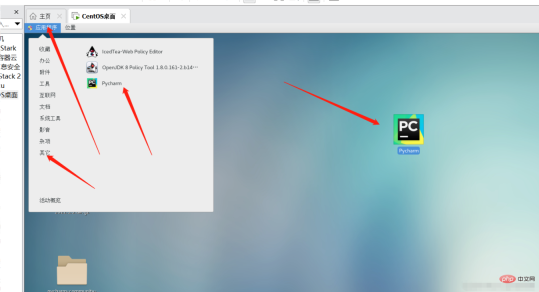 Optimization:
Every time you open Pycharm, you need to run the pycharm.sh script, which is quite cumbersome, so here it is It will be much more convenient to create a shortcut on the desktop and click on the icon to check in the software.
Create desktop icon: Enter the command in the terminal
gedit /usr/share/applications/Pycharm.desktop
Enter the code in the pop-up text:
[Desktop Entry]
Type=Application
Name=Pycharm
GenericName=Pycharm3
Comment=Pycharm3:The Python IDE
Exec=sh /home/pycharm-community-2020.1/bin/pycharm.sh
Icon=/home/pycharm-community-2020.1/bin//pycharm.png
Terminal=pycharm
Categories=Pycharm;
Note: The red arrow points to needs to be modified based on the actual local installation path. (The paths of the pycharm.sh and pycharm.png icons (both in the bin directory of the installation package))
Finally find the icon and move it to the desktop.
#After opening, you may need to manually configure the python interpreter again. The specific method is as above.
Finally complete the installation and optimization of Pycharm. After some time, I will publish a tutorial on Python3 Linux installation.
Related recommendations: "Linux Video Tutorial"
The above is the detailed content of Is pycharm under linux?. For more information, please follow other related articles on the PHP Chinese website!

Hot AI Tools

Undresser.AI Undress
AI-powered app for creating realistic nude photos

AI Clothes Remover
Online AI tool for removing clothes from photos.

Undress AI Tool
Undress images for free

Clothoff.io
AI clothes remover

AI Hentai Generator
Generate AI Hentai for free.

Hot Article
Hot Tools

SublimeText3 English version
Recommended: Win version, supports code prompts!

SecLists
SecLists is the ultimate security tester's companion. It is a collection of various types of lists that are frequently used during security assessments, all in one place. SecLists helps make security testing more efficient and productive by conveniently providing all the lists a security tester might need. List types include usernames, passwords, URLs, fuzzing payloads, sensitive data patterns, web shells, and more. The tester can simply pull this repository onto a new test machine and he will have access to every type of list he needs.

SAP NetWeaver Server Adapter for Eclipse
Integrate Eclipse with SAP NetWeaver application server.

VSCode Windows 64-bit Download
A free and powerful IDE editor launched by Microsoft

EditPlus Chinese cracked version
Small size, syntax highlighting, does not support code prompt function

