



es6 supports import. The import statement is used to import a binding exported by another module, with the syntax "import defaultExport from "module-name";"; regardless of whether strict mode is declared, the imported module runs in strict mode. Import is not only a keyword, but also a function. The parameter of the function is the path to the module that needs to be imported, and the function returns a promise object.

The operating environment of this tutorial: Windows 7 system, ECMAScript version 6, Dell G3 computer.
When the concept of modularization becomes more and more important, in es6, the module syntax is introduced: import. Let's briefly understand how to use import.
1. export
A js file can be understood as a module. This module can be imported by any other module. The result of the introduction is to modify this module. After execution, the object is held. Then there is a problem. After the file module is introduced, everything is in its own scope. The file that actively initiates the introduction behavior has obtained the introduced object, but cannot access the function. Things in the domain, so export is provided to determine what a module exposes to the outside world.
export is used to export functions, objects or primitive values from the module so that other programs can use them through the import statement.
In importing a file When , this file object will be obtained. The default is an empty object, which represents things that we cannot access the file. Use export to add content to this object
Usage:module1.js:
function f1 (){
    console.log("module - 1 : functino 1")
}

let b = {
    name:"test_obj"
}

let str = "hell绿绿绿"

export {
    f1,b,str
}Inmain.js Introduced in
// 先忽略 import 的写法,后面再说明
import * as m1 from "./m1.js"
console.log(m1)
In this file, we expose a function, a variable, and an object to the outside world. Therefore, the file object imported using import is no longer an empty object, but an object containing the export content. Therefore, we print out the m1.js file object, which is m1:
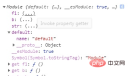
#So, we know that the content exported by export will be added to the file object, which can be simply understood as a deep copy.
2. export default
Many beginners are confused. Since there is export, why do we need export default? The answer given on the Internet is often that it is the default export interface for files. So what is the default export interface for files?
In fact, this problem is very simple. Let's put aside import first, do not consider the syntax of import, and only consider what export default does.
Modifymodule1.js :
function f1 (){
    console.log("module - 1 : functino 1")
}
let b = {
    name:"test_obj"
}
let str = "hell绿绿绿"
export {
    f1,b,str
}
export default{
    name:"default"
}
main.js remains unchanged. Execute it again and continue to view the printed file object:
Have you discovered that the function of export default is to add a default attribute to the file object. The value of the default attribute is also an object and is completely consistent with the content exported by export default.
3. Summary of file export
So here, we understand that a js file is introduced as a module and will be exposed as an object (that is, it is After importing, it can be operated as an object).
The function of export is to add attributes to this file object. Everything exported will be added to the file object.
The function of export default is to add a value to the default attribute of the file object.
4. import
In the above example, we understand what the module exposes to the outside world, so how do we use the things that the file exposes to the outside world? ?
First of all, we already understand what a file object is.
4.1 Export the entire file object
So first, we will export the entire file object to see what it looks like. This is the syntax we used in the above example, import * to export all interfaces of the file module, and as m_name to specify a namespace object. main.js :
import * as m1 from "./m1.js"
console.log(m1)示例中的m1 命名空间对象,可以访问到文件对象的所有对外接口,包括export,和export default。
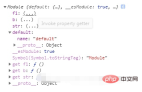
4.2 导出export的部分接口
在实际开发中,我们并不需要导出所有的接口。例如在vue项目中,使用某个组件库中的某个组件,我们只需要引入这一个组件,不必要引入所有组件。
我们知道,import 导出的是整个文件对象,那么我们直接在 import 语句中,对这个对象进行解构,就可以获得其中某一部分接口:main.js :
import {f1,b} from "./m1.js"
console.log(f1)
console.log(b)
打印结果,就是:

但是这种方式,仅限于获取文件对象的正常属性,default属性是获取不到的,原因有两个:
- 未解构的对象全部进行了丢弃
- default是关键字,不能再解构中当做变量进行使用
4.3 导入export default 的接口
export default是文件的默认导入,其实这句话的重点,并不在于 export default,而是在于 import 语句是如何处理文件默认导入的。
修改main.js 文件内容为:
import d from "./m1.js"
console.log(d)
打印出来,惊奇的发现,d 竟然和 export default 的内容一样。
所以,现在可以这么理解,所谓的默认导入,就是毫无花哨的直接导入一个模块,然后赋值给一个命名空间,这种时候,这个命名空间,持有的就是 文件对象的default 对象,也就是export default 出来的东西。
其实,默认导入可以理解为也是解构的一个语法糖(仅仅用作理解,实际是语法错误的):
import d from "./m1.js" 可以等价为 import {default as d} from "./m1.js"5、import动态导入
还有一种高端的玩法,在项目中也是很有用处的。
import不光是一个关键字,同时也是一个函数,函数的参数是需要导入模块的路径,函数返回一个promise对象。
import("./m1.js").then(m=>{
  console.log('then:',m)
})
在这段代码中,then中回调的m,就是文件模块的整个文件对象(包括export和export default)。
6、import不导入文件对象
import还可以不导入文件对象,仅仅是使用文件模块提供的功能。也就是传说中的,import将文件模块仅仅最为副作用进行导入,而不获取文件模块的接口。
在项目中,实践的地方,例如一个vue项目,我们需要给vue对象挂载很多东西,但是全部写在src/main.js 文件中,又会显得特别啰嗦,不利于维护,也没能体现工程化的理念。所以我们常常单独新建一个文件lib/init.js ,然后在这个 init.js 文件中,编写相关逻辑。这个文件的作用,仅仅是执行一遍,我们不期望这个文件暴露什么变量,所以没必要获取文件对象。那么这个时候,import 关键字的另一个作用就体现出来了:main.js :
import './lib/init.js';使用import直接引用一个文件时,会执行一遍这个文件,而不获取任何文件对象。
【相关推荐:javascript视频教程、web前端】
The above is the detailed content of Does es6 support import?. For more information, please follow other related articles on the PHP Chinese website!

 Frontend Development with React: Advantages and TechniquesApr 17, 2025 am 12:25 AM
The advantages of React are its flexibility and efficiency, which are reflected in: 1) Component-based design improves code reusability; 2) Virtual DOM technology optimizes performance, especially when handling large amounts of data updates; 3) The rich ecosystem provides a large number of third-party libraries and tools. By understanding how React works and uses examples, you can master its core concepts and best practices to build an efficient, maintainable user interface.
 React vs. Other Frameworks: Comparing and Contrasting OptionsApr 17, 2025 am 12:23 AM
React is a JavaScript library for building user interfaces, suitable for large and complex applications. 1. The core of React is componentization and virtual DOM, which improves UI rendering performance. 2. Compared with Vue, React is more flexible but has a steep learning curve, which is suitable for large projects. 3. Compared with Angular, React is lighter, dependent on the community ecology, and suitable for projects that require flexibility.
 Demystifying React in HTML: How It All WorksApr 17, 2025 am 12:21 AM
React operates in HTML via virtual DOM. 1) React uses JSX syntax to write HTML-like structures. 2) Virtual DOM management UI update, efficient rendering through Diffing algorithm. 3) Use ReactDOM.render() to render the component to the real DOM. 4) Optimization and best practices include using React.memo and component splitting to improve performance and maintainability.
 React in Action: Examples of Real-World ApplicationsApr 17, 2025 am 12:20 AM
React is widely used in e-commerce, social media and data visualization. 1) E-commerce platforms use React to build shopping cart components, use useState to manage state, onClick to process events, and map function to render lists. 2) Social media applications interact with the API through useEffect to display dynamic content. 3) Data visualization uses react-chartjs-2 library to render charts, and component design is easy to embed applications.
 Frontend Architecture with React: Best PracticesApr 17, 2025 am 12:10 AM
Best practices for React front-end architecture include: 1. Component design and reuse: design a single responsibility, easy to understand and test components to achieve high reuse. 2. State management: Use useState, useReducer, ContextAPI or Redux/MobX to manage state to avoid excessive complexity. 3. Performance optimization: Optimize performance through React.memo, useCallback, useMemo and other methods to find the balance point. 4. Code organization and modularity: Organize code according to functional modules to improve manageability and maintainability. 5. Testing and Quality Assurance: Testing with Jest and ReactTestingLibrary to ensure the quality and reliability of the code
 React Inside HTML: Integrating JavaScript for Dynamic Web PagesApr 16, 2025 am 12:06 AM
To integrate React into HTML, follow these steps: 1. Introduce React and ReactDOM in HTML files. 2. Define a React component. 3. Render the component into HTML elements using ReactDOM. Through these steps, static HTML pages can be transformed into dynamic, interactive experiences.
 The Benefits of React: Performance, Reusability, and MoreApr 15, 2025 am 12:05 AM
React’s popularity includes its performance optimization, component reuse and a rich ecosystem. 1. Performance optimization achieves efficient updates through virtual DOM and diffing mechanisms. 2. Component Reuse Reduces duplicate code by reusable components. 3. Rich ecosystem and one-way data flow enhance the development experience.
 React: Creating Dynamic and Interactive User InterfacesApr 14, 2025 am 12:08 AM
React is the tool of choice for building dynamic and interactive user interfaces. 1) Componentization and JSX make UI splitting and reusing simple. 2) State management is implemented through the useState hook to trigger UI updates. 3) The event processing mechanism responds to user interaction and improves user experience.


Hot AI Tools

Undresser.AI Undress
AI-powered app for creating realistic nude photos

AI Clothes Remover
Online AI tool for removing clothes from photos.

Undress AI Tool
Undress images for free

Clothoff.io
AI clothes remover

AI Hentai Generator
Generate AI Hentai for free.

Hot Article
Hot Tools

EditPlus Chinese cracked version
Small size, syntax highlighting, does not support code prompt function

WebStorm Mac version
Useful JavaScript development tools

Safe Exam Browser
Safe Exam Browser is a secure browser environment for taking online exams securely. This software turns any computer into a secure workstation. It controls access to any utility and prevents students from using unauthorized resources.

SublimeText3 English version
Recommended: Win version, supports code prompts!

Zend Studio 13.0.1
Powerful PHP integrated development environment

