



Solution to vue file upload error: 1. Create a vue project through "vue init webpack demo"; 2. Add an element to upload files; 3. Add "upload(data)" to the method Method; 4. Use FromData to add the required parameters, and use axios to submit the request.

The operating environment of this tutorial: Windows 10 system, vue3 version, DELL G3 computer
What should I do if there is an error when uploading vue files?
The solution to Vue’s failure to upload files
A colleague who developed the front-end in a project used Vue to develop a Module for uploading files, but it cannot submit this POST request to the background service anyway.
The specific phenomenon is that when the front-end interface uploads files,
Content-Type is always application/x-www-form-urlencoded , and then SpringBoot's background service reports an error: Current is not a multipart request. It means that the request is wrong.
In fact, when the post uploads the file, it should be Content-Type: multipart/form-data, but the front end is inside the intranet and is encapsulated. After analysis and testing, there is no problem uploading a file using ordinary HTML. The problem must lie in the VUE submission request process. Because the real development environment is in the company's intranet environment and is isolated from the outside world, I decided to simulate this scenario on my computer to facilitate problem solving.
In order to realize this simulated environment, you need to install a Vue development environment and a Python development environment. These two development installation methods are not the focus of the article, so they are skipped.
General idea:
Use Vue to develop a simple front-end interface to implement the file upload function, and then use Python to develop a Web back-end service.
Step 1: Create a WEB page with Vue
Create a vue project:
vue init webpack demo
To submit a request using axios, you don’t need to install it. Use Just import it directly
Use VSCode to open the newly created vue project

Add an element to upload files:
<template>
<div>
<img src="/static/imghwm/default1.png" data-src="./assets/logo.png" class="lazy" alt="What to do if vue file upload error occurs" >
<router-view></router-view>
<input>
</div>
</template>
<script></script>
<script>
import axios from 'axios'
export default {
name: 'App'
}
</script>
<style>
#app {
font-family: 'Avenir', Helvetica, Arial, sans-serif;
-webkit-font-smoothing: antialiased;
-moz-osx-font-smoothing: grayscale;
text-align: center;
color: #2c3e50;
margin-top: 60px;
}
</style>
Key points
Then add the control script:
<template>
<div>
<img src="/static/imghwm/default1.png" data-src="./assets/logo.png" class="lazy" alt="What to do if vue file upload error occurs" >
<router-view></router-view>
<input>
</div>
</template>
<script></script>
<script>
import axios from 'axios'
export default {
name: 'App',
methods:{
upload(data){
console.log('--->',data)
var formData = new FormData();
formData.append('side', 'front');
formData.append('file',data.target.files[0]);
let config = {
headers: {
'Content-Type': 'multipart/form-data'
}
};
axios.post('http://127.0.0.1:5050/icard/check',formData,config)
.then((response) => {
console.log("OK");
})
}
}
}</script>
Add the upload(data) method to the method
Use FromData to add the required parameters and submit it with axios Just request it.
Step 2: Use Python to develop a simple Web service
from flask import Flask, request
from flask_cors import CORS

app = Flask(__name__)

#跨域处理
cors = CORS(app, supports_credentials=True)

@app.route('/icard/check',methods=['POST'])
def deal_request1():
    print('收到post请求')
    side = request.form["side"]
    image = request.files.get('file')

    print("side= %s"% (side))
    print("filename= %s"% (image.filename))

    return "OK"

if __name__ == '__main__':
    app.run(host="127.0.0.1", port=5050)
Python's Flask is simply too sharp, and it is so easy to create a simple WEB service.
The basic idea is to create a service on the local port 5050. When there is an HTTP request for the URL http://127.0.0.1:5050/idcard/check, it receives parameters and prints out the received parameters.
After starting in jupyter, the following is as follows:

After starting, the prompt: Running on http://127.0.0.1:5050/ (Press CTRL C to quit )
OK, the simple WEB service is started, then start vue,
Open the command line terminal in VSCodel, enter npm run dev to start,
Then Open in the browser //m.sbmmt.com/link/5ba026c424f718a4808f9d3f75856dab

So you can see the log information in the browser 
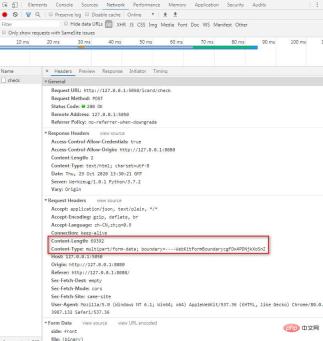
Content-Length: 69392
Content-Type: multipart/form-data; boundary=----WebKitFormBoundarycgFDx4PDNjkXoSnZ
第一行表示上传的文件大小字节数,
Content-Type代表发送端发送的实体数据的数据类型,如果向服务器端发送的是普通的字符串,默认设置为:text/html;
post请求肯定要发送数据包;
因此对数据包的Type有专门的限定:
Content-Type只能是
application/x-www-form-urlencoded,
application/json
multipart/form-data
或 text/plain中的一种。
其他的均不常见。
在看看服务端的情况:

Web 服务端立即输出了相关信息,说明已经得到了上传文件的数据,这里为了做测试仅仅输出了文件名和另一个参数。
在我的电脑上测试上传文件,接收文件都OK。
然后同事根据我的代码修改了内网VUE工程的代码,问题来了,在内网里上传文件时也用console.log(data)输出了event,但是格式和这里不同哦,这是很大的疑惑或许是环境问题吧,
在我的测试工程中用event.target.file[0]可以得到需要上传的文件对象,但是在内网环境下event里面根本木有target这个节点,根据最后需要的是file节点的特征,在raw节点下找到了file节点,然后代码修改为
upload(data){
          console.log('--->',data)
          var formData = new FormData();
          formData.append('side', 'front');
          formData.append('file',data.raw.files[0]);

          let config = {
            // headers: {
            //   'Content-Type': 'multipart/form-data'
            // }
          };
          axios.post('http://127.0.0.1:5050/icard/check',formData,config)
            .then((response) => {
                console.log("OK");
          })
        }
内网环境下上传文件成功了。并且测试发现,只要这里正确得到了文件对象参数,那么可以不用显式指定Content-Type,这里也会自动把Content-Type设置为multipart/form-data,我不了解Vue底层是如何处理的,可能是发现提交的数据是流,因此把这里的类型自动设置成了multipart/form-data。
推荐学习:《vue视频教程》
The above is the detailed content of What to do if vue file upload error occurs. For more information, please follow other related articles on the PHP Chinese website!

 Frontend Development with React: Advantages and TechniquesApr 17, 2025 am 12:25 AM
The advantages of React are its flexibility and efficiency, which are reflected in: 1) Component-based design improves code reusability; 2) Virtual DOM technology optimizes performance, especially when handling large amounts of data updates; 3) The rich ecosystem provides a large number of third-party libraries and tools. By understanding how React works and uses examples, you can master its core concepts and best practices to build an efficient, maintainable user interface.
 React vs. Other Frameworks: Comparing and Contrasting OptionsApr 17, 2025 am 12:23 AM
React is a JavaScript library for building user interfaces, suitable for large and complex applications. 1. The core of React is componentization and virtual DOM, which improves UI rendering performance. 2. Compared with Vue, React is more flexible but has a steep learning curve, which is suitable for large projects. 3. Compared with Angular, React is lighter, dependent on the community ecology, and suitable for projects that require flexibility.
 Demystifying React in HTML: How It All WorksApr 17, 2025 am 12:21 AM
React operates in HTML via virtual DOM. 1) React uses JSX syntax to write HTML-like structures. 2) Virtual DOM management UI update, efficient rendering through Diffing algorithm. 3) Use ReactDOM.render() to render the component to the real DOM. 4) Optimization and best practices include using React.memo and component splitting to improve performance and maintainability.
 React in Action: Examples of Real-World ApplicationsApr 17, 2025 am 12:20 AM
React is widely used in e-commerce, social media and data visualization. 1) E-commerce platforms use React to build shopping cart components, use useState to manage state, onClick to process events, and map function to render lists. 2) Social media applications interact with the API through useEffect to display dynamic content. 3) Data visualization uses react-chartjs-2 library to render charts, and component design is easy to embed applications.
 Frontend Architecture with React: Best PracticesApr 17, 2025 am 12:10 AM
Best practices for React front-end architecture include: 1. Component design and reuse: design a single responsibility, easy to understand and test components to achieve high reuse. 2. State management: Use useState, useReducer, ContextAPI or Redux/MobX to manage state to avoid excessive complexity. 3. Performance optimization: Optimize performance through React.memo, useCallback, useMemo and other methods to find the balance point. 4. Code organization and modularity: Organize code according to functional modules to improve manageability and maintainability. 5. Testing and Quality Assurance: Testing with Jest and ReactTestingLibrary to ensure the quality and reliability of the code
 React Inside HTML: Integrating JavaScript for Dynamic Web PagesApr 16, 2025 am 12:06 AM
To integrate React into HTML, follow these steps: 1. Introduce React and ReactDOM in HTML files. 2. Define a React component. 3. Render the component into HTML elements using ReactDOM. Through these steps, static HTML pages can be transformed into dynamic, interactive experiences.
 The Benefits of React: Performance, Reusability, and MoreApr 15, 2025 am 12:05 AM
React’s popularity includes its performance optimization, component reuse and a rich ecosystem. 1. Performance optimization achieves efficient updates through virtual DOM and diffing mechanisms. 2. Component Reuse Reduces duplicate code by reusable components. 3. Rich ecosystem and one-way data flow enhance the development experience.
 React: Creating Dynamic and Interactive User InterfacesApr 14, 2025 am 12:08 AM
React is the tool of choice for building dynamic and interactive user interfaces. 1) Componentization and JSX make UI splitting and reusing simple. 2) State management is implemented through the useState hook to trigger UI updates. 3) The event processing mechanism responds to user interaction and improves user experience.


Hot AI Tools

Undresser.AI Undress
AI-powered app for creating realistic nude photos

AI Clothes Remover
Online AI tool for removing clothes from photos.

Undress AI Tool
Undress images for free

Clothoff.io
AI clothes remover

AI Hentai Generator
Generate AI Hentai for free.

Hot Article
Hot Tools

ZendStudio 13.5.1 Mac
Powerful PHP integrated development environment

Zend Studio 13.0.1
Powerful PHP integrated development environment

EditPlus Chinese cracked version
Small size, syntax highlighting, does not support code prompt function

Safe Exam Browser
Safe Exam Browser is a secure browser environment for taking online exams securely. This software turns any computer into a secure workstation. It controls access to any utility and prevents students from using unauthorized resources.

Dreamweaver CS6
Visual web development tools

