


How does vue determine whether an element is in the visible area?

Three methods: 1. Use offsetTop and scrollTop to obtain the position of the element, and determine whether it is less than or equal to viewPortHeight (view port distance). 2. Use getBoundingClientRect() to judge, the syntax is "element object.getBoundingClientRect()". 3. Use IntersectionObserver to judge, just check whether the specified element and the visible area overlap.

The operating environment of this tutorial: windows7 system, vue3 version, DELL G3 computer.
What is the visible area
The visible area is the area visible to the naked eye on the device we use to browse the web, as shown below
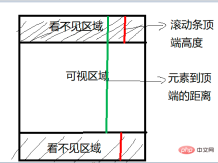
In daily development, we often need to determine whether the target element is within the view window or the distance from the view window is less than a value (such as 100 px), so as to implement some common functions, such as:
- Lazy loading of images
- Infinite scrolling of lists
- Calculate the exposure of advertising elements
- Preloading of clickable links
Three ways to determine whether an element is in the visible area
To determine whether an element is in the visible area, we commonly use three methods:
offsetTop, scrollTop
getBoundingClientRect
Intersection Observer
Method 1 , offsetTop, scrollTop
##offsetTop, the pixel distance between the top outer border of the element and the top inner border of the containing element, othersoffset The properties are shown in the figure below:

clientWidth, clientHeight:
- clientWidth
: The width of the element content area plus the left and right padding width, that is,clientWidth = content padding - clientHeight
: The height of the element content area plus The height of the top and bottom padding, that is,clientHeight = content padding
client elements do not include margins
scroll series are as follows:
scrollWidth
andscrollHeightare mainly used to determine the actual content of the element. The sizescrollLeft
andscrollTopproperties can both determine the current scrolling state of the element and set the scroll position of the element- Vertical scroll
- scrollTop > 0
- scrollLeft > 0
- scrollTop > 0
- Set the element's
scrollLeft
andscrollTopto 0 to reset the element's scroll position
Note
- The above attributes are read-only, and each access must be restarted
el.offsetTop - document.documentElement.scrollTop <= viewPortHeightCode implementation:
function isInViewPortOfOne (el) {
    // viewPortHeight 兼容所有浏览器写法
    const viewPortHeight = window.innerHeight || document.documentElement.clientHeight || document.body.clientHeight
    const offsetTop = el.offsetTop
    const scrollTop = document.documentElement.scrollTop
    const top = offsetTop - scrollTop
    return top <= viewPortHeight
}
Method 2: getBoundingClientRect
The return value is aDOMRect object with left, top, right, bottom, The x, y, width, and height properties. [Learning video sharing: vue video tutorial, web front-end video]
const target = document.querySelector('.target');
const clientRect = target.getBoundingClientRect();
console.log(clientRect);

// {
//   bottom: 556.21875,
//   height: 393.59375,
//   left: 333,
//   right: 1017,
//   top: 162.625,
//   width: 684
// }
The relationship diagram corresponding to the attributes is as follows:
top and left attribute values will change accordingly
- top is greater than or equal to 0
- left is greater than or equal to 0
- bottom is less than or equal to the window height
- right is less than or equal to the window width
function isInViewPort(element) {
  const viewWidth = window.innerWidth || document.documentElement.clientWidth;
  const viewHeight = window.innerHeight || document.documentElement.clientHeight;
  const {
    top,
    right,
    bottom,
    left,
  } = element.getBoundingClientRect();

  return (
    top >= 0 &&
    left >= 0 &&
    right <= viewWidth &&
    bottom <= viewHeight
  );
}
方法3:Intersection Observer
Intersection Observer 即重叠观察者,从这个命名就可以看出它用于判断两个元素是否重叠,因为不用进行事件的监听,性能方面相比getBoundingClientRect会好很多
使用步骤主要分为两步:创建观察者和传入被观察者
创建观察者
const options = {
  // 表示重叠面积占被观察者的比例,从 0 - 1 取值,
  // 1 表示完全被包含
  threshold: 1.0,
  root:document.querySelector('#scrollArea') // 必须是目标元素的父级元素
};

const callback = (entries, observer) => { ....}

const observer = new IntersectionObserver(callback, options);通过new IntersectionObserver创建了观察者 observer,传入的参数 callback 在重叠比例超过 threshold 时会被执行`
关于callback回调函数常用属性如下:
// 上段代码中被省略的 callback
const callback = function(entries, observer) {
    entries.forEach(entry => {
        entry.time;               // 触发的时间
        entry.rootBounds;         // 根元素的位置矩形,这种情况下为视窗位置
        entry.boundingClientRect; // 被观察者的位置举行
        entry.intersectionRect;   // 重叠区域的位置矩形
        entry.intersectionRatio;  // 重叠区域占被观察者面积的比例(被观察者不是矩形时也按照矩形计算)
        entry.target;             // 被观察者
    });
};通过 observer.observe(target) 这一行代码即可简单的注册被观察者
const target = document.querySelector('.target');
observer.observe(target);
案例分析
实现:创建了一个十万个节点的长列表,当节点滚入到视窗中时,背景就会从红色变为黄色
Html结构如下:
<div class="container"></div>
css样式如下:
.container {
    display: flex;
    flex-wrap: wrap;
}
.target {
    margin: 5px;
    width: 20px;
    height: 20px;
    background: red;
}往container插入1000个元素
const $container = $(".container");
// 插入 100000 个 <div class="target"></div>
function createTargets() {
const htmlString = new Array(100000)
.fill('<div class="target"></div>')
.join("");
$container.html(htmlString);
}这里,首先使用getBoundingClientRect方法进行判断元素是否在可视区域
function isInViewPort(element) {
    const viewWidth = window.innerWidth || document.documentElement.clientWidth;
    const viewHeight =
          window.innerHeight || document.documentElement.clientHeight;
    const { top, right, bottom, left } = element.getBoundingClientRect();

    return top >= 0 && left >= 0 && right <= viewWidth && bottom <= viewHeight;
}然后开始监听scroll事件,判断页面上哪些元素在可视区域中,如果在可视区域中则将背景颜色设置为yellow
$(window).on("scroll", () => {
    console.log("scroll !");
    $targets.each((index, element) => {
        if (isInViewPort(element)) {
            $(element).css("background-color", "yellow");
        }
    });
});通过上述方式,可以看到可视区域颜色会变成黄色了,但是可以明显看到有卡顿的现象,原因在于我们绑定了scroll事件,scroll事件伴随了大量的计算,会造成资源方面的浪费
下面通过Intersection Observer的形式同样实现相同的功能
首先创建一个观察者
const observer = new IntersectionObserver(getYellow, { threshold: 1.0 });getYellow回调函数实现对背景颜色改变,如下:
function getYellow(entries, observer) {
    entries.forEach(entry => {
        $(entry.target).css("background-color", "yellow");
    });
}最后传入观察者,即.target元素
$targets.each((index, element) => {
    observer.observe(element);
});The above is the detailed content of How does vue determine whether an element is in the visible area?. For more information, please follow other related articles on the PHP Chinese website!

 React Inside HTML: Integrating JavaScript for Dynamic Web PagesApr 16, 2025 am 12:06 AM
To integrate React into HTML, follow these steps: 1. Introduce React and ReactDOM in HTML files. 2. Define a React component. 3. Render the component into HTML elements using ReactDOM. Through these steps, static HTML pages can be transformed into dynamic, interactive experiences.
 The Benefits of React: Performance, Reusability, and MoreApr 15, 2025 am 12:05 AM
React’s popularity includes its performance optimization, component reuse and a rich ecosystem. 1. Performance optimization achieves efficient updates through virtual DOM and diffing mechanisms. 2. Component Reuse Reduces duplicate code by reusable components. 3. Rich ecosystem and one-way data flow enhance the development experience.
 React: Creating Dynamic and Interactive User InterfacesApr 14, 2025 am 12:08 AM
React is the tool of choice for building dynamic and interactive user interfaces. 1) Componentization and JSX make UI splitting and reusing simple. 2) State management is implemented through the useState hook to trigger UI updates. 3) The event processing mechanism responds to user interaction and improves user experience.
 React vs. Backend Frameworks: A ComparisonApr 13, 2025 am 12:06 AM
React is a front-end framework for building user interfaces; a back-end framework is used to build server-side applications. React provides componentized and efficient UI updates, and the backend framework provides a complete backend service solution. When choosing a technology stack, project requirements, team skills, and scalability should be considered.
 HTML and React: The Relationship Between Markup and ComponentsApr 12, 2025 am 12:03 AM
The relationship between HTML and React is the core of front-end development, and they jointly build the user interface of modern web applications. 1) HTML defines the content structure and semantics, and React builds a dynamic interface through componentization. 2) React components use JSX syntax to embed HTML to achieve intelligent rendering. 3) Component life cycle manages HTML rendering and updates dynamically according to state and attributes. 4) Use components to optimize HTML structure and improve maintainability. 5) Performance optimization includes avoiding unnecessary rendering, using key attributes, and keeping the component single responsibility.
 React and the Frontend: Building Interactive ExperiencesApr 11, 2025 am 12:02 AM
React is the preferred tool for building interactive front-end experiences. 1) React simplifies UI development through componentization and virtual DOM. 2) Components are divided into function components and class components. Function components are simpler and class components provide more life cycle methods. 3) The working principle of React relies on virtual DOM and reconciliation algorithm to improve performance. 4) State management uses useState or this.state, and life cycle methods such as componentDidMount are used for specific logic. 5) Basic usage includes creating components and managing state, and advanced usage involves custom hooks and performance optimization. 6) Common errors include improper status updates and performance issues, debugging skills include using ReactDevTools and Excellent
 React and the Frontend Stack: The Tools and TechnologiesApr 10, 2025 am 09:34 AM
React is a JavaScript library for building user interfaces, with its core components and state management. 1) Simplify UI development through componentization and state management. 2) The working principle includes reconciliation and rendering, and optimization can be implemented through React.memo and useMemo. 3) The basic usage is to create and render components, and the advanced usage includes using Hooks and ContextAPI. 4) Common errors such as improper status update, you can use ReactDevTools to debug. 5) Performance optimization includes using React.memo, virtualization lists and CodeSplitting, and keeping code readable and maintainable is best practice.
 React's Role in HTML: Enhancing User ExperienceApr 09, 2025 am 12:11 AM
React combines JSX and HTML to improve user experience. 1) JSX embeds HTML to make development more intuitive. 2) The virtual DOM mechanism optimizes performance and reduces DOM operations. 3) Component-based management UI to improve maintainability. 4) State management and event processing enhance interactivity.


Hot AI Tools

Undresser.AI Undress
AI-powered app for creating realistic nude photos

AI Clothes Remover
Online AI tool for removing clothes from photos.

Undress AI Tool
Undress images for free

Clothoff.io
AI clothes remover

AI Hentai Generator
Generate AI Hentai for free.

Hot Article
Hot Tools

SublimeText3 Chinese version
Chinese version, very easy to use

Atom editor mac version download
The most popular open source editor

VSCode Windows 64-bit Download
A free and powerful IDE editor launched by Microsoft

Zend Studio 13.0.1
Powerful PHP integrated development environment

DVWA
Damn Vulnerable Web App (DVWA) is a PHP/MySQL web application that is very vulnerable. Its main goals are to be an aid for security professionals to test their skills and tools in a legal environment, to help web developers better understand the process of securing web applications, and to help teachers/students teach/learn in a classroom environment Web application security. The goal of DVWA is to practice some of the most common web vulnerabilities through a simple and straightforward interface, with varying degrees of difficulty. Please note that this software

