



In jquery, the Chinese meaning of DOM is "Document Object Model". It is an interface that is independent of browsers, platforms, and languages. You can use this interface to easily access all standard components in the page; DOM operations It can be divided into three aspects: DOM Core, HTM-DOM and CSS-DOM. DOM operations in JQuery mainly include: creating, adding, deleting, modifying and searching DOM nodes.

The operating environment of this tutorial: windows7 system, jquery3.6.1 version, Dell G3 computer.
Dom is the abbreviation of Document Object Model, which means document object model. DOM is an interface that is independent of browsers, platforms, and languages. You can use this interface to easily access all standard components in the page. DOM operations can be divided into three aspects: DOM Core, HTM-DOM and CSS-DOM.
Every web page can be represented by DOM, and each DOM can be regarded as a DOM tree. The following html page structure can construct a DOM tree. Code:
The constructed DOM tree is as follows:
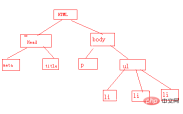
DOM operations in JQuery are mainly for Including: Create [New], Add [Add], Delete [Delete], Change [Modify], Check [Search] [Like database operation]. The following DOM operations will focus on the above DOM tree to learn JQueryDOM operations.
1. Search--Find DOM nodes
Finding nodes is very easy, and you can easily complete various search tasks using selectors. Example: Searching for element node p returns the text content within p $("p").text(); Example: Searching for attributes of element node p returns the attribute value corresponding to the attribute name $("p").attr("title" ), returns the value of the attribute title of p.
2. Build - Create a new DOM node
1. Create an element node
Create an element node and add the node to the DOM node as a child node of the
- element On the tree. First create the element point. Create the element node using Jquery's factory function $(). The format is as follows: $(html). This method will return a DOM object based on the incoming html string and wrap the DOM object into a JQuery Return after object. The JQuery code to create an element node is as follows: $li1=$("
- ")
The code returns $li1 which is a JQuery packaged by a DOM object object. The JQuery code to add the new node to the DOM tree is as follows:
$("ul").append($li1); The default "·", because no text is added to the node, only the default symbol is displayed. Create a text node below.
PS: The append() method is to add a DOM node. For details, see Add--Add DOM Node.
2. Create text nodes
Using JQuery’s factory function $() can also create text nodes. The JQuery code to create text nodes is as follows:
$li2=$( "
- Apple ");
- Durian "); A DOM object is packaged into a JQuery object, and the newly created attribute node is added to the DOM tree. The JQuery code is as follows:
- Banana ");
- Litchi
- ").appendTo("ul");
This method creates a new element li, and then adds li to the found ul element.
3. prepend() method
The prepend() method prepends the element to be added to each matching element. The method is as follows: $(target).prepend(element); Example:
$("ul").prepend("
- Mango ")
- 水瓜 ").prependTo("ul");
The code returns $li2, which is a DOM object packaged into a JQuery object. Add the newly created text node to the DOM tree. The JQuery code is as follows:
$("ul").append($li2);
After adding, you can see "·Apple" on the page. Right-click to view the page source code and find that the newly added text node does not have a title attribute. The following method creates a node with attributes.
3. Create attribute nodes
Creating attribute nodes is done using JQuery’s factory function just like element nodes and text nodes. The JQuery code to create the attribute node is as follows: $li3=$("
$("ul").append($li3);
After addition You can see "·Durian" on the page. Right-click to view the page source code and find that the newly added attribute node has the attribute title='Durian'.
3. Add--Add DOM nodes
It is meaningless to dynamically create new elements without adding them to the document. There are multiple methods to insert new nodes into the document, as follows: append() , appendTo(), prepend(), prependTo(), after(), insertAfter(), before(), insertBefore().
1. append() method
The append() method appends content to the matched element. The method is as follows: $("target").append(element); Example:
$("ul").append("
This method finds the ul element and then adds a new element to ul li element.
2. appendTo() method
The appendTo() method appends all matching elements to the specified element. This method is the inversion of the append() method [the inversion of the operation theme is not the result of the operation] operation . The method is as follows: $(element).appendTo(target); Example:
$("
This method will find the element ul and then add the new The li element serves as a child node of ul and is inserted into ul as the first child node of ul.
4. prependTo() method
The prependTo() method adds elements to the internal prepend of each matching element. The method is as follows: $(element).prependTo(); Example:
$("
This method inserts the newly created element li into the search As the first subsection element of ul in the ul element.
5. after() method
The after() method adds elements after the matched element, and the newly added element is used as the sibling element immediately after the target element. The method is as follows: $(target).after(element);Example:
$("p").after("Add a new section. Add a section. Add a section. Add a section. Add a section. ");
The method will find the node p, and then add the newly created element after the span node as a sibling node of p.
6. insertAfter() method
The insertAfter() method inserts the newly created element after the found target element as a sibling node of the target element. The method is as follows: $(element).insertAfter(target); Example:
$("
insertAfter operation
").insertAfter("span");Method adds the newly created p element to the span after the target element is found, as the first sibling node after the target element.
7. before() method
The before() method inserts before each matching element as the previous sibling node of the matching element. The method is as follows: $(target).before(element); Example:
$("p").before("The following is a paragraph");
The before method searches for each element p and inserts the newly created span element before the element p as the previous sibling node of p.
8. insertBefore() method
The insertBefore() method adds the new element before the target element as the previous sibling node of the target element. The method is as follows: $(element).insertBefore (target);Example:
$("anchor").insertBefore("ul");
insertBefore() Create a new a element and add the newly created a element before the element ul as the previous sibling node of ul.
The first four methods of adding elements are to add them to the inside of the element, and the last four are to add to the outside of the element. These methods can complete any form of adding elements.
4. Delete--Delete DOM node operation
If you want to delete an element in the document, JQuery provides two methods of deleting nodes: remove() and empty();
1. remove() method
The remove() method deletes all matching elements. The passed parameters are used to filter elements. This method can delete all child nodes in the element. When matching After the node and its descendants are deleted, the return value of this method is a reference to the deleted node, so you can use this reference to reuse these deleted elements. The method is as follows: $(element).remove(); Example:
$span=$("span").remove();
$span.insertAfter("ul");
In this example, all span elements are first deleted, the deleted elements are received using $span, and the deleted elements are added after ul as sibling nodes of ul. This operation is equivalent to moving all span elements and descendant elements behind ul.
2. empty() method.
Strictly speaking, the empty() method does not delete elements. This method only clears nodes. It can clear all child nodes in the element. The method is as follows: $(element).empty(); Example:
$("ul li:eq(0)").empty();
This example uses the empty method to clear ul The text value of the first li in . Only the default symbol "·" for the li tag can be downloaded.
5. Modify--Modify DOM node operation
You can use multiple methods to modify element nodes in the document: copy the node, replace the node, and wrap the node.
1. Copy node $(element).clone()
The copy node method can copy node elements, and can decide whether to copy node elements based on parameters. The method is as follows: $(element).clone(true); Example:
$("ul li:eq(0)").clone(true);
This method copies ul For the first li element, the true parameter determines that the element behavior will also be copied when the element is copied. There is no parameter when the behavior is not copied.
2. Replace node $(element).repalcewith(), $(element).repalceAll()
The replace node method can replace a node, and there are two forms of implementation: replaceWith () and replaceAll(). Use the replaceWith method to replace the previous element with the later element. The replaceAll method uses the previous element to replace the later element. The method is as follows: $(oldelement).replaceWith(newelement);$(newelement).repalceAll( oldelement);Example: $("p").replaceWith("I want to keep");This method uses the strong element to replace the p element.
$("
Replace strong
").repalceAll("strong");This example uses the h3 element to replace all strong elements.3. Wrap node $(element).wrap(), $(element).wrapAll(), $(element).wrapInner()
The wrap node method uses other tags to wrap the target The element thus changes the display form of the element, etc., and the operation does not destroy the meaning of the original document. There are three implementation forms of wrapping nodes: wrap();wrapAll();wrapInner();
The wrap() method is as follows: $(dstelement).wrap(tag); Example:
$ ("p").wrap("");This example method uses the b tag to wrap all p elements and each element is wrapped with the b tag.
The wrapAll() method is as follows: $(dstelement).wrapAll(tag); Example:
$("p").wrapAll("" ); The access example method uses b tags to wrap all p elements, and all p element tags are wrapped with a b tag.
The wrapInner() method is as follows: $(dstelement).wrapInner(tag); Example:
$("strong").wrapInner("" );This example uses the b tag to wrap each child element of a strong element.
Other operations on Dom elements: attribute operations, style operations, setting and getting HTML, text and values, traversing node operations, Css-Dom operations.
1. Attribute operations attr() and removeAttr()
attr() method can obtain element attributes and can also set element attributes. The method is as follows. When the attr(para1) method has a parameter, it is used to obtain the attribute value of para1 of the current element. When attr(para1,attrValue) has two parameters, it sets the attribute value of the current element named para1 to attrValue; Example:
$("p").attr("title"); This example is used to obtain the title attribute value of the p element.
$("p").attr("title","Your favorite fruit");This example sets the title attribute value of the p element to "Your favorite fruit";
If you set multiple attribute values at one time, you can use the "name/value" pair format, for example:
$("p").attr({"title":"Your favorite fruit"," name":"fruit"}). This example sets two property values at once.
The removeAttr() method is used to delete a specific attribute by specifying the attribute name in the parameter. Example:
$("p").removeAttr("name"); This method is to remove the name attribute of the p element.
2. Style operations addClass(), removeClass(), toggleClass() and hasClass()
Add the style addClass() method, use this method to add the corresponding style to the target element, method As follows: $(element).addClass(); Example:
$("p").addClass("ul"); This example sets the style of element p to ul.
Remove style removeClass() method, use this method to remove the specified style of the target element, the method is as follows: $(element).removeClass(); Example:
$("p" ).removeClass("ul"); This help removes the ul class style of the p element.
Switch style toggleClass() method, use this method to switch the style of the target element, the method is as follows: $(element).toggleClass(); Example:
$("p").toggleClass ("ul"); This method switches back and forth [add and delete to achieve switching] the style of element p ul.
Determine whether the element uses the style $(element).hasClass(), the method is as follows: $(element) .hasClass(class); Example:
alert($("p").hasClass("ul"));打印出p元素是否有ul样式。PS: The difference between the addClass() and attr() methods is to set the style. The attr method sets the attribute value corresponding to the attribute name of the element as the parameter value in the method, addClass () adds the attribute value to the attribute value corresponding to the attribute name.
例:已有元素
元素样式
,使用attr()和addClass()分别添加新样式。$("p").attr("class","another") //结果是<p class='another'>元素样式</>
$("p").addClass("class","another") //结果是<p class='class1 another'>元素样式</p>3、设置和获取HTML【html()】,文本【text()】和值【val()】
html()方法获得或设置某个元素的html元素。方法如下:$(selector).html();
例:
$("p").html();  //该示例获得元素p的html内容。
$("p").html("<strong>添加html内容</strong>");  //该示例设置p的html内容为”<strong>添加html内容</strong>“;
PS:该方法可以用于XHTML文档,不能用于XML文档。
text()方法获得或设置某个元素的文本值。方法如下:$(selecotr).text();
例:
$("p").text();该示例获得元素p的text文本内容。
$("p").text("重新设置的文本内容");该示例设置元素p的text文本为"重新设置的文本内容";
PS:该方法对html和XML文档都适用。
val()方法获得或设置某个元素的值,如果元素值是多选则以数组形式返回,方法如下:$(selector).val();
例:文本元素
<input type="text" id="userName" value="请输入用户名" />
$("#userName").val(); //获得input元素的值。
$("#userName").val('响马'); //设置input元素的值为'响马'。val()方法的不仅能操作input,最重要的一个用途用于select【下拉列表框】、checkbox【多选框】、radio【单选框】。
例:在下拉框下的多选赋值应用
<select id="fruits" multiple="multiple">
<option>苹果</option>
<option>香蕉</option>
<option>西瓜</option>
</select>
$("#fruits").val(['苹果','香蕉']); //该示例使select中苹果和香蕉两项被选中。4、遍历节点操作children()、next()、prev()、siblings()和closest()
children()方法用于取得匹配元素的子元素集合,只匹配子元素不考虑任何后代元素。方法如下:$(selector).children();
例:
$("$("body").children().length; //该示例获得body元素的子元素个数;next()方法用于匹配元素的下一个兄弟节点,方法如下:$(selector).next();
例:
$("p").next().html(); //该示例获得p元素的下一个兄弟节点的html内容。prev()方法用于匹配元素的上一个兄弟节点,方法如下:$(selector).prev();
例:
$("ul").prev().text(); //该示例获得ul元素的上一个兄弟节点的文本内容。siblings方法()用于匹配目标元素的所有兄弟元素,方法如下:$(selector).siblings();
例:
$("p").slibings(); //示例获得p元素的所有兄弟节点元素。closest()方法()用来取得最近的匹配元素,首先检查当前元素是否匹配如果匹配则直接返回,否则继续向上查找父元素中符合条件的元素返回,如果没有匹配的元素则返回空JQuery对象。
5、CSS-Dom操作css()、offset()、position()、scrollTop()和scrollLeft()
css()方法用于获取、设置元素的一个或多个属性。方法如下:
$(selector).css();
例:
$("p").css("color","red");  //该示例用于设置元素的颜色属性为红色;
$("p").css("color")  //该示例用于获得元素的color样式值;
$("p").css({"font-size":"30px","backgroundColor","#888888"});  //该示例用于设置元素的多个样式。
offset()方法用于获取元素相对当前窗体的偏移量,其返回对象包括两个属性:top和left。方法如下:$(selector).offset()
var offset= $("p").offset();
var left=offset.left;
var top=offset.top;  //该示例用于获得元素p的偏移量。
PS:offset()只对可见元素有效。
position()方法用于获取元素于最近的个position样式属性设置为relative或者absolute的祖交节点的相对偏移量。方法如下:$(selector).position();例:
var postion = $("p").positon();
var left=positon.left;
var top=positon.top;  //该示例用于获得元素p的位置。
scrollTop()和scrollLeft()方法用于获取元素的滚动条距顶端的距离和距左侧的距离。方法如下:
$(selector).scrollTop();$(selector).scrollLeft();
例:
var scrollTop=$("p").scrollTop();
var scrollLeft=$("p").scrollLeft();  //该示例用于获得元素的滚动条的位置。
也可以添加参数将元素滚动到指定的位置。例:
$("textarea").scrollTop(300);
$("textarea").scrollLeft(300);【推荐学习:javascript视频教程】
The above is the detailed content of What is the Chinese meaning of DOM in jquery. For more information, please follow other related articles on the PHP Chinese website!

 React: The Power of a JavaScript Library for Web DevelopmentApr 18, 2025 am 12:25 AM
React is a JavaScript library developed by Meta for building user interfaces, with its core being component development and virtual DOM technology. 1. Component and state management: React manages state through components (functions or classes) and Hooks (such as useState), improving code reusability and maintenance. 2. Virtual DOM and performance optimization: Through virtual DOM, React efficiently updates the real DOM to improve performance. 3. Life cycle and Hooks: Hooks (such as useEffect) allow function components to manage life cycles and perform side-effect operations. 4. Usage example: From basic HelloWorld components to advanced global state management (useContext and
 React's Ecosystem: Libraries, Tools, and Best PracticesApr 18, 2025 am 12:23 AM
The React ecosystem includes state management libraries (such as Redux), routing libraries (such as ReactRouter), UI component libraries (such as Material-UI), testing tools (such as Jest), and building tools (such as Webpack). These tools work together to help developers develop and maintain applications efficiently, improve code quality and development efficiency.
 React and Frontend Development: A Comprehensive OverviewApr 18, 2025 am 12:23 AM
React is a JavaScript library developed by Facebook for building user interfaces. 1. It adopts componentized and virtual DOM technology to improve the efficiency and performance of UI development. 2. The core concepts of React include componentization, state management (such as useState and useEffect) and the working principle of virtual DOM. 3. In practical applications, React supports from basic component rendering to advanced asynchronous data processing. 4. Common errors such as forgetting to add key attributes or incorrect status updates can be debugged through ReactDevTools and logs. 5. Performance optimization and best practices include using React.memo, code segmentation and keeping code readable and maintaining dependability
 The Power of React in HTML: Modern Web DevelopmentApr 18, 2025 am 12:22 AM
The application of React in HTML improves the efficiency and flexibility of web development through componentization and virtual DOM. 1) React componentization idea breaks down the UI into reusable units to simplify management. 2) Virtual DOM optimization performance, minimize DOM operations through diffing algorithm. 3) JSX syntax allows writing HTML in JavaScript to improve development efficiency. 4) Use the useState hook to manage state and realize dynamic content updates. 5) Optimization strategies include using React.memo and useCallback to reduce unnecessary rendering.
 Understanding React's Primary Function: The Frontend PerspectiveApr 18, 2025 am 12:15 AM
React's main functions include componentized thinking, state management and virtual DOM. 1) The idea of componentization allows splitting the UI into reusable parts to improve code readability and maintainability. 2) State management manages dynamic data through state and props, and changes trigger UI updates. 3) Virtual DOM optimization performance, update the UI through the calculation of the minimum operation of DOM replica in memory.
 Frontend Development with React: Advantages and TechniquesApr 17, 2025 am 12:25 AM
The advantages of React are its flexibility and efficiency, which are reflected in: 1) Component-based design improves code reusability; 2) Virtual DOM technology optimizes performance, especially when handling large amounts of data updates; 3) The rich ecosystem provides a large number of third-party libraries and tools. By understanding how React works and uses examples, you can master its core concepts and best practices to build an efficient, maintainable user interface.
 React vs. Other Frameworks: Comparing and Contrasting OptionsApr 17, 2025 am 12:23 AM
React is a JavaScript library for building user interfaces, suitable for large and complex applications. 1. The core of React is componentization and virtual DOM, which improves UI rendering performance. 2. Compared with Vue, React is more flexible but has a steep learning curve, which is suitable for large projects. 3. Compared with Angular, React is lighter, dependent on the community ecology, and suitable for projects that require flexibility.
 Demystifying React in HTML: How It All WorksApr 17, 2025 am 12:21 AM
React operates in HTML via virtual DOM. 1) React uses JSX syntax to write HTML-like structures. 2) Virtual DOM management UI update, efficient rendering through Diffing algorithm. 3) Use ReactDOM.render() to render the component to the real DOM. 4) Optimization and best practices include using React.memo and component splitting to improve performance and maintainability.


Hot AI Tools

Undresser.AI Undress
AI-powered app for creating realistic nude photos

AI Clothes Remover
Online AI tool for removing clothes from photos.

Undress AI Tool
Undress images for free

Clothoff.io
AI clothes remover

AI Hentai Generator
Generate AI Hentai for free.

Hot Article
Hot Tools

MinGW - Minimalist GNU for Windows
This project is in the process of being migrated to osdn.net/projects/mingw, you can continue to follow us there. MinGW: A native Windows port of the GNU Compiler Collection (GCC), freely distributable import libraries and header files for building native Windows applications; includes extensions to the MSVC runtime to support C99 functionality. All MinGW software can run on 64-bit Windows platforms.

PhpStorm Mac version
The latest (2018.2.1) professional PHP integrated development tool

DVWA
Damn Vulnerable Web App (DVWA) is a PHP/MySQL web application that is very vulnerable. Its main goals are to be an aid for security professionals to test their skills and tools in a legal environment, to help web developers better understand the process of securing web applications, and to help teachers/students teach/learn in a classroom environment Web application security. The goal of DVWA is to practice some of the most common web vulnerabilities through a simple and straightforward interface, with varying degrees of difficulty. Please note that this software

Safe Exam Browser
Safe Exam Browser is a secure browser environment for taking online exams securely. This software turns any computer into a secure workstation. It controls access to any utility and prevents students from using unauthorized resources.

VSCode Windows 64-bit Download
A free and powerful IDE editor launched by Microsoft

