



The floating syntax in the CSS language is "float: attribute value;". The float attribute is used to define the direction in which the element floats. It will make the box (element) float on the standard flow, and the elements around it will also be rearranged until its outer edge touches the border of the containing box or another floating box. . This attribute has three attribute values: 1. "left", which defines the element to float to the left; 2. "right", which defines the element to float to the right; 3. "none", which defines the element not to float.

The operating environment of this tutorial: Windows 7 system, CSS3&&HTML5 version, Dell G3 computer.
In the CSS language, if you want an element to float, you need to use the float attribute; This attribute specifies whether a box (element) should float. In the past, this property was always applied to images to make the text surround the image, but in CSS, any element can be floated. A floated element creates a block-level box, regardless of what type of element it is.
If floating non-replaced elements, specify an explicit width; otherwise, they are made as narrow as possible.
Note: If there is very little space for a floating element on a row, the element will jump to the next row, and this process will continue until a certain row has enough space.
The three attribute values of the float floating attribute:
left The element floats to the left.
#right The element floats to the right.
#none Default value. The element is not floated and appears where it appears in the text.
Floating
1. Three mechanisms of CSS layout
css provides 3 mechanisms to set The placement positions of the boxes are: normal flow (standard flow), floating and positioning, among which:
1. Normal flow (standard flow: "Block-level elements" will occupy one line, "from top to bottom" "Arrangement; "Inline elements" will be arranged in order, "from left to right", and will automatically wrap when touching the edge of the parent element;
2. Floating: Let the box "float" from the normal flow, the main function Let multiple block-level boxes be displayed in one line.
3. Positioning: "Position" the box at a certain position - CSS is inseparable from positioning, especially the subsequent js special effects.
2. Why is floating required?
**Concept: **Element floating means**an element with a floating attribute set will:**
- Out of the control of standard ordinary flow.
- Move to the specified position.
Function:
- Let more Boxes (divs) are arranged horizontally in a row, making floating an important means of layout.
- Can realize left and right alignment of boxes, etc...
- Floating was first used Control the image to achieve the effect of text surrounding the image.
Floating Tips——Floating
nbsp;html>


    <meta>
    <meta>
    <title>Document</title>
    <style>
        .box1{
            width: 200px;
            height: 200px;
            background-color: rgba(255,0,0,0.5);
            float: left;
        }
        .box2{
            width: 300px;
            height: 150px;
            background-color: skyblue;
        }
    </style>


    <div></div>
    <div></div>

## The float<span style="background-color: rgb(255, 192, 0);"></span> attribute will make the box float on top of the standard stream, so the second standard stream box runs to the bottom of the floating box.
nbsp;html>


    <meta>
    <meta>
    <title>Document</title>
    <style>
        .box1{
            width: 200px;
            height: 200px;
            background-color: rgba(255,0,0,0.5);
            /* 让第一个盒子浮动起来,不占位置 */
            float: left;
        }
        .box2{
            width: 300px;
            height: 150px;
            background-color: skyblue;
        }
    </style>


    <div></div>
    <div></div>
So, the thing under box2 actually ran under box1, and was suppressed by box1, blocking it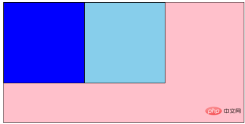
div {
  width: 200px;
  height: 200px;
  background-color: pink;
  /* 转换为行内块元素,可以水平显示,不过 div 之间有间隙,不方便处理 */
  /* display: inline-block; */
  /* 设置浮动属性,可以让 div 水平排列,并且没有间隙 */
  float: left;
}

.two {
  background-color: hotpink;
}
1. The relationship between floating elements and parent boxes
- The float of the child box is aligned with the parent box.

2. The relationship between floating elements and sibling boxes
In a parent box, if ** before A brother box** is:
- 浮动的,那么当前盒子会与前一个盒子的顶部对齐;
- 普通流的,那么当前盒子会显示在前一个兄弟盒子的下方。
结论: 如果一个盒子里面有多个子盒子,如果其中一个盒子浮动了,其他兄弟也应该浮动。防止引起问题
ps:浮动只会影响当前的或者后面的标准流的盒子,不会影响前面的标准流
建议:如果一个盒子里面有多个盒子,如果其中的一个盒子浮动了,其他兄弟也应该浮动。防止引起问题
三、为什么要清除浮动
因为父级盒子很多情况下,不方便给高度,但是子盒子浮动就不占有位置,最后父级盒子高度为0,就影响了下面的标准流盒子。 !
结论:
- 由于浮动元素不再占用原文档流的位置,所以它会对后面的元素排版产生影响
- 准确地说,并不是清除浮动,而是清除浮动后造成的影响
四、清除浮动本质
清除浮动主要为了解决父级元素因为子级浮动引起内部高度为0 的问题。 清除浮动之后, 父级就会根据浮动的子盒子自动检测高度。 父级有了高度,就不会影响下面的标准流了
五、清除浮动的四种方式
在CSS中,clear属性用于清除浮动
语法:
选择器{clear:属性值;} //clear 清除
| 属性值 | 右描述 |
|---|---|
| left | 不允许左侧有浮动元素(清除左侧浮动的影响) |
| right | 不允许右侧有浮动元素(清除右侧浮动的影响) |
| both | 同时清除左右俩侧浮动的影响 |
但是我们实际工作中, 几乎只用 clear: both;
1.额外标签法(隔墙法)
<!-- 是W3C推荐的做法是通过在浮动元素末尾添加一个空的标签:
  1.添加在浮动元素最后
  2.该元素必须是块元素,行内元素无效
 -->

<div></div>
- 优点:通俗易懂,书写方便
- 缺点:添加许多无意义的标签,结构化较差
2.父级添加overflow属性方法
可以给父级添加: overflow为 hidden| auto| scroll 都可以实现。
- 优点:代码简洁
- 缺点:内容增多时候容易造成不会自动换行导致内容被隐藏掉,无法显示需要溢出的元素。
3.使用after伪元素清除浮动
after 方式为空元素额外标签法的升级版,好处是不用单独加标签了
.clearfix:after {
  content: "";
  display: block;
  height: 0;
  clear: both;
  visibility: hidden;
}

.clearfix {
  /* IE6、7 专有 */
  *zoom: 1;
}
- 优点:符合闭合浮动思想 结构语义化正确
- 缺点:由于IE6-7不支持:after,使用 zoom:1触发 hasLayout。
4.使用双伪元素清除浮动
.clearfix:before,.clearfix:after {
  content:"";
  display:table;
}
.clearfix:after {
 clear:both;
}
.clearfix {
  *zoom:1;
}
- 优点:代码更简洁
- 缺点:由于IE6-7不支持:after,使用 zoom:1触发 hasLayout。
总结
标准流(普通流)在布局中 块级元素会独占一行,从上向下排列;行内元素会按照顺序,从左到右排列,碰到父元素边缘则自动换行。
浮动的应用场景大部分用于让盒子水平排列成一行和控制图片。
清除浮动主要为了解决父级元素因为子级浮动引起内部高度为0 的问题。
-
清除浮动一共有4中方式:
额外标签法(隔墙法)
父级添加overflow属性方法
使用after伪元素清除浮动
使用双伪元素清除浮动
(学习视频分享:web前端)
The above is the detailed content of Which item in css language is floating syntax?. For more information, please follow other related articles on the PHP Chinese website!

 React Inside HTML: Integrating JavaScript for Dynamic Web PagesApr 16, 2025 am 12:06 AM
To integrate React into HTML, follow these steps: 1. Introduce React and ReactDOM in HTML files. 2. Define a React component. 3. Render the component into HTML elements using ReactDOM. Through these steps, static HTML pages can be transformed into dynamic, interactive experiences.
 The Benefits of React: Performance, Reusability, and MoreApr 15, 2025 am 12:05 AM
React’s popularity includes its performance optimization, component reuse and a rich ecosystem. 1. Performance optimization achieves efficient updates through virtual DOM and diffing mechanisms. 2. Component Reuse Reduces duplicate code by reusable components. 3. Rich ecosystem and one-way data flow enhance the development experience.
 React: Creating Dynamic and Interactive User InterfacesApr 14, 2025 am 12:08 AM
React is the tool of choice for building dynamic and interactive user interfaces. 1) Componentization and JSX make UI splitting and reusing simple. 2) State management is implemented through the useState hook to trigger UI updates. 3) The event processing mechanism responds to user interaction and improves user experience.
 React vs. Backend Frameworks: A ComparisonApr 13, 2025 am 12:06 AM
React is a front-end framework for building user interfaces; a back-end framework is used to build server-side applications. React provides componentized and efficient UI updates, and the backend framework provides a complete backend service solution. When choosing a technology stack, project requirements, team skills, and scalability should be considered.
 HTML and React: The Relationship Between Markup and ComponentsApr 12, 2025 am 12:03 AM
The relationship between HTML and React is the core of front-end development, and they jointly build the user interface of modern web applications. 1) HTML defines the content structure and semantics, and React builds a dynamic interface through componentization. 2) React components use JSX syntax to embed HTML to achieve intelligent rendering. 3) Component life cycle manages HTML rendering and updates dynamically according to state and attributes. 4) Use components to optimize HTML structure and improve maintainability. 5) Performance optimization includes avoiding unnecessary rendering, using key attributes, and keeping the component single responsibility.
 React and the Frontend: Building Interactive ExperiencesApr 11, 2025 am 12:02 AM
React is the preferred tool for building interactive front-end experiences. 1) React simplifies UI development through componentization and virtual DOM. 2) Components are divided into function components and class components. Function components are simpler and class components provide more life cycle methods. 3) The working principle of React relies on virtual DOM and reconciliation algorithm to improve performance. 4) State management uses useState or this.state, and life cycle methods such as componentDidMount are used for specific logic. 5) Basic usage includes creating components and managing state, and advanced usage involves custom hooks and performance optimization. 6) Common errors include improper status updates and performance issues, debugging skills include using ReactDevTools and Excellent
 React and the Frontend Stack: The Tools and TechnologiesApr 10, 2025 am 09:34 AM
React is a JavaScript library for building user interfaces, with its core components and state management. 1) Simplify UI development through componentization and state management. 2) The working principle includes reconciliation and rendering, and optimization can be implemented through React.memo and useMemo. 3) The basic usage is to create and render components, and the advanced usage includes using Hooks and ContextAPI. 4) Common errors such as improper status update, you can use ReactDevTools to debug. 5) Performance optimization includes using React.memo, virtualization lists and CodeSplitting, and keeping code readable and maintainable is best practice.
 React's Role in HTML: Enhancing User ExperienceApr 09, 2025 am 12:11 AM
React combines JSX and HTML to improve user experience. 1) JSX embeds HTML to make development more intuitive. 2) The virtual DOM mechanism optimizes performance and reduces DOM operations. 3) Component-based management UI to improve maintainability. 4) State management and event processing enhance interactivity.


Hot AI Tools

Undresser.AI Undress
AI-powered app for creating realistic nude photos

AI Clothes Remover
Online AI tool for removing clothes from photos.

Undress AI Tool
Undress images for free

Clothoff.io
AI clothes remover

AI Hentai Generator
Generate AI Hentai for free.

Hot Article
Hot Tools

VSCode Windows 64-bit Download
A free and powerful IDE editor launched by Microsoft

DVWA
Damn Vulnerable Web App (DVWA) is a PHP/MySQL web application that is very vulnerable. Its main goals are to be an aid for security professionals to test their skills and tools in a legal environment, to help web developers better understand the process of securing web applications, and to help teachers/students teach/learn in a classroom environment Web application security. The goal of DVWA is to practice some of the most common web vulnerabilities through a simple and straightforward interface, with varying degrees of difficulty. Please note that this software

SublimeText3 Linux new version
SublimeText3 Linux latest version

Dreamweaver CS6
Visual web development tools

MantisBT
Mantis is an easy-to-deploy web-based defect tracking tool designed to aid in product defect tracking. It requires PHP, MySQL and a web server. Check out our demo and hosting services.

