


 Web Front-endVue.jsWhat should I do if the Vue project loads slowly for the first time? Two solutions
What should I do if the Vue project loads slowly for the first time? Two solutions

What should I do if the vue project loads slowly for the first time? The following article will introduce to you the reasons why the vue page is slow to load for the first time and two solutions. I hope it will be helpful to everyone!

When the project that packaged vue was deployed to the server for the first time, I found that the initial loading was particularly slow. It took nearly 20 seconds for the page to load, which was not as smooth as in the development environment. . The main reason is that if the page is packaged without relevant configuration, the resource file will be extremely large, and it will be extremely time-consuming to load them all at once. Here is a brief summary of some optimization solutions I have used. (Learning video sharing: vuejs video tutorial)
First we can install the webpack-bundle-analyzer plug-in. Through this plug-in we can see the size of the packaged file when packaging, which can be clearly seen. to see which files are larger.
Solution 1
1. Remove the map file in the compiled file.
After compilation, we will see a lot of .map files in the folder. These files mainly help us debug the code online and view the style. Therefore, in order to avoid the deployment package being too large, these files are usually not generated.
Set the value of productionSourceMap to false in the config/index.js file. After packaging again, you can see that there is no map file in the project file (file size 35MB–>10.5MB)
2, vue-router routing lazy loading
Lazy loading is the delayed loading of components. Usually, when a vue page is entered after running, there will be a default page, while other pages can only be clicked on It needs to be loaded later. Using lazy loading can divide the resources in the page into multiple parts, thereby reducing the time spent on the first load.
Lazy loading routing configuration:

Non-lazy loading routing configuration:

As shown in the picture Shown as a js file packaged through lazy loading. Instead of lazy loading, there is generally only one app.js file after packaging.

Solution 2
Use CDN to reduce the code size and speed up the request
Why use CDN
Using CDN mainly solves two problems:
The packaging time is too long, the code size after packaging is too large, and the request is slow
The server network is not Stable bandwidth is not high, using CDN can avoid server bandwidth problems
Specific steps
1.Introduce CDN## in /index.html #
<!DOCTYPE html>
<html>
    <head>
        <meta charset="utf-8">
        <title>vue-manage-system</title>
        <meta name="viewport" content="width=device-width,initial-scale=1,minimum-scale=1,maximum-scale=1,user-scalable=no">

        <script src="https://cdn.bootcss.com/vue/2.5.3/vue.js"></script>
        <script src="https://cdn.bootcss.com/vue-router/2.7.0/vue-router.min.js"></script>
        <script src="https://cdn.bootcss.com/axios/0.17.1/axios.min.js"></script>
        <link rel="stylesheet" href="https://cdn.bootcss.com/element-ui/2.4.0/theme-chalk/index.css">
        <script src="https://cdn.bootcss.com/element-ui/2.4.0/index.js"></script>
    </head>
    <body>
        <div id="app"></div>
    </body>
</html>
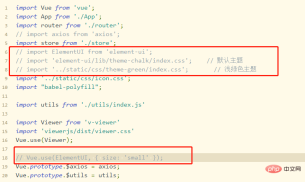
Note: After modifying the configuration, it still prompts that Element is undefined. This is because Element depends on Vue, and vue.js needs to be introduced before element-ui, so vue.js must also be changed to the cnd introduction method.2. Modify the configuration in /build/webpack.base.conf.js. Add the externals attribute to module.exports (see https://webpack.docschina.org/configuration/externals/ for details), where the key is the one referenced in the project and the value is the name of the referenced resource. It should be noted that the resource name needs to check the referenced JS source code to see what the global variables are. For example, the global variable of element-ui is ELEMENT module.exports = {
context: path.resolve(__dirname, '../'),
entry: {
app: './src/main.js'
},
externals: {
'vue': 'Vue',
'vue-router': 'VueRouter',
'ElementUI': 'ELEMENT',
'axios': 'axios',
}
}3. Delete the original importIf you do not delete the original import, the project will still introduce resources from node_modules. In other words, if you do not delete it, the referenced resources will still be packaged together when npm run build, and the generated file will be much larger. So I think it’s better to delete it.
web front-end development, Basic programming video)
The above is the detailed content of What should I do if the Vue project loads slowly for the first time? Two solutions. For more information, please follow other related articles on the PHP Chinese website!

 The Frontend Landscape: How Netflix Approached its ChoicesApr 15, 2025 am 12:13 AM
Netflix's choice in front-end technology mainly focuses on three aspects: performance optimization, scalability and user experience. 1. Performance optimization: Netflix chose React as the main framework and developed tools such as SpeedCurve and Boomerang to monitor and optimize the user experience. 2. Scalability: They adopt a micro front-end architecture, splitting applications into independent modules, improving development efficiency and system scalability. 3. User experience: Netflix uses the Material-UI component library to continuously optimize the interface through A/B testing and user feedback to ensure consistency and aesthetics.
 React vs. Vue: Which Framework Does Netflix Use?Apr 14, 2025 am 12:19 AM
Netflixusesacustomframeworkcalled"Gibbon"builtonReact,notReactorVuedirectly.1)TeamExperience:Choosebasedonfamiliarity.2)ProjectComplexity:Vueforsimplerprojects,Reactforcomplexones.3)CustomizationNeeds:Reactoffersmoreflexibility.4)Ecosystema
 The Choice of Frameworks: What Drives Netflix's Decisions?Apr 13, 2025 am 12:05 AM
Netflix mainly considers performance, scalability, development efficiency, ecosystem, technical debt and maintenance costs in framework selection. 1. Performance and scalability: Java and SpringBoot are selected to efficiently process massive data and high concurrent requests. 2. Development efficiency and ecosystem: Use React to improve front-end development efficiency and utilize its rich ecosystem. 3. Technical debt and maintenance costs: Choose Node.js to build microservices to reduce maintenance costs and technical debt.
 React, Vue, and the Future of Netflix's FrontendApr 12, 2025 am 12:12 AM
Netflix mainly uses React as the front-end framework, supplemented by Vue for specific functions. 1) React's componentization and virtual DOM improve the performance and development efficiency of Netflix applications. 2) Vue is used in Netflix's internal tools and small projects, and its flexibility and ease of use are key.
 Vue.js in the Frontend: Real-World Applications and ExamplesApr 11, 2025 am 12:12 AM
Vue.js is a progressive JavaScript framework suitable for building complex user interfaces. 1) Its core concepts include responsive data, componentization and virtual DOM. 2) In practical applications, it can be demonstrated by building Todo applications and integrating VueRouter. 3) When debugging, it is recommended to use VueDevtools and console.log. 4) Performance optimization can be achieved through v-if/v-show, list rendering optimization, asynchronous loading of components, etc.
 Vue.js and React: Understanding the Key DifferencesApr 10, 2025 am 09:26 AM
Vue.js is suitable for small to medium-sized projects, while React is more suitable for large and complex applications. 1. Vue.js' responsive system automatically updates the DOM through dependency tracking, making it easy to manage data changes. 2.React adopts a one-way data flow, and data flows from the parent component to the child component, providing a clear data flow and an easy-to-debug structure.
 Vue.js vs. React: Project-Specific ConsiderationsApr 09, 2025 am 12:01 AM
Vue.js is suitable for small and medium-sized projects and fast iterations, while React is suitable for large and complex applications. 1) Vue.js is easy to use and is suitable for situations where the team is insufficient or the project scale is small. 2) React has a richer ecosystem and is suitable for projects with high performance and complex functional needs.
 How to jump a tag to vueApr 08, 2025 am 09:24 AM
The methods to implement the jump of a tag in Vue include: using the a tag in the HTML template to specify the href attribute. Use the router-link component of Vue routing. Use this.$router.push() method in JavaScript. Parameters can be passed through the query parameter and routes are configured in the router options for dynamic jumps.


Hot AI Tools

Undresser.AI Undress
AI-powered app for creating realistic nude photos

AI Clothes Remover
Online AI tool for removing clothes from photos.

Undress AI Tool
Undress images for free

Clothoff.io
AI clothes remover

AI Hentai Generator
Generate AI Hentai for free.

Hot Article
Hot Tools

Notepad++7.3.1
Easy-to-use and free code editor

Zend Studio 13.0.1
Powerful PHP integrated development environment

SecLists
SecLists is the ultimate security tester's companion. It is a collection of various types of lists that are frequently used during security assessments, all in one place. SecLists helps make security testing more efficient and productive by conveniently providing all the lists a security tester might need. List types include usernames, passwords, URLs, fuzzing payloads, sensitive data patterns, web shells, and more. The tester can simply pull this repository onto a new test machine and he will have access to every type of list he needs.

DVWA
Damn Vulnerable Web App (DVWA) is a PHP/MySQL web application that is very vulnerable. Its main goals are to be an aid for security professionals to test their skills and tools in a legal environment, to help web developers better understand the process of securing web applications, and to help teachers/students teach/learn in a classroom environment Web application security. The goal of DVWA is to practice some of the most common web vulnerabilities through a simple and straightforward interface, with varying degrees of difficulty. Please note that this software

SAP NetWeaver Server Adapter for Eclipse
Integrate Eclipse with SAP NetWeaver application server.

