


 Web Front-endJS TutorialLet you understand Ref in React and share knowledge points worth knowing.
Let you understand Ref in React and share knowledge points worth knowing.

This article will take you to understand Ref in React and introduce some knowledge points you need to know about Ref. I hope it will be helpful to everyone!

Intro
In React projects, there are many scenarios where Ref is needed. For example, use the ref attribute to obtain the DOM node and obtain the ClassComponent object instance; use the useRef Hook to create a Ref object to solve problems such as setInterval not being able to obtain the latest state. Question; you can also call the React.createRef method to manually create a Ref object. [Related recommendations: Redis Video Tutorial]
Although Ref is very simple to use, it is inevitable to encounter problems in actual projects. This article will From the perspective of source code, sort out various issues related to Ref, and clarify what is done behind the APIs related to ref. After reading this article, you may have a deeper understanding of Ref.
Ref related type declaration
First of all ref is the abbreviation of reference, which is a reference. In the type declaration file of react, you can find several types related to Ref, and they are listed here.
RefObject/MutableRefObject
interface RefObject<T> { readonly current: T | null; }
interface MutableRefObject<T> { current: T; }
When using useRef Hook returns RefObject/MutableRefObejct. Both types define a { current: T } object structure, the difference is that the current property of RefObject is read-only. If refObject.current is modified, Typescript will warn⚠️.
const ref = useRef<string>(null) ref.current = '' // Error
TS Error: Cannot assign to "current" because it is a read-only property.

View the definition of the useRef method. Function overloading is used here. When passing in generic parameters T will return RefObject<t></t> when it does not contain null, and MutableRefObject<t>## when it contains </t>null. #.
function useRef<T>(initialValue: T): MutableRefObject<T>;
function useRef<T>(initialValue: T | null): RefObject<T>;
So if you want the current property of the created ref object to be modifiable, you need to add
| null.
const ref = useRef<string | null>(null) ref.current = '' // OKWhen calling the
React.createRef() method, it also returns a RefObject.
export function createRef(): RefObject {
  const refObject = {
    current: null,
  };
  if (__DEV__) {
    Object.seal(refObject);
  }
  return refObject;
}
RefObject/MutableRefObject was added in version 16.3, if you use an earlier version , need to use Ref Callback.
RefCallback
UsingRef Callback is to pass a callback function. When react calls back, the corresponding instance will be passed back. You can save it yourself for convenience. transfer. The type of this callback function is RefCallback.
type RefCallback<T> = (instance: T | null) => void;Using
RefCallback Example:
import React from 'react'

export class CustomTextInput extends React.Component {
  textInput: HTMLInputElement | null = null;

  saveInputRef = (element: HTMLInputElement | null) => {
    this.textInput = element;
  }

  render() {
    return (
      <input type="text" ref={this.saveInputRef} />
    );
  }
}
Ref/LegacyRef
In the type declaration, there is also the Ref/LegacyRef type , they are used to refer to Ref types generally.LegacyRef is a compatible version. In the previous old version, ref can also be string.
type Ref<T> = RefCallback<T> | RefObject<T> | null;
type LegacyRef<T> = string | Ref<T>;
Only when you understand the types related to Ref can you become more comfortable writing Typescript. Passing of Ref
Special props
When usingref on a JSX component, we pass ## The #ref attribute sets a Ref. We all know that the syntax of jsx will be compiled into the form of createElement by tools such as Babel. <pre class='brush:php;toolbar:false;'>// jsx
<App ref={ref} id="my-app" ></App>
// compiled to
React.createElement(App, {
ref: ref,
id: "my-app"
});</pre>It seems that
is no different from other props, but if you try to print props.ref inside the component, it is undefined. And the dev environment console will give a prompt.
undefinedbeing returned. If you need to access the same value within the child component, you should pass it as a different prop.
React 对 ref 做了啥?在 ReactElement 源码中可以看到,ref 是 RESERVED_PROPS,同样有这种待遇的还有 key,它们都会被特殊处理,从 props 中提取出来传递给 Element。
const RESERVED_PROPS = {
  key: true,
  ref: true,
  __self: true,
  __source: true,
};
所以 ref 是会被特殊处理的 “props“。
forwardRef
在 16.8.0 版本之前,Function Component 是无状态的,只会根据传入的 props render。有了 Hook 之后不仅可以有内部状态,还可以暴露方法供外部调用(需要借助 forwardRef 和 useImperativeHandle)。
如果直接对一个 Function Component 用 ref,dev 环境下控制台会告警,提示你需要用 forwardRef 进行包裹起来。
function Input () {
    return <input />
}

const ref = useRef()
<Input ref={ref} />
Function components cannot be given refs. Attempts to access this ref will fail. Did you mean to use React.forwardRef()?
forwardRef 为何物?查看源码 ReactForwardRef.js 将 __DEV__ 相关的代码折叠起来,它只是一个无比简单的高阶组件。接收一个 render 的 FunctionComponent,将它包裹一下定义 $$typeof 为 REACT_FORWARD_REF_TYPE,return 回去。
跟踪代码,找到 resolveLazyComponentTag,在这里 $$typeof 会被解析成对应的 WorkTag。
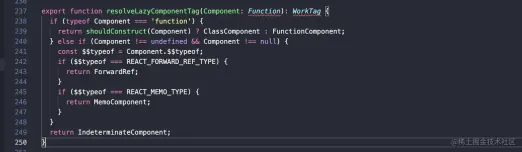
REACT_FORWARD_REF_TYPE 对应的 WorkTag 是 ForwardRef。紧接着 ForwardRef 又会进入 updateForwardRef 的逻辑。
case ForwardRef: {
  child = updateForwardRef(
    null,
    workInProgress,
    Component,
    resolvedProps,
    renderLanes,
  );
  return child;
}
这个方法又会调用 renderWithHooks 方法,并在第五个参数传入 ref。
nextChildren = renderWithHooks(
  current,
  workInProgress,
  render,
  nextProps,
  ref, // 这里
  renderLanes,
);
继续跟踪代码,进入 renderWithHooks 方法,可以看到,ref 会作为 Component 的第二个参数传递。到这里我们可以理解被 forwardRef 包裹的 FuncitonComponent 第二个参数 ref 是从哪里来的(对比 ClassComponent contructor 第二个参数是 Context)。
了解如何传递 ref,那下一个问题就是 ref 是如何被赋值的。
ref 的赋值
打断点(给 ref 赋值一个 RefCallback,在 callback 里面打断点) 跟踪到代码 commitAttachRef,在这个方法里面,会判断 Fiber 节点的 ref 是 function 还是 RefObject,依据类型处理 instance。如果这个 Fiber 节点是 HostComponent (tag = 5) 也就是 DOM 节点,instance 就是该 DOM 节点;而如果该 Fiber 节点是 ClassComponent (tag = 1),instance 就是该对象实例。
function commitAttachRef(finishedWork) {
  var ref = finishedWork.ref;

  if (ref !== null) {
    var instanceToUse = finishedWork.stateNode;

    if (typeof ref === 'function') {
      ref(instanceToUse);
    } else {
      ref.current = instanceToUse;
    }
  }
}
以上是 HostComponent 和 ClassComponent 中对 ref 的赋值逻辑,对于 ForwardRef 类型的组件走的是另外的代码,但行为基本是一致的,可以看这里 imperativeHandleEffect。
接下里,我们继续挖掘 React 源码,看看 useRef 是如何实现的。
useRef 的内部实现
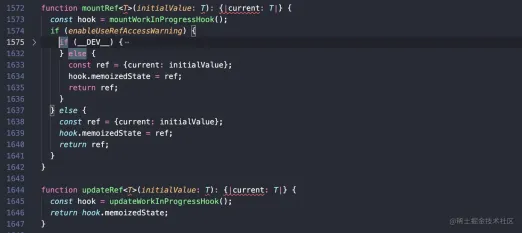
通过跟踪代码,定位到 useRef 运行时的代码 ReactFiberHooks
这里有两个方法,mountRef 和 updateRef,顾名思义就是对应 Fiber 节点 mount 和 update 时对 ref 的操作。
function updateRef<T>(initialValue: T): {|current: T|} {
  const hook = updateWorkInProgressHook();
  return hook.memoizedState;
}

function mountRef<T>(initialValue: T): {|current: T|} {
  const hook = mountWorkInProgressHook();
  const ref = {current: initialValue};
  hook.memoizedState = ref;
  return ref;
}
可以看到 mount 时,useRef 创建了一个 RefObject,并将它赋值给 hook 的 memoizedState,update 时直接将它取出返回。
不同的 Hook memoizedState 保存的内容不一样,useState 中保存 state 信息, useEffect 中 保存着 effect 对象,useRef 中保存的是 ref 对象...
mountWorkInProgressHook,updateWorkInProgressHook 方法背后是一条 Hooks 的链表,在不修改链表的情况下,每次 render useRef 都能取回同一个 memoizedState 对象,就这么简单。
应用:合并 ref
至此,我们了解了在 React 中 ref 的传递和赋值逻辑,以及 useRef 相关的源码。用一个应用题来巩固以上知识点:有一个 Input 组件,在组件内部需要通过 innerRef HTMLInputElement 来访问 DOM 节点,同时也允许组件外部 ref 该节点,需要怎么实现?
const Input = forwardRef((props, ref) => {
  const innerRef = useRef<HTMLInputElement>(null)
  return (
    <input {...props} ref={???} />
  )
})
考虑一下上面代码中的 ??? 应该怎么写。
============ 答案分割线 ==============
通过了解 Ref 相关的内部实现,很明显我们这里可以创建一个 RefCallback,在里面对多个 ref 进行赋值就可以了。
export function combineRefs<T = any>(
refs: Array<MutableRefObject<T | null> | RefCallback<T>>
): React.RefCallback<T> {
return value => {
refs.forEach(ref => {
if (typeof ref === 'function') {
ref(value);
} else if (ref !== null) {
ref.current = value;
}
});
};
}
const Input = forwardRef((props, ref) => {
const innerRef = useRef<HTMLInputElement>(null)
return (
<input {...props} ref={combineRefs(ref, innerRef)} />
)
})更多编程相关知识,请访问:编程入门!!
The above is the detailed content of Let you understand Ref in React and share knowledge points worth knowing.. For more information, please follow other related articles on the PHP Chinese website!

 JavaScript and the Web: Core Functionality and Use CasesApr 18, 2025 am 12:19 AM
The main uses of JavaScript in web development include client interaction, form verification and asynchronous communication. 1) Dynamic content update and user interaction through DOM operations; 2) Client verification is carried out before the user submits data to improve the user experience; 3) Refreshless communication with the server is achieved through AJAX technology.
 Understanding the JavaScript Engine: Implementation DetailsApr 17, 2025 am 12:05 AM
Understanding how JavaScript engine works internally is important to developers because it helps write more efficient code and understand performance bottlenecks and optimization strategies. 1) The engine's workflow includes three stages: parsing, compiling and execution; 2) During the execution process, the engine will perform dynamic optimization, such as inline cache and hidden classes; 3) Best practices include avoiding global variables, optimizing loops, using const and lets, and avoiding excessive use of closures.
 Python vs. JavaScript: The Learning Curve and Ease of UseApr 16, 2025 am 12:12 AM
Python is more suitable for beginners, with a smooth learning curve and concise syntax; JavaScript is suitable for front-end development, with a steep learning curve and flexible syntax. 1. Python syntax is intuitive and suitable for data science and back-end development. 2. JavaScript is flexible and widely used in front-end and server-side programming.
 Python vs. JavaScript: Community, Libraries, and ResourcesApr 15, 2025 am 12:16 AM
Python and JavaScript have their own advantages and disadvantages in terms of community, libraries and resources. 1) The Python community is friendly and suitable for beginners, but the front-end development resources are not as rich as JavaScript. 2) Python is powerful in data science and machine learning libraries, while JavaScript is better in front-end development libraries and frameworks. 3) Both have rich learning resources, but Python is suitable for starting with official documents, while JavaScript is better with MDNWebDocs. The choice should be based on project needs and personal interests.
 From C/C to JavaScript: How It All WorksApr 14, 2025 am 12:05 AM
The shift from C/C to JavaScript requires adapting to dynamic typing, garbage collection and asynchronous programming. 1) C/C is a statically typed language that requires manual memory management, while JavaScript is dynamically typed and garbage collection is automatically processed. 2) C/C needs to be compiled into machine code, while JavaScript is an interpreted language. 3) JavaScript introduces concepts such as closures, prototype chains and Promise, which enhances flexibility and asynchronous programming capabilities.
 JavaScript Engines: Comparing ImplementationsApr 13, 2025 am 12:05 AM
Different JavaScript engines have different effects when parsing and executing JavaScript code, because the implementation principles and optimization strategies of each engine differ. 1. Lexical analysis: convert source code into lexical unit. 2. Grammar analysis: Generate an abstract syntax tree. 3. Optimization and compilation: Generate machine code through the JIT compiler. 4. Execute: Run the machine code. V8 engine optimizes through instant compilation and hidden class, SpiderMonkey uses a type inference system, resulting in different performance performance on the same code.
 Beyond the Browser: JavaScript in the Real WorldApr 12, 2025 am 12:06 AM
JavaScript's applications in the real world include server-side programming, mobile application development and Internet of Things control: 1. Server-side programming is realized through Node.js, suitable for high concurrent request processing. 2. Mobile application development is carried out through ReactNative and supports cross-platform deployment. 3. Used for IoT device control through Johnny-Five library, suitable for hardware interaction.
 Building a Multi-Tenant SaaS Application with Next.js (Backend Integration)Apr 11, 2025 am 08:23 AM
I built a functional multi-tenant SaaS application (an EdTech app) with your everyday tech tool and you can do the same. First, what’s a multi-tenant SaaS application? Multi-tenant SaaS applications let you serve multiple customers from a sing


Hot AI Tools

Undresser.AI Undress
AI-powered app for creating realistic nude photos

AI Clothes Remover
Online AI tool for removing clothes from photos.

Undress AI Tool
Undress images for free

Clothoff.io
AI clothes remover

AI Hentai Generator
Generate AI Hentai for free.

Hot Article
Hot Tools

PhpStorm Mac version
The latest (2018.2.1) professional PHP integrated development tool

SAP NetWeaver Server Adapter for Eclipse
Integrate Eclipse with SAP NetWeaver application server.

SublimeText3 English version
Recommended: Win version, supports code prompts!

Atom editor mac version download
The most popular open source editor

Dreamweaver Mac version
Visual web development tools

