


 Web Front-endJS TutorialHow to get URL parameters in JavaScript? Detailed explanation of 4 common methods
How to get URL parameters in JavaScript? Detailed explanation of 4 common methods

如何利用原生JavaScript来获取URL链接参数?下面本篇文章给大家详细介绍4种常见的原生JS方法,希望对大家有所帮助!

作为一个前端开发,我们很多时候都需要对URL进行操作和处理,最常见的一种就是获取URL链接中携带的参数值了。使用框架开发的小伙伴可能会觉得这很简单,因为框架提供了很多方法让我们方便的获取URL链接携带的参数。但是有些时候我们不能依赖框架,需要我们使用原生JS去获取参数,这也是面试中经常遇到的一道题。今天我们就手撕代码,利用原生JS去获取URL链接参数值。
1. 获取方式总结
利用原生JS获取URL链接参数的方法也有好几种,今天我们依次来讲解常见的几种:
通过正则匹配的方式
利用a标签内置方法
利用split方法分割法
使用URLSearchParams方法
【相关推荐:javascript学习教程】
2. 具体实现方法
2.1 正则匹配法
这是非常中规中举的一种方法,重点是要求我们要懂正则表达式。
代码如下:
<script>
  // 利用正则表达式
  let url = "http://www.baidu.com?name=elephant&age=25&sex=male&num=100"
  // // 返回参数对象
  function queryURLParams(url) {
    let pattern = /(\w+)=(\w+)/ig; //定义正则表达式
    let parames = {}; // 定义参数对象
    url.replace(pattern, ($, $1, $2) => {
      parames[$1] = $2;
    });
    return parames;
  }
  console.log(queryURLParams(url))
</script>上段代码中重点是正则表达式的定义以及replace方法的使用,其中1、$2分别代表name=elephant、name、elephant,以此类推。replace结合正则更加详细的使用方法可以自行下去学习。
实现效果:

2.2 利用a标签
这种方法较少人使用,因为毕竟有点黑科技的意思在里面。它的原理主要就是利用了a标签得到一些内置属性,如href、hash、search等属性。
代码如下:
<script>
let URL = "http://www.baidu.com?name=elephant&age=25&sex=male&num=100#smallpig"
function queryURLParams(url) {
// 1.创建a标签
let link = document.createElement('a');
link.href = url;
let searchUrl = link.search.substr(1); // 获取问号后面字符串
let hashUrl = link.hash.substr(1); // 获取#后面的值
let obj = {}; // 声明参数对象
// 2.向对象中进行存储
hashUrl ? obj['HASH'] = hashUrl : null; // #后面是否有值
let list = searchUrl.split("&");
for (let i = 0; i < list.length; i++) {
let arr = list[i].split("=");
obj[arr[0]] = arr[1];
}
return obj;
}
console.log(queryURLParams(URL))
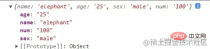
</script>上段代码中先创建了一个a标签,然后就可以根据a标签的属性分别得到url的各个部分了,这其实和Vue的路由跳转获取参数有点类似。
实现效果:
2.3 split分割法
该种方法利用了split可以以某个字符讲字符串分割为数组的特点,巧妙地将各个参数分割出来。
代码如下:
<script>
  let URL = "http://www.baidu.com?name=elephant&age=25&sex=male&num=100"
  function queryURLParams(URL) {
    // const url = location.search; // 项目中可直接通过search方法获取url中"?"符后的字串
    let url = URL.split("?")[1];
    let obj = {}; // 声明参数对象
    let arr = url.split("&"); // 以&符号分割为数组
    for (let i = 0; i < arr.length; i++) {
      let arrNew = arr[i].split("="); // 以"="分割为数组
      obj[arrNew[0]] = arrNew[1];
    }
    return obj;
  }
  console.log(queryURLParams(URL))
</script>
上传代码中如果在实际项目中,可以直接利用location.search获取“?”后面的字符串,这里为了方便演示,所以利用split分割了以下。
实现效果:
2.4 URLSearchParams方法
URLSearchParams方法能够让我们非常方便的获取URL参数,但是存在一定的兼容性问题,官网的解释如下:
URLSearchParams 接口定义了一些实用的方法来处理 URL 的查询字符串。
该接口提供了非常的的方法让我们来处理URL参数,这里我们只介绍如何获取URL参数值,更加详细的使用方法大家可以参考官网。
代码如下:
<script>
  let URL = "http://www.baidu.com?name=elephant&age=25&sex=male&num=100"
  function queryURLParams(URL) {
    let url = URL.split("?")[1];
    const urlSearchParams = new URLSearchParams(url);
    const params = Object.fromEntries(urlSearchParams.entries());
    return params
  }
  console.log(queryURLParams(URL))
</script>
这里我们基本上只用了两行主要代码就实现了参数的解析。需要注意的是urlSearchParams.entries()返回的是一个迭代协议iterator,所以我们需要利用Object.fromEntries()方法将把键值对列表转换为一个对象。
关于迭代协议,大家可以参考官网:
https://developer.mozilla.org/zh-CN/docs/Web/JavaScript/Reference/Iteration_protocols
实现效果:
Compatibility:

You can see that our interface is not compatible with IE, the source of all evil.
Summary
Here are four methods to implement the parsing of URL link parameter values, among which the split method should be the most widely used. As a rising star, urlSearchParams is gradually recognized by everyone, and there are many ways to make it compatible with IE.
[Related video tutorial recommendations: web front-end]
The above is the detailed content of How to get URL parameters in JavaScript? Detailed explanation of 4 common methods. For more information, please follow other related articles on the PHP Chinese website!

 Python vs. JavaScript: Community, Libraries, and ResourcesApr 15, 2025 am 12:16 AM
Python and JavaScript have their own advantages and disadvantages in terms of community, libraries and resources. 1) The Python community is friendly and suitable for beginners, but the front-end development resources are not as rich as JavaScript. 2) Python is powerful in data science and machine learning libraries, while JavaScript is better in front-end development libraries and frameworks. 3) Both have rich learning resources, but Python is suitable for starting with official documents, while JavaScript is better with MDNWebDocs. The choice should be based on project needs and personal interests.
 From C/C to JavaScript: How It All WorksApr 14, 2025 am 12:05 AM
The shift from C/C to JavaScript requires adapting to dynamic typing, garbage collection and asynchronous programming. 1) C/C is a statically typed language that requires manual memory management, while JavaScript is dynamically typed and garbage collection is automatically processed. 2) C/C needs to be compiled into machine code, while JavaScript is an interpreted language. 3) JavaScript introduces concepts such as closures, prototype chains and Promise, which enhances flexibility and asynchronous programming capabilities.
 JavaScript Engines: Comparing ImplementationsApr 13, 2025 am 12:05 AM
Different JavaScript engines have different effects when parsing and executing JavaScript code, because the implementation principles and optimization strategies of each engine differ. 1. Lexical analysis: convert source code into lexical unit. 2. Grammar analysis: Generate an abstract syntax tree. 3. Optimization and compilation: Generate machine code through the JIT compiler. 4. Execute: Run the machine code. V8 engine optimizes through instant compilation and hidden class, SpiderMonkey uses a type inference system, resulting in different performance performance on the same code.
 Beyond the Browser: JavaScript in the Real WorldApr 12, 2025 am 12:06 AM
JavaScript's applications in the real world include server-side programming, mobile application development and Internet of Things control: 1. Server-side programming is realized through Node.js, suitable for high concurrent request processing. 2. Mobile application development is carried out through ReactNative and supports cross-platform deployment. 3. Used for IoT device control through Johnny-Five library, suitable for hardware interaction.
 Building a Multi-Tenant SaaS Application with Next.js (Backend Integration)Apr 11, 2025 am 08:23 AM
I built a functional multi-tenant SaaS application (an EdTech app) with your everyday tech tool and you can do the same. First, what’s a multi-tenant SaaS application? Multi-tenant SaaS applications let you serve multiple customers from a sing
 How to Build a Multi-Tenant SaaS Application with Next.js (Frontend Integration)Apr 11, 2025 am 08:22 AM
This article demonstrates frontend integration with a backend secured by Permit, building a functional EdTech SaaS application using Next.js. The frontend fetches user permissions to control UI visibility and ensures API requests adhere to role-base
 JavaScript: Exploring the Versatility of a Web LanguageApr 11, 2025 am 12:01 AM
JavaScript is the core language of modern web development and is widely used for its diversity and flexibility. 1) Front-end development: build dynamic web pages and single-page applications through DOM operations and modern frameworks (such as React, Vue.js, Angular). 2) Server-side development: Node.js uses a non-blocking I/O model to handle high concurrency and real-time applications. 3) Mobile and desktop application development: cross-platform development is realized through ReactNative and Electron to improve development efficiency.
 The Evolution of JavaScript: Current Trends and Future ProspectsApr 10, 2025 am 09:33 AM
The latest trends in JavaScript include the rise of TypeScript, the popularity of modern frameworks and libraries, and the application of WebAssembly. Future prospects cover more powerful type systems, the development of server-side JavaScript, the expansion of artificial intelligence and machine learning, and the potential of IoT and edge computing.


Hot AI Tools

Undresser.AI Undress
AI-powered app for creating realistic nude photos

AI Clothes Remover
Online AI tool for removing clothes from photos.

Undress AI Tool
Undress images for free

Clothoff.io
AI clothes remover

AI Hentai Generator
Generate AI Hentai for free.

Hot Article
Hot Tools

SublimeText3 Chinese version
Chinese version, very easy to use

SAP NetWeaver Server Adapter for Eclipse
Integrate Eclipse with SAP NetWeaver application server.

Dreamweaver Mac version
Visual web development tools

Safe Exam Browser
Safe Exam Browser is a secure browser environment for taking online exams securely. This software turns any computer into a secure workstation. It controls access to any utility and prevents students from using unauthorized resources.

MinGW - Minimalist GNU for Windows
This project is in the process of being migrated to osdn.net/projects/mingw, you can continue to follow us there. MinGW: A native Windows port of the GNU Compiler Collection (GCC), freely distributable import libraries and header files for building native Windows applications; includes extensions to the MSVC runtime to support C99 functionality. All MinGW software can run on 64-bit Windows platforms.

