



This article brings you relevant knowledge about Selenium’s use of CSS positioning summary. CSS positioning also has its value. CSS positioning is faster and the syntax is simpler. I hope it will be helpful to everyone.

When most people use selenium to locate elements, they use xpath positioning. CSS positioning is often ignored. In fact, css positioning also has its value. CSS positioning is more Fast, the syntax is more concise
1. CSS selector
Common symbols:
#represents the id selector
.represents the class selector
>Indicates sub-elements, level
A space also indicates sub-elements, but all descendant sub-elements, which is equivalent to the relative path in xpath
2. CSS: Attribute positioning
css can be directly located through the three regular attributes of the element, id, class, and label.
如下是百度输入框的的html代码:
<input>
css uses the # sign to represent the id attribute, such as: #kw
css uses . to represent the class attribute. For example: .s_ipt
css directly uses the tag name without any identifier, such as: input
3. CSS: other attributes
css can use tag, class, and id Conventional attribute positioning can also be used to position other attributes
以下是定位其它属性的格式[name=wd] [autocomplete='off'][maxlength='255']
4. CSS: Tag
css can locate elements through a combination of tags and attributes
input.s_ipt input#kw input[id='kw']
5. CSS: Hierarchical relationship
//form的id属性form#form>span>input
//form的class属性form.fm>span>input
6. CSS: Index
css can also locate sub-elements through index
Select控件第三个Opel
#select>select>option:nth-child(3)CheckBox第一个Volvo
#checkbox>input:nth-child(1)CheckBox第二个Saab
#checkbox>input:nth-child(4)RadioBox第二个Saab
#radio>input:nth-child(4)
7. CSS: Logical operation
Same as css Logical operations can also be implemented to match two attributes at the same time, which is different from xpath
[type='checkbox'][name='checkbox1']

8. Baidu search box example
Take Baidu’s search box Specifically look at CSS positioning
Positioning input box
Single attribute positioning
type selector
driver.find_element_by_css_selector('input')id 定位
driver.find_element_by_css_selector('#kw')class 定位
driver.find_element_by_css_selector('.s_ipt')其他属性定位
driver.find_element_by_css_selector('[name='wd']')driver.find_element_by_css_selector("[type='text']")
Combined attribute positioning
id组合属性定位
driver.find_element_by_css_selector("input#kw")class组合属性定位
driver.find_element_by_css_selector("input.s_ipt")其他属性组合定位
driver.find_element_by_css_selector("input[name='wd']")仅有属性名,没有值也可以
driver.find_element_by_css_selector("input[name]")两个其他属性组合定位
driver.find_element_by_css_selector("[name='wd'][autocomplete='off']")
9. Click the button on Baidu homepage as an example
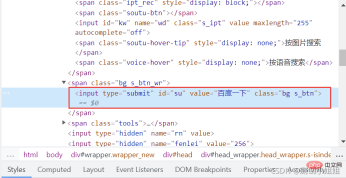
Fuzzy matching attribute value method
1>属性值由多个空格隔开,匹配其中一个值的方法
driver.find_element_by_css_selector("input[class~='btn']")2>匹配属性值为字符串开头的方法
driver.find_element_by_css_selector("input[class^='btn']")3>匹配属性值字符串结尾的方法
driver.find_element_by_css_selector("input[class$='s_btn']")
10. The difference between CSS and Xpath positioning
Attribute positioning
CSS
css can pass the element's The three regular attributes of id, class, and label are directly positioned
①. CSS uses the # symbol to represent the id attribute, such as:
id="kw" can be written as: #kw
②. CSS uses . to represent class Attributes, such as:
class="s_ipt" can be written as: .s_ipt
③. css directly uses the label name without any identifier, such as: input
Xpath
xpath can also be passed Locate the elements' id, name, and class attributes
①. Use xpath to locate the id attribute
driver.find_element(By.XPATH,"//[@id='kw']")
②. Use xpath to locate through the name attribute
driver.find_element(By.XPATH,"//[@name='wd']")
③. Use xpath to locate through the class attribute
driver.find_element(By. XPATH,"//*[@class='s_ipt']")
Other attributes
CSS
In addition to the above, css can also be positioned through other attributes
①. css is positioned through the name attribute:
driver.find_element(By.CSS_SELECTOR,"[name='wd']")
②. css is positioned through the autocomplete attribute:
driver.find_element(By. CSS_SELECTOR," [autocomplete='off']")
③.css is positioned through the type attribute:
driver.find_element(By.CSS_SELECTOR,"[type='text']")
Xpath
Without the above attributes, you can locate it through other attributes
driver.find_element(By.XPATH,"//*[@autocomplete='off']")
tag
CSS
The css page can locate elements through the combination of tags and attributes
①. css locates elements through the combination of tags and class attributes driver.find_element(By.CSS_SELECTOR, "input.s_ipt")
②. css through tags Positioning driver.find_element(By.CSS_SELECTOR, "input#kw") in combination with the id attribute
③. css positions driver.find_element(By.CSS_SELECTOR, "input[id='kw'] through the combination of tags and other attributes) ”)
Xpath
1. If there are many attributes with the same name, you can filter them by tags
①. Use xpath to locate driver.find_element(By.XPATH,"// input[@autocomplete='off']")
②. Use xpath to locate driver.find_element(By.XPATH,"//input[@id='kw']")
③. Use xpath locates driver.find_element(By.XPATH,"//name[@id='wd']") through the name attribute
Hierarchical relationship
CSS
Such as: //form [@id='form']/span/input and //form[@class='fm']/span/input
①. css locates driver.find_element(By.CSS_SELECTOR, "form#form> ;span>input”)
②. css locates driver.find_element(By.CSS_SELECTOR, “form.fm>span>input”)
Xpath
1. If an element, Its attributes are not obvious and cannot be located directly. You can first find its parent element, find the parent element, and then find the next level to locate it
①. Locate the input input box by locating the parent element driver.find_element(By. XPATH,"//span[@id='s_kw_wrap']/input")
②. Locate the input input box driver.find_element(By.XPATH,"//form[@id='form ']/span/input")
Index
CSS
1. CSS can also locate child elements through index option: nth-child(1)
①. Select the first child element driver.find_element(By. CSS_SELECTOR,“select#nr>option:nth-child(1)”)
②. Select the second child element driver.find_element(By.CSS_SELECTOR,“select#nr>option:nth-child(2)”)
③. Select the third child element driver.find_element(By.CSS_SELECTOR,“select#nr>option:nth-child(3)”)
Xpath
1. Can be positioned by sorting
①. Use xpath to locate the first driver.find_element(By.XPATH,"//select[@id='nr']/option[1]")
②. Use xpath to locate the second driver. find_element(By.XPATH,"//select[@id='nr']/option[2]")
③. Use xpath to locate the third driver.find_element(By.XPATH,"//select[@ id='nr']/option[3]")
Fuzzy matching
CSS
driver.find_element(By.CSS_SELECTOR,"input:contains('kw')")
Xpath
1. Powerful fuzzy matching of xpath
2. by_partial_link, fuzzy matching positioning
driver.find_element(By.XPATH,"//*[contains(text(),' hao123')]")
11. Summary
Automated testing Two mainstream XPATH and CSS positioning methods for positioning page elements in web testing in Python Selenium
XPATH positioning and CSS positioning Very similar, XPATH is more powerful, but CSS positioning is faster, but some browsers do not support CSS positioning, and it is generally more common to use xpath positioning than css in the automated testing process
( Learning video sharing: css video tutorial)
The above is the detailed content of What you must know about Selenium using CSS positioning summary. For more information, please follow other related articles on the PHP Chinese website!

 Where should 'Subscribe to Podcast' link to?Apr 16, 2025 pm 12:04 PM
For a while, iTunes was the big dog in podcasting, so if you linked "Subscribe to Podcast" to like:
 Browser Engine DiversityApr 16, 2025 pm 12:02 PM
We lost Opera when they went Chrome in 2013. Same deal with Edge when it also went Chrome earlier this year. Mike Taylor called these changes a "Decreasingly
 UX Considerations for Web SharingApr 16, 2025 am 11:59 AM
From trashy clickbait sites to the most august of publications, share buttons have long been ubiquitous across the web. And yet it is arguable that these
 Weekly Platform News: Apple Deploys Web Components, Progressive HTML Rendering, Self-Hosting Critical ResourcesApr 16, 2025 am 11:55 AM
In this week's roundup, Apple gets into web components, how Instagram is insta-loading scripts, and some food for thought for self-hosting critical resources.
 Git Pathspecs and How to Use ThemApr 16, 2025 am 11:53 AM
When I was looking through the documentation of git commands, I noticed that many of them had an option for . I initially thought that this was just a
 A Color Picker for Product ImagesApr 16, 2025 am 11:49 AM
Sounds kind of like a hard problem doesn't it? We often don't have product shots in thousands of colors, such that we can flip out the with . Nor do we
 A Dark Mode Toggle with React and ThemeProviderApr 16, 2025 am 11:46 AM
I like when websites have a dark mode option. Dark mode makes web pages easier for me to read and helps my eyes feel more relaxed. Many websites, including
 Some Hands-On with the HTML Dialog ElementApr 16, 2025 am 11:33 AM
This is me looking at the HTML element for the first time. I've been aware of it for a while, but haven't taken it for a spin yet. It has some pretty cool and


Hot AI Tools

Undresser.AI Undress
AI-powered app for creating realistic nude photos

AI Clothes Remover
Online AI tool for removing clothes from photos.

Undress AI Tool
Undress images for free

Clothoff.io
AI clothes remover

AI Hentai Generator
Generate AI Hentai for free.

Hot Article
Hot Tools

ZendStudio 13.5.1 Mac
Powerful PHP integrated development environment

PhpStorm Mac version
The latest (2018.2.1) professional PHP integrated development tool

SecLists
SecLists is the ultimate security tester's companion. It is a collection of various types of lists that are frequently used during security assessments, all in one place. SecLists helps make security testing more efficient and productive by conveniently providing all the lists a security tester might need. List types include usernames, passwords, URLs, fuzzing payloads, sensitive data patterns, web shells, and more. The tester can simply pull this repository onto a new test machine and he will have access to every type of list he needs.

DVWA
Damn Vulnerable Web App (DVWA) is a PHP/MySQL web application that is very vulnerable. Its main goals are to be an aid for security professionals to test their skills and tools in a legal environment, to help web developers better understand the process of securing web applications, and to help teachers/students teach/learn in a classroom environment Web application security. The goal of DVWA is to practice some of the most common web vulnerabilities through a simple and straightforward interface, with varying degrees of difficulty. Please note that this software

VSCode Windows 64-bit Download
A free and powerful IDE editor launched by Microsoft

