search
HomeWeb Front-endFront-end Q&AWhat are the text tags in html

What are the text tags in html

Nov 18, 2021 pm 03:03 PM
htmltext label

html text tags are: h1, h2, h3, h4, h5, h6, p, hr, br, q, blockquote, b, strong, i, em, s, u, small, big, sub, sup, code, pre, abbr, bdo, tt, kbd, dfn, var, etc.

What are the text tags in html

The operating environment of this tutorial: Windows 7 system, HTML5 version, Dell G3 computer.

HTML text is the main content displayed on the web page. The main tags that need to be used are as follows: title tags, paragraph tags, text tags, horizontal line tags, and special symbol tags. These tags are inside the body tag.

1. h1~h6 title tags

Word abbreviation: head header. Title

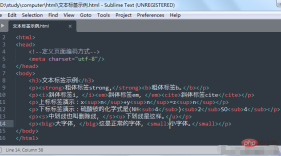
In order to make the web page more unique Semantically, we often use title tags in pages. HTML provides six levels of titles, namely

~

, which represent six levels of titles, and

represents the largest title.

represents the smallest title.

Title tag semantics: Used as a title, and in descending order of importance.

Note: Because the h1 tag is important, use it as little as possible
What are the text tags in html

## 2. p paragraph tag

Word abbreviation: paragraph paragraph

To display text in an orderly manner on a web page, paragraph tags are indispensable. Similar to writing an article in normal times, the entire web page can also be used Divided into several paragraphs.

Tips: p is a text-level tag, and only text, pictures, and form elements can be placed in p.

Paragraph tags are the most common tags in HTML documents. By default, text in a paragraph will automatically wrap according to the size of the browser window.

<p>这是一个段落。。。</p>

3. hr horizontal line label (single label)

Word abbreviation: horizontal horizontal line.

In web pages, we often see some horizontal lines separating paragraphs from each other, making the document structure clear and hierarchical. These horizontal lines can be achieved by inserting images, or simply through tags,
is a tag that creates a horizontal line across the web page.

What are the text tags in html

4. br Line break label (single label)

Word abbreviation: break break, line break

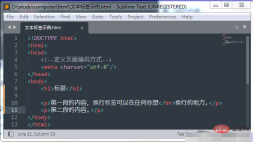
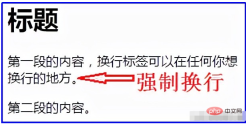
In HTML, the text in a paragraph will be arranged from left to right, until the right end of the browser window, and then automatically wrap. If you want a certain text to be forced to wrap in a new line, you need to use the line break tag
What are the text tags in html

What are the text tags in html

##5. Quote tags tag defines a short quote, and browsers often add quotation marks around the quoted content;

defines a block quote, and the text it contains will be Separated from regular text, the left and right sides are indented and sometimes italicized.

<q>细节决定成败</q>
<blockquote>
     <p>生命在于折腾啊!</p>
 </blockquote>

Tips: A piece of text cannot be placed directly in the blockquote element, but should be included in a block element, such as a p element.

6. Text formatting tagsIn web pages, sometimes you need to set bold, italic or underline effects for text. In this case, You need to use text formatting tags in HTML to display text in a special way.

标签 显示效果
文字以粗体方式显示(XHTML推荐使用 strong)
文字以斜体方式显示(XHTML推荐使用em)
文字以加删除线方式显示(XHTML推荐使用del)
文字以加下划线方式显示(XHTML不赞成使用u)
定义小号字体,标签包含的文本比周围小一号,下限1号文本
定义大号字体,标签包含的文字比周围大一号,上限7号文本
定义下标文本,以当前文本流中字符高度一半显示,但是与文本流中字符字体字号一致

定义上标文本,以当前文本流中字符高度一半显示,但是与文本流中字符字体字号一致

Tips: b i s u 只有使用 没有 强调的意思 strong em del ins 语义更强烈

Tips: 标签,在数学公式、科学符号和化学公式中非常有用。

What are the text tags in html

What are the text tags in html

七、输出文本

HTML元素提供了如下输出信息的标签:

标签 说明
表示代码字体,显示源代码
表示预定义格式的源代码,保留源代码显示中的空格大小
表示打印机字体
表示键盘字体
表示定义的术语
表示变量字体
表示代码范例

八、缩写文本

标签可以定义简称或缩写,通过对缩写进行标记,能够为浏览器、搜索引擎提供有用的信息。

标签是定义首字母缩写。

<abbr titile="Hyper Markup Language">HTML</abbr>
<acronym titile="Hyper Markup Language">HTML</acronym>

Tips:可以使用 title 属性,设置在鼠标移动到上显示完整文本。

九、文本方向

使用 标签可以改变文本流的方向,包含一个属性:dir,取值包活 ltr(从左到右) 和 rtl(从右到左)。

<bdo dir="rtl">床前明月光</bdo>

推荐教程:《html视频教程

The above is the detailed content of What are the text tags in html. For more information, please follow other related articles on the PHP Chinese website!

Statement
The content of this article is voluntarily contributed by netizens, and the copyright belongs to the original author. This site does not assume corresponding legal responsibility. If you find any content suspected of plagiarism or infringement, please contact admin@php.cn
React Inside HTML: Integrating JavaScript for Dynamic Web PagesReact Inside HTML: Integrating JavaScript for Dynamic Web PagesApr 16, 2025 am 12:06 AM

To integrate React into HTML, follow these steps: 1. Introduce React and ReactDOM in HTML files. 2. Define a React component. 3. Render the component into HTML elements using ReactDOM. Through these steps, static HTML pages can be transformed into dynamic, interactive experiences.

The Benefits of React: Performance, Reusability, and MoreThe Benefits of React: Performance, Reusability, and MoreApr 15, 2025 am 12:05 AM

React’s popularity includes its performance optimization, component reuse and a rich ecosystem. 1. Performance optimization achieves efficient updates through virtual DOM and diffing mechanisms. 2. Component Reuse Reduces duplicate code by reusable components. 3. Rich ecosystem and one-way data flow enhance the development experience.

React: Creating Dynamic and Interactive User InterfacesReact: Creating Dynamic and Interactive User InterfacesApr 14, 2025 am 12:08 AM

React is the tool of choice for building dynamic and interactive user interfaces. 1) Componentization and JSX make UI splitting and reusing simple. 2) State management is implemented through the useState hook to trigger UI updates. 3) The event processing mechanism responds to user interaction and improves user experience.

React vs. Backend Frameworks: A ComparisonReact vs. Backend Frameworks: A ComparisonApr 13, 2025 am 12:06 AM

React is a front-end framework for building user interfaces; a back-end framework is used to build server-side applications. React provides componentized and efficient UI updates, and the backend framework provides a complete backend service solution. When choosing a technology stack, project requirements, team skills, and scalability should be considered.

HTML and React: The Relationship Between Markup and ComponentsHTML and React: The Relationship Between Markup and ComponentsApr 12, 2025 am 12:03 AM

The relationship between HTML and React is the core of front-end development, and they jointly build the user interface of modern web applications. 1) HTML defines the content structure and semantics, and React builds a dynamic interface through componentization. 2) React components use JSX syntax to embed HTML to achieve intelligent rendering. 3) Component life cycle manages HTML rendering and updates dynamically according to state and attributes. 4) Use components to optimize HTML structure and improve maintainability. 5) Performance optimization includes avoiding unnecessary rendering, using key attributes, and keeping the component single responsibility.

React and the Frontend: Building Interactive ExperiencesReact and the Frontend: Building Interactive ExperiencesApr 11, 2025 am 12:02 AM

React is the preferred tool for building interactive front-end experiences. 1) React simplifies UI development through componentization and virtual DOM. 2) Components are divided into function components and class components. Function components are simpler and class components provide more life cycle methods. 3) The working principle of React relies on virtual DOM and reconciliation algorithm to improve performance. 4) State management uses useState or this.state, and life cycle methods such as componentDidMount are used for specific logic. 5) Basic usage includes creating components and managing state, and advanced usage involves custom hooks and performance optimization. 6) Common errors include improper status updates and performance issues, debugging skills include using ReactDevTools and Excellent

React and the Frontend Stack: The Tools and TechnologiesReact and the Frontend Stack: The Tools and TechnologiesApr 10, 2025 am 09:34 AM

React is a JavaScript library for building user interfaces, with its core components and state management. 1) Simplify UI development through componentization and state management. 2) The working principle includes reconciliation and rendering, and optimization can be implemented through React.memo and useMemo. 3) The basic usage is to create and render components, and the advanced usage includes using Hooks and ContextAPI. 4) Common errors such as improper status update, you can use ReactDevTools to debug. 5) Performance optimization includes using React.memo, virtualization lists and CodeSplitting, and keeping code readable and maintainable is best practice.

React's Role in HTML: Enhancing User ExperienceReact's Role in HTML: Enhancing User ExperienceApr 09, 2025 am 12:11 AM

React combines JSX and HTML to improve user experience. 1) JSX embeds HTML to make development more intuitive. 2) The virtual DOM mechanism optimizes performance and reduces DOM operations. 3) Component-based management UI to improve maintainability. 4) State management and event processing enhance interactivity.

See all articles

Hot AI Tools

Undresser.AI Undress

Undresser.AI Undress

AI-powered app for creating realistic nude photos

AI Clothes Remover

AI Clothes Remover

Online AI tool for removing clothes from photos.

Undress AI Tool

Undress AI Tool

Undress images for free

Clothoff.io

Clothoff.io

AI clothes remover

AI Hentai Generator

AI Hentai Generator

Generate AI Hentai for free.

Hot Article

R.E.P.O. Energy Crystals Explained and What They Do (Yellow Crystal)
4 weeks agoBy尊渡假赌尊渡假赌尊渡假赌
R.E.P.O. Best Graphic Settings
4 weeks agoBy尊渡假赌尊渡假赌尊渡假赌
R.E.P.O. How to Fix Audio if You Can't Hear Anyone
4 weeks agoBy尊渡假赌尊渡假赌尊渡假赌
R.E.P.O. Chat Commands and How to Use Them
4 weeks agoBy尊渡假赌尊渡假赌尊渡假赌

Hot Tools

VSCode Windows 64-bit Download

VSCode Windows 64-bit Download

A free and powerful IDE editor launched by Microsoft

DVWA

DVWA

Damn Vulnerable Web App (DVWA) is a PHP/MySQL web application that is very vulnerable. Its main goals are to be an aid for security professionals to test their skills and tools in a legal environment, to help web developers better understand the process of securing web applications, and to help teachers/students teach/learn in a classroom environment Web application security. The goal of DVWA is to practice some of the most common web vulnerabilities through a simple and straightforward interface, with varying degrees of difficulty. Please note that this software

SublimeText3 Linux new version

SublimeText3 Linux new version

SublimeText3 Linux latest version

Dreamweaver CS6

Dreamweaver CS6

Visual web development tools

MantisBT

MantisBT

Mantis is an easy-to-deploy web-based defect tracking tool designed to aid in product defect tracking. It requires PHP, MySQL and a web server. Check out our demo and hosting services.