



This article will give you a detailed understanding of the usage of the mini program template. I hope it will be helpful to you!

#WXML provides templates, in which code snippets can be defined and then called in different places. [Related learning recommendations: 小program development tutorial]
Preface
You will gain
How to use the small program template
Handling of mini program template data and events
Some precautions and optimization of mini program templates
Basic use of templates
Creating template files
Create a template folder in the page. You can use the mini program development tool [New Page] to quickly create files
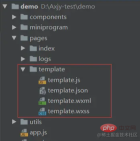
Note: When calling the template, only the wxml and wxss files work, and the JS files in the template do not work. The logic in the template must be processed in the file called by .
Create files can be designed according to your own project, this is not always the case
Define template
In<template></template> Define code snippets within, using the name attribute as the name of the template.
<template name="msgItem">
    <view>
        <text class="info">这是一个msg模板</text>
    </view>
</template>
Using templates
To use templates in wxml, there are two steps
1), declaration, key import tag
2), use, Key is attribute
<!-- index.wxml -->

<!-- 声明需要使用的模板文件 -->
<import src ="../template/template.wxml"/>

<!--使用-->
<template is="msgItem"/>
The name of is here is consistent with the name of the template
The wxss of the template
If the template has its own wxss, such as Our template.wxss file needs to be imported into the file that calls the template (such as index.wxss in the example), otherwise it will not take effect
/**index.wxss**/
@import "../template/template.wxss";
Summary:
- wxss import into wxss
- wxml import into wxml
- js is invalid
Data transfer of template
[Calling wxml] Pass the value to the template through data
<!-- index.wxml -->

<template is="msgItem" data="{{...item}}"/>
item is defined in the calling js
<!-- index.js -->
Page({
data: {
item: {
title: '模板',
msg: 'this is a template',
}
}
})is used directly in the template
<!-- template.wxml -->

<template name="msgItem">
    <view>
        <text class="info">
            {{title}}: {{msg}}
        </text>
    </view>
</template>
If multiple parameters are passed, separate them with commas
<template is="msgItem" data="{{data1, data2}}"/>
Event processing in the template file
Used by the template It is an event in [the js file that calls the template].
- Defined in your own
template.jswill not take effect
 ##
##
<!--template.wxml-->

<template name="msgItem">
    <view>
        <text class="info" bindtap="handleTap">
            {{title}}: {{msg}}
        </text>
    </view>
</template>
rrreeOptimization template eventIf it is a method common to the template, the method must be written in each called file. There will be a lot of repeated code. We can improve it as follows.
(Although the template template cannot directly use its own js, we can write the methods uniformly in the template.js file, and then introduce it into the js file that uses the template.)
<!-- index.js -->
handleTap() {
console.log('template 模版 click')
}, Just import it where you need to use it <!-- template.js -->
const template = {
handleTap() {
console.log('template 模版 click')
}
}
export default template; About data transfer in js files In template.js you can directly get the entire data of the index.js file
##template Similarities and differences between templates and Component components
are all to achieve code reuse
- cannot be presented alone and must be attached Displayed on the page
template template
: lightweight, mainly for display, no configuration file (.json) and Business logic file (.js), so the variable references and business logic events in the template template need to be defined in the [page js referencing the template] file;
Component component: Yes Your own business logic consists of 4 files, similar to the page, but the js files and json files are different from the page.
Select
- If it is just for display, using template is enough;
- If it involves There are many business logic interactions, so it is best to use component components;
- The scope of import
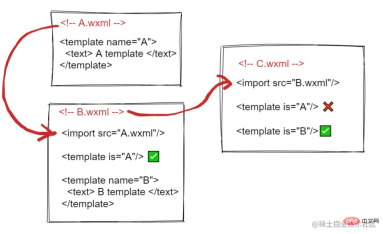
import has the concept of scope, that is, it will only import the definitions in the target file template, and the template of the target file will not be imported.
// index.js
import template from '../template/template';

Page({
  handleTap:template.handleTap
})
https://developers.weixin.qq.com/miniprogram/dev/reference /wxml/template.html
For more programming related knowledge, please visit: Programming Video! !
The above is the detailed content of In-depth analysis of how to use mini program templates. For more information, please follow other related articles on the PHP Chinese website!

Hot AI Tools

Undresser.AI Undress
AI-powered app for creating realistic nude photos

AI Clothes Remover
Online AI tool for removing clothes from photos.

Undress AI Tool
Undress images for free

Clothoff.io
AI clothes remover

AI Hentai Generator
Generate AI Hentai for free.

Hot Article
Hot Tools

VSCode Windows 64-bit Download
A free and powerful IDE editor launched by Microsoft

DVWA
Damn Vulnerable Web App (DVWA) is a PHP/MySQL web application that is very vulnerable. Its main goals are to be an aid for security professionals to test their skills and tools in a legal environment, to help web developers better understand the process of securing web applications, and to help teachers/students teach/learn in a classroom environment Web application security. The goal of DVWA is to practice some of the most common web vulnerabilities through a simple and straightforward interface, with varying degrees of difficulty. Please note that this software

SublimeText3 Linux new version
SublimeText3 Linux latest version

Dreamweaver CS6
Visual web development tools

MantisBT
Mantis is an easy-to-deploy web-based defect tracking tool designed to aid in product defect tracking. It requires PHP, MySQL and a web server. Check out our demo and hosting services.

