



In order to make programming easier for everyone, this book selects some useful but relatively rare and useful techniques. Without further ado, let’s drive.
1. Quick Hide
To hide a DOM element, no JavaScript is required. A native HTML attribute is enough to hide. The effect is similar to adding a style display: none;.
<p hidden>该段落在页面上是不可见的,它对HTML是隐藏的。</p>
However, this trick does not work on pseudo-elements.
2. Quick positioning
Are you familiar with the `inset` CSS property? It is the abbreviated version of `top`, `left`, `right` and `bottom`. Similar to the shorthand `margin` and `padding`, we can set all offsets of an element in a row.
// Before
div {
  position: absolute;
  top: 0;
  left: 0;
  bottom: 0;
  right: 0;
}

// After
div {
  position: absolute;
  inset: 0;
}
3. Front-end network speed test
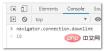
Chrome browser provides the original API navigator.connection.downlink to access the user’s current network environment network bandwidth.
navigator.connection.downlink;
connection.downlink does not return the network transmission speed displayed in the user's current environment, but the bandwidth of the current network. The official statement is: Returns the effective transmission speed in units of Mb/s bandwidth, and keep this value to the nearest integer multiple of 25kb/s.
For example, I ran the statement navigator.connection.downlink in my home Chrome browser console, and the result returned was 10, which means the download bandwidth is 10M.
4. Disable pull to refresh
CSS overscroll-behavior attribute allows developers to Overrides the browser's default overflow scrolling behavior when top/bottom. Use cases for this include disabling the "pull to refresh" feature on mobile devices, removing the over-scroll glow and rubber band effects, and preventing page content from scrolling under the modal/overlay
body {
 overscroll-behavior-y: contain;
}
This property is useful for organizing modals In-window scrolling is also very useful - it prevents the main page from intercepting scrolling when it reaches the boundary.
5. Insertion of text is prohibited
When the user initiates a "paste" operation in the browser user interface, the paste event will be triggered.
Sometime, I want to prohibit users from pasting text copied from somewhere into the input box. This can be easily done by listening to the paste event and calling its method preventDefault().
<input type="text"></input>
<script>
const input = document.querySelector('input');
input.addEventListener("paste", function(e){
e.preventDefault()
})
</script> It is impossible to know the possible bugs in real time after the code is deployed. In order to solve these bugs afterwards, a lot of time was spent on log debugging. By the way, I would like to recommend a useful BUG monitoring tool Fundebug.
Recommended learning: css video tutorial
The above is the detailed content of Five front-end tips that make people shine. For more information, please follow other related articles on the PHP Chinese website!

 How to create a hover effect on a table row in CSSAug 26, 2025 am 07:29 AM
To create a hover effect for table rows, you need to use the CSS :hover pseudo-class. It is recommended to set background color, text color and other styles for cells in the row through tr:hovertd to ensure compatibility. You can combine transitions to achieve smooth transitions and cursor:pointer prompts interactivity. You can also distinguish between processing table headers and data rows through class names to avoid style conflicts, and ultimately achieve a simple and efficient hover effect.
 How to use box-sizing: border-box in CSSAug 26, 2025 am 07:18 AM
Usingbox-sizing:border-boxensuresanelement’sdeclaredwidthincludesitscontent,padding,andborder,preventingunexpectedlayoutoverflow;applyingitgloballyvia,::before,*::after{box-sizing:border-box;}standardizessizingacrossallelementsandpseudo-elements,maki
 How to style a horizontal rule (hr) with CSSAug 26, 2025 am 07:11 AM
To completely customize the horizontal line style, you must first remove the default style, and then use the background, border and other properties of CSS to redefine the appearance. The specific method is to first set border:none to clear the browser's default style. Then you can create custom lines through background-color or border-top. It is recommended to use background-color to obtain higher control. If you need a dotted line or dotted line effect, use border-top and match dashed, dotted and other values. By setting width and margin:auto, you can control the line width and achieve horizontal centering. Use linear-gradient to create gradient effects on the background.
 How to style a file input button with CSSAug 26, 2025 am 06:48 AM
To customize the style of the file upload button, you need to hide the native input box and replace it with a label. By setting the input box to be transparent and absolutely positioned, it is overlaid on the styleable label, thus achieving a fully customizable appearance while retaining functionality and accessibility. This method is compatible with all browsers and supports displaying file names, hover status and keyboard navigation, and ultimately creating a file upload button that is both beautiful and practical.
 How to use CSS scroll-behavior for smooth scrolling?Aug 26, 2025 am 06:15 AM
To achieve smooth scrolling on web pages, you need to use the scroll-behavior attribute of CSS; 1. Apply scroll-behavior:smooth to the html element to enable global smooth scrolling; 2. When clicking an anchor link (such as #section), animated scrolling is triggered instead of instant jumps; 3. It is recommended to set it on html instead of body to ensure compatibility; 4. This property can be applied separately in a custom scroll container to achieve local smooth scrolling; 5. Note that JavaScript scrolling operations can override this effect through behavior:'auto'; this method is compatible with modern mainstream browsers and significantly improves the user experience, which can be easily implemented with one sentence of CSS.
 How to create a modal window in CSSAug 26, 2025 am 06:04 AM
Use hidden check boxes as status switches to control the display and hiding of modal boxes through the checked selector of CSS; 2. Use label's for attribute to associate check boxes to achieve opening and closing operations; 3. Use adjacent brother selectors ( ) to display modal boxes when the check box is selected; 4. Add appropriate styles to achieve visual effects such as centering, masking, rounding corners, shadows, etc.; 5. Ensure accessibility, add aria-hidden and role attributes, and ensure that the keyboard is operable. This method can create a modal window with complete functionality, clear structure and easy to maintain without JavaScript, suitable for simple prompts or information display scenarios.
 How to use the @supports rule in CSSAug 26, 2025 am 05:53 AM
@supports rules are used to implement progressive enhancement based on whether the browser supports specific CSS attributes or values. 1. The basic syntax is @supports(property:value){...}. If display:grid is supported, the grid layout is applied. 2. The conditions can be combined using and, or, and not logical operators, such as supporting multiple features at the same time or providing a fallback scheme. 3. Support grouping complex conditions in brackets and can be nested with other at rules such as @media. 4. In actual applications, it is recommended to set basic styles and gradually enhance them to avoid excessive use, ensure that browsers that do not support new features can still display content normally, and ultimately achieve the effect of safely adopting modern CSS.
 How to style form inputs with CSSAug 26, 2025 am 12:02 AM
To effectively and consistently beautify form input across browsers, the following steps must be followed: 1. Use standard CSS properties to customize the appearance of text input, password, mailbox, etc., set width, margins, borders, rounded corners and fonts, and add interactive feedback through the:focus pseudo-class; 2. Use the ::placeholder pseudo-element to adjust the color and style of the placeholder text to ensure it is clear and readable; 3. Make the input box responsive and maintain the layout stable by setting box-sizing:border-box and using relative units; 4. Use native controls to hide native controls and combine pseudo-elements and labels to achieve custom visual effects; 5. Always pay attention to accessibility and provide visible focus indicators


Hot AI Tools

Undress AI Tool
Undress images for free

Undresser.AI Undress
AI-powered app for creating realistic nude photos

AI Clothes Remover
Online AI tool for removing clothes from photos.

Clothoff.io
AI clothes remover

Video Face Swap
Swap faces in any video effortlessly with our completely free AI face swap tool!

Hot Article
Hot Tools

Atom editor mac version download
The most popular open source editor

DVWA
Damn Vulnerable Web App (DVWA) is a PHP/MySQL web application that is very vulnerable. Its main goals are to be an aid for security professionals to test their skills and tools in a legal environment, to help web developers better understand the process of securing web applications, and to help teachers/students teach/learn in a classroom environment Web application security. The goal of DVWA is to practice some of the most common web vulnerabilities through a simple and straightforward interface, with varying degrees of difficulty. Please note that this software

Dreamweaver Mac version
Visual web development tools

SublimeText3 Chinese version
Chinese version, very easy to use

MinGW - Minimalist GNU for Windows
This project is in the process of being migrated to osdn.net/projects/mingw, you can continue to follow us there. MinGW: A native Windows port of the GNU Compiler Collection (GCC), freely distributable import libraries and header files for building native Windows applications; includes extensions to the MSVC runtime to support C99 functionality. All MinGW software can run on 64-bit Windows platforms.

