


 Web Front-endCSS TutorialThrough interesting and vivid pictures, learn how to draw a heart using pure CSS! !
Through interesting and vivid pictures, learn how to draw a heart using pure CSS! !

This article will introduce to you how to draw a heart using pure CSS. It has certain reference value. Friends in need can refer to it. I hope it will be helpful to everyone.

Requirements/Function:
- How to use CSS HTMl to draw a love.
Analysis:
- A heart can be formed by combining a square and two circles. (Learning video sharing: css video tutorial)
1. First draw a square circle and place it as follows:
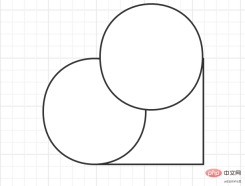
2. Add a circle.
3. Finally, rotate the entire shape 45 degrees clockwise.

Initial implementation:
1. First draw a square:
<body>
    <div id="heart"></div>
</body>
#heart{
height: 300px;
width: 300px;
border: 2px solid black;
}2. Add a circle to the left side of the square. Use the pseudo class: before here. Implementation
     #heart{
            height: 200px;
            width: 200px;
            border: 2px solid black;
            position: relative;
        }
    #heart:before{
        content: '';
        width: 200px;
        height: 200px;
        border: 2px solid black;
        border-radius: 50%; // 正方形加圆角变成圆
        position: absolute;
        left: -100px;  // 向左位移正方形一半的长度
    }
At this time, the graphic looks like this:
3. Add another circle, which is implemented here using the after pseudo-class.
    #heart{
            height: 200px;
            width: 200px;
            border: 2px solid black;
            position: relative;
        }
        // 这里偷个懒.直接写一块了
    #heart:before,#heart:after{
        content: '';
        width: 200px;
        height: 200px;
        border: 2px solid black;
        border-radius: 50%;
        position: absolute;
        left: -100px;
    }
    // 第二个圆, 只需要向上位移正方形一半的高度
    #heart:after{
        left: 0;
        top: -100px;
    }
4. The last step, rotate it, and then add a color. Remove the border added before to see clearly.
    /*给heart进行旋转并加上颜色*/
  transform: rotate(45deg);
  background-color: red;

Complete Code:
<body> <div id="heart"></div> </body>
Summary:
A heart can be composed of a square and two circles. The before and after pseudo-classes are used here. Then, the two pseudo-classes are displaced respectively. Finally, the extrusion By adding color, you can realize a love.
For more programming related knowledge, please visit: Programming Video! !
The above is the detailed content of Through interesting and vivid pictures, learn how to draw a heart using pure CSS! !. For more information, please follow other related articles on the PHP Chinese website!

 Weekly Platform News: Web Apps in Galaxy Store, Tappable Stories, CSS SubgridApr 14, 2025 am 11:20 AM
In this week's roundup: Firefox gains locksmith-like powers, Samsung's Galaxy Store starts supporting Progressive Web Apps, CSS Subgrid is shipping in Firefox
 Weekly Platform News: Internet Explorer Mode, Speed Report in Search Console, Restricting Notification PromptsApr 14, 2025 am 11:15 AM
In this week's roundup: Internet Explorer finds its way into Edge, Google Search Console touts a new speed report, and Firefox gives Facebook's notification
 The Power (and Fun) of Scope with CSS Custom PropertiesApr 14, 2025 am 11:11 AM
You’re probably already at least a little familiar with CSS variables. If not, here’s a two-second overview: they are really called custom properties, you set
 We Are ProgrammersApr 14, 2025 am 11:04 AM
Building websites is programming. Writing HTML and CSS is programming. I am a programmer, and if you're here, reading CSS-Tricks, chances are you're a
 How Do You Remove Unused CSS From a Site?Apr 14, 2025 am 10:59 AM
Here's what I'd like you to know upfront: this is a hard problem. If you've landed here because you're hoping to be pointed at a tool you can run that tells
 An Introduction to the Picture-in-Picture Web APIApr 14, 2025 am 10:57 AM
Picture-in-Picture made its first appearance on the web in the Safari browser with the release of macOS Sierra in 2016. It made it possible for a user to pop
 Ways to Organize and Prepare Images for a Blur-Up Effect Using GatsbyApr 14, 2025 am 10:56 AM
Gatsby does a great job processing and handling images. For example, it helps you save time with image optimization because you don’t have to manually
 Oh Hey, Padding Percentage is Based on the Parent Element's WidthApr 14, 2025 am 10:55 AM
I learned something about percentage-based (%) padding today that I had totally wrong in my head! I always thought that percentage padding was based on the


Hot AI Tools

Undresser.AI Undress
AI-powered app for creating realistic nude photos

AI Clothes Remover
Online AI tool for removing clothes from photos.

Undress AI Tool
Undress images for free

Clothoff.io
AI clothes remover

AI Hentai Generator
Generate AI Hentai for free.

Hot Article
Hot Tools

SublimeText3 English version
Recommended: Win version, supports code prompts!

Safe Exam Browser
Safe Exam Browser is a secure browser environment for taking online exams securely. This software turns any computer into a secure workstation. It controls access to any utility and prevents students from using unauthorized resources.

ZendStudio 13.5.1 Mac
Powerful PHP integrated development environment

Dreamweaver Mac version
Visual web development tools

Dreamweaver CS6
Visual web development tools

