




IIS script automated deployment method
Required tools: appcmd.exe This tool No need to install it separately, it is installed together with iis. The directory where this tool is located is "C:\Windows\System32\inetsrv"
Official Help Documentappcmd.exe Deployment of IIS Website Example: (Copy this code and save it as a bat file Can be executed and used)
Recommended (free): IIS
::跳到iis命令工具所在目录下
cd C:\Windows\System32\inetsrv
::删除指定web站点
appcmd.exe delete site "Default Web Site"
appcmd.exe delete site "ppsweb"
::删除指定应用程序池
appcmd delete apppool "ppsweb"
appcmd delete apppool "ppswebservice"
appcmd delete apppool "ChartPic"
appcmd delete apppool "PipelinePath"

::添加应用程序池
appcmd add apppool /name:"ppsweb"
::修改应用程序池启动模式
appcmd.exe set APPPOOL "ppsweb" /config /startMode:"AlwaysRunning"  /commit:apphost
::修改应用程序池标示
appcmd.exe set APPPOOL "ppsweb" /processModel.identityType:"SpecificUser" /processModel.userName:"*****" /processModel.password:"*****"  /commit:apphost
::设置固定时间间隔回收应用程序池
appcmd.exe set APPPOOL "ppsweb" /recycling.periodicRestart.time:"00:00:00"  /commit:apphost
::设置指定时间回收应用程序池
appcmd.exe set APPPOOL "ppsweb" /+"recycling.periodicRestart.schedule.[value='00:30:00']" /commit:apphost
::关闭快速故障防护功能
appcmd.exe set APPPOOL "ppsweb" /failure.rapidFailProtection:"False"  /commit:apphost

appcmd add apppool /name:"ppswebservice"
appcmd.exe set APPPOOL "ppswebservice" /config /startMode:"AlwaysRunning"  /commit:apphost
appcmd.exe set APPPOOL "ppswebservice" /processModel.identityType:"SpecificUser" /processModel.userName:"*****" /processModel.password:"*****"  /commit:apphost
appcmd.exe set APPPOOL "ppswebservice" /recycling.periodicRestart.time:"00:00:00"  /commit:apphost
appcmd.exe set APPPOOL "ppswebservice" /+"recycling.periodicRestart.schedule.[value='00:30:00']" /commit:apphost
appcmd.exe set APPPOOL "ppswebservice" /failure.rapidFailProtection:"False"  /commit:apphost
appcmd.exe set APPPOOL "ppswebservice" /enable32BitAppOnWin64:"True"  /commit:apphost

::添加web站点
appcmd.exe set config  -section:system.applicationHost/sites /+"[name='ppsweb',id='2',serverAutoStart='True']" /commit:apphost
::绑定端口访问方式
appcmd.exe set config  -section:system.applicationHost/sites /+"[name='ppsweb',id='2',serverAutoStart='True'].bindings.[protocol='http',bindingInformation='*:80:']" /commit:apphost
::绑定端口访问方式
appcmd.exe set config  -section:system.applicationHost/sites /+"[name='ppsweb',id='2',serverAutoStart='True'].bindings.[protocol='https',bindingInformation='*:443:']" /commit:apphost
::添加web站点默认运行路径和应用程序池
appcmd.exe set config  -section:system.applicationHost/sites /+"[name='ppsweb',id='2',serverAutoStart='True'].[path='/',applicationPool='ppsweb',serviceAutoStartEnabled='True',preloadEnabled='True']" /commit:apphost
::添加web站点的应程序路径
appcmd.exe set config  -section:system.applicationHost/sites /+"[name='ppsweb',id='2',serverAutoStart='True'].[path='/',applicationPool='ppsweb',serviceAutoStartEnabled='True',preloadEnabled='True'].[path='/',physicalPath='C:\inetpub\wwwroot\ppsweb']" /commit:apphost
::添加web子站点方式
appcmd.exe set config  -section:system.applicationHost/sites /+"[name='ppsweb',id='2',serverAutoStart='True'].[path='/WebService',applicationPool='ppswebservice',serviceAutoStartEnabled='True',preloadEnabled='True']" /commit:apphost

appcmd.exe set config  -section:system.applicationHost/sites /+"[name='ppsweb',id='2',serverAutoStart='True'].[path='/WebService',applicationPool='ppswebservice',serviceAutoStartEnabled='True',preloadEnabled='True'].[path='/',physicalPath='C:\inetpub\wwwroot\ppsweb\WebService']" /commit:apphost
::修改web站点单个请求的大小
appcmd.exe set config  -section:system.webServer/asp /limits.maxRequestEntityAllowed:"20000000"  /commit:apphost
::修改web站点允许上传单个文件大小
appcmd.exe set config  -section:system.webServer/serverRuntime /uploadReadAheadSize:"20971520"  /commit:apphost

pause
3. Use tools to automatically generate iis command deployment Script: (Here we only explain the use of the tool, and do not explain in detail what each attribute means. You can check the documentation and research this yourself)
Open the "Configuration Editor" 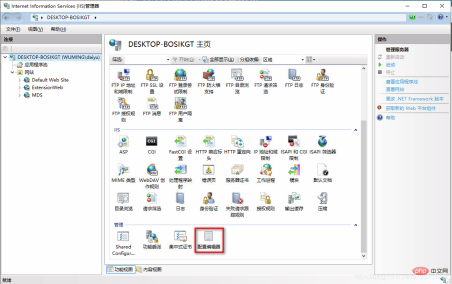
The content of this node is relatively small. There are many, you can choose the nodes you need to configure. Help document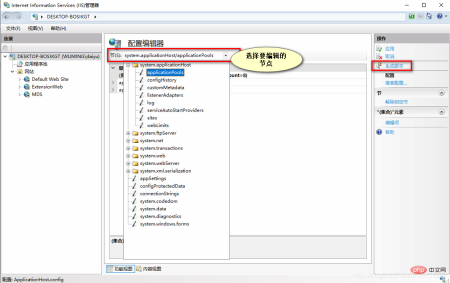
This is the generated script. There are multiple language scripts (C#, javaScript, APPCmd, PowerShell). Here I am more familiar with the AppCmd command line, so I choose the command line script. You can also You can choose other language scripts, whichever language script you are familiar with. 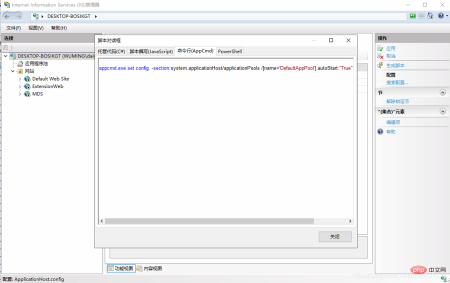
The above is the detailed content of Introducing the automatic deployment method of IIS scripts. For more information, please follow other related articles on the PHP Chinese website!

 Securing IIS Using the Request Filtering ModuleJul 21, 2025 am 02:22 AM
The IISRequestFiltering module can improve website security by configuring blacklist extensions, limiting URLs and querying string lengths, and prohibiting hiding HTTP. The specific steps are: 1. Add extensions such as .php and set to reject to prevent upload vulnerabilities in the "File Extension" tab; 2. Set the URL not more than 2KB and the query string not more than 1024 bytes in the "Request Limit" to prevent abnormal requests; 3. Deny non-essential methods such as PUT, DELETE, TRACE and other methods in the "HTTP Method" tab to reduce the attack surface. These settings are simple and effective, and are suitable for strengthening IIS security protection.
 What does a 200 0 64 status in IIS logs mean?Jul 21, 2025 am 01:25 AM
The 200064 status code indicates that the request is successful and there is no system error, but the data transmission volume is small. The specific explanation is as follows: 1.200 means that the HTTP request is successfully processed; 2.0 means that no Windows-level error occurred; 3.64 means that the server sent 64 bytes of data, usually the response header information. Commonly used in HEAD requests, small static file access, crawler detection, or page redirection. If this status code frequently appears in the log, it may indicate that there are a large number of small requests, scanning behaviors, or redirecting pages. There is usually no need to worry, but if the source is abnormal or the number of requests suddenly increases, it is recommended to further check whether there are security risks or optimization needs.
 Setting Up Multiple Websites Using Host Headers on a Single IIS ServerJul 21, 2025 am 12:45 AM
TorunmultiplewebsitesonasingleIISserverwithoutseparateIPaddresses,usehostheaders.1.AssignallsitesthesameIPandport(like80or443)inIISbindings.2.SetuniquehostheadersforeachsiteviatheBindingsmenu.3.EnsureDNSArecordspointeachdomaintotheserver'ssharedIP.Co
 What is the difference between IIS logging and Enhanced Logging?Jul 21, 2025 am 12:36 AM
ThemaindifferencebetweenstandardIISloggingandEnhancedLoggingisthatstandardIISloggingcapturesbasicrequest-leveldatalikeIPaddress,timestamp,URL,HTTPstatuscode,anduseragentbydefault,whileEnhancedLoggingoffersgreaterflexibility,allowingloggingofcustomhea
 Understanding the IIS Request Processing Pipeline StagesJul 20, 2025 am 02:58 AM
The IIS request processing process is divided into five main stages, each of which affects the performance and functions of the web application. 1. Receive requests and basic verification: IIS listens to ports and recognizes protocols, performs basic verification such as SSL/TLS handshake and IP restrictions. Common problems include firewall interception or certificate errors; 2. Authentication and authorization: Supports multiple authentication methods and access control based on users or roles. 401 or 403 errors usually originate from improper configuration at this stage; 3. Request processing module intervention: multiple modules handle requests in sequence in integrated pipeline mode, such as URL rewriting, logging, content compression and output cache. Custom modules can be inserted into logic but may affect performance; 4. Processor mapping and execution: Processor generation based on extension or path matching
 IIS logging on Azure App ServiceJul 20, 2025 am 02:56 AM
To enable IIS logging on AzureAppService, 1. Enter the AppService resource, 2. Find the "AppServicelogs" menu, 3. Select "FileSystem" or "BlobStorage" in the "IISlogs" section. It is recommended to select BlobStorage when retention for a long time; IIS logs record client IP, user agent, request method, URL, status code, processing time, data volume and other information by default; viewing methods include Kudu console, downloading Blob or using the LogStream tool of the portal, among which Blob storage is more suitable for long-term retention.
 What is the meaning of the cs-version field in IIS logs?Jul 20, 2025 am 02:25 AM
Thecs-versionfieldinIISlogsindicatestheHTTPprotocolversionusedbytheclientwhenmakingarequesttotheserver.1.CommonvaluesincludeHTTP/1.0,HTTP/1.1,andHTTP/2,withHTTP/1.1andHTTP/2beingmostprevalenttoday.2.Ahyphen(-)signifiesmissingorunspecifiedversiondatad
 What does sc-status 500 in IIS logs mean?Jul 20, 2025 am 12:23 AM
A500statuscodeinIISlogsindicatesaninternalservererror,meaningsomethingwentwrongduringrequestprocessing.Commoncausesincludeapplicationcrashes,badconfiguration,permissionissues,missingdependencies,orscripterrors.Todiagnose,checkthefullloglineforURLdeta


Hot AI Tools

Undress AI Tool
Undress images for free

Undresser.AI Undress
AI-powered app for creating realistic nude photos

AI Clothes Remover
Online AI tool for removing clothes from photos.

Clothoff.io
AI clothes remover

Video Face Swap
Swap faces in any video effortlessly with our completely free AI face swap tool!

Hot Article
Hot Tools

SAP NetWeaver Server Adapter for Eclipse
Integrate Eclipse with SAP NetWeaver application server.

EditPlus Chinese cracked version
Small size, syntax highlighting, does not support code prompt function

SublimeText3 Linux new version
SublimeText3 Linux latest version

Notepad++7.3.1
Easy-to-use and free code editor

mPDF
mPDF is a PHP library that can generate PDF files from UTF-8 encoded HTML. The original author, Ian Back, wrote mPDF to output PDF files "on the fly" from his website and handle different languages. It is slower than original scripts like HTML2FPDF and produces larger files when using Unicode fonts, but supports CSS styles etc. and has a lot of enhancements. Supports almost all languages, including RTL (Arabic and Hebrew) and CJK (Chinese, Japanese and Korean). Supports nested block-level elements (such as P, DIV),

