


 Web Front-endVue.jsDetailed explanation of 8 Vue component communication methods, come and collect it!
Detailed explanation of 8 Vue component communication methods, come and collect it!

This article will give you a detailed understanding of the 8 component communication methods in vue. It has certain reference value. Friends in need can refer to it. I hope it will be helpful to everyone.

#vue is a framework for data-driven view updates, so data communication between components is very important for vue. So how do data communication occur between components?
First of all, we need to know what kind of relationship exists between components in vue, so that it is easier to understand their communication methods. It is like going home during the New Year and sitting in a room full of strangers talking to each other. What do you call them? At this time, you need to first know what kind of relationship you have with them. (Learning video sharing: vue video tutorial)
Relationship description in vue components:
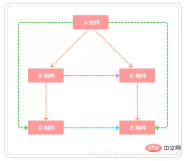
As shown above As shown, the relationship between A and B, A and C, B and D, C and E components is the father-child relationship; the relationship between B and C is the brother; the relationship between A and D, A and E is the generational relationship; the relationship between D and E is a cousin relationship (non-direct relative)
We classify the above relationships into:
- Communication between parent and child components
- Communication between non-father and child components (sibling components , intergenerational relationship components, etc.)
This article will introduce 8 ways of communication between components as shown in the following figure: and introduce how to choose effective ways to implement inter-component communication in different scenarios. I hope it can help friends better understand the communication between components.
1. props / $emit
Parent component Pass data to child components through props, and child components can communicate with parent components through $emit.
1. Parent component passes value to child component
The following uses an example to illustrate how the parent component passes data to the child component: In the child component How to get the data in the parent component section.vue in article.vuearticles:['A Dream of Red Mansions', 'Journey to the West', 'Romance of the Three Kingdoms']
// section父组件
<template>
<div class="section">
<com-article :articles="articleList"></com-article>
</div>
</template>
<script>
import comArticle from './test/article.vue'
export default {
name: 'HelloWorld',
components: { comArticle },
data() {
return {
articleList: ['红楼梦', '西游记', '三国演义']
}
}
}
</script>// 子组件 article.vue
<template>
<div>
<span v-for="(item, index) in articles" :key="index">{{item}}</span>
</div>
</template>
<script>
export default {
props: ['articles']
}
</script> Summary: props can only be passed from upper-level components to lower-level components (parent-child components), which is the so-called one-way data flow. Moreover, prop is read-only and cannot be modified. All modifications will be invalid and a warning will be issued.
2. Child component passes value to parent component
My own understanding of $emit is this: $emitBind a custom event. When this statement is executed, the parameter arg will be passed to the parent component. The parent component listens and receives the parameters through v-on. Through an example, explain how a child component passes data to a parent component.
Based on the previous example, click the item of the ariticle rendered by the page, and the subscript displayed in the array in the parent component
// 父组件中
<template>
<div class="section">
<com-article :articles="articleList" @onEmitIndex="onEmitIndex"></com-article>
<p>{{currentIndex}}</p>
</div>
</template>
<script>
import comArticle from './test/article.vue'
export default {
name: 'HelloWorld',
components: { comArticle },
data() {
return {
currentIndex: -1,
articleList: ['红楼梦', '西游记', '三国演义']
}
},
methods: {
onEmitIndex(idx) {
this.currentIndex = idx
}
}
}
</script><template>
<div>
<div v-for="(item, index) in articles" :key="index" @click="emitIndex(index)">{{item}}</div>
</div>
</template>
<script>
export default {
props: ['articles'],
methods: {
emitIndex(index) {
this.$emit('onEmitIndex', index)
}
}
}
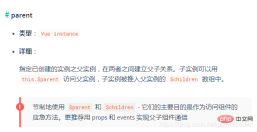
</script>two , $children / $parent
vue. You can access the instance of the component through $parent and $children, and get What does the instance represent? Represents access to all methods and data of this component. The next step is how to get the instance of the specified component.
Usage method// 父组件中
<template>
<div class="hello_world">
<div>{{msg}}</div>
<com-a></com-a>
<button @click="changeA">点击改变子组件值</button>
</div>
</template>
<script>
import ComA from './test/comA.vue'
export default {
name: 'HelloWorld',
components: { ComA },
data() {
return {
msg: 'Welcome'
}
},
methods: {
changeA() {
// 获取到子组件A
this.$children[0].messageA = 'this is new value'
}
}
}
</script>rrree
Pay attention to the boundary conditions. For example, if you take $parenton#app, you will get # For an instance of ##new Vue(), if you take$parenton this instance, you will getundefined, and on the bottom child component, you will get$childrenis an empty array. Also note that the values of$parentand$childrenare different. The value of$childrenis an array, while$parentis an object.Summary
The above two methods are used for communication between parent and child components, and using props for communication between parent and child components is more common; neither can be used for communication between non-parent and child components.
3.provide/ inject
##Concept:
provide
/ inject is the new api of vue2.2.0. Simply speaking, it is passed in the parent component through provide To provide variables, and then inject variables through inject in the subcomponent.
注意: 这里不论子组件嵌套有多深, 只要调用了inject那么就可以注入provide中的数据,而不局限于只能从当前父组件的props属性中回去数据
举例验证
接下来就用一个例子来验证上面的描述:
假设有三个组件: A.vue、B.vue、C.vue 其中 C是B的子组件,B是A的子组件
// A.vue
<template>
<div>
<comB></comB>
</div>
</template>
<script>
import comB from '../components/test/comB.vue'
export default {
name: "A",
provide: {
for: "demo"
},
components:{
comB
}
}
</script>// B.vue
<template>
<div>
{{demo}}
<comC></comC>
</div>
</template>
<script>
import comC from '../components/test/comC.vue'
export default {
name: "B",
inject: ['for'],
data() {
return {
demo: this.for
}
},
components: {
comC
}
}
</script>// C.vue
<template>
<div>
{{demo}}
</div>
</template>
<script>
export default {
name: "C",
inject: ['for'],
data() {
return {
demo: this.for
}
}
}
</script>四、ref / refs
ref:如果在普通的 DOM 元素上使用,引用指向的就是 DOM 元素;如果用在子组件上,引用就指向组件实例,可以通过实例直接调用组件的方法或访问数据, 我们看一个ref 来访问组件的例子:
// 子组件 A.vue

export default {
  data () {
    return {
      name: 'Vue.js'
    }
  },
  methods: {
    sayHello () {
      console.log('hello')
    }
  }
}
// 父组件 app.vue
<template>
<component-a ref="comA"></component-a>
</template>
<script>
export default {
mounted () {
const comA = this.$refs.comA;
console.log(comA.name); // Vue.js
comA.sayHello(); // hello
}
}
</script>五、eventBus
eventBus 又称为事件总线,在vue中可以使用它来作为沟通桥梁的概念, 就像是所有组件共用相同的事件中心,可以向该中心注册发送事件或接收事件, 所以组件都可以通知其他组件。
eventBus也有不方便之处, 当项目较大,就容易造成难以维护的灾难
在Vue的项目中怎么使用eventBus来实现组件之间的数据通信呢?具体通过下面几个步骤
1. 初始化
首先需要创建一个事件总线并将其导出, 以便其他模块可以使用或者监听它.
// event-bus.js

import Vue from 'vue'
export const EventBus = new Vue()
2. 发送事件
假设你有两个组件: additionNum 和 showNum, 这两个组件可以是兄弟组件也可以是父子组件;这里我们以兄弟组件为例:
<template>
<div>
<show-num-com></show-num-com>
<addition-num-com></addition-num-com>
</div>
</template>
<script>
import showNumCom from './showNum.vue'
import additionNumCom from './additionNum.vue'
export default {
components: { showNumCom, additionNumCom }
}
</script>// addtionNum.vue 中发送事件
<template>
<div>
<button @click="additionHandle">+加法器</button>
</div>
</template>
<script>
import {EventBus} from './event-bus.js'
console.log(EventBus)
export default {
data(){
return{
num:1
}
},
methods:{
additionHandle(){
EventBus.$emit('addition', {
num:this.num++
})
}
}
}
</script>3. 接收事件
// showNum.vue 中接收事件
<template>
<div>计算和: {{count}}</div>
</template>
<script>
import { EventBus } from './event-bus.js'
export default {
data() {
return {
count: 0
}
},
mounted() {
EventBus.$on('addition', param => {
this.count = this.count + param.num;
})
}
}
</script>这样就实现了在组件addtionNum.vue中点击相加按钮, 在showNum.vue中利用传递来的 num 展示求和的结果.
4. 移除事件监听者
如果想移除事件的监听, 可以像下面这样操作:
import { eventBus } from 'event-bus.js'
EventBus.$off('addition', {})
六、Vuex
1. Vuex介绍
Vuex 是一个专为 Vue.js 应用程序开发的状态管理模式。它采用集中式存储管理应用的所有组件的状态,并以相应的规则保证状态以一种可预测的方式发生变化.
Vuex 解决了多个视图依赖于同一状态和来自不同视图的行为需要变更同一状态的问题,将开发者的精力聚焦于数据的更新而不是数据在组件之间的传递上
2. Vuex各个模块
state:用于数据的存储,是store中的唯一数据源getters:如vue中的计算属性一样,基于state数据的二次包装,常用于数据的筛选和多个数据的相关性计算mutations:类似函数,改变state数据的唯一途径,且不能用于处理异步事件actions:类似于mutation,用于提交mutation来改变状态,而不直接变更状态,可以包含任意异步操作modules:类似于命名空间,用于项目中将各个模块的状态分开定义和操作,便于维护
3. Vuex实例应用
// 父组件
<template>
<div id="app">
<ChildA/>
<ChildB/>
</div>
</template>
<script>
import ChildA from './components/ChildA' // 导入A组件
import ChildB from './components/ChildB' // 导入B组件
export default {
name: 'App',
components: {ChildA, ChildB} // 注册A、B组件
}
</script>// 子组件childA
<template>
<div id="childA">
<h1 id="我是A组件">我是A组件</h1>
<button @click="transform">点我让B组件接收到数据</button>
<p>因为你点了B,所以我的信息发生了变化:{{BMessage}}</p>
</div>
</template>
<script>
export default {
data() {
return {
AMessage: 'Hello,B组件,我是A组件'
}
},
computed: {
BMessage() {
// 这里存储从store里获取的B组件的数据
return this.$store.state.BMsg
}
},
methods: {
transform() {
// 触发receiveAMsg,将A组件的数据存放到store里去
this.$store.commit('receiveAMsg', {
AMsg: this.AMessage
})
}
}
}
</script>// 子组件 childB
<template>
<div id="childB">
<h1 id="我是B组件">我是B组件</h1>
<button @click="transform">点我让A组件接收到数据</button>
<p>因为你点了A,所以我的信息发生了变化:{{AMessage}}</p>
</div>
</template>
<script>
export default {
data() {
return {
BMessage: 'Hello,A组件,我是B组件'
}
},
computed: {
AMessage() {
// 这里存储从store里获取的A组件的数据
return this.$store.state.AMsg
}
},
methods: {
transform() {
// 触发receiveBMsg,将B组件的数据存放到store里去
this.$store.commit('receiveBMsg', {
BMsg: this.BMessage
})
}
}
}
</script>vuex的store,js
import Vue from 'vue'
import Vuex from 'vuex'
Vue.use(Vuex)
const state = {
  // 初始化A和B组件的数据,等待获取
  AMsg: '',
  BMsg: ''
}

const mutations = {
  receiveAMsg(state, payload) {
    // 将A组件的数据存放于state
    state.AMsg = payload.AMsg
  },
  receiveBMsg(state, payload) {
    // 将B组件的数据存放于state
    state.BMsg = payload.BMsg
  }
}

export default new Vuex.Store({
  state,
  mutations
})
七、 localStorage / sessionStorage
这种通信比较简单,缺点是数据和状态比较混乱,不太容易维护。
通过window.localStorage.getItem(key) 获取数据
通过window.localStorage.setItem(key,value) 存储数据
注意用JSON.parse()/JSON.stringify()做数据格式转换localStorage/sessionStorage可以结合vuex, 实现数据的持久保存,同时使用vuex解决数据和状态混乱问题.
八 $attrs与 $listeners
现在我们来讨论一种情况, 我们一开始给出的组件关系图中A组件与D组件是隔代关系, 那它们之前进行通信有哪些方式呢?
使用
props绑定来进行一级一级的信息传递, 如果D组件中状态改变需要传递数据给A, 使用事件系统一级级往上传递使用
eventBus,这种情况下还是比较适合使用, 但是碰到多人合作开发时, 代码维护性较低, 可读性也低使用Vuex来进行数据管理, 但是如果仅仅是传递数据, 而不做中间处理,使用Vuex处理感觉有点大材小用了.
在vue2.4中,为了解决该需求,引入了$attrs 和$listeners , 新增了inheritAttrs 选项。 在版本2.4以前,默认情况下,父作用域中不作为 prop 被识别 (且获取) 的特性绑定 (class 和 style 除外),将会“回退”且作为普通的HTML特性应用在子组件的根元素上。接下来看一个跨级通信的例子:
// app.vue
// index.vue

<template>
  <div>
    <child-com1
      :name="name"
      :age="age"
      :gender="gender"
      :height="height"
      title="程序员成长指北"
    ></child-com1>
  </div>
</template>
<script>
const childCom1 = () => import("./childCom1.vue");
export default {
  components: { childCom1 },
  data() {
    return {
      name: "zhang",
      age: "18",
      gender: "女",
      height: "158"
    };
  }
};
</script>
// childCom1.vue
<template class="border">
<div>
<p>name: {{ name}}</p>
<p>childCom1的$attrs: {{ $attrs }}</p>
<child-com2 v-bind="$attrs"></child-com2>
</div>
</template>
<script>
const childCom2 = () => import("./childCom2.vue");
export default {
components: {
childCom2
},
inheritAttrs: false, // 可以关闭自动挂载到组件根元素上的没有在props声明的属性
props: {
name: String // name作为props属性绑定
},
created() {
console.log(this.$attrs);
// { "age": "18", "gender": "女", "height": "158", "title": "程序员成长指北" }
}
};
</script>// childCom2.vue
<template>
<div class="border">
<p>age: {{ age}}</p>
<p>childCom2: {{ $attrs }}</p>
</div>
</template>
<script>
export default {
inheritAttrs: false,
props: {
age: String
},
created() {
console.log(this.$attrs);
// { "gender": "女", "height": "158", "title": "程序员成长指北" }
}
};
</script>更多编程相关知识,请访问:编程视频!!
The above is the detailed content of Detailed explanation of 8 Vue component communication methods, come and collect it!. For more information, please follow other related articles on the PHP Chinese website!

 Netflix's Frontend: Examples and Applications of React (or Vue)Apr 16, 2025 am 12:08 AM
Netflix uses React as its front-end framework. 1) React's componentized development model and strong ecosystem are the main reasons why Netflix chose it. 2) Through componentization, Netflix splits complex interfaces into manageable chunks such as video players, recommendation lists and user comments. 3) React's virtual DOM and component life cycle optimizes rendering efficiency and user interaction management.
 The Frontend Landscape: How Netflix Approached its ChoicesApr 15, 2025 am 12:13 AM
Netflix's choice in front-end technology mainly focuses on three aspects: performance optimization, scalability and user experience. 1. Performance optimization: Netflix chose React as the main framework and developed tools such as SpeedCurve and Boomerang to monitor and optimize the user experience. 2. Scalability: They adopt a micro front-end architecture, splitting applications into independent modules, improving development efficiency and system scalability. 3. User experience: Netflix uses the Material-UI component library to continuously optimize the interface through A/B testing and user feedback to ensure consistency and aesthetics.
 React vs. Vue: Which Framework Does Netflix Use?Apr 14, 2025 am 12:19 AM
Netflixusesacustomframeworkcalled"Gibbon"builtonReact,notReactorVuedirectly.1)TeamExperience:Choosebasedonfamiliarity.2)ProjectComplexity:Vueforsimplerprojects,Reactforcomplexones.3)CustomizationNeeds:Reactoffersmoreflexibility.4)Ecosystema
 The Choice of Frameworks: What Drives Netflix's Decisions?Apr 13, 2025 am 12:05 AM
Netflix mainly considers performance, scalability, development efficiency, ecosystem, technical debt and maintenance costs in framework selection. 1. Performance and scalability: Java and SpringBoot are selected to efficiently process massive data and high concurrent requests. 2. Development efficiency and ecosystem: Use React to improve front-end development efficiency and utilize its rich ecosystem. 3. Technical debt and maintenance costs: Choose Node.js to build microservices to reduce maintenance costs and technical debt.
 React, Vue, and the Future of Netflix's FrontendApr 12, 2025 am 12:12 AM
Netflix mainly uses React as the front-end framework, supplemented by Vue for specific functions. 1) React's componentization and virtual DOM improve the performance and development efficiency of Netflix applications. 2) Vue is used in Netflix's internal tools and small projects, and its flexibility and ease of use are key.
 Vue.js in the Frontend: Real-World Applications and ExamplesApr 11, 2025 am 12:12 AM
Vue.js is a progressive JavaScript framework suitable for building complex user interfaces. 1) Its core concepts include responsive data, componentization and virtual DOM. 2) In practical applications, it can be demonstrated by building Todo applications and integrating VueRouter. 3) When debugging, it is recommended to use VueDevtools and console.log. 4) Performance optimization can be achieved through v-if/v-show, list rendering optimization, asynchronous loading of components, etc.
 Vue.js and React: Understanding the Key DifferencesApr 10, 2025 am 09:26 AM
Vue.js is suitable for small to medium-sized projects, while React is more suitable for large and complex applications. 1. Vue.js' responsive system automatically updates the DOM through dependency tracking, making it easy to manage data changes. 2.React adopts a one-way data flow, and data flows from the parent component to the child component, providing a clear data flow and an easy-to-debug structure.
 Vue.js vs. React: Project-Specific ConsiderationsApr 09, 2025 am 12:01 AM
Vue.js is suitable for small and medium-sized projects and fast iterations, while React is suitable for large and complex applications. 1) Vue.js is easy to use and is suitable for situations where the team is insufficient or the project scale is small. 2) React has a richer ecosystem and is suitable for projects with high performance and complex functional needs.


Hot AI Tools

Undresser.AI Undress
AI-powered app for creating realistic nude photos

AI Clothes Remover
Online AI tool for removing clothes from photos.

Undress AI Tool
Undress images for free

Clothoff.io
AI clothes remover

AI Hentai Generator
Generate AI Hentai for free.

Hot Article
Hot Tools

mPDF
mPDF is a PHP library that can generate PDF files from UTF-8 encoded HTML. The original author, Ian Back, wrote mPDF to output PDF files "on the fly" from his website and handle different languages. It is slower than original scripts like HTML2FPDF and produces larger files when using Unicode fonts, but supports CSS styles etc. and has a lot of enhancements. Supports almost all languages, including RTL (Arabic and Hebrew) and CJK (Chinese, Japanese and Korean). Supports nested block-level elements (such as P, DIV),

SAP NetWeaver Server Adapter for Eclipse
Integrate Eclipse with SAP NetWeaver application server.

WebStorm Mac version
Useful JavaScript development tools

MinGW - Minimalist GNU for Windows
This project is in the process of being migrated to osdn.net/projects/mingw, you can continue to follow us there. MinGW: A native Windows port of the GNU Compiler Collection (GCC), freely distributable import libraries and header files for building native Windows applications; includes extensions to the MSVC runtime to support C99 functionality. All MinGW software can run on 64-bit Windows platforms.

VSCode Windows 64-bit Download
A free and powerful IDE editor launched by Microsoft

