



How to convert raw format to jpg format: First open the software and find the picture that needs to be converted; then click the "Save Picture As" option; finally select or enter the saved file name, and select JPG format on the save type. That's it.

The operating environment of this article: Windows 10 system, the version of Swift Image Converter is V2.4.0.0, Dell G3 computer.
How to convert raw format to jpg format:
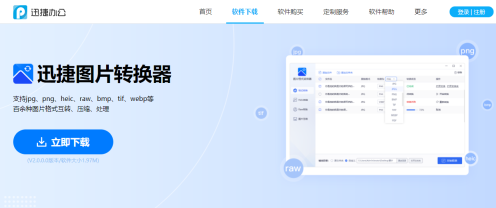
1. Download and install the Swift Image Converter (you can go to Swift Office official website to download) ;
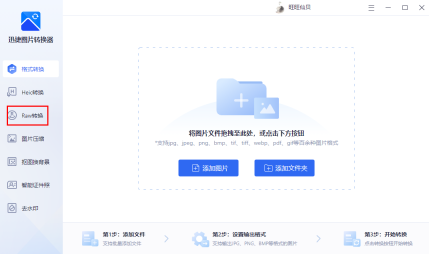
 2. Open the software, find and click the "Raw Conversion" function in the function options on the left column;
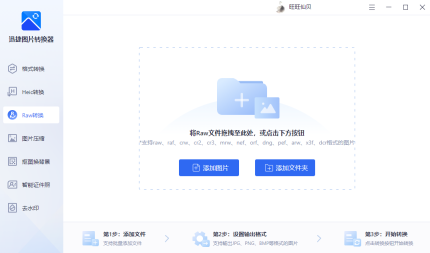
 3. Select to add pictures/folders, Add the image files that need to be converted;
 4. After setting the conversion format and output directory, click to start conversion;
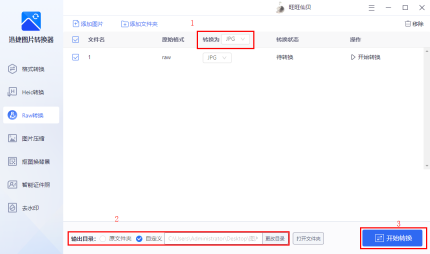 5. Wait a few seconds , when the conversion status is 100%, the conversion is completed and you can view the pictures at will.
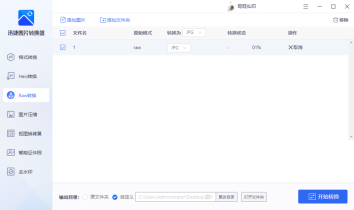 raw format is a special format for digital cameras. Opening pictures in this format requires professional software such as PS and ACDsee, which has a certain threshold. Therefore, we often convert raw to jpg format to solve the problem of opening raw images. Hope the above tutorial can help you!
If you want to know more about programming learning, please pay attention to the php training column!
The above is the detailed content of How to convert raw format to jpg format. For more information, please follow other related articles on the PHP Chinese website!

Hot AI Tools

Undresser.AI Undress
AI-powered app for creating realistic nude photos

AI Clothes Remover
Online AI tool for removing clothes from photos.

Undress AI Tool
Undress images for free

Clothoff.io
AI clothes remover

AI Hentai Generator
Generate AI Hentai for free.

Hot Article
Hot Tools

WebStorm Mac version
Useful JavaScript development tools

SAP NetWeaver Server Adapter for Eclipse
Integrate Eclipse with SAP NetWeaver application server.

VSCode Windows 64-bit Download
A free and powerful IDE editor launched by Microsoft

SublimeText3 Chinese version
Chinese version, very easy to use

Atom editor mac version download
The most popular open source editor

