



How to split a picture in css: 1. Use the background-image and background-position attributes to split the picture; 2. Use the clip attribute to set "clip:rect(y1, y2,x2,x1);" style to segment the picture.
The operating environment of this tutorial: Windows 7 system, CSS3&&HTML5 version, Dell G3 computer.
Scenario: If a page has a small img icon, then when accessing the browser, the browsing speed will be slowed down due to loading of images. At this time, if you put so many small icons together and integrate them into one img, you only need to access one image. You can reduce the number of image requests
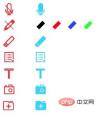
Integrated img
So the integrated img is available, how to get the pixel range we want during use Woolen cloth? The reference address is written above. I'll just do it again.
Method 1
The background of the element in CSS: background-color || background-image || background-repeate || background-attachment || background-position , examples are as follows:
background:transparent url(123.jpg) no-repeat scroll -140px -20px;
transparent means transparency without color
url(123.jpg) means the background image
no-repeat means the image is not repeated
scroll means the background image scrolls with the browser pull-down
-140px Indicates that the horizontal position is at -140px of the image (taking the upper left corner of the image as 0,0)
-20px indicates that the vertical position is at -20px of the image
But I found the above It's not suitable for what I want.
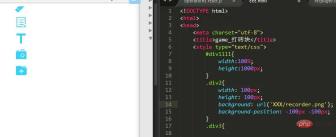
The above effect can only display the lower right corner of the picture. Then try the second method
Method 2
Use the rect,clip:rect(y1,y2,x2,x1) parameter in the clip attribute of img The description is as follows
y1 = The starting point of the positioning y coordinate (vertical direction)
y2 = The end point of the positioning y coordinate (vertical direction)
x1 = The positioning x coordinate The starting point (vertical direction)
x2 = The end point of the positioning x coordinate (vertical direction)
Note: The starting point of the coordinate is in the upper left corner
The code is as follows:
    img{
        position:absolute;
        clip:rect(20px ,100px , 50px , 20px);
}
During the actual operation, two problems were discovered: 1. The rect method needs to have a comma, 2. The position must be included, and it needs to be absolute positioning, also It is absolute or fixed attribute.
For more programming related knowledge, please visit: Programming Video! !
The above is the detailed content of How to split an image in css. For more information, please follow other related articles on the PHP Chinese website!

 Two Images and an API: Everything We Need for Recoloring ProductsApr 15, 2025 am 11:27 AM
I recently found a solution to dynamically update the color of any product image. So with just one of a product, we can colorize it in different ways to show
 Weekly Platform News: Impact of Third-Party Code, Passive Mixed Content, Countries with the Slowest ConnectionsApr 15, 2025 am 11:19 AM
In this week's roundup, Lighthouse sheds light on third-party scripts, insecure resources will get blocked on secure sites, and many country connection speeds
 Options for Hosting Your Own Non-JavaScript-Based AnalyticsApr 15, 2025 am 11:09 AM
There are loads of analytics platforms to help you track visitor and usage data on your sites. Perhaps most notably Google Analytics, which is widely used
 It's All In the Head: Managing the Document Head of a React Powered Site With React HelmetApr 15, 2025 am 11:01 AM
The document head might not be the most glamorous part of a website, but what goes into it is arguably just as important to the success of your website as its
 What is super() in JavaScript?Apr 15, 2025 am 10:59 AM
What's happening when you see some JavaScript that calls super()?.In a child class, you use super() to call its parent’s constructor and super. to access its
 Comparing the Different Types of Native JavaScript PopupsApr 15, 2025 am 10:48 AM
JavaScript has a variety of built-in popup APIs that display special UI for user interaction. Famously:
 Why Are Accessible Websites so Hard to Build?Apr 15, 2025 am 10:45 AM
I was chatting with some front-end folks the other day about why so many companies struggle at making accessible websites. Why are accessible websites so hard
 The `hidden` Attribute is Visibly WeakApr 15, 2025 am 10:43 AM
There is an HTML attribute that does exactly what you think it should do:


Hot AI Tools

Undresser.AI Undress
AI-powered app for creating realistic nude photos

AI Clothes Remover
Online AI tool for removing clothes from photos.

Undress AI Tool
Undress images for free

Clothoff.io
AI clothes remover

AI Hentai Generator
Generate AI Hentai for free.

Hot Article
Hot Tools

SublimeText3 Chinese version
Chinese version, very easy to use

Atom editor mac version download
The most popular open source editor

VSCode Windows 64-bit Download
A free and powerful IDE editor launched by Microsoft

Zend Studio 13.0.1
Powerful PHP integrated development environment

DVWA
Damn Vulnerable Web App (DVWA) is a PHP/MySQL web application that is very vulnerable. Its main goals are to be an aid for security professionals to test their skills and tools in a legal environment, to help web developers better understand the process of securing web applications, and to help teachers/students teach/learn in a classroom environment Web application security. The goal of DVWA is to practice some of the most common web vulnerabilities through a simple and straightforward interface, with varying degrees of difficulty. Please note that this software

