


 Operation and MaintenanceWindows Operation and MaintenanceWhat should I do if the win7 screen exceeds the display range?
Solution to the problem that the win7 screen exceeds the display range: 1. Open the control panel and click [Adjust Resolution]; 2. Select the appropriate resolution as needed in the screen resolution setting interface; 3. In the pop-up Click [Save Changes] in the window.

#The operating environment of this article: windows7 system, thinkpad t480 computer.
The solution is as follows:
1. First, click to open the Control Panel, click Display after entering, and then click Adjust Resolution in the left menu.
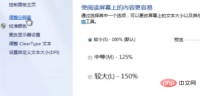
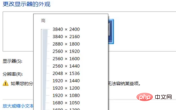
#2. Set the resolution size according to your needs on the screen resolution page and click OK.
(Free video tutorial: php video tutorial)
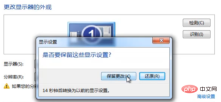
3. Finally, click Save Changes in the pop-up window.
Related recommendations: windows tutorial
The above is the detailed content of What should I do if the win7 screen exceeds the display range?. For more information, please follow other related articles on the PHP Chinese website!

Hot AI Tools

Undresser.AI Undress
AI-powered app for creating realistic nude photos

AI Clothes Remover
Online AI tool for removing clothes from photos.

Undress AI Tool
Undress images for free

Clothoff.io
AI clothes remover

AI Hentai Generator
Generate AI Hentai for free.

Hot Article
Hot Tools

ZendStudio 13.5.1 Mac
Powerful PHP integrated development environment

SublimeText3 Mac version
God-level code editing software (SublimeText3)

Notepad++7.3.1
Easy-to-use and free code editor

SublimeText3 Linux new version
SublimeText3 Linux latest version

MantisBT
Mantis is an easy-to-deploy web-based defect tracking tool designed to aid in product defect tracking. It requires PHP, MySQL and a web server. Check out our demo and hosting services.

