



How to change the content of Paiyipai: 1. Open WeChat and select a friend; 2. Enter the chat interface and click on the friend’s avatar; 3. Click [Set Notes and Tags], edit the note name, and click [Complete] That’s it.

The operating environment of this article: EMUI 5.1 system, WeChat 7.0.15, honor 10 mobile phone.
Specific method:
Open the mobile phone desktop and open WeChat;
Enter WeChat and select a friend;
Enter the chat page and click on the friend’s avatar ;
Then click "Set notes and tags;"
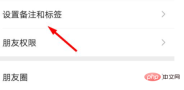
Enter the note name and click "Finish" in the upper right corner;
Enter the On the friend chat page, use PaiPai. At this time, you will find that the text of PaiPai has changed.
Related recommendations: WeChat public account development tutorial
The above is the detailed content of How to change the content of Paiyipai. For more information, please follow other related articles on the PHP Chinese website!

Hot AI Tools

Undresser.AI Undress
AI-powered app for creating realistic nude photos

AI Clothes Remover
Online AI tool for removing clothes from photos.

Undress AI Tool
Undress images for free

Clothoff.io
AI clothes remover

AI Hentai Generator
Generate AI Hentai for free.

Hot Article
Hot Tools

SublimeText3 English version
Recommended: Win version, supports code prompts!

SecLists
SecLists is the ultimate security tester's companion. It is a collection of various types of lists that are frequently used during security assessments, all in one place. SecLists helps make security testing more efficient and productive by conveniently providing all the lists a security tester might need. List types include usernames, passwords, URLs, fuzzing payloads, sensitive data patterns, web shells, and more. The tester can simply pull this repository onto a new test machine and he will have access to every type of list he needs.

SAP NetWeaver Server Adapter for Eclipse
Integrate Eclipse with SAP NetWeaver application server.

VSCode Windows 64-bit Download
A free and powerful IDE editor launched by Microsoft

EditPlus Chinese cracked version
Small size, syntax highlighting, does not support code prompt function

