



Free learning recommendation: js video tutorial
##About JavaScript event flow
##Foreword- Text
- What is an event?
- What Is it event streaming?
- Event bubbling vs event capturing
- DOM event hierarchy
- DOM0 event
- DOM2 event
Before reading this article, I suggest you take a look at the JavaScript event loop. Of course, for those who already know it No need! This article will discuss the event flow of js.
TextWe all know that when we perform certain types of operations on a web page, such as clicking, sliding, etc., some corresponding events will be triggered. We also know that the entire web page is actually parsed into a DOM tree by the browser. When a node generates an event, the event will be propagated in a certain order between the node and the root node, and all nodes passing through this propagation path will receive the event. This entire process is called
DOM event flow.
What are events?The interaction between js and html is actually achieved through "events". All user clicks, selections, slides, etc. on web pages are all events in the js world.
For events, when an event occurs, there must be a response. In js, the so-called response is the listener. Just like the observer pattern, the event is our subject, and when the event occurs, all listeners corresponding to the event (subject) must be notified to perform corresponding responses.
What is event flow?Event flow describes the order in which events are received from the page. Mainly divided into the following two types:
IE's event bubbling- Netscape's event capture
The event flow model proposed by IE is event bubbling, that is, from bottom to top, it propagates upward step by step from the element triggered by the target, all the way to the document object.
 The event flow model proposed by Netscape is event capturing. Contrary to event bubbling, it is from top to bottom, that is, it is propagated from the document object to the target object step by step.
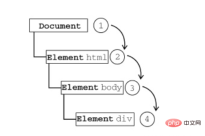 The above is the event flow mechanism under the DOM0 standard. Later, ECMAScript further standardized the event flow in DOM2. In DOM2, the event stream contained in an event is divided into the following three stages:
- Target stage (target)
- Event bubbling stage (bubble)
-


When an event occurs on a DOM node, of course you need to do the corresponding Department, and DOM events are divided into 4 levels, as follows:
Among them, the more important ones are DOM0/DOM2, so we will focus on them below. 
There are two main ways to implement DOM0-level events. The first is the inline model, which directly uses the function name as the event attribute in the html tag. attribute value. As follows:
// js code// eventDOM.jsfunction btnClick() {
    console.log('Hello World')}
<!-- html code -->

        <title>eventDOM demo</title>


        <p></p>
        <script></script>
However, the inline model has obvious shortcomings, that is, it violates the W3C requirement for the separation of content (html) and behavior (js). So there is the second type, which is the script model (dynamic binding model). The specific method is to select a specific DOM node through a js script, and then add event attributes and attribute values to the node. As follows:
// js code// eventDOM.jslet btn = document.getElementById('btn')let btnClick = function() {
    console.log('Hello World')}btn.onclick = btnClick
<!-- html code -->

        <title>eventDOM demo</title>


        <p></p>
        <script></script>
Click and
Hello World will appear, no problem. But the script model also has shortcomings. Based on the above html code, add a little js, as follows: <pre class="brush:php;toolbar:false">// js code// eventDOM.jslet btn = document.getElementById('btn')let btnClick = function() {
console.log('Hello World')}let btnClick2 = function() {
console.log('Hello World again')}btn.onclick = btnClick
btn.onclick = btnClick2</pre>We found that now clicking only
will appear. Therefore, the script model only allows one node to add events of the same type once, and subsequent ones will overwrite the previous ones. Finally let us look at an interesting example:
<!-- html code -->

        <title>eventDOM demo</title>


        <p>
            btn3            </p><p>
                btn2                </p><p>
                    btn1                </p>


        <script></script>
// js code// eventDOM.jslet btn1 = document.getElementById('btn1')let btn2 = document.getElementById('btn2')let btn3 = document.getElementById('btn3')btn1.onclick = function() {
    console.log('1')}btn2.onclick = function() {
    console.log('2')}btn3.onclick = function() {
    console.log('3')}
When we click btn3, the output is as follows: 
It is in line with expectations, but what if we click btn1? The output is as follows: 
This is a bit strange, Obviously we only added one listener for btn1, why does it feel like we added it together with btn2 and btn3? The reason is because, although DOM0 has two models: event bubbling proposed by IE and event capturing proposed by Netscape, in fact DOM0 only supports event bubbling. Therefore, the event flow of clicking btn1 is as follows: 
That is, the event flow also passes through btn2 and btn3, so their event processing is triggered. But obviously, this is not the result we want.
DOM2 events
After further specification, there is a DOM2-level event handler. Two methods are defined:
- addEventListener() Add event listener
- removeEventListener() Remove event listener
These two functions There are three parameters in the following table:
| Parameter | Type | Description |
|---|---|---|
| String | The name of the event to be monitored, such as 'click'. Note that there is no need to "on" here | |
| function | The callback function to be executed to trigger the event | |
| Boolean(default:false) | Whether the event is processed in the capture phase |


The above is the detailed content of An introduction to JavaScript's event flow. For more information, please follow other related articles on the PHP Chinese website!

 Understanding the JavaScript Engine: Implementation DetailsApr 17, 2025 am 12:05 AM
Understanding how JavaScript engine works internally is important to developers because it helps write more efficient code and understand performance bottlenecks and optimization strategies. 1) The engine's workflow includes three stages: parsing, compiling and execution; 2) During the execution process, the engine will perform dynamic optimization, such as inline cache and hidden classes; 3) Best practices include avoiding global variables, optimizing loops, using const and lets, and avoiding excessive use of closures.
 Python vs. JavaScript: The Learning Curve and Ease of UseApr 16, 2025 am 12:12 AM
Python is more suitable for beginners, with a smooth learning curve and concise syntax; JavaScript is suitable for front-end development, with a steep learning curve and flexible syntax. 1. Python syntax is intuitive and suitable for data science and back-end development. 2. JavaScript is flexible and widely used in front-end and server-side programming.
 Python vs. JavaScript: Community, Libraries, and ResourcesApr 15, 2025 am 12:16 AM
Python and JavaScript have their own advantages and disadvantages in terms of community, libraries and resources. 1) The Python community is friendly and suitable for beginners, but the front-end development resources are not as rich as JavaScript. 2) Python is powerful in data science and machine learning libraries, while JavaScript is better in front-end development libraries and frameworks. 3) Both have rich learning resources, but Python is suitable for starting with official documents, while JavaScript is better with MDNWebDocs. The choice should be based on project needs and personal interests.
 From C/C to JavaScript: How It All WorksApr 14, 2025 am 12:05 AM
The shift from C/C to JavaScript requires adapting to dynamic typing, garbage collection and asynchronous programming. 1) C/C is a statically typed language that requires manual memory management, while JavaScript is dynamically typed and garbage collection is automatically processed. 2) C/C needs to be compiled into machine code, while JavaScript is an interpreted language. 3) JavaScript introduces concepts such as closures, prototype chains and Promise, which enhances flexibility and asynchronous programming capabilities.
 JavaScript Engines: Comparing ImplementationsApr 13, 2025 am 12:05 AM
Different JavaScript engines have different effects when parsing and executing JavaScript code, because the implementation principles and optimization strategies of each engine differ. 1. Lexical analysis: convert source code into lexical unit. 2. Grammar analysis: Generate an abstract syntax tree. 3. Optimization and compilation: Generate machine code through the JIT compiler. 4. Execute: Run the machine code. V8 engine optimizes through instant compilation and hidden class, SpiderMonkey uses a type inference system, resulting in different performance performance on the same code.
 Beyond the Browser: JavaScript in the Real WorldApr 12, 2025 am 12:06 AM
JavaScript's applications in the real world include server-side programming, mobile application development and Internet of Things control: 1. Server-side programming is realized through Node.js, suitable for high concurrent request processing. 2. Mobile application development is carried out through ReactNative and supports cross-platform deployment. 3. Used for IoT device control through Johnny-Five library, suitable for hardware interaction.
 Building a Multi-Tenant SaaS Application with Next.js (Backend Integration)Apr 11, 2025 am 08:23 AM
I built a functional multi-tenant SaaS application (an EdTech app) with your everyday tech tool and you can do the same. First, what’s a multi-tenant SaaS application? Multi-tenant SaaS applications let you serve multiple customers from a sing
 How to Build a Multi-Tenant SaaS Application with Next.js (Frontend Integration)Apr 11, 2025 am 08:22 AM
This article demonstrates frontend integration with a backend secured by Permit, building a functional EdTech SaaS application using Next.js. The frontend fetches user permissions to control UI visibility and ensures API requests adhere to role-base


Hot AI Tools

Undresser.AI Undress
AI-powered app for creating realistic nude photos

AI Clothes Remover
Online AI tool for removing clothes from photos.

Undress AI Tool
Undress images for free

Clothoff.io
AI clothes remover

AI Hentai Generator
Generate AI Hentai for free.

Hot Article
Hot Tools

MinGW - Minimalist GNU for Windows
This project is in the process of being migrated to osdn.net/projects/mingw, you can continue to follow us there. MinGW: A native Windows port of the GNU Compiler Collection (GCC), freely distributable import libraries and header files for building native Windows applications; includes extensions to the MSVC runtime to support C99 functionality. All MinGW software can run on 64-bit Windows platforms.

EditPlus Chinese cracked version
Small size, syntax highlighting, does not support code prompt function

SublimeText3 Chinese version
Chinese version, very easy to use

SublimeText3 Linux new version
SublimeText3 Linux latest version

Zend Studio 13.0.1
Powerful PHP integrated development environment

