



Uniapp's method of displaying tabbar: First, the first item in the pages array represents the application startup page; then configure it in the [page.js] file, the code is ["path" : "pages/show/show ","style" : {"navigationBarT】.

The operating environment of this tutorial: windows7 system, uni-app2.5.1 version, this method is suitable for all brands Computer.
Recommended (free): uni-app development tutorial
How to display tabbar in uniapp :
First, check the official website to learn about tabBar
If the application is a multi-tab application, you can specify the performance of the tab bar through the tabBar configuration item, and the corresponding page displayed when tab switching .
When the position is set to top, the icon will not be displayed
The list in tabBar is an array and can only be configured with at least 2 , up to 5 tabs, and the tabs are sorted in the order of the array.
tabbar may not be rendered in time when switching the first load. You can first load it in the onLoad life cycle of each tabbar page. Pop up a waiting snowflake (hello uni-app uses this method)
The tabbar page is displayed once and remains in the memory. Switching the tabbar page again will only trigger each page. onShow will no longer trigger onLoad.
The tabbar at the top is currently only supported on the WeChat applet. If you need to use the top tab, it is recommended not to use the top setting of the tabbar, but To make the top tab yourself, you can refer to hello uni-app->Template->Top tab.
Second, configure it in the page.js file
{
"pages": [ //pages数组中第一项表示应用启动页,
{
"path": "pages/index/index",
"style": {
"navigationBarTitleText": "uni-app"
}
}
    ,{
            "path" : "pages/show/show",
            "style" : {
"navigationBarTitleText": "show"
}
        }
        ,{
            "path" : "pages/component/component",
            "style" : {
"navigationBarTitleText": "component"
}
        }
    ],
"globalStyle": {
"navigationBarTextStyle": "black",
"navigationBarTitleText": "uni-app",
"navigationBarBackgroundColor": "#F8F8F8",
"backgroundColor": "#F8F8F8"
},
"tabBar": {
    "color": "#F0AD4E",
    "selectedColor": "#3cc51f",
    "borderStyle": "black",
    "backgroundColor": "#F8F8F8",
    "list": [{
        "pagePath": "pages/index/index",
        "iconPath": "static/logo.png",
        "selectedIconPath": "static/logo.png",
        "text": "首页"
    },{
        "pagePath": "pages/component/component",
        "iconPath": "static/logo.png",
        "selectedIconPath": "static/logo.png",
        "text": "组件"
    }, {
        "pagePath": "pages/show/show",
      "iconPath": "static/logo.png",
      "selectedIconPath": "static/logo.png",
        "text": "展示"
    }]
}
}
At first I didn’t know why it was not displayed when I configured two pages in "tabBar", but it was successful after configuring three pages. I don’t know if you have encountered this problem.
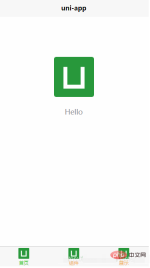
Okay, the configuration is successful. , the renderings are as follows
Related free learning recommendations: php programming (video)
The above is the detailed content of How to display tabbar in uniapp. For more information, please follow other related articles on the PHP Chinese website!

 How do you debug issues on different platforms (e.g., mobile, web)?Mar 27, 2025 pm 05:07 PM
The article discusses debugging strategies for mobile and web platforms, highlighting tools like Android Studio, Xcode, and Chrome DevTools, and techniques for consistent results across OS and performance optimization.
 What debugging tools are available for UniApp development?Mar 27, 2025 pm 05:05 PM
The article discusses debugging tools and best practices for UniApp development, focusing on tools like HBuilderX, WeChat Developer Tools, and Chrome DevTools.
 How do you perform end-to-end testing for UniApp applications?Mar 27, 2025 pm 05:04 PM
The article discusses end-to-end testing for UniApp applications across multiple platforms. It covers defining test scenarios, choosing tools like Appium and Cypress, setting up environments, writing and running tests, analyzing results, and integrat
 What are the different types of testing that you can perform in a UniApp application?Mar 27, 2025 pm 04:59 PM
The article discusses various testing types for UniApp applications, including unit, integration, functional, UI/UX, performance, cross-platform, and security testing. It also covers ensuring cross-platform compatibility and recommends tools like Jes
 What are some common performance anti-patterns in UniApp?Mar 27, 2025 pm 04:58 PM
The article discusses common performance anti-patterns in UniApp development, such as excessive global data use and inefficient data binding, and offers strategies to identify and mitigate these issues for better app performance.
 How can you use profiling tools to identify performance bottlenecks in UniApp?Mar 27, 2025 pm 04:57 PM
The article discusses using profiling tools to identify and resolve performance bottlenecks in UniApp, focusing on setup, data analysis, and optimization.
 How can you optimize network requests in UniApp?Mar 27, 2025 pm 04:52 PM
The article discusses strategies for optimizing network requests in UniApp, focusing on reducing latency, implementing caching, and using monitoring tools to enhance application performance.
 How can you optimize images for web performance in UniApp?Mar 27, 2025 pm 04:50 PM
The article discusses optimizing images in UniApp for better web performance through compression, responsive design, lazy loading, caching, and using WebP format.


Hot AI Tools

Undresser.AI Undress
AI-powered app for creating realistic nude photos

AI Clothes Remover
Online AI tool for removing clothes from photos.

Undress AI Tool
Undress images for free

Clothoff.io
AI clothes remover

AI Hentai Generator
Generate AI Hentai for free.

Hot Article
Hot Tools

SublimeText3 Mac version
God-level code editing software (SublimeText3)

PhpStorm Mac version
The latest (2018.2.1) professional PHP integrated development tool

WebStorm Mac version
Useful JavaScript development tools

Atom editor mac version download
The most popular open source editor

Dreamweaver Mac version
Visual web development tools

