



How to connect mysql and qt: first download and install mysql and qt; then enter SQL related instructions in the "cmd.exe" software; then create the QT program; finally add in the "sql_test.pro" file "QT =sql" is enough.

Recommendation: "mysql video tutorial"
Because QT is needed to read the data in the database , and save the data to the database. It took a day to finally realize reading the data in the database from QT. There is a lot of relevant information on the Internet, but it is not comprehensive. Some problems arise in the middle, which are troublesome to solve. Therefore, this article downloads and installs from MYSQL and connects QT to MYSQL in as much detail as possible. If there are any shortcomings, please forgive me.
1. QT5.5 download
The windows32 QT5.5 version used in this article is (qt-opensource-windows-x86-mingw492-5.5.10), which can be downloaded from my Baidu Cloud: https://pan.baidu.com/s/1XsVmgd3Qd-J0BHPVOtMVkA download
If you choose a higher version, you can refer to Baidu for the specific installation method.
2. MYSQL5.6 download
Since QT uses Windows 32-bit, MYSQL should also choose the Windows 32-bit version as mysql-5.6.39-win32.zip. (If QT selects Windows 64-bit, MYSQL should select Windows 64-bit),
can be downloaded from my Baidu Cloud: https://pan.baidu.com/s/1XsVmgd3Qd-J0BHPVOtMVkA.
If you choose a higher version, you can refer to Baidu for the specific download method.
3. MYSQL5.6 installation
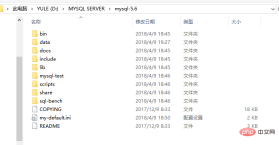
1) Extract mysql-5.6.39-win32.zip to MYSQL SERVER in the D drive, and rename it to mysql-5.6. The result after decompression and modification is shown in Figure 1-1.
# 图 1-1
## 2) Modify my-default.ini, after modification, as shown in Figure 1-2 ## . Right-click My Computer, click Properties, click Advanced System Settings, click Environment Variables, and add;D:\MYSQL SERVER\mysql-5.6\bin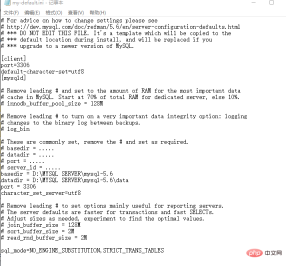 to PATH (don’t forget the semicolon, according to your own installation Directory rewriting), click OK.
4) Find cmd.exe in the C drive and open it with administrator rights. Execute the following instructions respectively:
d: cd MYSQL SERVER\mysql-5.6\bin
mysqld -initalize -user=mysql -console mysqld -install, after entering this command, it will print Service successfully installednet start mysql, after entering this command, it will print that the MySQL service has been started successfully. At this point, MYSQL5.6 has been installed successfully and is running.
4. MYSQL login and password change
1) In the cmd.exe software, continue to enter SQL related commands:
mysql -u root -p, Enter password: appears after entering this command, press Enter directly when logging in for the first time, and enter the mysql software. As shown in Figure 1-3
# 2) Add root password. mysql> set password for root@localhost=password('88888888');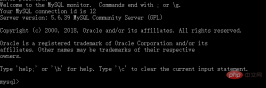
mysql>exit
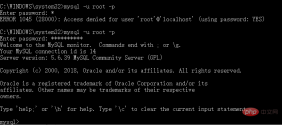
Enter this command and exit.Log in again, enter mysql -u root -p, Enter password: will appear after entering this command, enter 88888888. If the entered password is not 88888888, an error will appear, as shown in Figure 1-4 ## 3) Add a test table in Add the student table to the test library and add some data. The specific operations are shown in Figure 1-5. At this point, the MYSQL part has been completed. (Note that it is added in the test library. For QT, test should be selected;
#1) Copy libmysql.dll and libmysqld.dll in the lib directory of the mysql-5.6 file to the bin file of mingw493_32 in Qt5.5. Shown in Figure 1-6; Name the project sql_test;
Add QT =sql
main.cpp in the sql_test.pro file and change it to 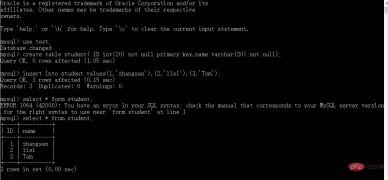
 1 #include <qcoreapplication> 2 #include <qsqldatabase> 3 #include <qsqlquery> 4 #include <qsqlerror> 5 #include <qtdebug> 6 void connect_mysql() 7 { 8     QSqlDatabase db=QSqlDatabase::addDatabase("QMYSQL"); 9        db.setHostName("127.0.0.1");      //连接数据库主机名,这里需要注意(若填的为”127.0.0.1“,出现不能连接,则改为localhost)10        db.setPort(3306);                 //连接数据库端口号,与设置一致11         db.setDatabaseName("test");      //连接数据库名,与设置一致12         db.setUserName("root");          //数据库用户名,与设置一致13         db.setPassword("88888888");    //数据库密码,与设置一致14         db.open();15         if(!db.open())16         {17             qDebug()3) Test results<p></p> <p> </p>
<p><img src="/static/imghwm/default1.png" data-src="https://img.php.cn/upload/article/000/000/020/5befd6fa6bc61c487383b195bd9fa272-5.png?x-oss-process=image/resize,p_40" class="lazy" alt=""    style="max-width:90%"  style="max-width:90%">                                                                                                                                                                                           Figure 1-7</p>
<p></p> The results show that QT has successfully read the student table in MYSQL. <p></p>
<p>The project can be downloaded at https://github.com/xtuwang/Qt_Project/tree/xtuwang-patch-1. </p>
<p> </p></qtdebug></qsqlerror></qsqlquery></qsqldatabase></qcoreapplication>
The above is the detailed content of How to connect mysql with qt. For more information, please follow other related articles on the PHP Chinese website!

 MySQL's Role: Databases in Web ApplicationsApr 17, 2025 am 12:23 AM
The main role of MySQL in web applications is to store and manage data. 1.MySQL efficiently processes user information, product catalogs, transaction records and other data. 2. Through SQL query, developers can extract information from the database to generate dynamic content. 3.MySQL works based on the client-server model to ensure acceptable query speed.
 MySQL: Building Your First DatabaseApr 17, 2025 am 12:22 AM
The steps to build a MySQL database include: 1. Create a database and table, 2. Insert data, and 3. Conduct queries. First, use the CREATEDATABASE and CREATETABLE statements to create the database and table, then use the INSERTINTO statement to insert the data, and finally use the SELECT statement to query the data.
 MySQL: A Beginner-Friendly Approach to Data StorageApr 17, 2025 am 12:21 AM
MySQL is suitable for beginners because it is easy to use and powerful. 1.MySQL is a relational database, and uses SQL for CRUD operations. 2. It is simple to install and requires the root user password to be configured. 3. Use INSERT, UPDATE, DELETE, and SELECT to perform data operations. 4. ORDERBY, WHERE and JOIN can be used for complex queries. 5. Debugging requires checking the syntax and use EXPLAIN to analyze the query. 6. Optimization suggestions include using indexes, choosing the right data type and good programming habits.
 Is MySQL Beginner-Friendly? Assessing the Learning CurveApr 17, 2025 am 12:19 AM
MySQL is suitable for beginners because: 1) easy to install and configure, 2) rich learning resources, 3) intuitive SQL syntax, 4) powerful tool support. Nevertheless, beginners need to overcome challenges such as database design, query optimization, security management, and data backup.
 Is SQL a Programming Language? Clarifying the TerminologyApr 17, 2025 am 12:17 AM
Yes,SQLisaprogramminglanguagespecializedfordatamanagement.1)It'sdeclarative,focusingonwhattoachieveratherthanhow.2)SQLisessentialforquerying,inserting,updating,anddeletingdatainrelationaldatabases.3)Whileuser-friendly,itrequiresoptimizationtoavoidper
 Explain the ACID properties (Atomicity, Consistency, Isolation, Durability).Apr 16, 2025 am 12:20 AM
ACID attributes include atomicity, consistency, isolation and durability, and are the cornerstone of database design. 1. Atomicity ensures that the transaction is either completely successful or completely failed. 2. Consistency ensures that the database remains consistent before and after a transaction. 3. Isolation ensures that transactions do not interfere with each other. 4. Persistence ensures that data is permanently saved after transaction submission.
 MySQL: Database Management System vs. Programming LanguageApr 16, 2025 am 12:19 AM
MySQL is not only a database management system (DBMS) but also closely related to programming languages. 1) As a DBMS, MySQL is used to store, organize and retrieve data, and optimizing indexes can improve query performance. 2) Combining SQL with programming languages, embedded in Python, using ORM tools such as SQLAlchemy can simplify operations. 3) Performance optimization includes indexing, querying, caching, library and table division and transaction management.
 MySQL: Managing Data with SQL CommandsApr 16, 2025 am 12:19 AM
MySQL uses SQL commands to manage data. 1. Basic commands include SELECT, INSERT, UPDATE and DELETE. 2. Advanced usage involves JOIN, subquery and aggregate functions. 3. Common errors include syntax, logic and performance issues. 4. Optimization tips include using indexes, avoiding SELECT* and using LIMIT.


Hot AI Tools

Undresser.AI Undress
AI-powered app for creating realistic nude photos

AI Clothes Remover
Online AI tool for removing clothes from photos.

Undress AI Tool
Undress images for free

Clothoff.io
AI clothes remover

AI Hentai Generator
Generate AI Hentai for free.

Hot Article
Hot Tools

mPDF
mPDF is a PHP library that can generate PDF files from UTF-8 encoded HTML. The original author, Ian Back, wrote mPDF to output PDF files "on the fly" from his website and handle different languages. It is slower than original scripts like HTML2FPDF and produces larger files when using Unicode fonts, but supports CSS styles etc. and has a lot of enhancements. Supports almost all languages, including RTL (Arabic and Hebrew) and CJK (Chinese, Japanese and Korean). Supports nested block-level elements (such as P, DIV),

Safe Exam Browser
Safe Exam Browser is a secure browser environment for taking online exams securely. This software turns any computer into a secure workstation. It controls access to any utility and prevents students from using unauthorized resources.

ZendStudio 13.5.1 Mac
Powerful PHP integrated development environment

SublimeText3 Mac version
God-level code editing software (SublimeText3)

Dreamweaver Mac version
Visual web development tools

