



How to save WPS files to the desktop on Mac: First double-click WPS on the desktop and create the required document, click "File" in the toolbar in the upper left corner; then click "Save As" in the pop-up list, A dialog box for selecting the file storage location will pop up. Click "My Desktop" on the left side of the dialog box; finally create the file in "My Desktop" and save it.

Step 1: Double-click the desktop WPS 2019 office software and create the required document in the WPS2019 office software. After completing the document, click on the toolbar in the upper left corner "document".

Step 2: Next, click "Save As" in the pop-up list of the selected "File" function. A dialog box for selecting the file storage location will pop up. Click the dialog box "My Desktop" on the left.
Step 3: After selecting the "My Desktop" option in the "Save As" dialog box, fill in the creation file in the list on the left corresponding to "My Desktop" "File name" and click "Save".
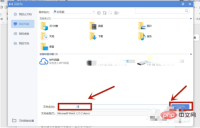
Step 4: Through the above three operations, the document created in the WPS office software can be saved on the computer desktop.

More tutorials: "php tutorial"
The above is the detailed content of How to save wps files to desktop on mac. For more information, please follow other related articles on the PHP Chinese website!

Hot AI Tools

Undresser.AI Undress
AI-powered app for creating realistic nude photos

AI Clothes Remover
Online AI tool for removing clothes from photos.

Undress AI Tool
Undress images for free

Clothoff.io
AI clothes remover

AI Hentai Generator
Generate AI Hentai for free.

Hot Article
Hot Tools

Safe Exam Browser
Safe Exam Browser is a secure browser environment for taking online exams securely. This software turns any computer into a secure workstation. It controls access to any utility and prevents students from using unauthorized resources.

Zend Studio 13.0.1
Powerful PHP integrated development environment

MantisBT
Mantis is an easy-to-deploy web-based defect tracking tool designed to aid in product defect tracking. It requires PHP, MySQL and a web server. Check out our demo and hosting services.

VSCode Windows 64-bit Download
A free and powerful IDE editor launched by Microsoft

WebStorm Mac version
Useful JavaScript development tools

