



❝It is inevitable to use Xsheel at work. Next, Kaka will introduce you to a few tips so that you can work with ease.
❞
1. Say goodbye to the tediousness
Is your Xsheel like this after connecting?
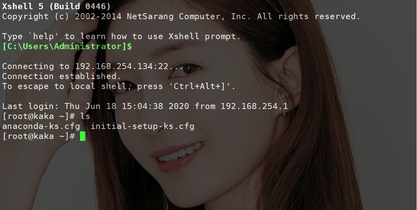 oh! This is too annoying. I have to type the command at least twice to get to my working directory.
 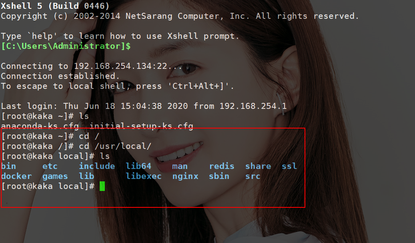 Next, I will tell you how to connect and directly enter the working directory you need. Open the software and let’s do it together.
 gaoMy gaogao
Come to the following directory, there is a bash_profile file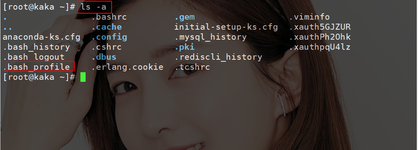 Insert into this file, and then modify the working directory you often use
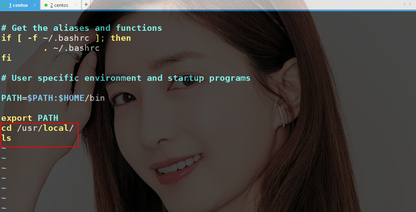 To test it, when restart When you connect to a terminal, you are already directly in the working directory. Isn't it very convenient? Let’s get started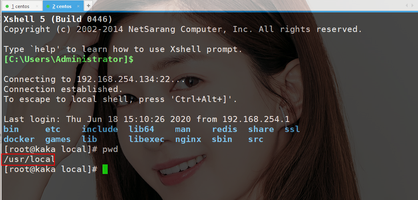
2. Say goodbye to dullness
Hey! Why does the background of this Xsheel look like this? It's not dry black.
Is your screen like this? 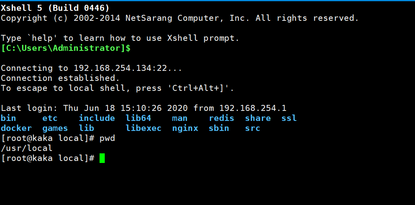 That's it?
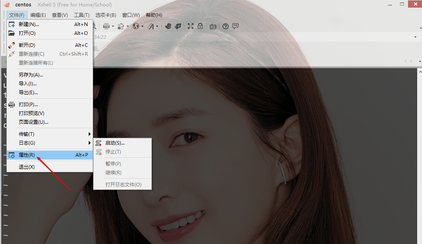
This is too low! Let’s start the operation
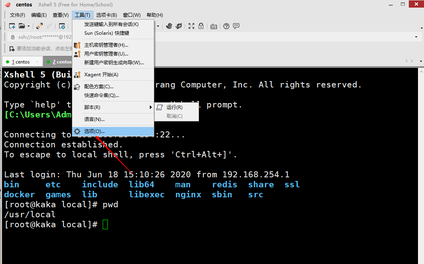
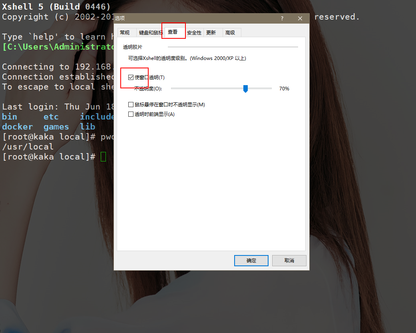 Huh? What's going on? Why is this background the desktop background? That's right, it's the desktop background. You can change it to whoever you want. You're welcome to the next one.
3. Say goodbye to the chaos
Nani! I obviously hit 1 2 3, what the hell is coming out of this
 Young man, don’t panic, watch the operation correctly, one move is fatal
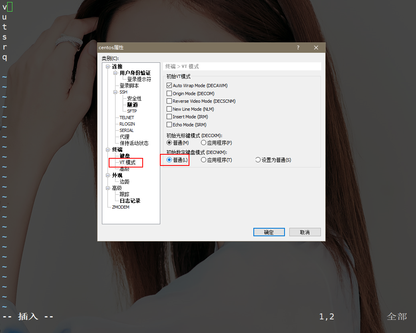 Let us be happy together Call 1 2 3
Oh! Qian Na! This can also play 5 6 7 8 9!
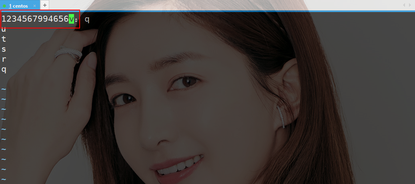 You will be the next one
4. Farewell to CTRL C
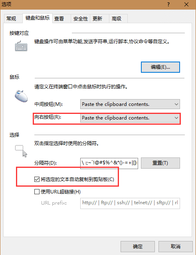
Is there such a painful point that when you want to copy something, you can only use the ctrl ins key? ! This is too troublesome. As a programmer, if you can do it in one action, don't use two actions.
Tools->Options->Keyboard and Mouse
This way you can copy directly as long as you copy it by right-clicking
Go and try it soon
5. Farewell Noise
I don’t know how you are doing at work. This is how Kaka works at work
Headphones never leave your ears
Eyes never leave the screen
Hands never leave the plate
When you wear headphones and focus on coding, a The command was not typed properly. I stared at him. Who can stand this?
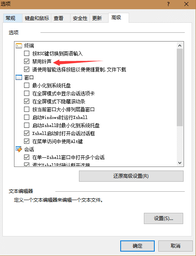
Kaka will take you to say goodbye to the warning sound
Tools->Options->Advanced
The above is the detailed content of This work of conscience gives you some tips on how to use Xsheel. For more information, please follow other related articles on the PHP Chinese website!

 GitHub: A Hub for Open Source and Software DevelopmentApr 15, 2025 am 12:10 AM
GitHub is a Git-based version control system hosting platform that provides version control, collaborative development and community communication functions. Using GitHub can improve development efficiency and code quality.
 Git and GitHub: What's the Relationship?Apr 14, 2025 am 12:10 AM
Git and GitHub are different tools: Git is software for version control, and GitHub is an online platform based on Git. 1.Git allows you to track file changes and collaborative development. 2. GitHub provides code hosting and collaboration tools to enhance team development efficiency.
 GitHub: The Platform for Developers and ProjectsApr 13, 2025 am 12:01 AM
The core features of GitHub include version control, branch management, code review, issue tracking and project management. 1. Version control and branch management are based on Git, allowing tracking of code changes and experimental development. 2. Code review is implemented through PullRequest to improve code quality and team collaboration. 3. Issues tracking and project management are carried out through Issues and the project management board to improve project transparency and traceability.
 GitHub in Action: Examples and Use CasesApr 12, 2025 am 12:16 AM
GitHub is a powerful tool to improve the efficiency and quality of software development. 1) Version control: manage code changes through Git. 2) PullRequests: Conduct code review and improve code quality. 3) Issues: Track bugs and project progress. 4) GitHubActions: Automate the construction, testing and deployment process.
 Git vs. GitHub: Version Control and Code HostingApr 11, 2025 am 11:33 AM
Git is a version control system, and GitHub is a Git-based code hosting platform. Git is used to manage code versions and supports local operations; GitHub provides online collaboration tools such as Issue tracking and PullRequest.
 What is Git in simple words?Apr 09, 2025 am 12:12 AM
Git is an open source distributed version control system that helps developers track file changes, work together and manage code versions. Its core functions include: 1) record code modifications, 2) fallback to previous versions, 3) collaborative development, and 4) create and manage branches for parallel development.
 Is Git the same as GitHub?Apr 08, 2025 am 12:13 AM
Git and GitHub are not the same thing. Git is a version control system, and GitHub is a Git-based code hosting platform. Git is used to manage code versions, and GitHub provides an online collaboration environment.
 How to use GitHub for HTML?Apr 07, 2025 am 12:13 AM
The reason for using GitHub to manage HTML projects is that it provides a platform for version control, collaborative development and presentation of works. The specific steps include: 1. Create and initialize the Git repository, 2. Add and submit HTML files, 3. Push to GitHub, 4. Use GitHubPages to deploy web pages, 5. Use GitHubActions to automate building and deployment. In addition, GitHub also supports code review, Issue and PullRequest features to help optimize and collaborate on HTML projects.


Hot AI Tools

Undresser.AI Undress
AI-powered app for creating realistic nude photos

AI Clothes Remover
Online AI tool for removing clothes from photos.

Undress AI Tool
Undress images for free

Clothoff.io
AI clothes remover

AI Hentai Generator
Generate AI Hentai for free.

Hot Article
Hot Tools

SublimeText3 English version
Recommended: Win version, supports code prompts!

Safe Exam Browser
Safe Exam Browser is a secure browser environment for taking online exams securely. This software turns any computer into a secure workstation. It controls access to any utility and prevents students from using unauthorized resources.

ZendStudio 13.5.1 Mac
Powerful PHP integrated development environment

Dreamweaver Mac version
Visual web development tools

Dreamweaver CS6
Visual web development tools

