



事情经过
昨天早上,打开电脑发现自己的博客网站打开不了,准备远程登录服务器查看问题,发现服务器远程不上。没办法,登录阿里云后台,重启服务器。重启完成后,网站能正常打开,所以当时就不以为然,以为阿里云那边是不是出了什么毛病。
到了下午的时候,发现网站又打不开了,而且又远程连接不了服务器。进入阿里云控制台,查看监控发现cpu跑满了。只能再重启服务器,等重启完成后再远程连接上去,这次需要好好排查问题。

解决问题
当时首先想到的是中病毒了,先不管那么多,第一步是找到那些耗cpu的进程杀死。使用top命令,查看耗cpu的进程有哪些。一看就明白了,都是bzip2搞得鬼。
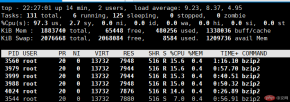
杀进程的过程发现一个问题,就是这些进程杀死了,过一会又出现了。这种现象,我知道肯定要找到他们的父进程,擒贼先擒王。
# ps -lA | grep bzip2
0 R     0  1965  1964 44  80   0 -  3435 -      ?        00:01:43 bzip2
0 S     0  1981  1980 33  80   0 -  3435 pipe_w ?        00:00:56 bzip2
0 R     0  1997  1996 30  80   0 -  3435 -      ?        00:00:31 bzip2
0 R     0  2013  2012 27  80   0 -  3435 -      ?        00:00:07 bzip2
0 R     0  2024  2023 15  80   0 -  3435 -      ?        00:00:00 bzip2
但是发现他们的ppid不是同一个,这就让我很疑惑了。我打算用进程树看看
pstree -up

这时候,我就知道了,原来是自己的定时脚本有问题。那么我需要做以下几件事:
关闭crond服务
crontab -e 将weekly.sh去掉
杀掉那些耗cpu的进程
# 关闭
[root@iz8vb626ci0aehwsivxaydz ~]# kill 1622
[root@iz8vb626ci0aehwsivxaydz ~]# systemctl status crond
● crond.service - Command Scheduler
   Loaded: loaded (/usr/lib/systemd/system/crond.service; enabled; vendor preset: enabled)
   Active: inactive (dead) since Tue 2019-11-12 10:44:32 CST; 10s ago
 Main PID: 1622 (code=exited, status=0/SUCCESS)

# 修改crontab -e

# 杀掉耗cpu进程,下面的命令执行了好几遍,才将所有耗cpu进程全部杀掉了
ps -lA | grep bzip2 | awk '{print $4}' | xargs -n 10 kill -9
问题原因与思考
刚开始,我以为是自己的shell脚本有问题,出现死循环导致问题出现。但是查看脚本,发现没有问题,没有死循环的情况出现。一时间,百思不得姐。
#!/bin/bash
# 每周备份脚本

export PATH=/usr/local/sbin:/usr/local/bin:/sbin:/bin:/usr/sbin:/usr/bin:/root/bin
export

backdir=/backup/weekly # 备份目录

[ -z "$backdir" ] || mkdir -p $backdir

dirs=(/etc /home /root /usr /var/spool/cron /var/spool/at)  # 需要备份的目录

for dir in ${dirs[@]}
do
    if [ ! -d $dir ];then
        continue
    fi

    cd $backdir
    tar -jcpf $(basename $dir)_$(date +%Y%m%d).tar.bz2 $dir
done


# 删除mtime大于30天的文件
find $backdir -mtime +30 -name *.tar.bz2 -exec rm -f {} \;
过了很长时间,终于找到了原因所在,原来是自己的定时任务写法有问题
* 3 * * 1 /root/bin/weekly.sh 1>/dev/null 2>&1
我原本的想法是每周1凌晨3点执行一次备份脚本,但是这样写的结果是每周一凌晨3点的每分钟都会执行该脚本一次。正确的写法应该如下:
# 每周一凌晨三点零一分执行该脚本
1 3 * * 1  /root/bin/weekly.sh 1>/dev/null 2>&1
问题解决了,原因也找到了。自己该写一个服务器资源监控脚本了。
The above is the detailed content of Record a server CPU full event. For more information, please follow other related articles on the PHP Chinese website!

 Linux: How to Enter Recovery Mode (and Maintenance)Apr 18, 2025 am 12:05 AM
The steps to enter Linux recovery mode are: 1. Restart the system and press the specific key to enter the GRUB menu; 2. Select the option with (recoverymode); 3. Select the operation in the recovery mode menu, such as fsck or root. Recovery mode allows you to start the system in single-user mode, perform file system checks and repairs, edit configuration files, and other operations to help solve system problems.
 Linux's Essential Components: Explained for BeginnersApr 17, 2025 am 12:08 AM
The core components of Linux include the kernel, file system, shell and common tools. 1. The kernel manages hardware resources and provides basic services. 2. The file system organizes and stores data. 3. Shell is the interface for users to interact with the system. 4. Common tools help complete daily tasks.
 Linux: A Look at Its Fundamental StructureApr 16, 2025 am 12:01 AM
The basic structure of Linux includes the kernel, file system, and shell. 1) Kernel management hardware resources and use uname-r to view the version. 2) The EXT4 file system supports large files and logs and is created using mkfs.ext4. 3) Shell provides command line interaction such as Bash, and lists files using ls-l.
 Linux Operations: System Administration and MaintenanceApr 15, 2025 am 12:10 AM
The key steps in Linux system management and maintenance include: 1) Master the basic knowledge, such as file system structure and user management; 2) Carry out system monitoring and resource management, use top, htop and other tools; 3) Use system logs to troubleshoot, use journalctl and other tools; 4) Write automated scripts and task scheduling, use cron tools; 5) implement security management and protection, configure firewalls through iptables; 6) Carry out performance optimization and best practices, adjust kernel parameters and develop good habits.
 Understanding Linux's Maintenance Mode: The EssentialsApr 14, 2025 am 12:04 AM
Linux maintenance mode is entered by adding init=/bin/bash or single parameters at startup. 1. Enter maintenance mode: Edit the GRUB menu and add startup parameters. 2. Remount the file system to read and write mode: mount-oremount,rw/. 3. Repair the file system: Use the fsck command, such as fsck/dev/sda1. 4. Back up the data and operate with caution to avoid data loss.
 How Debian improves Hadoop data processing speedApr 13, 2025 am 11:54 AM
This article discusses how to improve Hadoop data processing efficiency on Debian systems. Optimization strategies cover hardware upgrades, operating system parameter adjustments, Hadoop configuration modifications, and the use of efficient algorithms and tools. 1. Hardware resource strengthening ensures that all nodes have consistent hardware configurations, especially paying attention to CPU, memory and network equipment performance. Choosing high-performance hardware components is essential to improve overall processing speed. 2. Operating system tunes file descriptors and network connections: Modify the /etc/security/limits.conf file to increase the upper limit of file descriptors and network connections allowed to be opened at the same time by the system. JVM parameter adjustment: Adjust in hadoop-env.sh file
 How to learn Debian syslogApr 13, 2025 am 11:51 AM
This guide will guide you to learn how to use Syslog in Debian systems. Syslog is a key service in Linux systems for logging system and application log messages. It helps administrators monitor and analyze system activity to quickly identify and resolve problems. 1. Basic knowledge of Syslog The core functions of Syslog include: centrally collecting and managing log messages; supporting multiple log output formats and target locations (such as files or networks); providing real-time log viewing and filtering functions. 2. Install and configure Syslog (using Rsyslog) The Debian system uses Rsyslog by default. You can install it with the following command: sudoaptupdatesud
 How to choose Hadoop version in DebianApr 13, 2025 am 11:48 AM
When choosing a Hadoop version suitable for Debian system, the following key factors need to be considered: 1. Stability and long-term support: For users who pursue stability and security, it is recommended to choose a Debian stable version, such as Debian11 (Bullseye). This version has been fully tested and has a support cycle of up to five years, which can ensure the stable operation of the system. 2. Package update speed: If you need to use the latest Hadoop features and features, you can consider Debian's unstable version (Sid). However, it should be noted that unstable versions may have compatibility issues and stability risks. 3. Community support and resources: Debian has huge community support, which can provide rich documentation and


Hot AI Tools

Undresser.AI Undress
AI-powered app for creating realistic nude photos

AI Clothes Remover
Online AI tool for removing clothes from photos.

Undress AI Tool
Undress images for free

Clothoff.io
AI clothes remover

AI Hentai Generator
Generate AI Hentai for free.

Hot Article
Hot Tools

PhpStorm Mac version
The latest (2018.2.1) professional PHP integrated development tool

SAP NetWeaver Server Adapter for Eclipse
Integrate Eclipse with SAP NetWeaver application server.

SublimeText3 English version
Recommended: Win version, supports code prompts!

Atom editor mac version download
The most popular open source editor

Dreamweaver Mac version
Visual web development tools

