




wamp cannot access phpmyadminWhat should I do? The solution to the problem of unable to access phpmyadmin when building wamp locally
When building wamp locally to access phpmyadmin, if the page as shown in the figure appears, don’t worry, then read on, let us solve this problem step by step.

Before solving this problem, you should first adjust the language of the software interface to Chinese mode, move the mouse to the software icon, right-click, and then move the mouse to Luanguage

in the newly popped-up tab, then move the mouse to the Chinese position in the newly opened menu tab and check
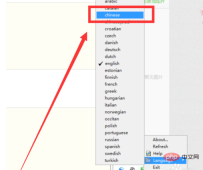
After the adjustment is completed, the operation interface will be converted into Chinese. For a Chinese, this operation will be much more convenient. Next, enter the theme. We find wamp\ in the installation directory of the software. alias\phpmyadmin.conf file, as shown in the figure
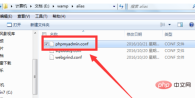
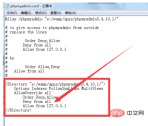
Open it with notepad, find
<Directory "c:/wamp/apps/phpmyadmin3.5.1/">
    Options Indexes FollowSymLinks MultiViews
    AllowOverride all
    Order Deny,Allow
    Deny from all
    Allow from 127.0.0.1
</Directory>
and change Deny from all to Allow from all And save it as shown in the picture
After saving, restart all services and open http://localhost/phpmyadmin/ again. When you can see the page as shown, then Congratulations, the repair is complete.

The above is the detailed content of What should I do if wamp cannot access phpmyadmin?. For more information, please follow other related articles on the PHP Chinese website!

 SQL and phpMyAdmin: A Beginner's GuideApr 16, 2025 am 12:02 AM
Beginners can learn SQL and phpMyAdmin from scratch. 1) Create database and tables: Create a new database in phpMyAdmin and create tables using SQL commands. 2) Execute basic query: Use SELECT statement to query data from the table. 3) Optimization and best practices: Create indexes, avoid SELECT*, use transactions, and regularly back up databases.
 MySQL, phpMyAdmin, and Database Administration: A GuideApr 15, 2025 am 12:01 AM
MySQL and phpMyAdmin are powerful database management tools. 1.MySQL is an open source relational database management system, and phpMyAdmin is a MySQL management tool based on the Web. 2.MySQL works through the client-server model, and phpMyAdmin simplifies database operations. 3. Basic usage includes creating tables and data operations, and advanced usage involves stored procedures and triggers. 4. Common errors include SQL syntax errors, permission issues and performance bottlenecks. 5. Optimization techniques include reasonable use of indexes, optimized query, regular maintenance and backup and recovery.
 phpMyAdmin: Unveiling Its Relationship to SQLApr 14, 2025 am 12:11 AM
phpMyAdmin implements the operation of the database through SQL commands. 1) phpMyAdmin communicates with the database server through PHP scripts, generates and executes SQL commands. 2) Users can enter SQL commands in the SQL editor for query and complex operations. 3) Performance optimization suggestions include optimizing SQL queries, creating indexes and using pagination. 4) Best practices include regular backups, ensuring security and using version control.
 phpMyAdmin: Enhancing Database ProductivityApr 13, 2025 am 12:04 AM
phpMyAdmin improves database productivity through an intuitive web interface: 1. Simplify the creation and management of databases and tables; 2. Support complex SQL queries and data operations; 3. Provide relationship view functions to manage table relationships; 4. Optimize performance and best practices to improve efficiency.
 phpMyAdmin's Purpose: Managing MySQL Databases with EaseApr 12, 2025 am 12:14 AM
phpMyAdmin is a web-based MySQL database management tool. 1. It supports basic CRUD operations and advanced features such as database design and performance optimization. 2. Run through the web server, accept user input and convert it to MySQL commands. 3. The basic usage includes creating a database, and the advanced usage supports query optimization. 4. Common errors such as insufficient permissions can be solved by checking user permissions. 5. Performance optimization includes index optimization, query optimization and database design.
 The Roles of MySQL and phpMyAdmin: A Detailed BreakdownApr 11, 2025 am 12:14 AM
The roles of MySQL and phpMyAdmin are to store and manage data and provide user-friendly database management interfaces. MySQL performs data operations through SQL, phpMyAdmin interacts with MySQL through HTTP requests, and converts user operations into SQL commands.
 phpmyadmin connection to databaseApr 10, 2025 pm 11:09 PM
How to connect to the database through phpMyAdmin: Visit the phpMyAdmin website and log in with credentials. Select the database to connect to. Under the Actions tab, select the Export option. Configure export settings and select format, table, and data range. Save the exported file. Select the Import tab in the target database and browse the exported files. Click the "Execute" button and use the "Query" tab to verify that the import is successful.
 How to connect to oracle by phpmyadminApr 10, 2025 pm 11:03 PM
Connect phpMyAdmin to the Oracle database by following the steps: 1. Install the Oracle driver; 2. Create a database connection, including host, username, password, port, and type; 3. Save settings to establish a connection; 4. Select the connected Oracle database from phpMyAdmin to manage and use it.


Hot AI Tools

Undresser.AI Undress
AI-powered app for creating realistic nude photos

AI Clothes Remover
Online AI tool for removing clothes from photos.

Undress AI Tool
Undress images for free

Clothoff.io
AI clothes remover

AI Hentai Generator
Generate AI Hentai for free.

Hot Article
Hot Tools

SublimeText3 Chinese version
Chinese version, very easy to use

ZendStudio 13.5.1 Mac
Powerful PHP integrated development environment

Zend Studio 13.0.1
Powerful PHP integrated development environment

MinGW - Minimalist GNU for Windows
This project is in the process of being migrated to osdn.net/projects/mingw, you can continue to follow us there. MinGW: A native Windows port of the GNU Compiler Collection (GCC), freely distributable import libraries and header files for building native Windows applications; includes extensions to the MSVC runtime to support C99 functionality. All MinGW software can run on 64-bit Windows platforms.

Atom editor mac version download
The most popular open source editor

