



This article introduces how to convert HTML to WXML, which has certain reference value. I hope it will be helpful to friends who are learning WeChat applet development!

WXML case of converting HTML to WeChat mini program
Although WeChat mini program development is more towards front-end development , but their grammatical structures are different. For example, wxml is fundamentally different from html. Take the a tag as an example. Wxml does not support the a tag. Also, wxml is not compatible with html. The following editor will analyze this issue and analyze how to convert html. into wxml. The specific steps are as follows:
1. Download from https://github.com/icindy/wxParse
2.1 Introduce the WxParse module into the xxx.js file you need to use
var WxParse = require('../../wxParse/wxParse.js');
2.2 Introduce WxParse.css into the Wxss you are using, which can be in app.wxss. Note that it is the global app.wxss
@import "/wxParse/wxParse.wxss";
3. Data binding
var article = '<div>我是HTML代码</div>';/** * WxParse.wxParse(bindName , type, data, target,imagePadding) * 1.bindName绑定的数据名(必填) * 2.type可以为html或者md(必填) * 3.data为传入的具体数据(必填) * 4.target为Page对象,一般为this(必填) * 5.imagePadding为当图片自适应是左右的单一padding(默认为0,可选) */var that = this; WxParse.wxParse('article', 'html', article, that,5);
4. Template reference
//这里data中article为bindName<template is="wxParse" data="{{wxParseData:article.nodes}}"/>Next, I will follow the above steps to analyze the WeChat applet case made for my personal blog. Here I take the download section as an example
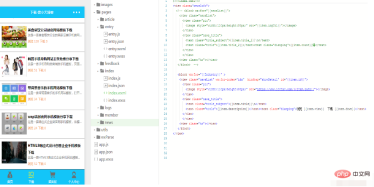
My download section It is index, and the details section that you click to enter is entry. It is precisely because when I click to enter the details, the data I drop is in my html format. The details will have some tags such as p, div, and a. This is not the effect we need. All I need to convert into the corresponding mini program. wxml format.
1. I put the downloaded wxParse folder into my project. I only need to put the wxParse directory here. If you look at the picture, you will find that it is a directory at the same level as pages.
2. I introduced it in the page I need to display: var WxParse = require('../../wxParse/wxParse.js'); Because I don’t need all styles, I have the global wxParse.wxss Just commented.

3. This step is the most critical and important step, data binding. Because all my data are real data taken from the database, this involves loading data from list clicks to detail events. If you are interested, you can read "How to load real data from the database in the WeChat applet". All my data binding is actually the content.
 var article = res.data.content;//article是取到的数据
 var that = this;
 WxParse.wxParse('article', 'html', article, that, 5);
4. Reference the data just bound in the template I need, that is, in entry.wxml
<template is="wxParse" data="{{wxParseData:article.nodes}}"/>The final effect is as follows
For more WeChat applet development tutorials, please pay attention to PHP Chinese website.
The above is the detailed content of WXML case of converting HTML to WeChat applet. For more information, please follow other related articles on the PHP Chinese website!

Hot AI Tools

Undresser.AI Undress
AI-powered app for creating realistic nude photos

AI Clothes Remover
Online AI tool for removing clothes from photos.

Undress AI Tool
Undress images for free

Clothoff.io
AI clothes remover

AI Hentai Generator
Generate AI Hentai for free.

Hot Article
Hot Tools

SublimeText3 English version
Recommended: Win version, supports code prompts!

Safe Exam Browser
Safe Exam Browser is a secure browser environment for taking online exams securely. This software turns any computer into a secure workstation. It controls access to any utility and prevents students from using unauthorized resources.

ZendStudio 13.5.1 Mac
Powerful PHP integrated development environment

Dreamweaver Mac version
Visual web development tools

Dreamweaver CS6
Visual web development tools

