


 Operation and MaintenanceWindows Operation and MaintenanceWhat to do if there is nothing on the desktop of Windows 10 system
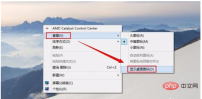
You can’t see the desktop icons but you can see the background on the desktop, and a menu appears when you right-click. You can use the following method to solve the problem:
Click on the desktop Right-click and select [View]--[Show desktop icons].
If there is no icon and the taskbar is gone, this usually means that Windows Explorer has crashed and you need to reopen it
Press the key combination [Ctrl Alt Delete] on the keyboard and then you can see the interface as shown below, and then click [Task Manager];
Enter the Task Manager and click [File]-[Run New Task】;
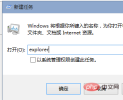
#Enter [explorer] during operation and confirm to see the pictures of the desktop and taskbar
Taskbar and desktop icons appear.

Recommended related articles and tutorials: windows tutorial
The above is the detailed content of What to do if there is nothing on the desktop of Windows 10 system. For more information, please follow other related articles on the PHP Chinese website!

Hot AI Tools

Undresser.AI Undress
AI-powered app for creating realistic nude photos

AI Clothes Remover
Online AI tool for removing clothes from photos.

Undress AI Tool
Undress images for free

Clothoff.io
AI clothes remover

AI Hentai Generator
Generate AI Hentai for free.

Hot Article
Hot Tools

SecLists
SecLists is the ultimate security tester's companion. It is a collection of various types of lists that are frequently used during security assessments, all in one place. SecLists helps make security testing more efficient and productive by conveniently providing all the lists a security tester might need. List types include usernames, passwords, URLs, fuzzing payloads, sensitive data patterns, web shells, and more. The tester can simply pull this repository onto a new test machine and he will have access to every type of list he needs.

SublimeText3 Linux new version
SublimeText3 Linux latest version

Atom editor mac version download
The most popular open source editor

MinGW - Minimalist GNU for Windows
This project is in the process of being migrated to osdn.net/projects/mingw, you can continue to follow us there. MinGW: A native Windows port of the GNU Compiler Collection (GCC), freely distributable import libraries and header files for building native Windows applications; includes extensions to the MSVC runtime to support C99 functionality. All MinGW software can run on 64-bit Windows platforms.

SublimeText3 Mac version
God-level code editing software (SublimeText3)

