



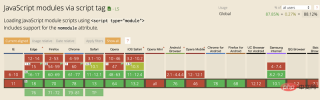
Currently, almost all of our projects are developed based on build tools such as webpack and rollup, and modularization has become the norm.
We are no stranger to it. Today, we will systematically review the module mechanism of ES6 and summarize the common operations and best practices. We hope it will be helpful to you.
Some simple background
Take it as you go, it is a mechanism that we all hope to realize.
The same is true in Javascript. Divide a large Javascript program into different parts. Which part is to be used, just take that part.
[Related course recommendations: JavaScript video tutorial]
For a long time, NodeJS had such capabilities. Later, more and more libraries and frameworks It also has the ability to modularize, such as CommonJS, or implementation based on the AMD model (such as RequireJs), as well as subsequent Webpack, Babel, etc.
By 2015, a standard modular system was born. This is the protagonist we are going to talk about today - the ES6 model system.
At first glance, it is not difficult to find that the ES6 model system is very similar to the CommonJS syntax. After all, the ES6 model system comes from the CommonJS era and is deeply influenced by CommonJS.
Look at a simple example, such as in CommonJs: (https://flaviocopes.com/commonjs/)
//file.js
module.exports = value;

// 引入value
const value = require('file.js')
And in ES6:
// const.js
export const value = 'xxx';


import { value } from 'const.js'
The syntax is Very similar.
Below we will mainly look at import and export, and several related features to learn more about ES6 Modules.
The benefits of modularization
The main benefits of modularization are two points:
1. 避免全局变量污染
2. 有效的处理依赖关系
With the evolution of the times, Browsers have also begun to natively support es6 import and export syntax.
Let’s look at a simple example first:
<script>
import { addTextToBody } from '/util.js';
addTextToBody('Modules are pretty cool.');
</script>
// util.js
export function addTextToBody(text) {
const p = document.createElement('p');
p.textContent = text;
document.body.appendChild(p);
}
If you want to handle events, the same is true. Let’s look at a simple example:
<button>Show Message</button>
<script></script>

// showImport.js
import { showMessage } from '/show.js'

document.getElementById('test').onclick = function() {
  showMessage();
}

// show.js
export function showMessage() {
  alert("Hello World!")
}
If you want to run this demo, be sure to set up a simple service:
$ http-server
Otherwise, you will see a CORS error.
As for the specific reasons for the error and other details, they are not the focus of this article. Those who are interested can read the following link for details.
https://jakearchibald.com/2017/es-modules-in-browsers/
strict mode
https://developer.mozilla.org/en-US/docs/Web/JavaScript/Reference/Strict_mode
'use strict' statement is familiar to us, and we often use it in the es5 era, usually in The purpose of adding this statement at the top of the file is to disable the less friendly parts of Javascript and help us write more rigorous code.
This feature is enabled by default in es6 syntax. If there is less strict code in the code, an error will be reported, for example:

below I took some parts from MDN that are disabled in strict mode:
Variables can't be left undeclared-
Function parametersmust haveunique names(or are considered syntax errors) -
withis forbidden - Errors are thrown on assignment to
read-only properties -
Octal numberslike 00840 aresyntax errors - Attempts to
delete undeletable propertiesthrow an error -
delete propis a syntax error, instead of assuming delete global[prop] -
evaldoesn't introduce new variables into its surrounding scope -
evaland arguments can't be bound or assigned to -
argumentsdoesn't magically track changes to method parameters -
arguments.calleethrows a TypeError, no longer supported -
arguments.callerthrows a TypeError , no longer supported - Context passed as this in method invocations is not “boxed” (forced) into becoming an Object
- No longer able to use
fn.callerand fn.arguments to access the JavaScript stack -
Reserved words(e.g protected, static, interface, etc) cannot be bound
Several usages of exports
ES6 module only supports static export. You can only use export in the outermost scope of the module. It cannot be used in conditional statements or in functions. used in the domain.
In terms of classification, there are three main types of exports:
1. Named Exports (Zero or more exports per module)
2. Default Exports (One per module)
3. Hybrid Exports
Exports Overview:
// Exporting inpidual features
export let name1, name2, …, nameN; // also var, const
export let name1 = …, name2 = …, …, nameN; // also var, const
export function functionName(){...}
export class ClassName {...}

// Export list
export { name1, name2, …, nameN };

// Renaming exports
export { variable1 as name1, variable2 as name2, …, nameN };

// Exporting destructured assignments with renaming
export const { name1, name2: bar } = o;

// Default exports
export default expression;
export default function (…) { … } // also class, function*
export default function name1(…) { … } // also class, function*
export { name1 as default, … };

// Aggregating modules
export * from …; // does not set the default export
export * as name1 from …;
export { name1, name2, …, nameN } from …;
export { import1 as name1, import2 as name2, …, nameN } from …;
export { default } from …;
Now I will introduce the common usage of exports.
1. Named exports (导出每个函数/变量)
具名导出,这种方式导出多个函数,一般使用场景比如 utils、tools、common 之类的工具类函数集,或者全站统一变量等。
只需要在变量或函数前面加 export 关键字即可。
//------ lib.js ------
export const sqrt = Math.sqrt;

export function square(x) {
    return x * x;
}
export function diag(x, y) {
    return sqrt(square(x) + square(y));
}

//------ main.js 使用方式1 ------
import { square, diag } from 'lib';
console.log(square(11)); // 121
console.log(diag(4, 3)); // 5

//------ main.js 使用方式2 ------
import * as lib from 'lib';
console.log(lib.square(11)); // 121
console.log(lib.diag(4, 3)); // 5
我们也可以直接导出一个列表,例如上面的lib.js可以改写成:
//------ lib.js ------
const sqrt = Math.sqrt;
function square(x) {
    return x * x;
}
function add (x, y) {
    return x + y;
}
export { sqrt, square, add }
2. Default exports (导出一个默认 函数/类)
这种方式比较简单,一般用于一个类文件,或者功能比较单一的函数文件使用。
一个模块中只能有一个export default默认输出。
export default与export的主要区别有两个:
不需要知道导出的具体变量名, 导入(import)时不需要{}.
//------ myFunc.js ------
export default function () {};

//------ main.js ------
import myFunc from 'myFunc';
myFunc();
导出一个类
//------ MyClass.js ------
class MyClass{}

export default MyClass;

//------ Main.js ------
import MyClass from 'MyClass';
注意这里默认导出不需要用{}。
3. Mixed exports (混合导出)
混合导出,也就是 上面第一点和第二点结合在一起的情况。比较常见的比如 Lodash,都是这种组合方式。
//------ lib.js ------
export var myVar = ...;
export let myVar = ...;
export const MY_CONST = ...;

export function myFunc() {
  // ...
}
export function* myGeneratorFunc() {
  // ...
}
export default class MyClass {
  // ...
}

// ------ main.js ------
import MyClass, { myFunc } from 'lib';
再比如lodash例子:
//------ lodash.js ------
export default function (obj) {
  // ...
};
export function each(obj, iterator, context) {
  // ...
}
export { each as forEach };

//------ main.js ------
import _, { forEach } from 'lodash';
4. Re-exporting (别名导出)
一般情况下,export输出的变量就是在原文件中定义的名字,但也可以用 as 关键字来指定别名,这样做一般是为了简化或者语义化export的函数名。
//------ lib.js ------
export function getUserName(){
  // ...
};
export function setName(){
  // ...
};

//输出别名,在import的时候可以同时使用原始函数名和别名
export {
  getName as get, //允许使用不同名字输出两次
  getName as getNameV2,
  setName as set
}
5. Module Redirects (中转模块导出)
有时候为了避免上层模块导入太多的模块,我们可能使用底层模块作为中转,直接导出另一个模块的内容如下:
//------ myFunc.js ------
export default function() {...};

//------ lib.js ------
export * from 'myFunc';
export function each() {...};

//------ main.js ------
import myFunc, { each } from 'lib';

export 只支持在最外层静态导出、只支持导出变量、函数、类,如下的几种用法都是错误的。

`错误`的export用法:

//直接输出变量的值
export 'Mark';

// 未使用中括号 或 未加default
// 当只有一个导出数,需加default,或者使用中括号
var name = 'Mark';
export name;

//export不要输出块作用域内的变量
function () {
  var name = 'Mark';
  export  { name };
}
import的几种用法
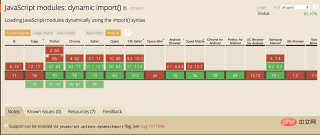
import的用法和export是一一对应的,但是import支持静态导入和动态导入两种方式,动态import支持晚一些,兼容性要差一些。
下面我就总结下import的基本用法:
1. Import All things
当export有多个函数或变量时,如文中export的第一点,可以使用 * as 关键字来导出所有函数及变量,同时 as 后面跟着的名称做为 该模块的命名空间。
//导出lib的所有函数及变量
import * as lib from 'lib';

//以 lib 做为命名空间进行调用,类似于object的方式
console.log(lib.square(11)); // 121
2. Import a single/multiple export from a module
从模块文件中导入单个或多个函数,与 * as namepage 方式不同,这个是按需导入。如下例子:
//导入square和 diag 两个函数
import { square, diag } from 'lib';

// 只导入square 一个函数
import { square } from 'lib';

// 导入默认模块
import _ from 'lodash';

// 导入默认模块和单个函数,这样做主要是简化单个函数的调用
import _, { each } from 'lodash';
3. Rename multiple exports during import
和 export 一样,也可以用 as 关键字来设置别名,当import的两个类的名字一样时,可以使用 as 来重设导入模块的名字,也可以用as 来简化名称。
比如:
// 用 as 来 简化函数名称
import {
  reallyReallyLongModuleExportName as shortName,
  anotherLongModuleName as short
} from '/modules/my-module.js';

// 避免重名
import { lib as UserLib} from "alib";
import { lib as GlobalLib } from "blib";
4. Import a module for its side effects only
有时候我们只想import一个模块进来,比如样式,或者一个类库。
// 导入样式
import './index.less';

// 导入类库
import 'lodash';
5. Dynamic Imports
静态import在首次加载时候会把全部模块资源都下载下来.
我们实际开发时候,有时候需要动态import(dynamic import)。
例如点击某个选项卡,才去加载某些新的模块:
// 当动态import时,返回的是一个promise
import('lodash')
  .then((lodash) => {
    // Do something with lodash.
  });

// 上面这句实际等同于
const lodash = await import('lodash');
es7的新用法:
async function run() {
    const myModule = await import('./myModule.js');

    const { export1, export2 } = await import('./myModule.js');

    const [module1, module2, module3] =
        await Promise.all([
            import('./module1.js'),
            import('./module2.js'),
            import('./module3.js'),
        ]);
}

run();
总结
以上, 我总结了ES6 Module 的简单背景和 常见的import , export 用法, 但这远远不是它的全部, 篇幅有限,如果想了解更多, 可以看下面的延伸阅读部分(质量都还不错, 可以看看)。
本文来自 js教程 栏目,欢迎学习!
The above is the detailed content of Detailed explanation of ES6 Modules. For more information, please follow other related articles on the PHP Chinese website!

 Python vs. JavaScript: The Learning Curve and Ease of UseApr 16, 2025 am 12:12 AM
Python is more suitable for beginners, with a smooth learning curve and concise syntax; JavaScript is suitable for front-end development, with a steep learning curve and flexible syntax. 1. Python syntax is intuitive and suitable for data science and back-end development. 2. JavaScript is flexible and widely used in front-end and server-side programming.
 Python vs. JavaScript: Community, Libraries, and ResourcesApr 15, 2025 am 12:16 AM
Python and JavaScript have their own advantages and disadvantages in terms of community, libraries and resources. 1) The Python community is friendly and suitable for beginners, but the front-end development resources are not as rich as JavaScript. 2) Python is powerful in data science and machine learning libraries, while JavaScript is better in front-end development libraries and frameworks. 3) Both have rich learning resources, but Python is suitable for starting with official documents, while JavaScript is better with MDNWebDocs. The choice should be based on project needs and personal interests.
 From C/C to JavaScript: How It All WorksApr 14, 2025 am 12:05 AM
The shift from C/C to JavaScript requires adapting to dynamic typing, garbage collection and asynchronous programming. 1) C/C is a statically typed language that requires manual memory management, while JavaScript is dynamically typed and garbage collection is automatically processed. 2) C/C needs to be compiled into machine code, while JavaScript is an interpreted language. 3) JavaScript introduces concepts such as closures, prototype chains and Promise, which enhances flexibility and asynchronous programming capabilities.
 JavaScript Engines: Comparing ImplementationsApr 13, 2025 am 12:05 AM
Different JavaScript engines have different effects when parsing and executing JavaScript code, because the implementation principles and optimization strategies of each engine differ. 1. Lexical analysis: convert source code into lexical unit. 2. Grammar analysis: Generate an abstract syntax tree. 3. Optimization and compilation: Generate machine code through the JIT compiler. 4. Execute: Run the machine code. V8 engine optimizes through instant compilation and hidden class, SpiderMonkey uses a type inference system, resulting in different performance performance on the same code.
 Beyond the Browser: JavaScript in the Real WorldApr 12, 2025 am 12:06 AM
JavaScript's applications in the real world include server-side programming, mobile application development and Internet of Things control: 1. Server-side programming is realized through Node.js, suitable for high concurrent request processing. 2. Mobile application development is carried out through ReactNative and supports cross-platform deployment. 3. Used for IoT device control through Johnny-Five library, suitable for hardware interaction.
 Building a Multi-Tenant SaaS Application with Next.js (Backend Integration)Apr 11, 2025 am 08:23 AM
I built a functional multi-tenant SaaS application (an EdTech app) with your everyday tech tool and you can do the same. First, what’s a multi-tenant SaaS application? Multi-tenant SaaS applications let you serve multiple customers from a sing
 How to Build a Multi-Tenant SaaS Application with Next.js (Frontend Integration)Apr 11, 2025 am 08:22 AM
This article demonstrates frontend integration with a backend secured by Permit, building a functional EdTech SaaS application using Next.js. The frontend fetches user permissions to control UI visibility and ensures API requests adhere to role-base
 JavaScript: Exploring the Versatility of a Web LanguageApr 11, 2025 am 12:01 AM
JavaScript is the core language of modern web development and is widely used for its diversity and flexibility. 1) Front-end development: build dynamic web pages and single-page applications through DOM operations and modern frameworks (such as React, Vue.js, Angular). 2) Server-side development: Node.js uses a non-blocking I/O model to handle high concurrency and real-time applications. 3) Mobile and desktop application development: cross-platform development is realized through ReactNative and Electron to improve development efficiency.


Hot AI Tools

Undresser.AI Undress
AI-powered app for creating realistic nude photos

AI Clothes Remover
Online AI tool for removing clothes from photos.

Undress AI Tool
Undress images for free

Clothoff.io
AI clothes remover

AI Hentai Generator
Generate AI Hentai for free.

Hot Article
Hot Tools

VSCode Windows 64-bit Download
A free and powerful IDE editor launched by Microsoft

DVWA
Damn Vulnerable Web App (DVWA) is a PHP/MySQL web application that is very vulnerable. Its main goals are to be an aid for security professionals to test their skills and tools in a legal environment, to help web developers better understand the process of securing web applications, and to help teachers/students teach/learn in a classroom environment Web application security. The goal of DVWA is to practice some of the most common web vulnerabilities through a simple and straightforward interface, with varying degrees of difficulty. Please note that this software

SublimeText3 Linux new version
SublimeText3 Linux latest version

Dreamweaver CS6
Visual web development tools

MantisBT
Mantis is an easy-to-deploy web-based defect tracking tool designed to aid in product defect tracking. It requires PHP, MySQL and a web server. Check out our demo and hosting services.

